Starlink Mobile is getting closer to becoming a real U.S. phone carrier. In a press release, Qualcomm announced that SpaceX has chosen its Dragonwing chips to power the base stations for Starlink Mobile’s nationwide 5G network, with rollout starting in 2027.
Under the multi-year deal, SpaceX plans to deploy tens of thousands of cellular sites across the U.S. Financial terms weren’t disclosed.
What Qualcomm Is Providing
Qualcomm will supply its Dragonwing QRU100 and QDU100 platforms, which will handle the processing inside Starlink Mobile’s radio units and base stations. The network will use Massive MIMO radios with 64 transmit and 64 receive paths, which Qualcomm says will improve coverage and capacity so the network can handle more traffic. The chips are also designed to be power-efficient, which should help keep costs down when deploying this many sites.
Not a Tesla App
The network will run on multiple spectrum bands and roll out in several waves. Qualcomm also called the deal a step toward a future AI-native 6G network with SpaceX.
“We shouldn’t live in a time where phone calls are still dropping whether you’re at home or on-the-go,” said Michael Nicolls, Starlink’s Senior Vice President. He added that the partnership will help speed up development of Starlink’s base station architecture.
Last month, SpaceX agreed to buy nationwide 800 MHz spectrum to enable terrestrial Starlink Mobile connectivity that works better indoors. That adds to the 2 GHz spectrum it previously purchased from EchoStar, and the FCC has also approved 15,000 next-gen satellites built to connect directly to phones. All of this sets the stage for Starlink to enter the telecom market, competing with T-Mobile, Verizon, and AT&T.
Not a Tesla App
The Qualcomm deal fills in the ground side of that plan. Starlink says it’s building the first fully integrated nationwide satellite-and-terrestrial network that will keep people connected no matter where they are, with cell towers covering cities and satellites covering everything else.
SpaceX hasn’t said which tower companies it will work with or how many new towers it will need. With the spectrum deal still awaiting FCC approval and next-gen satellites set to launch in mid-2027, the next year is shaping up to be a big one for Starlink Mobile.
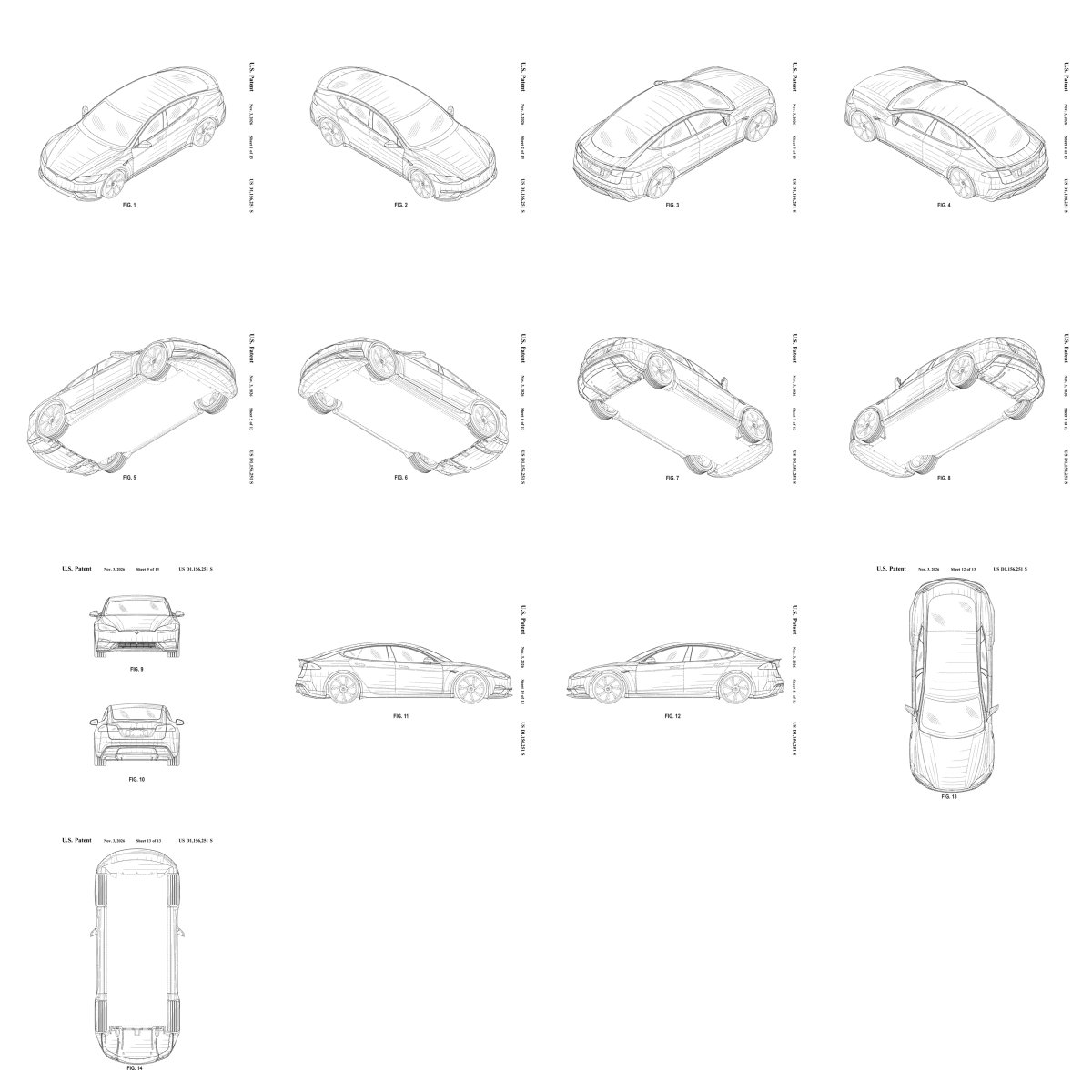
The Model S may be out of production, but Tesla is making sure nobody else can copy its look. The U.S. Patent and Trademark Office has granted Tesla a design patent for an “automobile body” that matches the latest Model S, months after the sedan’s production ended.
The patent, US-D1156251-S, was granted on November 3. It doesn’t mention the Model S by name, but the drawings make it pretty clear.
What the Patent Covers
Drawings inside the patent show the car from every angle, including the front, rear, both sides, top, bottom, and multiple 3D views. They show the Model S’s fastback roofline along with a front lip, side skirts, a rear spoiler, and a rear diffuser. Franz von Holzhausen, Tesla’s chief designer, and Julien Bilodeau are listed as the inventors.
Not a Tesla App
Interestingly, Tesla filed for the patent back in May 2025, well before Musk announced the end of the Model S and Model X during Tesla’s Q4 2025 earnings call in January of this year. The patent’s term is 15 years, which means the Model S’s design is protected until 2041.
A design patent only covers how something looks, not how it works. In this case, it would let Tesla go after any automaker that releases a car with a body that looks too much like the Model S.
A Fitting Sendoff
The patent closes another chapter for Tesla’s first flagship. Tesla stopped taking Model S and Model X orders on March 31 and sent them off with a special Signature Edition. Tesla delivered over 400,000 Model S sedans since they began shipping in June 2012. The model that proved EVs could go mainstream stayed in the market for about 14 years.
The move is a bit unusual for Tesla, which has a long history of avoiding patents. Back in 2014, Tesla famously pledged not to file patent lawsuits against anyone using its technology in good faith.
It also comes after Musk said Tesla would open-source the Model S and Model X. “Just as Tesla made the original Roadster design & software open source, we plan to do the same with Model S & X,” he said in July.
Those two things don’t necessarily conflict. Tesla could still publish engineering documents, service manuals, and software for owners and repair shops while keeping the car’s exterior design protected.
Tesla still hasn’t said when those Model S and X files will go public. For now, the car’s look is protected by patent, while enthusiasts keep waiting on the open-source release.









![Tesla's Tron Mode: A Look at All The Features [VIDEO]](https://www.notateslaapp.com/img/containers/article_images/2025/tesla_tron_mode.jpg/53b6d09b34526142d5ff4e780e59cdba/tesla_tron_mode.jpg)