












โหมดทรอน

สวัสดีโปรแกรม แปลงโฉมรถของคุณให้เป็น Light Cycle
ไปที่ตัวเปิดใช้งานแอป > Toybox > ทรอน
สิ่งก่อสร้าง 3 มิติ

ตอนนี้คุณสามารถดูรายละเอียดเพิ่มเติมของสิ่งก่อสร้างและเมืองด้วยมุมมอง 3 มิติ หากต้องการเปิดใช้งาน ให้เปลี่ยนเป็นมุมมองแผนที่ แล้วแตะไอคอน 3 มิติ
ต้องใช้การเชื่อมต่อแบบพรีเมียม
มุมมองดาวเทียม

ตอนนี้คุณสามารถเปลี่ยนไปใช้มุมมองดาวเทียมได้แล้วโดยแตะที่ไอคอนลูกโลกบนแผนที่
อัปเดตโปรแกรมดูกล้องหน้ารถ

ชื่อถนนจะรวมอยู่ในรายละเอียดเหตุการณ์กล้องหน้ารถ (เมื่อใช้งานอยู่) จึงช่วยให้แยกความแตกต่างระหว่างเหตุการณ์ที่บันทึกไว้ได้ง่ายขึ้น นอกจากนี้ ตอนนี้โปรแกรมดูกล้องหน้ารถมือถือสามารถสตรีมและดาวน์โหลดที่ความละเอียดสูงขึ้นได้แล้ว ต้องใช้แอป Tesla เวอร์ชัน 4.49.5+
Side Cameras Recording

Your vehicle's side cameras (B-Pillar) will now be recorded to both Dashcam and Sentry clips.
ฟังก์ชันปุ่มเลื่อนใหม่

ปุ่มเลื่อนด้านซ้ายมีตัวเลือกใหม่เพื่อเข้าถึงการควบคุมต่าง ๆ ของรถได้อย่างรวดเร็ว เช่น โหมดป้องกันอาวุธชีวภาพ ปิดเสียงการนำทาง และไฟซิงค์ไฟเพลง หากมีอยู่ในรถของคุณ
กดปุ่มเลื่อนด้านซ้ายค้างไว้เพื่อเปิดเมนู
Grok (Beta)

ตอนนี้คุณสามารถพูดคุยกับ Grok ผู้ช่วยอัจฉริยะที่สร้างโดย xAI ได้แล้ว คุณสามารถเลือกเสียงและลักษณะนิสัยของ Grok ได้ โดยมีตั้งแต่แบบนักเล่าเรื่องไปจนถึงแบบสุดโต่ง หากต้องการเปิดใช้ Grok ให้ไปที่ตัวเปิดใช้แอป > Grok หรือกดปุ่มเสียงบนพวงมาลัยค้างไว้
ต้องใช้การเชื่อมต่อแบบพรีเมียมหรือการเชื่อมต่อ Wi-Fi การพูดคุยสื่อสารจะไม่ระบุชื่อและไม่เกี่ยวข้องกับรถของคุณ
หมายเหตุ: ขณะนี้ Grok ยังเป็นรุ่น Beta และไม่รองรับคำสั่งเสียงสำหรับการควบคุมรถ เช่น การนำทางหรือสื่อ คำสั่งเสียงที่มีอยู่จะยังคงไม่เปลี่ยนแปลง
คู่มือการเริ่มต้นใช้งาน

คู่มือการเริ่มต้นใช้งานจะช่วยให้คุณคุ้นเคยกับ Tesla ของคุณ ซึ่งครอบคลุมการปรับการตั้งค่าของผู้ขับขี่ การใช้หน้าจอสัมผัส รวมถึงการควบคุมระบบแสงสว่าง ที่ปัดน้ำฝน ใช้งานฟีเจอร์ Autopilot ด้วยพวงมาลัย และฟังก์ชันอื่น ๆ
ไปที่ตัวเปิดใช้แอป > คู่มือ > ทำความรู้จักกับ Tesla ของคุณ
การอัปเดตเล็กน้อย

- Apple Music ให้มุมมองเพลย์ลิสต์ที่มีการจัดระเบียบ พร้อมด้วยโฟลเดอร์ หน้าศิลปินที่ขยายมากขึ้น และชั้น "เพลงที่เล่นเมื่อเร็ว ๆ นี้" ซึ่งแสดงให้คุณเห็นประวัติการฟังมากขึ้น
- คุณสามารถเข้าสู่ระบบสื่อของคุณได้โดยใช้การแจ้งเตือนของแอป Tesla เพื่อประสบการณ์การใช้งานที่รวดเร็วและราบรื่นยิ่งขึ้น
- ตอนนี้คุณสามารถเลือกได้ว่าต้องใช้กุญแจโทรศัพท์ก่อนหรือไม่ จึงจะสามารถเลือกโปรไฟล์ผู้ขับขี่ได้ ไปที่การตั้งค่าโปรไฟล์ผู้ขับขี่ > ต้องใช้กุญแจโทรศัพท์สำหรับโปรไฟล์
- การอัปเดตนี้ประกอบด้วยการแก้ไขและการปรับปรุงการรักษาความปลอดภัยที่สำคัญ
Santa Mode

Tesla has added Santa Mode to 2026 Model S and Model X vehicles. These cars use the Unreal Engine and did not include Santa Mode until this update. Santa Mode was noticeably absent from the Toybox, and when users tried to enable the feature through voice commands, the system would say that Santa Mode is not available and will be enabled in a future update.
New FSD Guide

When a user activates FSD from the Controls > Autopilot menu, Tesla will now present a one-screen guide that introduces the user to FSD.
The guide includes the same disclaimer as previous updates and now also includes an image of the steering wheel controls for FSD, letting the user know how to switch FSD Profiles and set the maximum speed (for FSD V13 and below).
The image used is specific to the vehicle and will either include steering wheel buttons or stalks, depending on the model.
More Charging Information

While a vehicle is charging, Tesla now includes a link for ‘Additional Charging Information’ in the Controls > Charging section. If the vehicle is charging, the link will appear in blue in the top-right corner.
Tapping the link displays a pop-up containing additional information, such as the maximum and current battery input power.
Maximum Battery Input Power is the total power the charger can deliver.
Battery Input Power is the amount of energy that is being actively put into the vehicle’s battery. The battery input power may be less than the maximum charger capability for several reasons, including a high vehicle charge level. The vehicle will also draw power directly from the charger rather than draining the battery if it needs to run the HVAC system, screen, or other components. This reduces battery wear by using energy from the battery, only to have to re-add it.
Keep Accessory Power On App Control
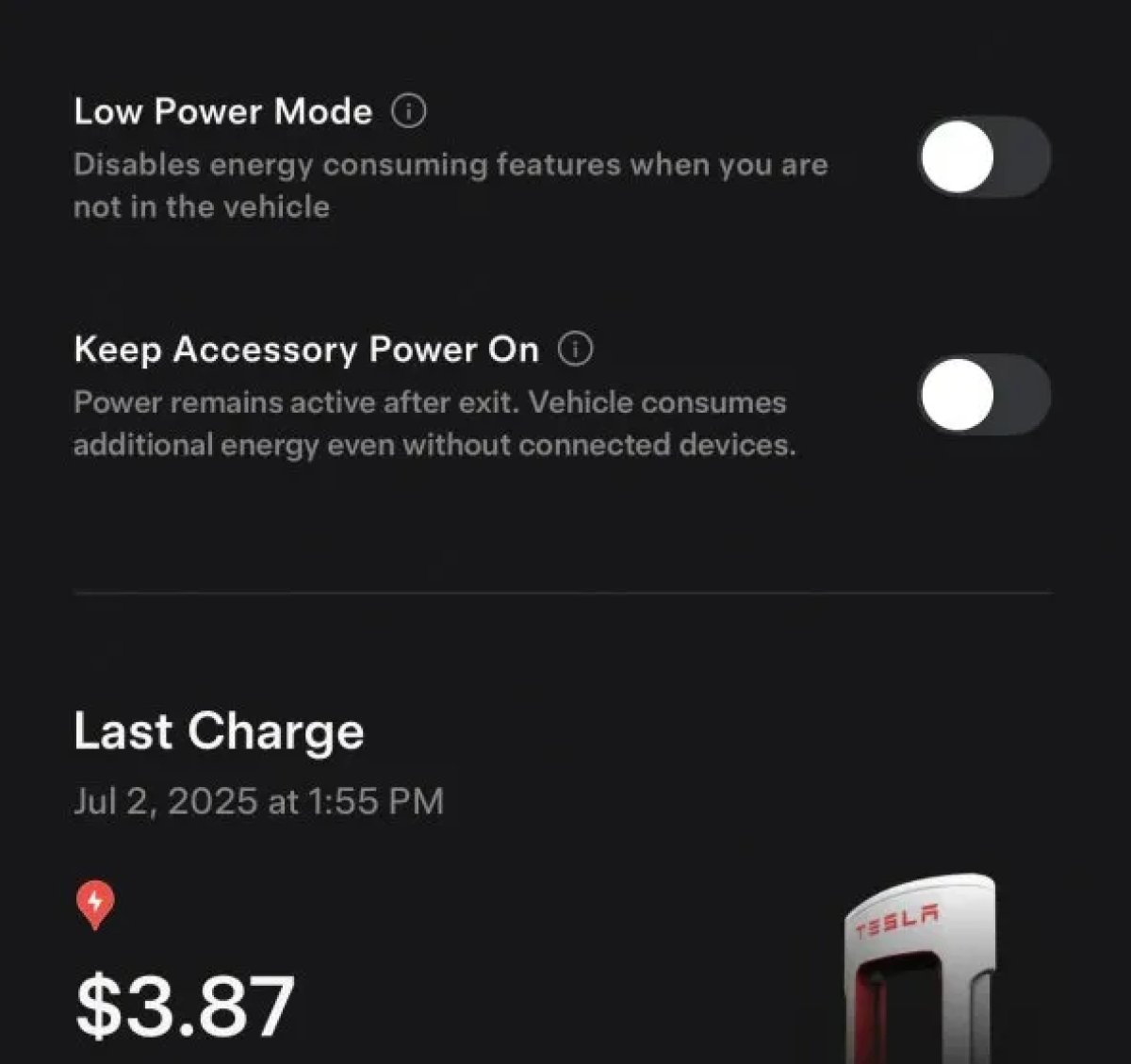
The 2025.38 vehicle update adds support for the ‘Keep Accessory Power On’ option in the latest Tesla app. This option is part of the latest Tesla app update, which adds the new Charging menu that consolidates most charging options under a single menu.
It also adds a button for Low Power Mode, instead of just being under Quick Actions.
Buy Parts

Tesla has added a Buy Parts button to Tesla’s Service Mode. Tapping the button displays a QR code that takes users to Tesla’s service site, where owners can buy parts directly from Tesla.
Parts can be shipped directly to the customer or to the nearest service center.
Charger Visualization

Tesla has added a visualization of a charger when the vehicle is parked and plugged in. In this photo, the owner is using a non-Tesla charger, so a generic charger is displayed. Tesla will presumably display a mobile charger, Wall Connector, or Supercharger if those are plugged into the vehicle.
Service Mode Improvements

New Trunk Panel
A new Trunk panel with an overview of the liftgate status, latch status, and calibration status for the trunk is now available. The panel also provides additional information, such as the request source, set liftgate height, and hands-free settings.
Models: ModelS (2021+), Model 3, Model X (2021+), Model Y
New Front Trunk Panel
A new Front Trunk (or frunk) panel with an overview of the liftgate status, latch status, and calibration status for the front trunk is now available. The panel also provides additional information, such as the request source, set liftgate height, and hands-free settings.
Models: Cybertruck
Cameras Panel Update - Mismatched Firmware Detection
In the Cameras panel, detection for when Driver Assistance System (DAS) Hardware 4 (HW4) cameras have mismatched firmware versions has been added.
If a DAS HW4 camera with mismatched firmware is detected, touch the Update Camera button to initiate a camera firmware update.
Models: ModelS (2021+), Model 3, Model X (2021+), Model Y, Cybertruck
Brakes Panel Update - ESP Stiffness Test Routine Changes
In the Electronic Stability Program (ESP) replacement panel, the routine TEST-BRAKE_CORNER_STIFFNESS-TEST has been replaced with TEST_BRAKE_X_STIFFNESS-TEST-SERVICE.
Models: Model 3(2017-2023), Model Y (2020-2024)

