















מצב 'טרון'

שלום לכם, תוכנות. הפכו את הרכב שלכם לאופנוע אור.
יש לעבור אל 'מפעיל האפליקציות' > 'קופסת צעצועים' > 'טרון'.
מבנים תלת-ממדיים

כעת ניתן לראות מבנים ונופים עירוניים בפירוט רב יותר באמצעות תצוגה תלת-ממדית. להפעלה, יש לעבור לתצוגת מפה ולהקיש על סמל התלת-ממד.
נדרש שירות קישוריות פרימיום.
תצוגת לוויין

כעת ניתן לעבור לתצוגת לוויין על ידי הקשה על סמל כדור הארץ במפה.
עדכונים עבור מציג מצלמת הדרך

שמות הרחובות כלולים בפרטי האירועים של מצלמת הדרך (במידה והם זמינים), דבר המקל על ההבחנה בין האירועים שהוקלטו. בנוסף, מציג מצלמת הדרך הנייד מזרים ומוריד מידע כעת ברזולוציה גבוהה יותר. נדרשת אפליקציית Tesla בגרסה 4.49.5+.
Side Cameras Recording

Your vehicle's side cameras (B-Pillar) will now be recorded to both Dashcam and Sentry clips.
פונקציות חדשות של גלגל הגלילה

גלגל הגלילה השמאלי כולל אפשרויות חדשות לגישה מהירה למגוון פקדי הרכב, כגון מצב הגנה מפני נשק ביולוגי, השתקת הניווט וסנכרון אורות עם המוזיקה - במידה והם זמינים ברכב.
יש ללחוץ ולהחזיק את גלגל הגלילה השמאלי כדי לפתוח את התפריט.
Grok (בטא)

כעת תוכלו לדבר עם Grok, עוזר חכם שנבנה על ידי xAI. ניתן לבחור את הקול ואת האישיות של Grok, החל ממספר סיפורים ועד למשוגע. להפעלת Grok, יש לעבור אל 'מפעיל האפליקציות' > Grok, או ללחוץ לחיצה ארוכה על לחצן הקול בהגה.
נדרש שירות קישוריות פרימיום או רשת Wi-Fi. השיחות הנשלחות ל-Tesla הן אנונימיות ואינן משויכות לרכב.
הערה: Grok זמין כעת בגרסת בטא מוקדמת ואינו תומך בפקודות קוליות עבור פקדי רכב כגון ניווט או מדיה. הפקודות הקוליות הקיימות נותרו ללא שינוי.
מדריך הצטרפות

מדריך ההצטרפות מסייע לכם להכיר את ה-Tesla שלכם. הוא כולל בין היתר את כוונון הגדרות הנהג, שימוש במסך המגע וכן, בקרת האורות, המגבים ותכונות Autopilot - בין יתר הפונקציות.
יש לעבור אל 'מפעיל האפליקציות' > 'מדריך' > 'הכר את רכב Tesla שלך'.
עדכונים קלים

- Apple Music מספקת תצוגת רשימת השמעה מאורגנת עם תיקיות, עמודי אמנים מורחבים ומדף 'הושמעו לאחרונה' המציג חלק גדול יותר מהיסטוריית ההאזנה שלכם.
- ניתן להתחבר למדיה באמצעות התראת אפליקציית Tesla לקבלת חוויה מהירה יותר וללא הפרעות.
- כעת ניתן לבחור האם נדרש מפתח טלפון לפני שניתן יהיה לבחור פרופיל נהג. יש לעבור אל 'הגדרות פרופיל נהג' > 'דרישת מפתח טלפון עבור פרופיל'.
- עדכון זה כולל תיקונים ושיפורי אבטחה חשובים.
Santa Mode

Tesla has added Santa Mode to 2026 Model S and Model X vehicles. These cars use the Unreal Engine and did not include Santa Mode until this update. Santa Mode was noticeably absent from the Toybox, and when users tried to enable the feature through voice commands, the system would say that Santa Mode is not available and will be enabled in a future update.
New FSD Guide

When a user activates FSD from the Controls > Autopilot menu, Tesla will now present a one-screen guide that introduces the user to FSD.
The guide includes the same disclaimer as previous updates and now also includes an image of the steering wheel controls for FSD, letting the user know how to switch FSD Profiles and set the maximum speed (for FSD V13 and below).
The image used is specific to the vehicle and will either include steering wheel buttons or stalks, depending on the model.
More Charging Information

While a vehicle is charging, Tesla now includes a link for ‘Additional Charging Information’ in the Controls > Charging section. If the vehicle is charging, the link will appear in blue in the top-right corner.
Tapping the link displays a pop-up containing additional information, such as the maximum and current battery input power.
Maximum Battery Input Power is the total power the charger can deliver.
Battery Input Power is the amount of energy that is being actively put into the vehicle’s battery. The battery input power may be less than the maximum charger capability for several reasons, including a high vehicle charge level. The vehicle will also draw power directly from the charger rather than draining the battery if it needs to run the HVAC system, screen, or other components. This reduces battery wear by using energy from the battery, only to have to re-add it.
Keep Accessory Power On App Control
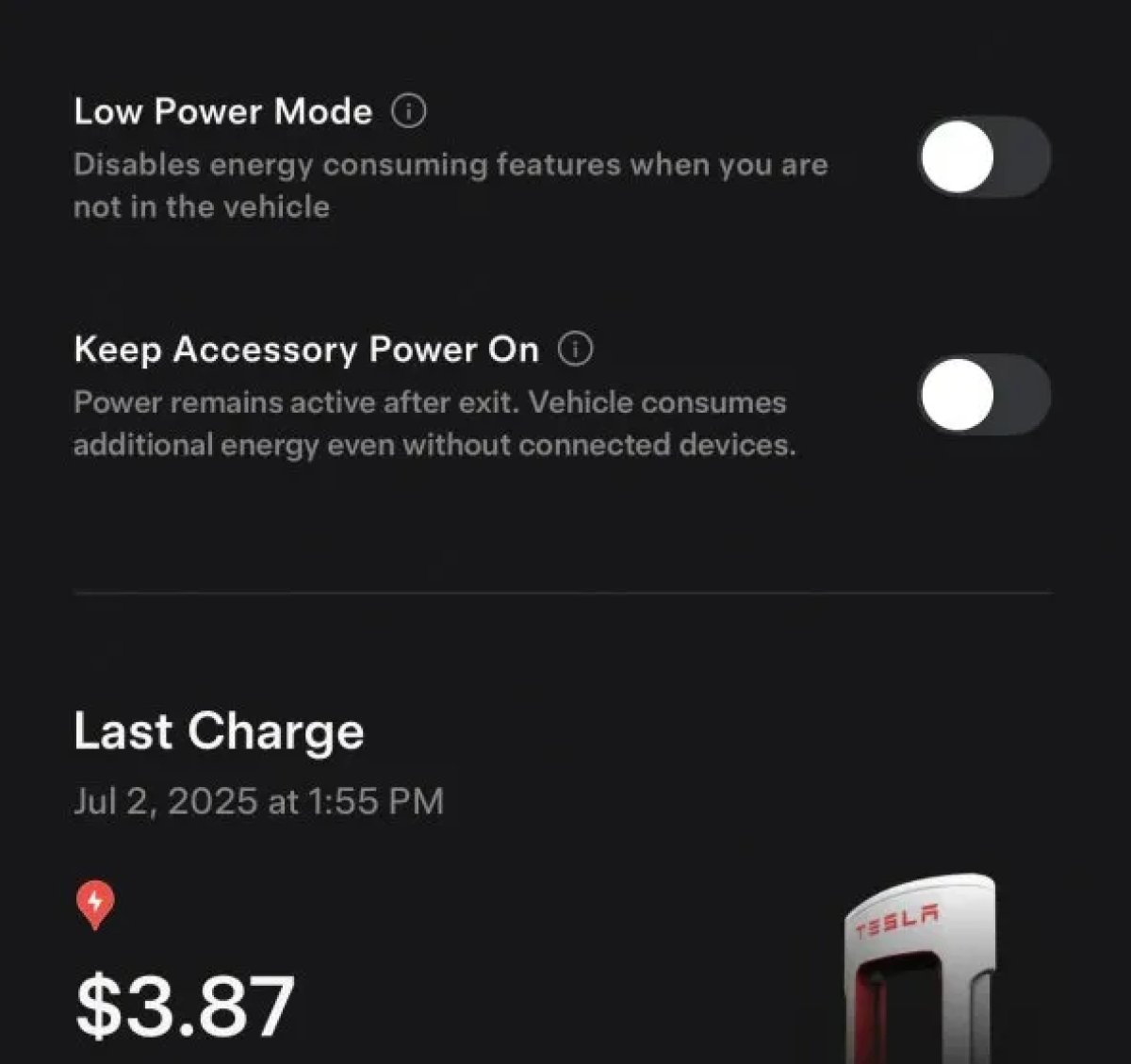
The 2025.38 vehicle update adds support for the ‘Keep Accessory Power On’ option in the latest Tesla app. This option is part of the latest Tesla app update, which adds the new Charging menu that consolidates most charging options under a single menu.
It also adds a button for Low Power Mode, instead of just being under Quick Actions.
Buy Parts

Tesla has added a Buy Parts button to Tesla’s Service Mode. Tapping the button displays a QR code that takes users to Tesla’s service site, where owners can buy parts directly from Tesla.
Parts can be shipped directly to the customer or to the nearest service center.
Charger Visualization

Tesla has added a visualization of a charger when the vehicle is parked and plugged in. In this photo, the owner is using a non-Tesla charger, so a generic charger is displayed. Tesla will presumably display a mobile charger, Wall Connector, or Supercharger if those are plugged into the vehicle.
Service Mode Improvements

New Trunk Panel
A new Trunk panel with an overview of the liftgate status, latch status, and calibration status for the trunk is now available. The panel also provides additional information, such as the request source, set liftgate height, and hands-free settings.
Models: ModelS (2021+), Model 3, Model X (2021+), Model Y
New Front Trunk Panel
A new Front Trunk (or frunk) panel with an overview of the liftgate status, latch status, and calibration status for the front trunk is now available. The panel also provides additional information, such as the request source, set liftgate height, and hands-free settings.
Models: Cybertruck
Cameras Panel Update - Mismatched Firmware Detection
In the Cameras panel, detection for when Driver Assistance System (DAS) Hardware 4 (HW4) cameras have mismatched firmware versions has been added.
If a DAS HW4 camera with mismatched firmware is detected, touch the Update Camera button to initiate a camera firmware update.
Models: ModelS (2021+), Model 3, Model X (2021+), Model Y, Cybertruck
Brakes Panel Update - ESP Stiffness Test Routine Changes
In the Electronic Stability Program (ESP) replacement panel, the routine TEST-BRAKE_CORNER_STIFFNESS-TEST has been replaced with TEST_BRAKE_X_STIFFNESS-TEST-SERVICE.
Models: Model 3(2017-2023), Model Y (2020-2024)

