















Tron Modu

Selamlama Programları. Aracınızı Işık Döngüsüne dönüştürün.
Uygulama Başlatıcı > Toybox > Tron'a gidin.
3D Yapılar

Artık binaları ve şehir manzaralarını 3D görünüm ile daha ayrıntılı görebilirsiniz. Etkinleştirmek için Harita Görünümüne geçin ve 3D simgesine dokunun.
Premium Bağlantı gerektirir.
Uydu Görünümü

Artık haritadaki küre simgesine dokunarak uydu görünümüne geçebilirsiniz.
Yol Kamerası Görüntüleyici Güncellemeleri

Artık sokak adları, kayıtlı olayları ayırt etmeyi kolaylaştırması için (varsa) yol kamerası olayı ayrıntılarına dahil edildi. Ayrıca, Mobil Yol Kamerası Görüntüleyici artık daha yüksek çözünürlükte akış ve indirme yapıyor. Tesla Uygulamasının 4.49.5 veya daha yeni sürümünü gerektirir.
Side Cameras Recording

Your vehicle's side cameras (B-Pillar) will now be recorded to both Dashcam and Sentry clips.
Yeni Kaydırma Tekerleği İşlevleri

Sol kaydırma tekerleğiniz çeşitli araç kontrollerine hızlıca erişmeniz için Biyolojik Silah Savunma Modu, Navigasyonu Sessize Al ve aracınızda varsa Müzik Işık Senkronizasyonu gibi yeni seçenekler içerir.
Menüyü açmak için sol kaydırma tekerleğini basılı tutun.
Grok (Beta)

Artık, xAI tarafından üretilen akıllı asistan Grok ile konuşabilirsiniz. Hikâye anlatıcısından Huysuz'a kadar Grok'un sesini ve kişiliğini seçebilirsiniz. Grok'u başlatmak için Uygulama Başlatıcı > Grok'a gidin veya direksiyon simidinizdeki sağ kaydırma düğmesine uzun basın.
Premium Bağlantı veya Wi-Fi bağlantısı gerektirir. Etkileşimler Tesla için anonimdir ve aracınızla ilişkili değildir.
Not: Grok şu anda Beta aşamasındadır ve navigasyon veya medya gibi araç kontrolleri için sesli komutları desteklemez. Mevcut sesli komutlar değişmeden kalır.
Kullanma kılavuzu

Kullanma Kılavuzu, Tesla'nızı tanımanıza yardımcı olur. Diğer işlevlerin yanı sıra sürücü ayarlarının yapılması, dokunmatik ekranı kullanmanın yanı sıra ışıkları, silecekleri ve Otopilot özelliklerinin kontrol edilmesini kapsar.
Uygulama Başlatıcı’ya gidin > Kılavuz > Tesla’nızı tanımaya başlayın.
Küçük Güncellemeler

- Apple Music; klasörler ile düzenli bir liste görünümü, genişletilmiş sanatçı sayfaları ve dinleme geçmişinizin daha fazlasını görüntüleyen bir Son Çalınanlar rafı sağlar.
- Daha hızlı ve daha sorunsuz bir deneyim için bir Tesla uygulaması bildirimini kullanarak medya uygulamalarınıza giriş yapabilirsiniz.
- Artık, bir sürücü profilinin seçilebilmesi için bir telefon anahtarın gerekli olup olmadığını seçebilirsiniz. Sürücü Profil Ayarları > Profil için Telefon Anahtarı Gerekir seçeneğine gidin.
- Bu güncelleme önemli güvenlik düzeltmelerini ve iyileştirmeleri içerir.
Santa Mode

Tesla has added Santa Mode to 2026 Model S and Model X vehicles. These cars use the Unreal Engine and did not include Santa Mode until this update. Santa Mode was noticeably absent from the Toybox, and when users tried to enable the feature through voice commands, the system would say that Santa Mode is not available and will be enabled in a future update.
New FSD Guide

When a user activates FSD from the Controls > Autopilot menu, Tesla will now present a one-screen guide that introduces the user to FSD.
The guide includes the same disclaimer as previous updates and now also includes an image of the steering wheel controls for FSD, letting the user know how to switch FSD Profiles and set the maximum speed (for FSD V13 and below).
The image used is specific to the vehicle and will either include steering wheel buttons or stalks, depending on the model.
More Charging Information

While a vehicle is charging, Tesla now includes a link for ‘Additional Charging Information’ in the Controls > Charging section. If the vehicle is charging, the link will appear in blue in the top-right corner.
Tapping the link displays a pop-up containing additional information, such as the maximum and current battery input power.
Maximum Battery Input Power is the total power the charger can deliver.
Battery Input Power is the amount of energy that is being actively put into the vehicle’s battery. The battery input power may be less than the maximum charger capability for several reasons, including a high vehicle charge level. The vehicle will also draw power directly from the charger rather than draining the battery if it needs to run the HVAC system, screen, or other components. This reduces battery wear by using energy from the battery, only to have to re-add it.
Keep Accessory Power On App Control
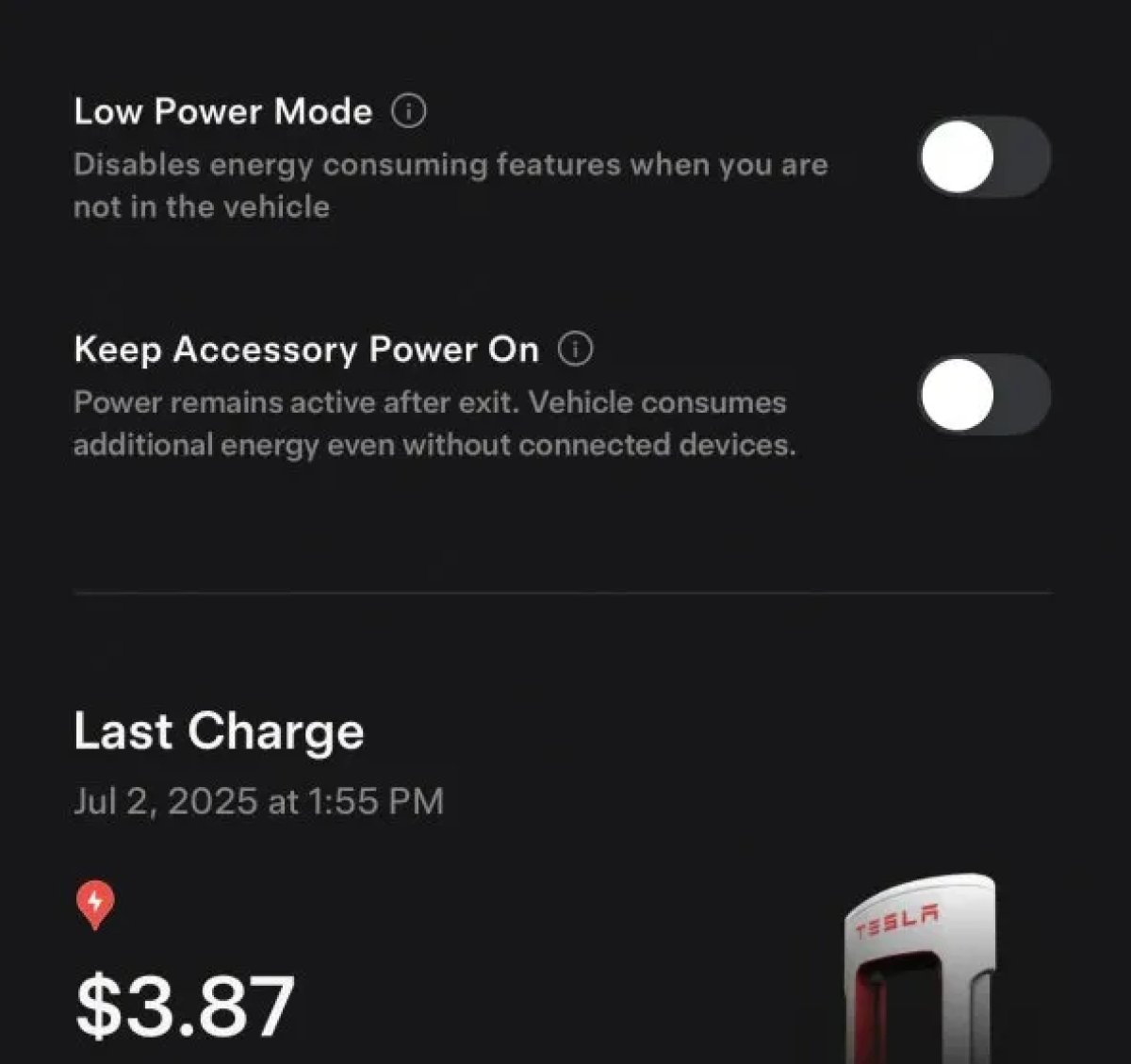
The 2025.38 vehicle update adds support for the ‘Keep Accessory Power On’ option in the latest Tesla app. This option is part of the latest Tesla app update, which adds the new Charging menu that consolidates most charging options under a single menu.
It also adds a button for Low Power Mode, instead of just being under Quick Actions.
Buy Parts

Tesla has added a Buy Parts button to Tesla’s Service Mode. Tapping the button displays a QR code that takes users to Tesla’s service site, where owners can buy parts directly from Tesla.
Parts can be shipped directly to the customer or to the nearest service center.
Charger Visualization

Tesla has added a visualization of a charger when the vehicle is parked and plugged in. In this photo, the owner is using a non-Tesla charger, so a generic charger is displayed. Tesla will presumably display a mobile charger, Wall Connector, or Supercharger if those are plugged into the vehicle.
Service Mode Improvements

New Trunk Panel
A new Trunk panel with an overview of the liftgate status, latch status, and calibration status for the trunk is now available. The panel also provides additional information, such as the request source, set liftgate height, and hands-free settings.
Models: ModelS (2021+), Model 3, Model X (2021+), Model Y
New Front Trunk Panel
A new Front Trunk (or frunk) panel with an overview of the liftgate status, latch status, and calibration status for the front trunk is now available. The panel also provides additional information, such as the request source, set liftgate height, and hands-free settings.
Models: Cybertruck
Cameras Panel Update - Mismatched Firmware Detection
In the Cameras panel, detection for when Driver Assistance System (DAS) Hardware 4 (HW4) cameras have mismatched firmware versions has been added.
If a DAS HW4 camera with mismatched firmware is detected, touch the Update Camera button to initiate a camera firmware update.
Models: ModelS (2021+), Model 3, Model X (2021+), Model Y, Cybertruck
Brakes Panel Update - ESP Stiffness Test Routine Changes
In the Electronic Stability Program (ESP) replacement panel, the routine TEST-BRAKE_CORNER_STIFFNESS-TEST has been replaced with TEST_BRAKE_X_STIFFNESS-TEST-SERVICE.
Models: Model 3(2017-2023), Model Y (2020-2024)

