















Način Tron

Zdravo programi. Spremenite svoje vozilo v svetlobni cikel.
Odprite Zaganjalnik aplikacij > Igrače > Tron.
3D zgradbe

S pogledom 3D si lahko zdaj stavbe in mestne pokrajine ogledate podrobneje. Če želite to omogočiti, preklopite v Pogled zemljevida in tapnite ikono 3D.
Zahteva Premium povezljivost.
Satelitski pogled

Zdaj lahko preklopite na satelitski pogled tako, da tapnete ikono globusa na zemljevidu.
Posodobitve pregledovalnika kamere na armaturni plošči

Imena ulic so zdaj vključena v podrobnosti o dogodkih kamere na armaturni plošči (ko so na voljo), kar omogoča lažje razlikovanje med zabeleženimi dogodki. Dodatno mobilni pregledovalnik kamere na armaturni plošči zdaj pretaka in se prenaša z višjo ločljivostjo. Zahtevana je različica aplikacije Tesla 4.49.5+.
Side Cameras Recording

Your vehicle's side cameras (B-Pillar) will now be recorded to both Dashcam and Sentry clips.
Nove funkcije drsnega kolesca

Levo drsno kolesce vključuje nove možnosti za hiter dostop do različnih upravljalnih elementov vozila, kot so način obrambe pred biološkim orožjem, izklop zvoka navigacije in sinhronizacija luči z glasbo – če so na voljo v vašem vozilu.
Zadržite levo drsno kolesce, da odprete meni.
Grok (Beta)

Zdaj se lahko pogovarjate z Grokom, inteligentnim asistentom, ki ga je izdelal xAI. Izberete lahko Grokov glas in osebnost, od Pripovedovalca do Zmedenega. Če želite zagnati pomočnika Grok, odprite Zaganjalnik aplikacij > Grok ali pritisnite in pridržite gumb za glasovni ukaz na volanu.
Zahteva storitev Premium povezljivost ali drugo omrežje Wi-Fi. Pogovori so za družbo Tesla anonimni in niso povezani z vašim vozilom.
Opomba: Grok je trenutno v zgodnji različici beta in ne podpira glasovnih ukazov za upravljalne elemente vozila, kot so navigacija ali mediji. Obstoječi glasovni ukazi ostanejo nespremenjeni.
Vodnik za uvajanje

Vodnik za uvajanje vam bo pomagal pri seznanitvi z vašim vozilom Tesla. Med drugim zajema prilagajanje nastavitev za voznika z uporabo zaslona na dotik, kot tudi upravljanje luči, brisalcev in funkcij avtopilota.
Odprite razdelek Zaganjalnik aplikacij > Navodila za uporabo > Spoznajte svoje vozilo Tesla.
Manjše posodobitve

- Apple Music omogoča urejen pogled seznamov predvajanja z mapami, razširjenimi stranmi izvajalcev in polico Nedavno predvajano, na kateri je prikazan večji del zgodovine poslušanja.
- Za hitrejšo in bolj brezhibno izkušnjo se lahko prijavite v predstavnost z obvestilom aplikacije Tesla.
- Zdaj lahko izberete, ali je pred izbiro profila voznika potreben telefon kot ključ. Odprite Nastavitve profilov voznika > Za profil potrebujete telefon kot ključ.
- Ta posodobitev vključuje pomembne varnostne popravke in izboljšave.
Santa Mode

Tesla has added Santa Mode to 2026 Model S and Model X vehicles. These cars use the Unreal Engine and did not include Santa Mode until this update. Santa Mode was noticeably absent from the Toybox, and when users tried to enable the feature through voice commands, the system would say that Santa Mode is not available and will be enabled in a future update.
New FSD Guide

When a user activates FSD from the Controls > Autopilot menu, Tesla will now present a one-screen guide that introduces the user to FSD.
The guide includes the same disclaimer as previous updates and now also includes an image of the steering wheel controls for FSD, letting the user know how to switch FSD Profiles and set the maximum speed (for FSD V13 and below).
The image used is specific to the vehicle and will either include steering wheel buttons or stalks, depending on the model.
More Charging Information

While a vehicle is charging, Tesla now includes a link for ‘Additional Charging Information’ in the Controls > Charging section. If the vehicle is charging, the link will appear in blue in the top-right corner.
Tapping the link displays a pop-up containing additional information, such as the maximum and current battery input power.
Maximum Battery Input Power is the total power the charger can deliver.
Battery Input Power is the amount of energy that is being actively put into the vehicle’s battery. The battery input power may be less than the maximum charger capability for several reasons, including a high vehicle charge level. The vehicle will also draw power directly from the charger rather than draining the battery if it needs to run the HVAC system, screen, or other components. This reduces battery wear by using energy from the battery, only to have to re-add it.
Keep Accessory Power On App Control
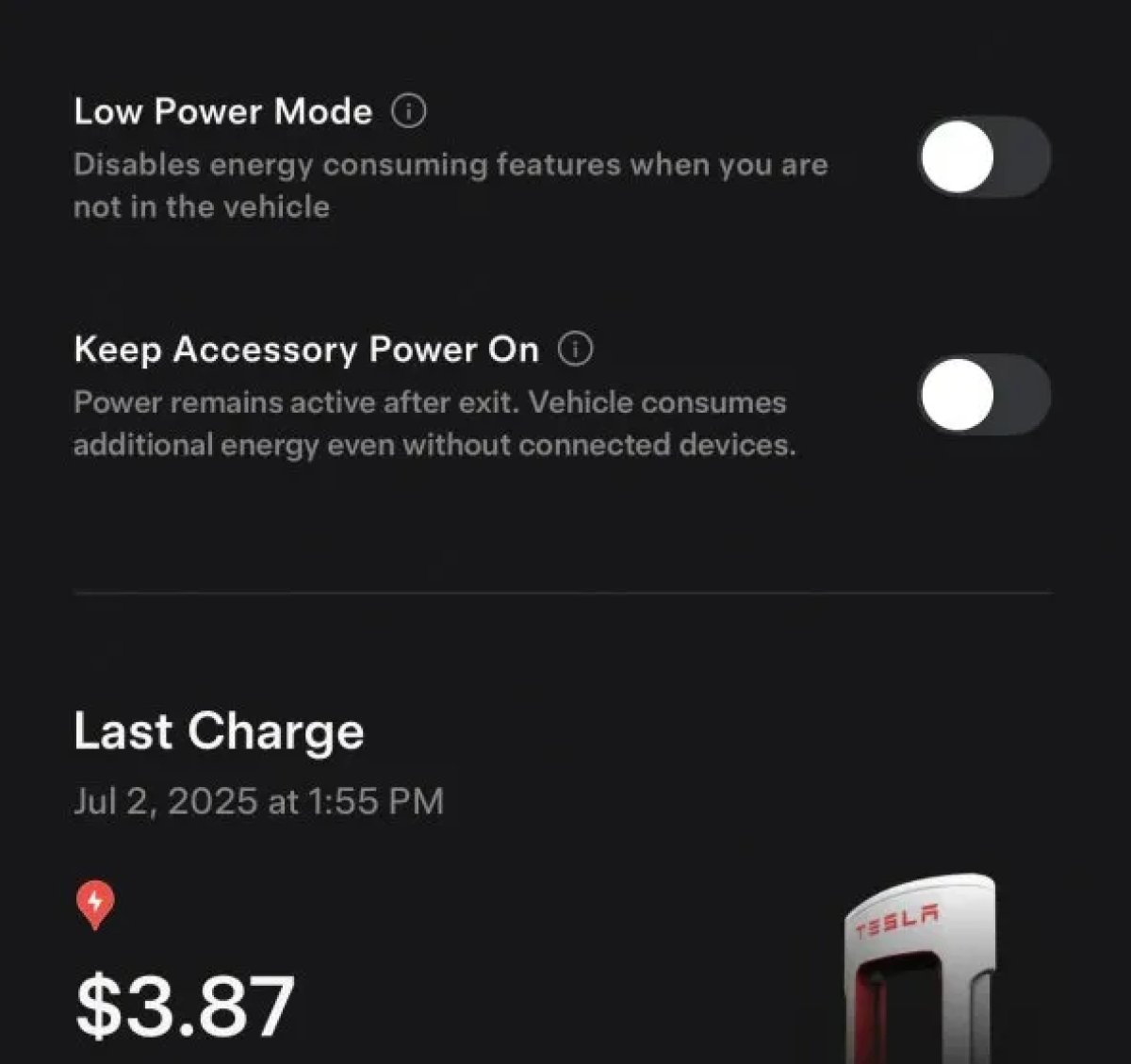
The 2025.38 vehicle update adds support for the ‘Keep Accessory Power On’ option in the latest Tesla app. This option is part of the latest Tesla app update, which adds the new Charging menu that consolidates most charging options under a single menu.
It also adds a button for Low Power Mode, instead of just being under Quick Actions.
Buy Parts

Tesla has added a Buy Parts button to Tesla’s Service Mode. Tapping the button displays a QR code that takes users to Tesla’s service site, where owners can buy parts directly from Tesla.
Parts can be shipped directly to the customer or to the nearest service center.
Charger Visualization

Tesla has added a visualization of a charger when the vehicle is parked and plugged in. In this photo, the owner is using a non-Tesla charger, so a generic charger is displayed. Tesla will presumably display a mobile charger, Wall Connector, or Supercharger if those are plugged into the vehicle.
Service Mode Improvements

New Trunk Panel
A new Trunk panel with an overview of the liftgate status, latch status, and calibration status for the trunk is now available. The panel also provides additional information, such as the request source, set liftgate height, and hands-free settings.
Models: ModelS (2021+), Model 3, Model X (2021+), Model Y
New Front Trunk Panel
A new Front Trunk (or frunk) panel with an overview of the liftgate status, latch status, and calibration status for the front trunk is now available. The panel also provides additional information, such as the request source, set liftgate height, and hands-free settings.
Models: Cybertruck
Cameras Panel Update - Mismatched Firmware Detection
In the Cameras panel, detection for when Driver Assistance System (DAS) Hardware 4 (HW4) cameras have mismatched firmware versions has been added.
If a DAS HW4 camera with mismatched firmware is detected, touch the Update Camera button to initiate a camera firmware update.
Models: ModelS (2021+), Model 3, Model X (2021+), Model Y, Cybertruck
Brakes Panel Update - ESP Stiffness Test Routine Changes
In the Electronic Stability Program (ESP) replacement panel, the routine TEST-BRAKE_CORNER_STIFFNESS-TEST has been replaced with TEST_BRAKE_X_STIFFNESS-TEST-SERVICE.
Models: Model 3(2017-2023), Model Y (2020-2024)

