















Modo Tron

Saudações, Programas. Transforme o seu veículo num Ciclo de Luz.
Vá ao Iniciador de Aplicações > Brinquedos > Tron.
Construções em 3D

Agora, pode ver edifícios e vistas da cidade com mais detalhes com a vista 3D. Para ativar, mude para a Vista de Mapa e toque no ícone 3D.
Requer Conectividade Premium.
Vista de satélite

Agora pode mudar para a vista de satélite tocando no ícone de mundo no mapa.
Atualizações do Visualizador da Dashcam

Os nomes de ruas estão incluídos nos detalhes de eventos da dashcam (quando disponíveis), facilitando a distinção entre os eventos registados. Agora, o Visualizador da Dashcam para Telemóvel transmite e transfere com uma resolução superior. Requer a versão 4.49.5+ da Aplicação da Tesla.
Side Cameras Recording

Your vehicle's side cameras (B-Pillar) will now be recorded to both Dashcam and Sentry clips.
Novas Funções de Roda de Deslocação

A roda de deslocação esquerda inclui novas opções para aceder rapidamente a vários controlos do veículo, como o Modo de Defesa contra Armas Biológicas, Silenciar Navegação e a Sincronização da Luz da Música - se disponível no seu veículo.
Mantenha premida a roda de deslocação esquerda para abrir o menu.
Grok (Beta)

Agora pode falar com Grok, um assistente inteligente construído pela xAI. Pode escolher a voz e a personalidade de Grok, que vão do Narrador ao Desiquilibrado. Para iniciar o Grok, aceda ao Iniciador de Aplicações > Grok, ou mantenha premido o botão de deslocamento direito do volante.
Requer Conectividade Premium ou uma ligação Wi-Fi. As conversas são anónimas e não são conhecidas pela Tesla, e não estão associadas ao seu veículo.
Nota: atualmente, o Grok está na fase Beta inicial e não suporta comandos de voz para controlos do carro, como navegação ou multimédia. Os comandos de voz existentes permanecem inalterados.
Guia de Integração

O Guia de Integração ajuda-o a familiarizar-se com o seu Tesla. Abrange o ajuste das definições do condutor, utilizando o ecrã tátil, bem como o controlo das luzes, dos limpa-para-brisas e das funcionalidades do Autopilot, entre outras funções.
Aceda ao Iniciador de Aplicações > Manual > Conheça o seu Tesla.
Pequenas Atualizações

- A Apple Music disponibiliza uma vista organizada da lista de reprodução com pastas, páginas de artistas expandidas e uma estante de Reproduzidos Recentemente que apresenta mais do seu histórico de reprodução.
- Pode iniciar sessão nos seus conteúdos multimédia utilizando uma notificação da Aplicação da Tesla para uma experiência mais rápida e perfeita.
- Pode agora escolher se é necessário utilizar uma Phone Key antes de selecionar um perfil de condutor. Aceda a Definições do Perfil de Condutor > Requer Phone Key para Perfil.
- Esta atualização inclui correções de segurança e melhorias importantes.
Santa Mode

Tesla has added Santa Mode to 2026 Model S and Model X vehicles. These cars use the Unreal Engine and did not include Santa Mode until this update. Santa Mode was noticeably absent from the Toybox, and when users tried to enable the feature through voice commands, the system would say that Santa Mode is not available and will be enabled in a future update.
New FSD Guide

When a user activates FSD from the Controls > Autopilot menu, Tesla will now present a one-screen guide that introduces the user to FSD.
The guide includes the same disclaimer as previous updates and now also includes an image of the steering wheel controls for FSD, letting the user know how to switch FSD Profiles and set the maximum speed (for FSD V13 and below).
The image used is specific to the vehicle and will either include steering wheel buttons or stalks, depending on the model.
More Charging Information

While a vehicle is charging, Tesla now includes a link for ‘Additional Charging Information’ in the Controls > Charging section. If the vehicle is charging, the link will appear in blue in the top-right corner.
Tapping the link displays a pop-up containing additional information, such as the maximum and current battery input power.
Maximum Battery Input Power is the total power the charger can deliver.
Battery Input Power is the amount of energy that is being actively put into the vehicle’s battery. The battery input power may be less than the maximum charger capability for several reasons, including a high vehicle charge level. The vehicle will also draw power directly from the charger rather than draining the battery if it needs to run the HVAC system, screen, or other components. This reduces battery wear by using energy from the battery, only to have to re-add it.
Keep Accessory Power On App Control
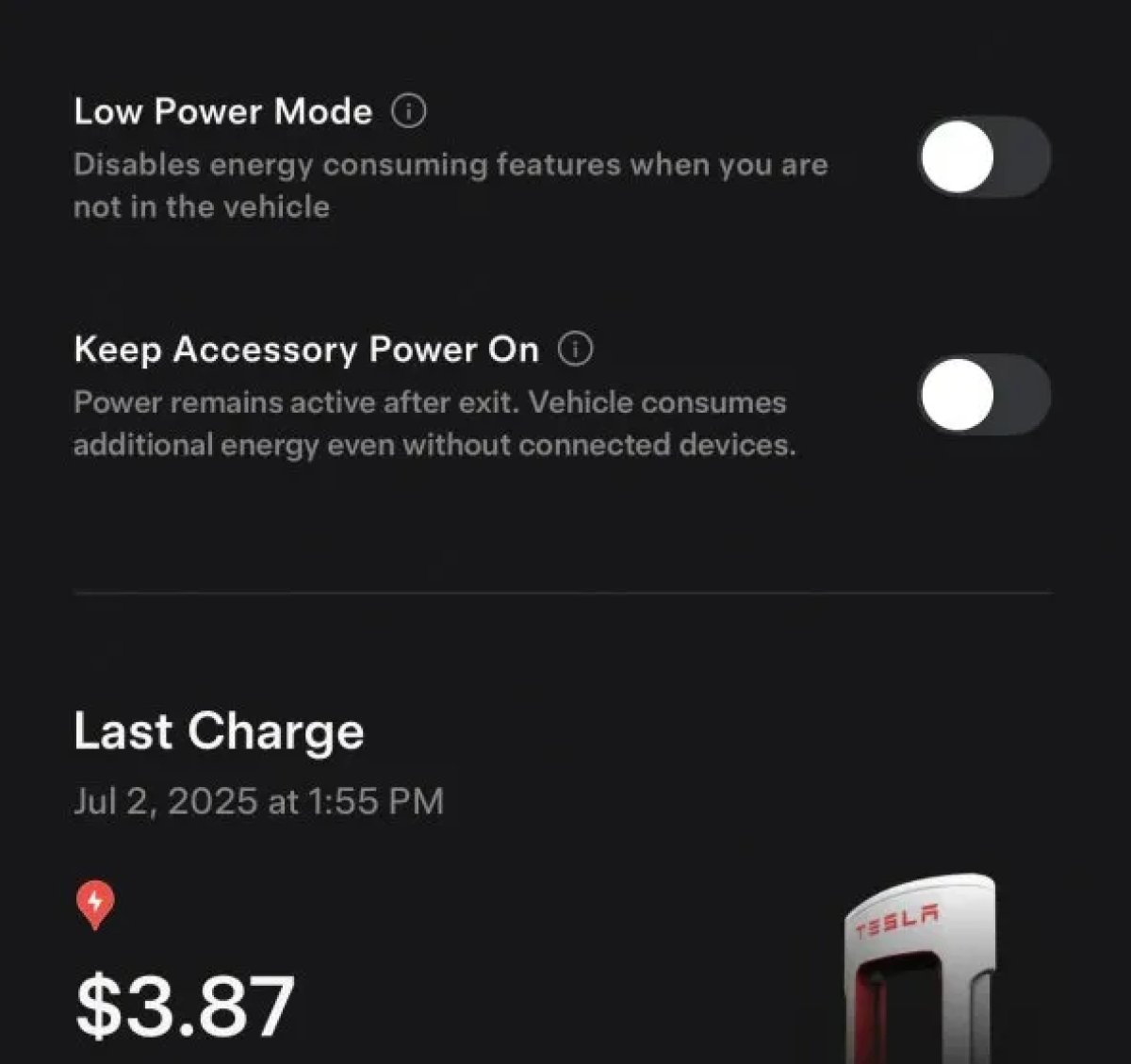
The 2025.38 vehicle update adds support for the ‘Keep Accessory Power On’ option in the latest Tesla app. This option is part of the latest Tesla app update, which adds the new Charging menu that consolidates most charging options under a single menu.
It also adds a button for Low Power Mode, instead of just being under Quick Actions.
Buy Parts

Tesla has added a Buy Parts button to Tesla’s Service Mode. Tapping the button displays a QR code that takes users to Tesla’s service site, where owners can buy parts directly from Tesla.
Parts can be shipped directly to the customer or to the nearest service center.
Charger Visualization

Tesla has added a visualization of a charger when the vehicle is parked and plugged in. In this photo, the owner is using a non-Tesla charger, so a generic charger is displayed. Tesla will presumably display a mobile charger, Wall Connector, or Supercharger if those are plugged into the vehicle.
Service Mode Improvements

New Trunk Panel
A new Trunk panel with an overview of the liftgate status, latch status, and calibration status for the trunk is now available. The panel also provides additional information, such as the request source, set liftgate height, and hands-free settings.
Models: ModelS (2021+), Model 3, Model X (2021+), Model Y
New Front Trunk Panel
A new Front Trunk (or frunk) panel with an overview of the liftgate status, latch status, and calibration status for the front trunk is now available. The panel also provides additional information, such as the request source, set liftgate height, and hands-free settings.
Models: Cybertruck
Cameras Panel Update - Mismatched Firmware Detection
In the Cameras panel, detection for when Driver Assistance System (DAS) Hardware 4 (HW4) cameras have mismatched firmware versions has been added.
If a DAS HW4 camera with mismatched firmware is detected, touch the Update Camera button to initiate a camera firmware update.
Models: ModelS (2021+), Model 3, Model X (2021+), Model Y, Cybertruck
Brakes Panel Update - ESP Stiffness Test Routine Changes
In the Electronic Stability Program (ESP) replacement panel, the routine TEST-BRAKE_CORNER_STIFFNESS-TEST has been replaced with TEST_BRAKE_X_STIFFNESS-TEST-SERVICE.
Models: Model 3(2017-2023), Model Y (2020-2024)

