












FSD(수퍼바이즈드) v14.2.1

풀 셀프-드라이빙(수퍼바이즈드) v14.2.1 포함 항목:
- 신경망 기반 비전 인코더를 업그레이드하여 고해상도 특성을 활용함으로써, 긴급 차량 대응, 도로상의 장애물 처리, 보행자의 제스처 인식 등 다양한 주행 상황에서의 성능을 한층 향상했습니다.
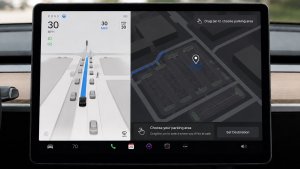
- FSD 이 주차할 위치를 선택할 수 있는 도착 옵션이 추가됨(예: 주차장, 도로변, 진입로, 주차 건물 또는 길가).
- 응급 차량(예: 경찰차, 소방차, 구급차)을 위해 길가에 정차하거나 양보하는 기능 추가됨.
- 차단된 도로 및 우회로를 실시간으로 처리하기 위해 비전 기반 신경망에 내비게이션 및 경로 설정을 추가함.
- 운전 스타일 선호도를 추가로 맞춤 설정할 수 있는 속도 프로필이 추가됨.
- 정적 및 동적 게이트 처리를 개선.
- 도로상의 파편(예: 타이어, 나뭇가지, 상자)에 대한 회피를 개선.
- 비보호 좌회전, 차선변경, 차량 끼어들기, 스쿨버스 등 여러 시나리오 처리 능력이 개선됨.
- 신뢰성 향상을 위해 시스템 오류 관리 및 성능 저하 상태에서의 원활한 복구 등 FSD 의 능력이 개선됨.
- 전면 카메라 시야에 영향을 줄 수 있는 윈드실드 내측 오염물 축적 알림 기능이 추가됨. 영향을 받는 경우 세척을 위해 서비스 센터를 방문하세요!
- 초기 실내 자재에서 나온 가스로 카메라 가시성이 달라지면 운전가 주의 집중 모니터링 민감도가 높아질 수 있습니다.
향후 개선 사항:
- 전반적인 부드러움과 감성
- 주차 공간 선택 및 주차 품질
도착 옵션

- 로보택시 하차를 위해 주차장, 도로변, 진입로, 주차 건물, 길가와 같은 도착 옵션을 선택할 수 있음.
- 각 목적지에 대한 도착 옵션 및 선호 주차 위치 설정이 저장됨.
- 추론 모델이 목적지에 적합한 옵션을 평가하고 직관적인 기본값을 선택.
속도 프로필

FSD(수퍼바이즈드)은 이제 운전자 프로필, 속도 제한, 주변 교통 상황을 종합적으로 판단하여 적절한 속도를 결정합니다.
- 컴포트보다 낮은 속도와 보수적인 차선 선택을 제공하는 새로운 속도 프로필인 나무늘보가 도입됨.
- 새로운 속도 프로필 'MAD MAX'를 도입했습니다. 해당 프로필은 '신속 주행' 대비 더 빠른 속도와 더 잦은 차선 변경 동작을 제공합니다.
- 운전자 프로필이 이제 주행 동작에 더 강한 영향을 미침. 프로필이 공격적일수록 최대 속도가 높아짐.
- 이제 오른쪽 스크롤 휠을 위/아래로 이동하여 mph/kph 단위의 정확한 최대 속도 오프셋 선택이 아닌 속도 프로필 설정을 조정할 수 있음.
UI 개선 사항

- 주차 모드에서 또는 주행 중 언제든지 터치스크린을 탭하여 자율주행 시작 가능.
- 중앙 디스플레이의 오토파일럿 시각화 화면에서 직접 속도 프로필 및 도착 옵션 같은 설정의 조정 가능.
브레이크 확인

자율주행 시작하기 버튼의 브레이크 확인 기능이 이제 기본적으로 꺼져 있습니다. 비활성화 시, 자율주행 시작 시 작동 확인을 위해 브레이크를 눌렀다 뗄 필요가 없습니다.
오토파일럿 > 브레이크 확인에서 브레이크 확인 기능을 활성화할 수 있습니다.
풀 셀프-드라이빙(수퍼바이즈드)

운전자의 감독 하에 풀 셀프 드라이빙 구현 기능(수퍼바이즈드)으로 Tesla를 거의 모든 곳에서 운전할 수 있습니다. 주차된 위치에서 출발하여 차선변경, 내비게이션 경로상의 분기 선택, 다른 차량 및 장애물 주변 운행, 좌우회전 및 목적지 주차 등 작업을 수행합니다. 사용자와 사용자가 허가한 모든 사람은 주의 깊은 관찰과 함께 추가적인 주의를 기울여 사용해야 합니다. 이 기능으로 차량이 자율주행 차량이 되는 것은 아닙니다. 방심하지 마세요.
풀 셀프 드라이빙 구현 기능(수퍼바이즈드)이 차량에서 활성화되었습니다. 이 기능을 사용하려면 UI의 자율주행 시작하기 버튼을 누르거나 오른쪽 스크롤 휠 버튼을 한 번 누르세요. 오토파일럿 설정에서 풀 셀프 드라이빙 구현 기능(수퍼바이즈드)을 비활성화할 수 있습니다.
Tron 모드

그리팅 프로그램. 여러분의 차량을 라이트 사이클로 바꿔보세요.
앱 시작 관리자 > 토이박스 > Tron으로 이동하세요.
3D 건물

이제 3D 보기로 건물과 도시 풍경을 더욱 세밀하게 볼 수 있습니다. 활성화하려면 지도 보기로 전환하고 3D 아이콘을 탭하세요.
이 기능은 프리미엄 커넥티비티가 필요합니다.
위성 지도

이제 지도에서 지구 아이콘을 탭하여 위성 보기로 전환할 수 있습니다.
블랙박스 뷰어 업데이트

이제 블랙박스 이벤트 세부 정보에 도로명이 포함되어(해당하는 경우) 녹화된 이벤트를 더 쉽게 구분할 수 있습니다. 또한, 모바일 블랙박스 뷰어는 이제 더 높은 해상도로 스트리밍 및 다운로드할 수 있습니다. Tesla 앱 버전 4.49.5+ 이상이 필요합니다.
Side Cameras Recording

Your vehicle's side cameras (B-Pillar) will now be recorded to both Dashcam and Sentry clips.
새로운 스크롤 휠 기능

왼쪽 스크롤 휠에 생화학무기 방어 모드, 내비게이션 음소거, 뮤직 라이트 동기화 등 다양한 차량 컨트롤 기능에 빠르게 접근할 수 있는 새로운 옵션이 추가되었습니다(차량에서 지원하는 경우).
왼쪽 스크롤 휠을 길게 눌러 메뉴를 여세요.
Grok (Beta)

이제 xAI로 구축한 지능형 비서 Grok와 대화할 수 있습니다. Grok의 음성과 성격을 선택할 수 있습니다. 스토리텔러부터 엉뚱한 스타일까지 다양하게 제공됩니다. Grok을 실행하려면 앱 시작 관리자 > Grok으로 이동하거나 스티어링 휠의 음성 버튼을 길게 누르세요.
프리미엄 커넥티비티 또는 Wi-Fi 연결이 필요합니다. 대화는 익명으로 처리되며 차량과 연결되지 않습니다.
참고: Grok는 현재 초기 베타 버전이며 내비게이션 또는 미디어와 같은 차량 제어를 위한 음성 명령을 지원하지 않습니다. 기존 음성 명령은 변경되지 않습니다.
온보딩 가이드

이 온보딩 가이드는 Tesla 차량에 익숙해지는 데 도움이 됩니다. 운전자 설정 조정, 터치스크린 사용을 비롯해 조명, 와이퍼 및 오토파일럿 기능 제어 등의 기능을 다룹니다.
앱 시작 관리자 > 매뉴얼 > Tesla 차량 알아보기로 이동하세요.
사소한 업데이트

- Apple Music에서는 폴더가 있는 정리된 플레이리스트 보기, 확장된 아티스트 페이지, 더 많은 청취 기록을 표시하는 최근 재생됨 목록을 제공합니다.
- Tesla 앱 알림을 통해 미디어에 로그인할 수 있어 더 빠르고 원활한 경험을 제공합니다.
- 이제 운전자 프로필을 선택하기 전에 핸드폰 키가 필요한지 선택할 수 있습니다. 운전자 프로필 설정 > 프로필에 핸드폰 키 필요로 이동하세요.
- 이 업데이트에는 중요한 보안 향상 및 개선 사항이 포함되어 있습니다.
Santa Mode

Tesla has added Santa Mode to 2026 Model S and Model X vehicles. These cars use the Unreal Engine and did not include Santa Mode until this update. Santa Mode was noticeably absent from the Toybox, and when users tried to enable the feature through voice commands, the system would say that Santa Mode is not available and will be enabled in a future update.
New FSD Guide

When a user activates FSD from the Controls > Autopilot menu, Tesla will now present a one-screen guide that introduces the user to FSD.
The guide includes the same disclaimer as previous updates and now also includes an image of the steering wheel controls for FSD, letting the user know how to switch FSD Profiles and set the maximum speed (for FSD V13 and below).
The image used is specific to the vehicle and will either include steering wheel buttons or stalks, depending on the model.
More Charging Information

While a vehicle is charging, Tesla now includes a link for ‘Additional Charging Information’ in the Controls > Charging section. If the vehicle is charging, the link will appear in blue in the top-right corner.
Tapping the link displays a pop-up containing additional information, such as the maximum and current battery input power.
Maximum Battery Input Power is the total power the charger can deliver.
Battery Input Power is the amount of energy that is being actively put into the vehicle’s battery. The battery input power may be less than the maximum charger capability for several reasons, including a high vehicle charge level. The vehicle will also draw power directly from the charger rather than draining the battery if it needs to run the HVAC system, screen, or other components. This reduces battery wear by using energy from the battery, only to have to re-add it.
Keep Accessory Power On App Control
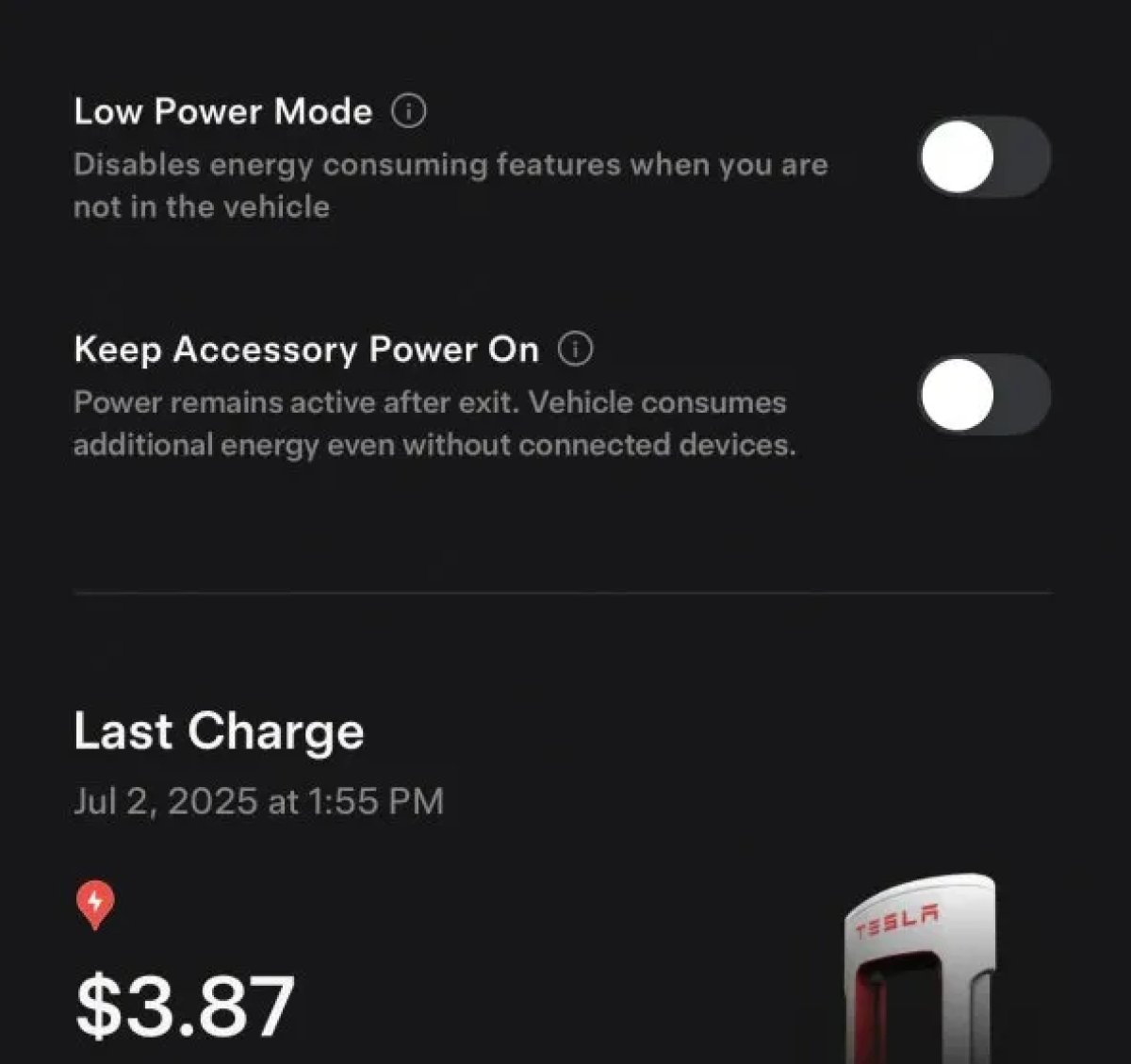
The 2025.38 vehicle update adds support for the ‘Keep Accessory Power On’ option in the latest Tesla app. This option is part of the latest Tesla app update, which adds the new Charging menu that consolidates most charging options under a single menu.
It also adds a button for Low Power Mode, instead of just being under Quick Actions.
Buy Parts

Tesla has added a Buy Parts button to Tesla’s Service Mode. Tapping the button displays a QR code that takes users to Tesla’s service site, where owners can buy parts directly from Tesla.
Parts can be shipped directly to the customer or to the nearest service center.
Charger Visualization

Tesla has added a visualization of a charger when the vehicle is parked and plugged in. In this photo, the owner is using a non-Tesla charger, so a generic charger is displayed. Tesla will presumably display a mobile charger, Wall Connector, or Supercharger if those are plugged into the vehicle.
Service Mode Improvements

New Trunk Panel
A new Trunk panel with an overview of the liftgate status, latch status, and calibration status for the trunk is now available. The panel also provides additional information, such as the request source, set liftgate height, and hands-free settings.
Models: ModelS (2021+), Model 3, Model X (2021+), Model Y
New Front Trunk Panel
A new Front Trunk (or frunk) panel with an overview of the liftgate status, latch status, and calibration status for the front trunk is now available. The panel also provides additional information, such as the request source, set liftgate height, and hands-free settings.
Models: Cybertruck
Cameras Panel Update - Mismatched Firmware Detection
In the Cameras panel, detection for when Driver Assistance System (DAS) Hardware 4 (HW4) cameras have mismatched firmware versions has been added.
If a DAS HW4 camera with mismatched firmware is detected, touch the Update Camera button to initiate a camera firmware update.
Models: ModelS (2021+), Model 3, Model X (2021+), Model Y, Cybertruck
Brakes Panel Update - ESP Stiffness Test Routine Changes
In the Electronic Stability Program (ESP) replacement panel, the routine TEST-BRAKE_CORNER_STIFFNESS-TEST has been replaced with TEST_BRAKE_X_STIFFNESS-TEST-SERVICE.
Models: Model 3(2017-2023), Model Y (2020-2024)

