












FSD(スーパーバイズド)v14.1.5

フルセルフドライビング(スーパーバイズド)v14.1.5を含む:
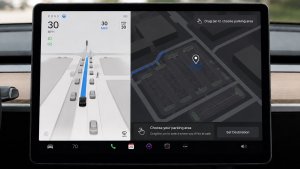
- FSDが駐車する場所 (駐車場、路上、車道、駐車ガレージ、または路肩) を選択できる到着オプションが追加。
- 緊急車両が通過する際に車を路肩に寄せたり、道を譲ったりする処理能力の追加(例、警察、消防トラック、救急車など)。
- ビジョンベースのニューラル ネットワークへのナビゲーションおよびルーティングが追加され、障害物や迂回をリアルタイムで処理できるようになりました。
- 速度プロファイルの改良により、好みに合わせてドライビング スタイルがさらにカスタマイズ可能。
- 静的および動的なゲートの処理能力を改善。
- 路上障害物回避の改善(例:タイヤ、枝木、箱など)。
- 不用意な右左折、車線変更、車両の割り込み、スクール バスなど、いくつかの状況における処理能力が向上。
- システムの障害を管理し、劣化した運用からスムーズに復旧するFSDの能力を向上し、信頼性を向上。
- フロントガラスの視界に影響を与える可能性のある車内フロントガラスに付着する汚れの知らせる警告を追加。影響を受ける場合は、サービスで清掃を依頼してください。
今後の改良点:
- 総合的なスムーズさと機敏な反応
- 駐車スペースの選択とクオリティの高い駐車
到着オプション

- ロボタクシー スタイルの降車場所として、駐車場、道路、車道、駐車ガレージ、縁石などの到着オプションが選択可能。
- 各目的地ごとに、到着オプションと駐車位置に関する希望を設定可能。
- Teslaのリーズニング モデルは、目的地に適したオプションを評価し、直感的にデフォルト選択します。
速度プロフィール

FSD(スーパーバイズド)は、ドライバープロフィール、制限速度、周囲の交通状況の組み合わせに基づいて適切な速度を判断するようになりました。
- 「コンフォート」よりも低速で、より保守的な車線変更を行う新しい速度プロファイル「ナマケモノ」を導入。
- 新たな速度プロファイル「マッドマックス」を導入しました。これは、「急ぎ」よりも速い高速走行を行い、頻繁に車線変更を行います。
- ドライバー プロフィールが動作に与える影響が大きくなりました。プロフィールが積極的に設定されている場合は、最高速度が高くなります。
- 右スクロールホイールのアップ/ダウンにより、時速の表示(mph/kph)で正確な最大速度オフセットの選択し、速度プロファイル設定が調整可能。
UIの改善

- パーキングから、または運転中いつでもタッチスクリーンをタップしてセルフドライビングを開始。
- センターディスプレイのオートパイロット ビジュアライゼーションから、速度プロファイルや到着オプションなどの設定を直接調整することができます。
ブレーキによる確認

「セルフドライビングを開始」ボタンの「ブレーキによる確認」がデフォルトでオフになりました。無効にすると、「セルフドライビングを開始」するために、ブレーキを踏んで解除する必要がなくなります。
「オートパイロット」>「ブレーキによる確認」でブレーキによる確認を有効にすることができます。
フルセルフドライビング(Supervised)

お客様の監視の下、フルセルフドライビング(スーパーバイズド)は、お客様のTeslaをほぼどこへでも運転することができます。駐車した位置から起動し、車線変更、ナビゲーション ルートに合わせた分岐の選択、他の車両や障害物の回避、および左折や右折を行い、目的地に到着すると駐車します。お客様およびこれの使用を承認される方は、充分に注意を払い、周囲を確認しながら使用する必要があります。この機能はお客様の車両を自律運転させるものではありません。注意力散漫な状態で運転しないでください。
車両は、フルセルフドライビング(スーパーバイズド)が有効になっています。この機能を使用するには、UI の「セルフドライビングを開始」ボタンを押すか、右スクロール ホイール ボタンを 1 回押します。オートパイロット設定でフルセルフドライビング(スーパーバイズド)を無効にすることができます。
Santa Mode

Tesla has added Santa Mode to 2026 Model S and Model X vehicles. These cars use the Unreal Engine and did not include Santa Mode until this update. Santa Mode was noticeably absent from the Toybox, and when users tried to enable the feature through voice commands, the system would say that Santa Mode is not available and will be enabled in a future update.
New FSD Guide

When a user activates FSD from the Controls > Autopilot menu, Tesla will now present a one-screen guide that introduces the user to FSD.
The guide includes the same disclaimer as previous updates and now also includes an image of the steering wheel controls for FSD, letting the user know how to switch FSD Profiles and set the maximum speed (for FSD V13 and below).
The image used is specific to the vehicle and will either include steering wheel buttons or stalks, depending on the model.
More Charging Information

While a vehicle is charging, Tesla now includes a link for ‘Additional Charging Information’ in the Controls > Charging section. If the vehicle is charging, the link will appear in blue in the top-right corner.
Tapping the link displays a pop-up containing additional information, such as the maximum and current battery input power.
Maximum Battery Input Power is the total power the charger can deliver.
Battery Input Power is the amount of energy that is being actively put into the vehicle’s battery. The battery input power may be less than the maximum charger capability for several reasons, including a high vehicle charge level. The vehicle will also draw power directly from the charger rather than draining the battery if it needs to run the HVAC system, screen, or other components. This reduces battery wear by using energy from the battery, only to have to re-add it.
Keep Accessory Power On App Control
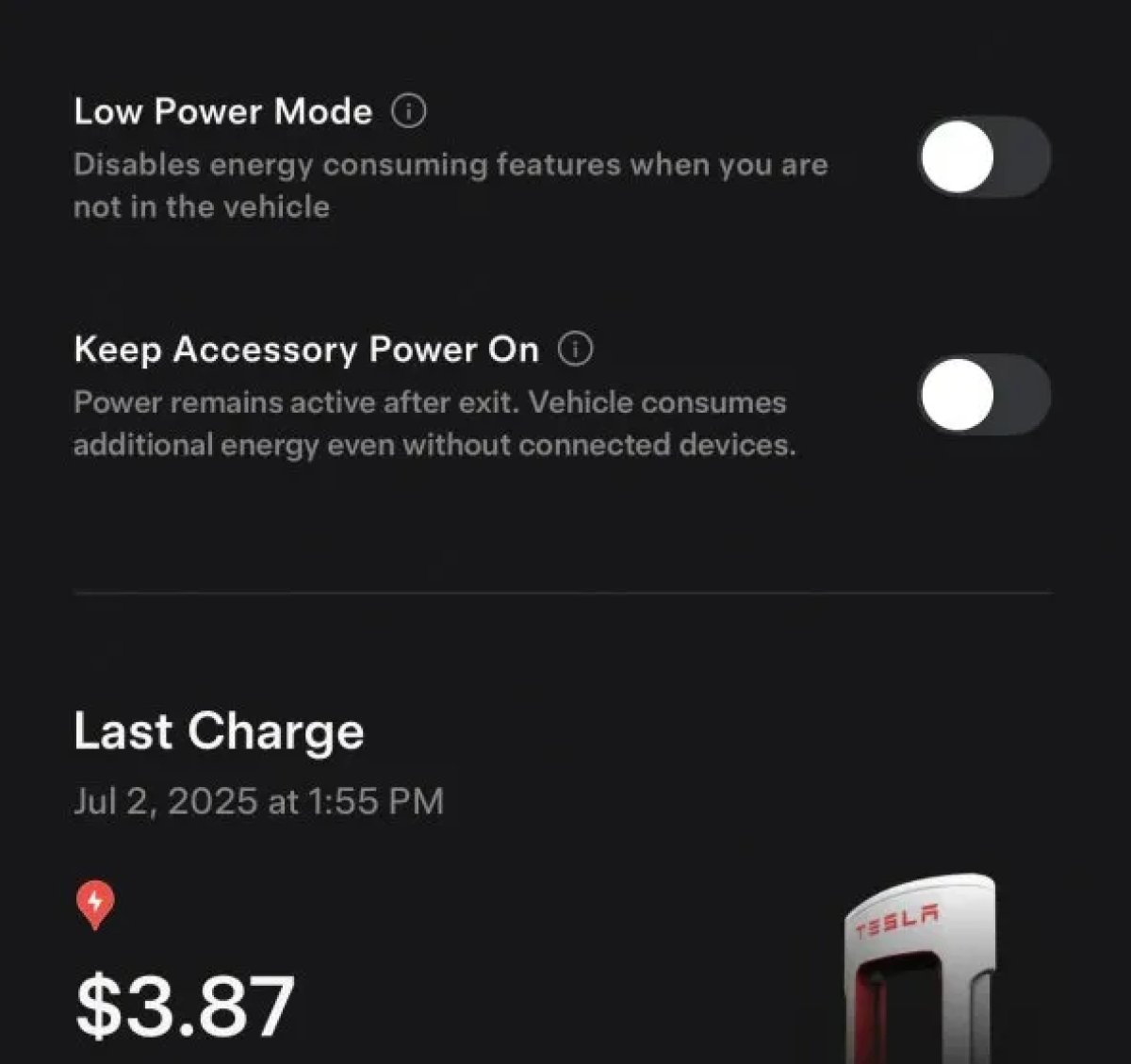
The 2025.38 vehicle update adds support for the ‘Keep Accessory Power On’ option in the latest Tesla app. This option is part of the latest Tesla app update, which adds the new Charging menu that consolidates most charging options under a single menu.
It also adds a button for Low Power Mode, instead of just being under Quick Actions.
Buy Parts

Tesla has added a Buy Parts button to Tesla’s Service Mode. Tapping the button displays a QR code that takes users to Tesla’s service site, where owners can buy parts directly from Tesla.
Parts can be shipped directly to the customer or to the nearest service center.
Charger Visualization

Tesla has added a visualization of a charger when the vehicle is parked and plugged in. In this photo, the owner is using a non-Tesla charger, so a generic charger is displayed. Tesla will presumably display a mobile charger, Wall Connector, or Supercharger if those are plugged into the vehicle.
Service Mode Improvements

New Trunk Panel
A new Trunk panel with an overview of the liftgate status, latch status, and calibration status for the trunk is now available. The panel also provides additional information, such as the request source, set liftgate height, and hands-free settings.
Models: ModelS (2021+), Model 3, Model X (2021+), Model Y
New Front Trunk Panel
A new Front Trunk (or frunk) panel with an overview of the liftgate status, latch status, and calibration status for the front trunk is now available. The panel also provides additional information, such as the request source, set liftgate height, and hands-free settings.
Models: Cybertruck
Cameras Panel Update - Mismatched Firmware Detection
In the Cameras panel, detection for when Driver Assistance System (DAS) Hardware 4 (HW4) cameras have mismatched firmware versions has been added.
If a DAS HW4 camera with mismatched firmware is detected, touch the Update Camera button to initiate a camera firmware update.
Models: ModelS (2021+), Model 3, Model X (2021+), Model Y, Cybertruck
Brakes Panel Update - ESP Stiffness Test Routine Changes
In the Electronic Stability Program (ESP) replacement panel, the routine TEST-BRAKE_CORNER_STIFFNESS-TEST has been replaced with TEST_BRAKE_X_STIFFNESS-TEST-SERVICE.
Models: Model 3(2017-2023), Model Y (2020-2024)

