















FSD (Supervizat) v13.2.9 Australia și Noua Zeelandă

FSD (Supervizat) v13 Australia și Noua Zeelandă îmbunătățește fiecare parte din rețeaua de conducere end-to-end.
Include:
- Intrări video AI4 rezoluție maximă, 36 Hz
- Intrări AI4 și arhitecturi rețele neuronale native
- Scalare date 4.2x
- Scalare capacități de calcul pentru antrenare 5x (activat de către clusterul Cortex)
- Latență foton-comandă redusă de 2 ori
- Capacități integrate de ieșire din parcare, mers înapoi și parcare
- Îmbunătățire predicții recompense pentru evitarea coliziunilor
- Îmbunătățire curățare cameră
- Controler reproiectat pentru o monitorizare mai cursivă și mai precisă
- Direcționare dinamică la ocolirea porțiunilor de drum închise, cu afișarea lor pe traseul afectat când sunt detectate de flotă
Îmbunătățiri viitoare:
- Scalare dimensiune model 3x
- Scalare lungime context model 3x
- Intrări audio pentru o gestionare mai bună a vehiculelor de urgență
- Predicții recompense optimizate pentru navigație
- Îmbunătățiri pentru frânare falsă și rulare mai lentă în parcări
- Suport pentru opțiuni la destinație, inclusiv oprire pe marginea drumului, parcare pe un loc de parcare, pe drum sau în garaj
- Reprezentare eficientă a hărților și intrărilor pentru navigație
- Îmbunătățire gestionare a obstrucționărilor camerei
Full Self-Driving (Supervizat) Australia și Noua Zeelandă
Sub supravegherea dvs., Full Self-Driving (Supervizat) Australia și Noua Zeelandă vă poate conduce vehiculul Tesla aproape oriunde. Va schimba banda, va selecta benzi în intersecție pentru a vă urma traseul din navigație, va ocoli alte vehicule și obiecte și va efectua viraje la stânga și la dreapta. Dvs. și cei autorizați de dvs. trebuie să manifestați și mai multă prudență și să fiți atenți. Această funcție nu vă transformă vehiculul într-unul autonom. Nu vă bazați excesiv pe această funcție.
Full Self-Driving (Supervizat) Australia și Noua Zeelandă este activat pe vehiculul dvs. Pentru a utiliza funcția, apăsați o dată pe butonul rotiței de derulare din dreapta. Puteți dezactiva Full Self-Driving (Supervizat) Australia și Noua Zeelandă din setările Autopilot.
Notă: aceasta este o versiune cu acces anticipat. Dvs. și cei autorizați de dvs. trebuie să manifestați și mai multă prudență și să fiți atenți.
Monitorizarea atenției prin vizualizare computerizată
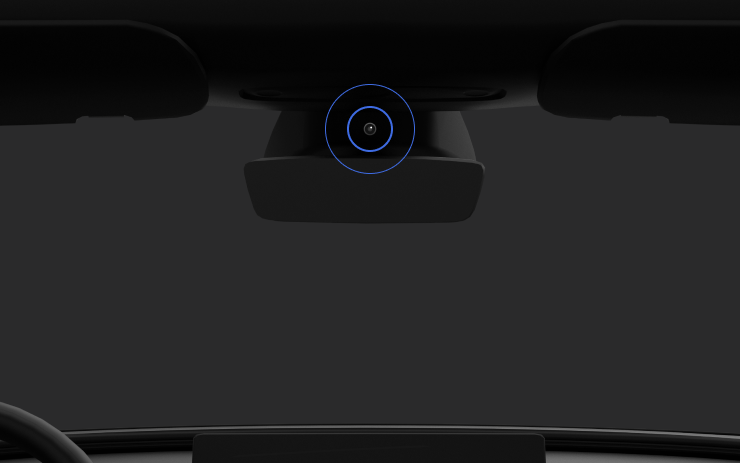
Odată ce s-a activat Full Self-Driving (Supervizat), sistemul de monitorizare a șoferului stabilește gradul de atenție a șoferului în special pe baza datelor de la camera habitaclu. Camera habitaclu trebuie să aibă o vedere clară (de ex. camera nu este obstrucționată, ochii și mâinile sunt vizibile, habitaclul este iluminat suficient, iar șoferul privește drept la drum și nu poartă ochelari de soare sau alte obiecte care acoperă ochii). În alte situații, sistemul de monitorizare a șoferului se va baza în principal pe monitorizarea unghiului de rotire (al volanului) pentru a măsura gradul de atenție a șoferului.
Când se detectează neatenție de către camera habitaclu, apare un avertisment. Avertismentul poate fi respins de șofer, care va putea astfel să-și reorienteze imediat atenția la drum. Gravitatea avertismentelor va crește pe baza naturii și frecvenței situațiilor de neatenție detectate, iar neatenția continuă va genera o Eliminare.
New Lock Alert

Tesla has added a new locking animation when you remotely lock your vehicle through the Tesla app or by walking away, and there’s still someone in the vehicle with a phone.
This new alert lets users inside the vehicle know that the vehicle can still be opened from the outside due to a phone key being nearby.
Mobile Access

Tesla’s mobile access option, found under Controls > Safety, can safely disable your vehicle from being controlled from Tesla’s mobile app. This removes the ability to control any aspects of the vehicle, including seeing the location, unlocking and starting the vehicle.
To disable mobile access, you previously had to provide the email associated with your Tesla account. You can now provide the email address or the phone number associated with your Tesla account.
Battery Health Test Removed

Tesla has removed its Battery Health Test feature from many, but not all, vehicles. Tesla’s Battery Health Test was initially added to Service Mode, but was later added to the vehicle’s main menus under Service — allowing more users to access it.
The test allows owners to see their vehicle’s battery degradation levels. While the tool under Controls and Service Mode are almost identical, the main menu version requires your vehicle to have less than a 20% state of charge before performing the test. It also only allows you to run the test once every six months to prevent further degradation from running the test too often.
It’s not clear why the feature has been removed at this time, even for vehicles that have never run the test, but the removal depends on your vehicle’s model, age, and potentially other factors.
Tow Limit Exceeded

In the latest software update, 2025.26, Tesla has added another new, undocumented feature that helps to improve the Cybertruck’s utility. When towing heavy objects, you need to be sure you balance the trailer and stay within the weight limits of the vehicle. Now, your Cybertruck can detect and warn you if the vehicle’s load rating is being exceeded.
Car Wash Mode Improvements

Car Wash Mode has been improved with this update. While Car Wash Mode will still close windows when it’s initially activated, it will now also continuously monitor your vehicle’s windows and warn you if any windows are opened during the car wash.
Service Mode Improvements

New Vehicle Functions Panel (Service Mode Plus)
A new Vehicle Functions panel with an overview of all vehicle functions, their limitations, and respective states (no conditions detected, degraded, or unavailable) is available. The panel enables users to understand the impact of conditions on affected vehicle functions and pinpoint the respective underlying alerts.
Note: This feature was added in update 2026.26.3 and is not available in prior 2025.26 updates.
Models: Model Y
New Seats Panel
A new Seats panel is available to support diagnosis for the front row seats. It adds the ability to view the location of the actuators, motor statuses, switch statuses, and run calibration routines.
Models: Model 3, Model Y
New Thermal Control Components (Service Mode Plus)
A new Control Components panel is available to support thermal Noise, Vibration, and Harshness (NVH) diagnosis. It adds the ability to individually control thermal components, set specific targets, and sweep across operating ranges with realtime feedback. It also includes a 3D static view of the heat pump, including the radiator, blower motor, louver, and pumps.
Models: Model S (2021+), Model 3, Model X (2021+), Model Y
Infotainment Panel Updates - Reboot Gateway and Infotainment (Service Mode Plus)
The ability to reboot the Gateway (GTW) and Infotainment system has been added to the Infotainment panel in Service Mode Plus. To access these new buttons, tap Infotainment > Actions.
Models: Model S (2021+), Model 3, Model X (2021+), Model Y, Cybertruck, SemiTruck
Infotainment Panel Updates - Touch Check Routine Relocation
The Touch Check routine has been moved to the Infotainment panel. To access it, tap Infotainment > Actions.
Models: All Vehicles
Refrigerant Panel Updates - Drain and Fill Routine
The Refrigerant panel has been updated to display the system pressure and highlight the current pressure values during the Drain and Fill routine. If the system pressure is too high (above 1.5 bar), a warning will be displayed until the pressure is reduced to an acceptable level. Make sure to maintain vehicle power and monitor the pressure in the Refrigerant panel while running the Drain and Fill routine.
Models: Model S (2021+), Model 3, Model X (2021+), Model Y, Cybertruck
Power Distribution Panel Updates - Hardware
The hardware protection self-test and battery capacity self-test has been added to the Power Distribution panel.
Models: Cybertruck
Power Distribution Panel Updates - Active Test Statuses
The status of the hardware protection self-test and battery capacity test is now displayed in the Power Distribution panel while the tests are actively running on the vehicle.
Models: Cybertruck
Sentry Mode With Ambient Lighting

The ambient light strips inside supported vehicles will now gently pulse red when Sentry Mode detects a threat and begins recording.

