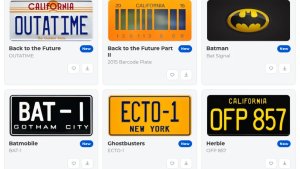
Following the popularity of our lock sounds library, we launched our customizable, license plate generator that lets you recreate your vehicle’s actual license plate in the vehicle visualization. Now, we’re launching a new Tesla wraps page to give you another way to personalize your vehicle.
You can browse and download digital wraps that change your vehicle’s appear in the visualization and in the Tesla app. You can also upload your own designs to share with the community.
Find a Wrap for Your Model
Wrap files are specific to your vehicle model, so choosing the right model matters. Our launch collection includes options for Model S, Model 3, Model X, Model Y and Cybertruck. Filter the library by model and check each design’s compatibility before downloading.
You’ll find designs inspired by familiar vehicles, including the Cybercab, Herbie and the DeLorean from Back to the Future. Some designs are available for multiple models, while others were created for a particular vehicle.
For the first-generation Model Y, we hand-created Lightning McQueen and the TMNT Party Wagon. These took time to create, and they’re two designs we’re excited to share with you.


Download and Apply Your New Look
Tesla introduced custom wrap visualizations for the Cybertruck with the 2024 Holiday Update and later expanded support to all other models.
Adding them to your vehicle has also become easier. You can now use the Tesla app to upload a wrap directly to your vehicle. Simply scroll down to Creations (or Wraps on Intel vehicles) and then select wrap and upload the file from your phone. You can also grab your USB drive from your vehicle and add the PNG files to the Wraps folder and then select the wrap you want to use in the Toybox feature in the vehicle.
Create and Share Your Own
High-quality wraps can be difficult to find, and creating them takes time and patience. We’re starting with a small collection and would love your help making this a useful resource for Tesla owners.
If you’d like to create a design, our custom wrap creation guide explains the process. Start with the template for your vehicle and an image editor that supports layers. Add your artwork on a separate layer, then hide the template before exporting your finished design as a PNG.
Have you already created a wrap and want to share it? Upload your wrap to submit it for the library. Browse the collection, try a new look and help us grow it with your own creations.