













Navigasyon Komutları ile Grok (Beta)

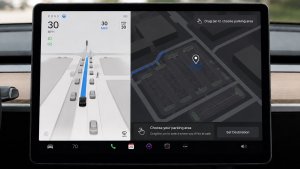
Artık Grok navigasyon varış yerleri ekleyebilir ve düzenleyebilir ve kişisel rehberiniz olur. Grok'tan yakınınızdaki en iyi Tayland restoranını aramasını, bir kafeye yürüme mesafesinde bir Supercharger bulmasını ve hatta romantik bir gezi turu planlamasını söyleyebilirsiniz. Premium Bağlantı veya Wi-Fi bağlantısı gerektirir. Etkileşimler Tesla için anonimdir ve aracınızla ilişkili değildir.
Navigasyon Komutlarını kullanmak için Grok'un kişiliğini Asistan olarak ayarlayın. Grok'u başlatmak için Uygulama Başlatıcı > Grok'a gidin veya direksiyon simidinizdeki ses düğmesine uzun basın.
Tesla Fotoğraf Kabini

Arabanızı bir fotoğraf kabinine dönüştürün! Tesla'nızın içinden selfie'ler çekin ve eğlenceli filtreler, çıkartmalar ve ifadelerle kendinizi baştan yaratın. Şık fotoğraflarınızı doğrudan Tesla uygulamasından arkadaşlarınız ve ailenizle paylaşın. Aracınız Park konumunda olmalıdır. Tesla Uygulamasının 4.51.5 veya daha yeni sürümünü gerektirir.Uygulama Başlatıcı > Toybox > Fotoğraf Kabini
iOS'ta Köpek Modu Canlı Etkinliği

Evcil hayvanınıza göz kulak olun! Köpek Modu etkinken iPhone'unuzda kokpit sıcaklığı ve hava koşullarıyla ilgili canlı güncellemeler içeren bir Canlı Etkinlik göreceksiniz. Premium Bağlantınız varsa aracınızın kabininin periyodik anlık fotoğraflarını da alırsınız. Tesla Uygulamasının 4.51.5 veya daha yeni sürümünü gerektirir.
Yol Kamerası Görüntüleyici Güncellemeleri

Yol kamerası klipleri artık hız, direksiyon simidi açısı ve self driving durumu gibi ek ayrıntıları içeriyor. Bu bilgiler, hem araç ekranında hem de Tesla uygulamasında oynatma sırasında Yol Kamerası Görüntüleyicide görünür. Premium Bağlantı ve Tesla Uygulamasının 4.51.5+ sürümünü gerektirir.
Telefonunuzda görüntülemeyi etkinleştirmek için Kontroller > Güvenlik'e gidin ve Mobil Uygulama Yoluyla Kamerayı Görüntüle'yi açın.
Noel Baba Modu Güncellemesi

Yıl boyunca tatil neşesini yaygınlaştırın ve tatil temalı efektlerle araç içi deneyiminizi dönüştürün. Noel Baba Modu artık 3D görsel bir şölen için kardan adamlar, ağaç, kilit sesi ve kar efektleri ekliyor.
Uygulama Başlatıcı > Toybox > Noel Baba'ya gidin.
Işık Gösterisi Güncellemesi

En son Işık Gösterisi - Jingle Rush ile kutlama zamanı. Gösteriyi anında oynatabilir veya tek bir araçta ya da arkadaşlarınızla senkronize olarak 10 dakikaya kadar önceden planlayabilirsiniz. Işık Gösterisi hayranları iç aydınlatmayı kontrol edebilir, ekran renk efektleri ekleyebilir ve daha uzun özel gösteriler oluşturabilir. Özel bir gösteriyi oynatmak için gösteri dosyalarını flaş belleğinizdeki "LightShow" klasörüne kaydedin, bağlayın ve seçin.
Tesla Uygulamanızda gösteriyi başlatın veya aracınızın dokunmatik ekranında Uygulama Başlatıcı > Toybox > Işık Gösterisi gidin.
Boya Atölyesi

Tesla Avatarınızı Cam Renkleri, Özel Kaplamalar ve Plakalarla Kişiselleştirin. Aracınızı benzersiz kılmak için önceden yüklenmiş birçok tasarımdan birini kullanın veya bir USB flaş bellek kullanarak kendi tasarımınızı oluşturup yükleyin.
Uygulama Başlatıcı > Toybox > Boya Atölyesi’ne gidin ya da Kontroller > Yazılım’da boya veya plaka düğmesine dokunun.
Navigasyon İyileştirmeleri

Artık navigasyon favorilerinizi yeniden sıralayabilir, haritada herhangi bir iğneyi bırakarak Ev veya İş için ayarlayabilir ve son seyahatlerinize ve alışkanlıklarınıza göre önerilen varış noktalarını görüntüleyebilirsiniz.
Otomatik HOV Şeritlerini kullanma

Navigasyon artık HOV araç paylaşımı şeritlerini kullanma seçeneği içeriyor. Rotanız zaman, konum, yolcu sayısı ve yol kısıtlamalarına göre uygun olduğunda araç paylaşımı şeridini otomatik olarak seçecektir.
Kontroller > Navigasyon > HOV şeritlerini Kullanma'ya gidin.
Süperşarj Sitesi Haritaları

Artık "Site Haritasını Görüntüle"ye dokunarak seçili Tesla Supercharger'ların 3D görünümünü görebilirsiniz. Bir konuma giderken, tesis düzeni ve canlı doluluk (Kullanılabilir / Dolu / Aşağı) varışta görüntülenecektir.
Telefonunuz Kablosuz Şarj Cihazında Bırakıldı

Kablosuz şarj aletinde bir telefon bırakılırsa ve yolcu algılanmazsa, aracınız kapılar kapandıktan birkaç saniye sonra uyarı sesi verecektir.
Kontroller > Kilitler > Telefon Kablosuz Şarj Cihazında Bırakıldı Uyarı Sesi'ne gidin.
Telefon Geride Kaldı
Kokpitin içinde bir telefon anahtarı varsa veya kablosuz şarj cihazında bir telefon kalırsa ve yolcu algılanmazsa, kapılar kapandıktan birkaç saniye sonra aracınız uyarı sesi verecektir. Telefon anahtar algılama, UWB destekli cihazlar gerektirir.
Kontroller > Kilitler > Telefon Uyarı Sesinin Geride Kalanı'na gidin.
Konuma Göre Şarj Sınırını Kaydet

Artık, mevcut konumunuz için park halindeyken bir şarj sınırı kaydedebilirsiniz ve bu sınır, orada bir sonraki şarjınızda otomatik olarak uygulanacaktır.
Kontroller > Şarj seçeneğine gidin.
SpaceX ISS Kenetlenme Simülatörü

Astronot olun, Uluslararası Uzay İstasyonu'na kenetlenerek becerilerinizi kanıtlayın. Bu 3D yanaşma simülatörü oyununda Nasa astronotları tarafından kullanılan gerçek arayüzlere dayalı bir dizi kontrol kullanarak roketi kontrol edin ve yönlendirin.
Oynamak için Park vitesine (P) geçin ve Uygulama Başlatıcı > Arcade > Space X'e gidin.
Küçük Güncellemeler

- Kontroller > Şarj bölümünden kablosuz telefon şarj pedlerini etkinleştirin veya devre dışı bırakın.
- Aracınız artık Köpek Modu etkinken herhangi bir kabin kapısı açık kalırsa mobil uyarı gönderecektir.
- Arama ekranından doğrudan Spotify parçalarını kuyruğuna ekle.
- Büyük Spotify çalma listeleri, albümler, pod yayınları, sesli kitaplar ve arşivinizde disk belleği olmadan sorunsuz bir şekilde ilerleyin.
- Kilitleme Sesi artık Tron Modundan Işık Döngüsü içeriyor. Uygulama Başlatıcı > Toybox > Boombox > Kilitleme Sesi'ne gidin.
- Tesla uygulamasında Şarj İstatistikleri gibi özellikleri desteklemek için aracınızın şarj verilerini Tesla ile paylaşmasına izin verin.
New Wheel Options

The new wheel designs that are available on the Standard Model 3 and Model Y are now available for all vehicles to equip in the vehicle visualization.
The new 18” Prismata for the Model 3 and the 18” Aperture wheels are available for all models in the tire section. To view or select the new wheels, go to Controls > Service and select tires and wheels.
Express Lanes

Tesla has added support for Express Lanes in some vehicles. Similar to HOV or toll roads, Express Lanes are faster lanes that may charge fees based on vehicle occupancy, vehicle type, and time of day.
With this update, Tesla is adding the ability for users to toggle the use of Express Lanes on or off in navigation settings. This feature is not available in all vehicles and Tesla may still be testing it.
Supercharger Live Maps Shows Exact Models

The new Supercharger Site Maps not only provide a real-time 3D rendering of a Supercharger site but also show the actual vehicle models being charged at each stall.
Tesla will show what kind of vehicle is charging at each stall, whether it’s the original Model Y, the new Model Y, a Cybertruck, or show whether it’s a non-Tesla being charged.
The Supercharger maps are useful to see which stalls are open, their location, which are handicap accessible or whether a location has pull-through stalls.
Dashcam Viewer Zoom Support

When you’re viewing a video in the Dashcam Viewer, you can now pinch the video to zoom in. In addition, you can also pan the video while zoomed to see other parts of the video.
Note: This feature is limited to vehicles with Tesla’s AMD Ryzen infotainment processor.
Camera Visibility Warning Improvement

When you receive a camera visibility warning, indicating that a camera has an obscured view, the camera's view will now be labeled. This lets you know exactly which camera needs to be cleaned.
The display is similar to the Dashcam Viewer, where the camera location is overlaid on top of a photo from the camera. Previously, the camera was unlabeled, making it unclear which camera was obscured and needed to be cleaned.
Tesla will display Front for one of the front cameras underneath the windshield and fascia for the front bumper camera.
V4 Supercharger Visualization

Tesla recently launched charging visualizations on the vehicle’s display. Tesla supports a wide variety of chargers and includes a different visualization for each type, including the mobile connector, Wall Connector, v2, and v3 Supercharger styles, as well as a generic type for third-party chargers.
However, surprisingly absent was a unique visualization for the newer style, V4 Superchargers. With this update, Tesla has added a proper visualization for the V4 Superchargers.
Wrap & License Plate Icons

You can easily access the vehicle wraps and license plate options by navigating to Controls > Software. Underneath the vehicle visualization, you’ll have a photo of the selected license plate for your vehicle, as well as a wrapping paper icon that will take you directly to the vehicle visualization options.
The wrapping paper icon replaces the old colored square that used to take you to the vehicle Colorizer feature.
Car Wash Mode Notification

Tesla will now show you a notification reminding you to use Car Wash Mode. Whenever you’re near a car wash, Tesla pops up a reminder that lets you easily enable Car Wash Mode.
This is part of Tesla’s Car Wash Mode improvements in this update.
Parking Brake

Tesla has removed the ability to enable the emergency brake (parking brake) from the vehicle’s display. Near the bottom of the Controls > Safety menu, users could manually enable the vehicle’s emergency brake. However, this option has now disappeared.
However, users can still enable the vehicle’s emergency brake by using the gear stalk or Park icon on the touch screen.
Car Wash Mode Redesign

Tesla has redesigned the Car Wash Mode feature with this update. It now includes a visualization of the vehicle on the right with the usual checklist items on the left.
For anyone not familiar with Car Wash Mode, it features a real-time checklist to help prepare your vehicle for a car wash. If any items are in the proper setting, such as a window or trunk being opened, the dot next to the item will turn red.
The ‘Enable Free Roll’ option at the bottom is now more obvious, making it easier for users to find how to put their vehicle into neutral.
Switch to Bluetooth

If your phone is connected via Bluetooth and the vehicle detects that your phone is playing audio, it will now prompt you to switch over to the Bluetooth audio source, so the audio comes out of your vehicle’s speakers instead.
Most users likely listen to a music streaming service such as Apple Music or Spotify, but when they listen to audio on their phone, there is often a second pause, leaving the driver wondering why the audio isn’t coming out of their vehicle’s speakers.
This solves that problem and also makes it easier to switch to Bluetooth instead of manually finding and tapping the Bluetooth app.
New Visualizations With Unreal Engine

The new visualizations that have been available on the 2026 Model S and Model X are now available on all 2021+ Model S and Model X vehicles.
Besides the improved visuals in the instrument cluster and in the menus, you can now freely rotate your vehicle’s visualization in the Controls menu, letting you view your vehicle from any angle.
In addition, the module that pops up when parked, which lets you open the doors and trunk, is also interactive, allowing you to pan and zoom in on the vehicle.
Air Suspension Controls

Air suspension controls for the Model S and Model X are now available in the main Controls section, rather than requiring users to go to the separate Suspension tab.
The 2026 models already include this feature. 2025 and older vehicles keep the older, more detailed Suspension menu, instead of the simplified version found in the 2026 models.
Boomerang Fu Game Removed

The game Boomerang Fu has been removed from vehicles and replaced with SpaceX Docking Simulator. The game's license likely expired this year, as it was released in last year’s holiday update.
Favorites On Map

Tesla has made several changes to favorites and home/work in this update. However, this change has gone undocumented in the release notes.
In addition to putting the home/work icons into the Navigate box and showing your top two suggestions underneath, Tesla is also pinning all of your favorites, home, and work locations directly on the map.
This makes it much easier to orient yourself as you move the map around and makes it obvious when you’re near one of your favorites, such as a friend’s home, restaurant, or other favorite location.
View Dashcam Storage

You can now view the storage space of your Dashcam USB drive. You can view the amount of space used by Dashcam and the total size of the drive.
To view Dashcam storage, go to Controls > Safety and scroll down to Dashcam.
Dashcam Filters

Tesla has made additional improvements to the Dashcam Viewer. In addition to having Dashcam and Sentry tabs in the Dashcam Viewer, Tesla now includes additional categories for Dashcam videos.
The system will automatically categorize videos taken with Dashcam and Sentry Mode and put them into appropriate categories that triggered the footage, such as Honk, Manual Save, Handle Pull, etc.
Hebrew Language Added

You can now choose Hebrew as your touchscreen language.
To change the language, shift into Park, and go to Controls > Display > Touchscreen Language.
Service Mode Improvements

Thermal Control Components Panel Added to Service Mode
The Thermal Control Components panel has been added to Service Mode to support thermal Noise, Vibration, and Harshness (NVH) diagnosis. It adds the ability to individually control thermal components, set specific targets, and sweep across operating ranges with real-time feedback. It also includes a 3D static view of the heat pump, including the radiator, blower motor, louver, and pumps.
Models: Model S (2021+), Model 3 (Heat Pump), Model X (2021+), Model Y, Cybertruck
Airbag Panel Update - New Disarm Airbag and Resistance Check Routines
In the Airbags panel, a routine has been added that allows users to disarm the airbags. With this routine, users no longer need to disconnect the Low Voltage (LV) battery when diagnosing the Safety and Restraints system. Once the airbags are disarmed, individual components, such as an airbag or pretensioner, can be tapped to view the resistance readings.
Models: Model S (2021+), Model 3, Model X (2021+), Model Y, Cybertruck

