












FSD (Supervised) v14.2.2

Full Self-Driving (Supervised) v14.2.2 includes:
- Upgraded the neural network vision encoder, leveraging higher resolution features to further improve scenarios like handling emergency vehicles, obstacles on the road, and human gestures.
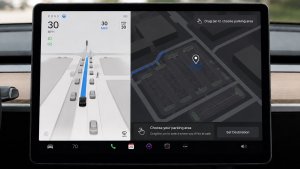
- Added Arrival Options for you to select where FSD should park: in a Parking Lot, on the Street, in a Driveway, in a Parking Garage, or at the Curbside.
- Added handling to pull over or yield for emergency vehicles (e.g. police cars, fire trucks, ambulances).
- Added navigation and routing into the vision-based neural network for real-time handling of blocked roads and detours.
- Added additional Speed Profile to further customize driving style preference.
- Improved handling for static and dynamic gates.
- Improved offsetting for road debris (e.g. tires, tree branches, boxes).
- Improve handling of several scenarios including: unprotected turns, lane changes, vehicle cut-ins, and school busses.
- Improved FSD's ability to manage system faults and recover smoothly from degraded operation for enhanced reliability.
- Added alerting for residue build-up on interior windshield that may impact front camera visibility. If affected, visit Service for cleaning!
- Camera visibility can lead to increased attention monitoring sensitivity.
Upcoming Improvements:
- Overall smoothness and sentience
- Parking spot selection and parking quality
Arrival Options

- You can now select an arrival option such as Parking Lot, Street, Driveway, Parking Garage and Curbside for Robotaxi-style drop offs.
- Your preferences for arrival options and preferred parking positions are persisted for each destination.
- Our reasoning model will assess the suitable options for your destination and pick an intuitive default.
- The navigation pin will be adjusted based on the selected Arrival Option.
โปรไฟล์ความเร็ว

ตอนนี้ FSD (ผ่านการกำกับ) จะกำหนดความเร็วที่เหมาะสมโดยพิจารณาจากโปรไฟล์ผู้ขับขี่ ขีดจำกัดความเร็ว และสภาพจราจรโดยรอบ
- เปิดตัวโปรไฟล์สลอธ โปรไฟล์ความเร็วใหม่ที่ขับด้วยความเร็วที่ต่ำกว่า และการเลือกเลนที่ระมัดระวังมากกว่าโหมดชิล
- เปิดตัวโปรไฟล์ความเร็วใหม่ MAD MAX ที่มาพร้อมความเร็วที่สูงขึ้นและการเปลี่ยนช่องจราจรที่บ่อยขึ้นกว่าโหมดเร่งรีบ
- ตอนนี้โปรไฟล์ผู้ขับขี่มีผลกระทบต่อพฤติกรรมมากขึ้นแล้ว ยิ่งโปรไฟล์มีระดับความแน่วแน่มากเท่าไร ความเร็วสูงสุดก็จะยิ่งสูงขึ้น
- ตอนนี้ปุ่มเลื่อนขึ้น/ลงด้านขวาจะเป็นปุ่มปรับการตั้งค่าโปรไฟล์ความเร็วแทนการปรับค่าออฟเซตของความเร็วสูงสุดที่แม่นยำเป็น mph/kph
UI Improvements

- You can now view your Self-Driving stats under Controls > Autopilot.
- Start Self-Driving with a tap of the touchscreen from Park, or any time during your drive.
- Adjust settings like the Speed Profile and Arrival Options directly from the Autopilot visualization on the center display.
ยืนยันการเบรก

ตอนนี้ปุ่มเริ่มการขับอัตโนมัติได้ปิดการยืนยันการเบรกไว้โดยค่าเริ่มต้น เมื่อปิดการยืนยันไว้ คุณจะไม่จำเป็นต้องคุณเหยียบเบรกและปล่อยเพื่อยืนยันการเริ่มทำงานการขับอัตโนมัติ
คุณสามารถเปิดใช้งานการยืนยันการเบรกได้ใน Autopilot > ยืนยันการเบรก
การขับอัตโนมัติเต็มรูปแบบ (ผ่านการกำกับ)

การขับอัตโนมัติเต็มรูปแบบ (ผ่านการกำกับ) สามารถขับ Tesla ของคุณได้เกือบทุกที่โดยอยู่ภายใต้การควบคุมของคุณ ซึ่งระบบจะเริ่มจากตำแหน่งจอด ทำการเปลี่ยนช่องจราจร เลือกทางแยกเพื่อวิ่งไปตามเส้นทางการนำทาง หลบหลีกรถคันอื่นและวัตถุต่าง ๆ และเลี้ยวซ้ายและขวา แล้วจอดที่จุดหมายของคุณ คุณและบุคคลที่คุณอนุญาตจะต้องใช้ความระมัดระวังเพิ่มเติมและมีสมาธิในการขับขี่อยู่เสมอ ฟีเจอร์นี้ไม่ได้ทำให้รถของคุณขับเคลื่อนอัตโนมัติ อย่าประมาท
การขับอัตโนมัติเต็มรูปแบบ (ผ่านการกำกับ) เปิดใช้งานอยู่ในรถของคุณ หากต้องการใช้ฟีเจอร์ ให้กดปุ่มเริ่มการขับอัตโนมัติบน UI หรือกดปุ่มเลื่อนด้านขวาหนึ่งครั้ง คุณสามารถปิดใช้งานการขับอัตโนมัติเต็มรูปแบบ (ผ่านการกำกับ) สำหรับออสเตรเลียและนิวซีแลนด์ได้ในการตั้งค่า Autopilot
Grok พร้อมคำสั่งการนำทาง (Beta)

Grok สามารถเพิ่มและแก้ไขจุดหมายของการนำทางได้ โดยจะเป็นไกด์นำทางส่วนตัวของคุณ คุณสามารถขอให้ Grok นำทางไปยังร้านอาหารไทยที่ดีที่สุดที่อยู่ใกล้คุณ หา Supercharger ที่อยู่ห่างจากร้านกาแฟในระยะที่เดินได้ หรือแม้แต่วางแผนทัวร์ชมสถานที่สุดโรแมนติก ต้องใช้การเชื่อมต่อแบบพรีเมียมหรือการเชื่อมต่อ Wi-Fi Tesla จะไม่ทราบตัวตนของผู้ที่สนทนาและการสนทนานั้นจะไม่เชื่อมโยงกับรถของคุณ
ตั้งค่าลักษณะการทำงานของ Grok เป็น Assistant เพื่อใช้คำสั่งการนำทาง ไปที่ตัวเปิดใช้งานแอป > Grok หรือกดปุ่มเสียงบนพวงมาลัยค้างไว้หลังจากที่ลงชื่อเข้าใช้ Grok แล้ว
Tesla Photobooth

เปลี่ยนรถของคุณให้เป็นตู้ถ่ายภาพ! ถ่ายเซลฟี่จากภายใน Tesla และแปลงโฉมตัวคุณเองด้วยฟิลเตอร์ สติ๊กเกอร์ และอีโมจิแสนสนุก แชร์ภาพถ่ายที่มีสไตล์กับเพื่อนๆ และครอบครัวได้โดยตรงจากแอป Tesla รถของคุณต้องเข้าเกียร์จอด ต้องใช้แอป Tesla เวอร์ชัน 4.51.5 ขึ้นไป
ไปที่ตัวเปิดใช้งานแอป > Toybox > Photobooth
กิจกรรมสดโหมดสุนัขบน iOS

ไม่คลาดสายตาจากสัตว์เลี้ยงของคุณ! เมื่อโหมดสุนัขทำงาน คุณจะเห็นกิจกรรมสดบน iPhone พร้อมการอัปเดตแบบสดเกี่ยวกับอุณหภูมิและสภาพอากาศ หากคุณมีการเชื่อมต่อแบบพรีเมียม คุณจะได้รับสแนปชอตเป็นระยะๆ ของห้องโดยสารรถของคุณด้วย ต้องใช้แอป Tesla เวอร์ชัน 4.51.5 ขึ้นไป
อัปเดตโปรแกรมดูกล้องหน้ารถ

ตอนนี้คลิปจากกล้องหน้ารถมีรายละเอียดเพิ่มเติม เช่น ความเร็ว มุมพวงมาลัย และสถานะการขับอัตโนมัติ ข้อมูลนี้จะแสดงขึ้นในโปรแกรมดูกล้องหน้ารถในระหว่างการเล่นบนจอแสดงผลของรถและแอป Tesla ต้องใช้การเชื่อมต่อแบบพรีเมียมและแอป Tesla เวอร์ชัน 4.51.5 ขึ้นไป
หากต้องการเปิดใช้งานการดูบนโทรศัพท์ ให้ไปที่การควบคุม > ความปลอดภัย แล้วเปิดดูกล้องผ่านแอปมือถือ
อัปเดตโหมด Santa

ส่งต่อความสุขในวันหยุดของคุณได้ตลอดทั้งปีและแปลงโฉมประสบการณ์ในรถของคุณด้วยเอฟเฟ็กต์ธีมวันหยุด ตอนนี้ โหมด Santa เพิ่มตุ๊กตาหิมะ ต้นไม้ เสียงเตือนล็อก และเอฟเฟ็กต์หิมะแล้วเพื่อตกแต่งเป็นภาพ 3 มิติได้แล้ว
ไปที่ตัวเปิดใช้งานแอป > Toybox > Santa
อัปเดตการแสดงแสงสี

ได้เวลาเฉลิมฉลองด้วยการแสดงแสงสีล่าสุดอย่าง Jingle Rush แล้ว คุณสามารถเล่นรายการได้ทันทีหรือกำหนดเวลาล่วงหน้าได้ถึง 10 นาที ไม่ว่าจะในรถยนต์คันเดียวหรือซิงค์กับเพื่อนๆ ผู้ที่ชื่นชอบการแสดงแสงสีสามารถควบคุมไฟภายใน เพิ่มเอฟเฟ็กต์สีของจอแสดงผล และสร้างการแสดงแบบกำหนดเองที่ยาวขึ้นได้ หากต้องการเล่นการแสดงแบบกำหนดเอง ให้บันทึกไฟล์การแสดงในโฟลเดอร์ "LightShow" ในแฟลชไดรฟ์ของคุณ จากนั้นเชื่อมต่อ และเลือก
เริ่มการแสดงจากแอป Tesla ของคุณ หรือไปที่ตัวเปิดใช้แอป > Toybox > การแสดงแสงสี บนหน้าจอสัมผัสของรถคุณ
ร้านสี

ปรับแต่งรูปอวตาร Tesla ของคุณด้วยสีหน้าต่าง แรปรอบคันแบบกำหนดเอง และแผ่นป้ายทะเบียน ใช้หนึ่งในการออกแบบที่โหลดไว้ล่วงหน้าจำนวนมาก หรือสร้างและอัปโหลดการออกแบบของคุณเองได้โดยใช้แฟลชไดรฟ์ USB เพื่อทำให้รถของคุณโดดเด่น
ไปที่ตัวเปิดใช้งานแอป > Toybox > ร้านสี หรือแตะปุ่มสีหรือป้ายทะเบียนในการควบคุม > ซอฟต์แวร์
Paint Shop Upgrade

Paint Shop now lets you customize your Cybertruck with new wraps, window tint options and license plate designs. Perfect your look before hitting the road!
Go to App Launcher > Toybox > Paint Shop.
การปรับปรุงการนำทาง

ตอนนี้ คุณเรียงลำดับการนำทางที่ชื่นชอบใหม่ได้แล้ว ตั้งค่าบ้านหรือที่ทำงานโดยปักหมุดที่ใดก็ได้บนแผนที่ และดูจุดหมายที่แนะนำตามการเดินทางและพฤติกรรมล่าสุดของคุณ
การกำหนดเส้นทางช่องจราจร HOV อัตโนมัติ

ตอนนี้ การนำทางมีตัวเลือกให้ใช้ช่องเดินรถมวลชน (HOV) แล้ว เส้นทางของคุณจะเลือกช่องเดินรถมวลชนโดยอัตโนมัติ หากทำได้ ตามเวลา สถานที่ จำนวนผู้โดยสาร และข้อจำกัดของถนน
ไปที่การควบคุม > การนำทาง > ใช้ช่องเดินรถมวลชน
แผนที่สถานที่ให้บริการ Supercharger

ตอนนี้ คุณดูมุมมอง 3 มิติของ Tesla Supercharger บางแห่งได้แล้วโดยการแตะ "ดูแผนที่สถานที่" เมื่อนำทางไปยังสถานที่นำร่อง แผนผังจุดให้บริการและจำนวนการใช้งานแบบเรียลไทม์ (ว่าง/ไม่ว่าง/ขัดข้อง) จะแสดงขึ้นเมื่อมาถึง
การวางโทรศัพท์ทิ้งไว้บนแท่นชาร์จไร้สาย

รถของคุณจะส่งเสียงเตือนภายในไม่กี่วินาทีหลังจากปิดประตู หากลืมโทรศัพท์ไว้บนแท่นชาร์จไร้สายและตรวจไม่พบผู้โดยสาร
ไปที่การควบคุม > ล็อก > เสียงเตือนเมื่อวางโทรศัพท์ทิ้งไว้บนแท่นชาร์จไร้สาย
การขับอัตโนมัติเต็มรูปแบบ (ผ่านการกำกับ)
การขับอัตโนมัติเต็มรูปแบบ (ผ่านการกำกับ) สามารถขับ Tesla ของคุณได้เกือบทุกที่โดยอยู่ภายใต้การควบคุมของคุณ ซึ่งระบบจะเริ่มจากตำแหน่งจอด ทำการเปลี่ยนช่องจราจร เลือกทางแยกเพื่อวิ่งไปตามเส้นทางการนำทาง หลบหลีกรถคันอื่นและวัตถุต่าง ๆ และเลี้ยวซ้ายและขวา แล้วจอดที่จุดหมายของคุณ คุณและบุคคลที่คุณอนุญาตจะต้องใช้ความระมัดระวังเพิ่มเติมและมีสมาธิในการขับขี่อยู่เสมอ ฟีเจอร์นี้ไม่ได้ทำให้รถของคุณขับเคลื่อนอัตโนมัติ อย่าประมาท
การขับอัตโนมัติเต็มรูปแบบ (ผ่านการกำกับ) เปิดใช้งานอยู่ในรถของคุณ หากต้องการใช้ฟีเจอร์ ให้กดปุ่มเริ่มการขับอัตโนมัติบน UI หรือกดปุ่มเลื่อนด้านขวาหนึ่งครั้ง คุณสามารถปิดใช้งานการขับอัตโนมัติเต็มรูปแบบ (ผ่านการกำกับ) สำหรับออสเตรเลียและนิวซีแลนด์ได้ในการตั้งค่า Autopilot
การวางโทรศัพท์ทิ้งไว้
รถของคุณจะส่งเสียงเตือนภายในไม่กี่วินาทีหลังจากปิดประตู หากมีกุญแจโทรศัพท์อยู่ในห้องโดยสาร หรือหากลืมโทรศัพท์ไว้บนแท่นชาร์จไร้สายและตรวจไม่พบผู้โดยสาร การตรวจจับกุญแจโทรศัพท์ต้องใช้อุปกรณ์ที่รองรับ UWB
ไปที่การควบคุม > ล็อก > เสียงเตือนเมื่อลืมโทรศัพท์
ขีดจำกัดการชาร์จตามสถานที่

ตอนนี้ คุณบันทึกขีดจำกัดการชาร์จสำหรับสถานที่ปัจจุบันขณะจอดรถได้แล้ว และระบบจะนำขีดจำกัดการชาร์จไปใช้โดยอัตโนมัติเมื่อคุณชาร์จที่สถานที่ดังกล่าวในครั้งถัดไป
ไปที่การควบคุม > การชาร์จ
SpaceX Docking Simulator

Become an astronaut and prove your skills by docking with the International Space Station. Control and guide the rocket in this 3D docking simulator game using a set of controls based on actual interfaces used by NASA astronauts.
To play, shift into Park (P), and go to App Launcher > Arcade > SpaceX.
การอัปเดตเล็กน้อย

- Enable or disable wireless phone charging pads in Controls > Outlets & Mods.
- Your vehicle will now send a mobile alert if any cabin door is left open while Dog Mode is active.
- Add Spotify tracks to your queue right from the search screen.
- Scroll through large Spotify playlists, albums, podcasts, audiobooks, and your library seamlessly, without paging.
- Take the vibes up another level with rainbow colors during Rave Cave. Accent lights color will change along with the beats of your music. Go to App Launcher > Toybox > Light Sync.
- Lock Sound now includes Light Cycle from Tron Mode. Go to App Launcher > Toybox > Boombox > Lock Sound.
- Allow your vehicle to share charging data with Tesla to support features like Charge Stats in the Tesla app.
- You can now configure your tire season and record your seasonal tire swap. Go to Controls > Service > Wheel & Tire
New Wheel Options

The new wheel designs that are available on the Standard Model 3 and Model Y are now available for all vehicles to equip in the vehicle visualization.
The new 18” Prismata for the Model 3 and the 18” Aperture wheels are available for all models in the tire section. To view or select the new wheels, go to Controls > Service and select tires and wheels.
Express Lanes

Tesla has added support for Express Lanes in some vehicles. Similar to HOV or toll roads, Express Lanes are faster lanes that may charge fees based on vehicle occupancy, vehicle type, and time of day.
With this update, Tesla is adding the ability for users to toggle the use of Express Lanes on or off in navigation settings. This feature is not available in all vehicles and Tesla may still be testing it.
Supercharger Live Maps Shows Exact Models

The new Supercharger Site Maps not only provide a real-time 3D rendering of a Supercharger site but also show the actual vehicle models being charged at each stall.
Tesla will show what kind of vehicle is charging at each stall, whether it’s the original Model Y, the new Model Y, a Cybertruck, or show whether it’s a non-Tesla being charged.
The Supercharger maps are useful to see which stalls are open, their location, which are handicap accessible or whether a location has pull-through stalls.
Dashcam Viewer Zoom Support

When you’re viewing a video in the Dashcam Viewer, you can now pinch the video to zoom in. In addition, you can also pan the video while zoomed to see other parts of the video.
Note: This feature is limited to vehicles with Tesla’s AMD Ryzen infotainment processor.
Camera Visibility Warning Improvement

When you receive a camera visibility warning, indicating that a camera has an obscured view, the camera's view will now be labeled. This lets you know exactly which camera needs to be cleaned.
The display is similar to the Dashcam Viewer, where the camera location is overlaid on top of a photo from the camera. Previously, the camera was unlabeled, making it unclear which camera was obscured and needed to be cleaned.
Tesla will display Front for one of the front cameras underneath the windshield and fascia for the front bumper camera.
V4 Supercharger Visualization

Tesla recently launched charging visualizations on the vehicle’s display. Tesla supports a wide variety of chargers and includes a different visualization for each type, including the mobile connector, Wall Connector, v2, and v3 Supercharger styles, as well as a generic type for third-party chargers.
However, surprisingly absent was a unique visualization for the newer style, V4 Superchargers. With this update, Tesla has added a proper visualization for the V4 Superchargers.
Wrap & License Plate Icons

You can easily access the vehicle wraps and license plate options by navigating to Controls > Software. Underneath the vehicle visualization, you’ll have a photo of the selected license plate for your vehicle, as well as a wrapping paper icon that will take you directly to the vehicle visualization options.
The wrapping paper icon replaces the old colored square that used to take you to the vehicle Colorizer feature.
Car Wash Mode Notification

Tesla will now show you a notification reminding you to use Car Wash Mode. Whenever you’re near a car wash, Tesla pops up a reminder that lets you easily enable Car Wash Mode.
This is part of Tesla’s Car Wash Mode improvements in this update.
Parking Brake

Tesla has removed the ability to enable the emergency brake (parking brake) from the vehicle’s display. Near the bottom of the Controls > Safety menu, users could manually enable the vehicle’s emergency brake. However, this option has now disappeared.
However, users can still enable the vehicle’s emergency brake by using the gear stalk or Park icon on the touch screen.
Car Wash Mode Redesign

Tesla has redesigned the Car Wash Mode feature with this update. It now includes a visualization of the vehicle on the right with the usual checklist items on the left.
For anyone not familiar with Car Wash Mode, it features a real-time checklist to help prepare your vehicle for a car wash. If any items are in the proper setting, such as a window or trunk being opened, the dot next to the item will turn red.
The ‘Enable Free Roll’ option at the bottom is now more obvious, making it easier for users to find how to put their vehicle into neutral.
Switch to Bluetooth

If your phone is connected via Bluetooth and the vehicle detects that your phone is playing audio, it will now prompt you to switch over to the Bluetooth audio source, so the audio comes out of your vehicle’s speakers instead.
Most users likely listen to a music streaming service such as Apple Music or Spotify, but when they listen to audio on their phone, there is often a second pause, leaving the driver wondering why the audio isn’t coming out of their vehicle’s speakers.
This solves that problem and also makes it easier to switch to Bluetooth instead of manually finding and tapping the Bluetooth app.
New Visualizations With Unreal Engine

The new visualizations that have been available on the 2026 Model S and Model X are now available on all 2021+ Model S and Model X vehicles.
Besides the improved visuals in the instrument cluster and in the menus, you can now freely rotate your vehicle’s visualization in the Controls menu, letting you view your vehicle from any angle.
In addition, the module that pops up when parked, which lets you open the doors and trunk, is also interactive, allowing you to pan and zoom in on the vehicle.
Air Suspension Controls

Air suspension controls for the Model S and Model X are now available in the main Controls section, rather than requiring users to go to the separate Suspension tab.
The 2026 models already include this feature. 2025 and older vehicles keep the older, more detailed Suspension menu, instead of the simplified version found in the 2026 models.
Boomerang Fu Game Removed

The game Boomerang Fu has been removed from vehicles and replaced with SpaceX Docking Simulator. The game's license likely expired this year, as it was released in last year’s holiday update.
Favorites On Map

Tesla has made several changes to favorites and home/work in this update. However, this change has gone undocumented in the release notes.
In addition to putting the home/work icons into the Navigate box and showing your top two suggestions underneath, Tesla is also pinning all of your favorites, home, and work locations directly on the map.
This makes it much easier to orient yourself as you move the map around and makes it obvious when you’re near one of your favorites, such as a friend’s home, restaurant, or other favorite location.
View Dashcam Storage

You can now view the storage space of your Dashcam USB drive. You can view the amount of space used by Dashcam and the total size of the drive.
To view Dashcam storage, go to Controls > Safety and scroll down to Dashcam.
Dashcam Filters

Tesla has made additional improvements to the Dashcam Viewer. In addition to having Dashcam and Sentry tabs in the Dashcam Viewer, Tesla now includes additional categories for Dashcam videos.
The system will automatically categorize videos taken with Dashcam and Sentry Mode and put them into appropriate categories that triggered the footage, such as Honk, Manual Save, Handle Pull, etc.
Hebrew Language Added

You can now choose Hebrew as your touchscreen language.
To change the language, shift into Park, and go to Controls > Display > Touchscreen Language.
Service Mode Improvements

Thermal Control Components Panel Added to Service Mode
The Thermal Control Components panel has been added to Service Mode to support thermal Noise, Vibration, and Harshness (NVH) diagnosis. It adds the ability to individually control thermal components, set specific targets, and sweep across operating ranges with real-time feedback. It also includes a 3D static view of the heat pump, including the radiator, blower motor, louver, and pumps.
Models: Model S (2021+), Model 3 (Heat Pump), Model X (2021+), Model Y, Cybertruck
Airbag Panel Update - New Disarm Airbag and Resistance Check Routines
In the Airbags panel, a routine has been added that allows users to disarm the airbags. With this routine, users no longer need to disconnect the Low Voltage (LV) battery when diagnosing the Safety and Restraints system. Once the airbags are disarmed, individual components, such as an airbag or pretensioner, can be tapped to view the resistance readings.
Models: Model S (2021+), Model 3, Model X (2021+), Model Y, Cybertruck

