












![Tesla Driver in Mexico Makes His Model Y Fly [VIDEO]](/img/containers/article_images/2026/model-y-flying-accident-mexico.webp/c6f78372a6ed7ca93d8a0c61a905cd6b/model-y-flying-accident-mexico.jpg)



FSD (ผ่านการกำกับ) v14.1.5

การขับอัตโนมัติเต็มรูปแบบ (ผ่านการกำกับ) v14.1.5 รวมถึง:
- เพิ่มตัวเลือกการมาถึงเพื่อให้คุณเลือกว่า FSD ควรจอดที่ใด เช่น ในลานจอดรถ ถนน บนถนนส่วนบุคคล ในที่จอดรถนอกบ้าน หรือริมถนน
- เพิ่มวิธีการควบคุมรถเพื่อหยุดรถหรือหยุดให้รถฉุกเฉินขับผ่าน (เช่น รถตำรวจ รถดับเพลิง รถพยาบาล)
- เพิ่มการนำทางและการกำหนดเส้นทางในโครงข่ายประสาทเทียมที่อาศัยการมองเห็น เพื่อควบคุมรถกรณีที่มีถนนและทางอ้อมถูกปิดกั้นได้แบบเรียลไทม์
- เพิ่มโปรไฟล์ความเร็วเพิ่มเติมเพื่อปรับแต่งรูปแบบการขับขี่ที่ต้องการเพิ่มเติม
- ปรับปรุงการรับมือกับประตูแบบคงที่และแบบไดนามิก
- ปรับปรุงการตั้งค่าออฟเซตสำหรับเศษสิ่งสกปรกบนถนน (เช่น ยาง กิ่งไม้ กล่อง)
- ปรับปรุงการควบคุมรถในสถานการณ์หลายรูปแบบ รวมถึง การเลี้ยวที่ไม่มีสัญญาณป้องกัน การเปลี่ยนเลน การตัดหน้าของรถคันอื่น และรถโรงเรียน
- ปรับปรุงความสามารถของ FSD ในการจัดการข้อผิดพลาดของระบบและกู้คืนการทำงานจากสภาวะประสิทธิภาพเสื่อมได้อย่างราบรื่นจากการเพื่อเพิ่มความน่าเชื่อถือ
- เพิ่มการแจ้งเตือนการสะสมของสิ่งตกค้างบนกระจกหน้าภายในที่อาจส่งผลต่อทัศนวิสัยของกล้องด้านหน้า หากพบปัญหานี้ โปรดเข้ารับบริการเพื่อทำความสะอาด!
การปรับปรุงที่กำลังจะมีขึ้น:
- ความนุ่มนวลและการตอบสนองโดยรวม
- การเลือกช่องจอดและคุณภาพการจอด
ตัวเลือกการมาถึง

- ตอนนี้คุณสามารถเลือกตัวเลือกการมาถึงได้แล้ว เช่น ลานจอดรถ ถนน ถนนส่วนบุคคล ที่จอดรถนอกบ้าน และริมถนนสำหรับการส่งผู้โดยสารแบบ Robotaxi
- การกำหนดค่าสำหรับตัวเลือกการมาถึงและตำแหน่งจอดที่ต้องการสำหรับจุดหมายแต่ละแห่งจะยังคงค่าเดิม
- โมเดลการคิดวิเคราะห์เหตุผลของเราจะประเมินตัวเลือกที่เหมาะสมสำหรับจุดหมายของคุณ และเลือกค่าเริ่มต้นที่เข้าใจง่าย
โปรไฟล์ความเร็ว

ตอนนี้ FSD (ผ่านการกำกับ) จะกำหนดความเร็วที่เหมาะสมโดยพิจารณาจากโปรไฟล์ผู้ขับขี่ ขีดจำกัดความเร็ว และสภาพจราจรโดยรอบ
- เปิดตัวโปรไฟล์สลอธ โปรไฟล์ความเร็วใหม่ที่ขับด้วยความเร็วที่ต่ำกว่า และการเลือกเลนที่ระมัดระวังมากกว่าโหมดชิล
- เปิดตัวโปรไฟล์ความเร็วใหม่ MAD MAX ที่มาพร้อมความเร็วที่สูงขึ้นและการเปลี่ยนช่องจราจรที่บ่อยขึ้นกว่าโหมดเร่งรีบ
- ตอนนี้โปรไฟล์ผู้ขับขี่มีผลกระทบต่อพฤติกรรมมากขึ้นแล้ว ยิ่งโปรไฟล์มีระดับความแน่วแน่มากเท่าไร ความเร็วสูงสุดก็จะยิ่งสูงขึ้น
- ตอนนี้ปุ่มเลื่อนขึ้น/ลงด้านขวาจะเป็นปุ่มปรับการตั้งค่าโปรไฟล์ความเร็วแทนการปรับค่าออฟเซตของความเร็วสูงสุดที่แม่นยำเป็น mph/kph
การปรับปรุง UI

- เริ่มการขับอัตโนมัติโดยแตะที่หน้าจอสัมผัสเมื่ออยู่ในเกียร์จอดหรือเมื่อใดก็ได้ระหว่างขับขี่
- ปรับการตั้งค่าต่าง ๆ เช่น โปรไฟล์ความเร็วและตัวเลือกการมาถึงได้โดยตรงจากการแสดงภาพ Autopilot บนจอแสดงผลตรงกลาง
ยืนยันการเบรก

ตอนนี้ปุ่มเริ่มการขับอัตโนมัติได้ปิดการยืนยันการเบรกไว้โดยค่าเริ่มต้น เมื่อปิดการยืนยันไว้ คุณจะไม่จำเป็นต้องคุณเหยียบเบรกและปล่อยเพื่อยืนยันการเริ่มทำงานการขับอัตโนมัติ
คุณสามารถเปิดใช้งานการยืนยันการเบรกได้ใน Autopilot > ยืนยันการเบรก
การขับอัตโนมัติเต็มรูปแบบ (ผ่านการกำกับ)

การขับอัตโนมัติเต็มรูปแบบ (ผ่านการกำกับ) สามารถขับ Tesla ของคุณได้เกือบทุกที่โดยอยู่ภายใต้การควบคุมของคุณ ซึ่งระบบจะเริ่มจากตำแหน่งจอด ทำการเปลี่ยนช่องจราจร เลือกทางแยกเพื่อวิ่งไปตามเส้นทางการนำทาง หลบหลีกรถคันอื่นและวัตถุต่าง ๆ และเลี้ยวซ้ายและขวา แล้วจอดที่จุดหมายของคุณ คุณและบุคคลที่คุณอนุญาตจะต้องใช้ความระมัดระวังเพิ่มเติมและมีสมาธิในการขับขี่อยู่เสมอ ฟีเจอร์นี้ไม่ได้ทำให้รถของคุณขับเคลื่อนอัตโนมัติ อย่าประมาท
การขับอัตโนมัติเต็มรูปแบบ (ผ่านการกำกับ) เปิดใช้งานอยู่ในรถของคุณ หากต้องการใช้ฟีเจอร์ ให้กดปุ่มเริ่มการขับอัตโนมัติบน UI หรือกดปุ่มเลื่อนด้านขวาหนึ่งครั้ง คุณสามารถปิดใช้งานการขับอัตโนมัติเต็มรูปแบบ (ผ่านการกำกับ) สำหรับออสเตรเลียและนิวซีแลนด์ได้ในการตั้งค่า Autopilot
Santa Mode

Tesla has added Santa Mode to 2026 Model S and Model X vehicles. These cars use the Unreal Engine and did not include Santa Mode until this update. Santa Mode was noticeably absent from the Toybox, and when users tried to enable the feature through voice commands, the system would say that Santa Mode is not available and will be enabled in a future update.
New FSD Guide

When a user activates FSD from the Controls > Autopilot menu, Tesla will now present a one-screen guide that introduces the user to FSD.
The guide includes the same disclaimer as previous updates and now also includes an image of the steering wheel controls for FSD, letting the user know how to switch FSD Profiles and set the maximum speed (for FSD V13 and below).
The image used is specific to the vehicle and will either include steering wheel buttons or stalks, depending on the model.
More Charging Information

While a vehicle is charging, Tesla now includes a link for ‘Additional Charging Information’ in the Controls > Charging section. If the vehicle is charging, the link will appear in blue in the top-right corner.
Tapping the link displays a pop-up containing additional information, such as the maximum and current battery input power.
Maximum Battery Input Power is the total power the charger can deliver.
Battery Input Power is the amount of energy that is being actively put into the vehicle’s battery. The battery input power may be less than the maximum charger capability for several reasons, including a high vehicle charge level. The vehicle will also draw power directly from the charger rather than draining the battery if it needs to run the HVAC system, screen, or other components. This reduces battery wear by using energy from the battery, only to have to re-add it.
Keep Accessory Power On App Control
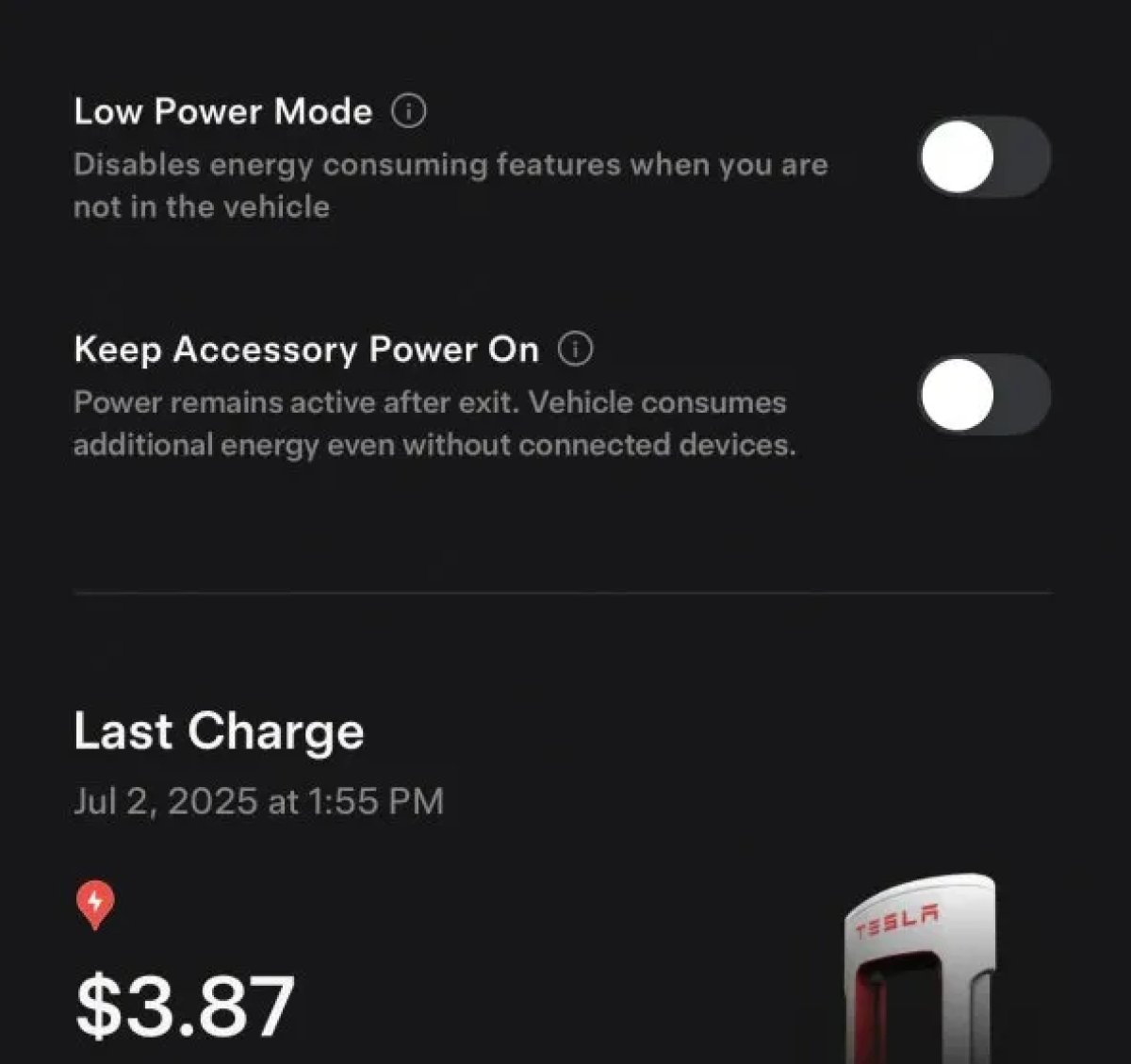
The 2025.38 vehicle update adds support for the ‘Keep Accessory Power On’ option in the latest Tesla app. This option is part of the latest Tesla app update, which adds the new Charging menu that consolidates most charging options under a single menu.
It also adds a button for Low Power Mode, instead of just being under Quick Actions.
Buy Parts

Tesla has added a Buy Parts button to Tesla’s Service Mode. Tapping the button displays a QR code that takes users to Tesla’s service site, where owners can buy parts directly from Tesla.
Parts can be shipped directly to the customer or to the nearest service center.
Charger Visualization

Tesla has added a visualization of a charger when the vehicle is parked and plugged in. In this photo, the owner is using a non-Tesla charger, so a generic charger is displayed. Tesla will presumably display a mobile charger, Wall Connector, or Supercharger if those are plugged into the vehicle.
Service Mode Improvements

New Trunk Panel
A new Trunk panel with an overview of the liftgate status, latch status, and calibration status for the trunk is now available. The panel also provides additional information, such as the request source, set liftgate height, and hands-free settings.
Models: ModelS (2021+), Model 3, Model X (2021+), Model Y
New Front Trunk Panel
A new Front Trunk (or frunk) panel with an overview of the liftgate status, latch status, and calibration status for the front trunk is now available. The panel also provides additional information, such as the request source, set liftgate height, and hands-free settings.
Models: Cybertruck
Cameras Panel Update - Mismatched Firmware Detection
In the Cameras panel, detection for when Driver Assistance System (DAS) Hardware 4 (HW4) cameras have mismatched firmware versions has been added.
If a DAS HW4 camera with mismatched firmware is detected, touch the Update Camera button to initiate a camera firmware update.
Models: ModelS (2021+), Model 3, Model X (2021+), Model Y, Cybertruck
Brakes Panel Update - ESP Stiffness Test Routine Changes
In the Electronic Stability Program (ESP) replacement panel, the routine TEST-BRAKE_CORNER_STIFFNESS-TEST has been replaced with TEST_BRAKE_X_STIFFNESS-TEST-SERVICE.
Models: Model 3(2017-2023), Model Y (2020-2024)

