






![All of Tesla's Robotaxi Markets and Their Actual Sizes [UPDATED]](/img/containers/article_images/robotaxi/robotaxi-regions.webp/f815854a07c0943a7d4dcac05ff125c1/robotaxi-regions.jpg)







FSD (Supervised) v14.2.2

Full Self-Driving (Supervised) v14.2.2 includes:
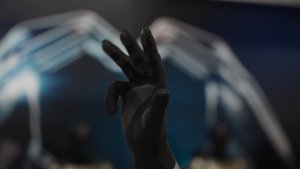
- Upgraded the neural network vision encoder, leveraging higher resolution features to further improve scenarios like handling emergency vehicles, obstacles on the road, and human gestures.
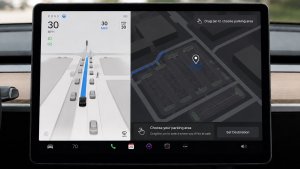
- Added Arrival Options for you to select where FSD should park: in a Parking Lot, on the Street, in a Driveway, in a Parking Garage, or at the Curbside.
- Added handling to pull over or yield for emergency vehicles (e.g. police cars, fire trucks, ambulances).
- Added navigation and routing into the vision-based neural network for real-time handling of blocked roads and detours.
- Added additional Speed Profile to further customize driving style preference.
- Improved handling for static and dynamic gates.
- Improved offsetting for road debris (e.g. tires, tree branches, boxes).
- Improve handling of several scenarios including: unprotected turns, lane changes, vehicle cut-ins, and school busses.
- Improved FSD's ability to manage system faults and recover smoothly from degraded operation for enhanced reliability.
- Added alerting for residue build-up on interior windshield that may impact front camera visibility. If affected, visit Service for cleaning!
- Camera visibility can lead to increased attention monitoring sensitivity.
Upcoming Improvements:
- Overall smoothness and sentience
- Parking spot selection and parking quality
Arrival Options

- You can now select an arrival option such as Parking Lot, Street, Driveway, Parking Garage and Curbside for Robotaxi-style drop offs.
- Your preferences for arrival options and preferred parking positions are persisted for each destination.
- Our reasoning model will assess the suitable options for your destination and pick an intuitive default.
- The navigation pin will be adjusted based on the selected Arrival Option.
Hastighetsprofiler

FSD (under uppsyn) bestämmer nu lämplig hastighet baserat på en blandning av förarprofil, hastighetsgräns och omgivande trafik.
– Introducerat den nya hastighetsprofilen SLOTH , som kommer med lägre hastigheter och ett mer konservativt filval än CHILL.
– Introducerat den nya hastighetsprofilen MAD MAX, som kommer med högre hastigheter och mer frekventa filbyten än HURRY.
– Förarprofilen har nu större inverkan på beteendet. Ju mer bestämd profil, desto högre maxhastighet.
– Tryck på höger rullningshjul uppåt/nedåt för att justera inställningen av hastighetsprofilen snarare än ditt exakta offset för maxfart i mph/kph.
UI Improvements

- You can now view your Self-Driving stats under Controls > Autopilot.
- Start Self-Driving with a tap of the touchscreen from Park, or any time during your drive.
- Adjust settings like the Speed Profile and Arrival Options directly from the Autopilot visualization on the center display.
Bromsbekräftelse

Bromsbekräftelse för knappen Starta självkörning är nu avstängd som standard. När den är avaktiverad behöver du inte trycka på och släppa bromsen för att bekräfta kopplingen från Starta självkörning.
Du kan aktivera Bromsbekräftelse i Autopilot > Bromsbekräftelse.
Total självkörning (under uppsyn)

Under din övervakning kan total självkörningsförmåga (under uppsyn) köra din Tesla nästan var som helst. Den utgår från en parkerad position, gör filbyten, väljer förgreningar för att följa din navigeringsrutt, navigerar runt andra fordon och föremål, gör vänster- och högersvängar och parkerar vid din destination. Du, och alla du ger tillåtelse, måste vara extra uppmärksamma och försiktiga. Det gör inte ditt fordon autonomt. Behåll uppmärksamheten.
Total Självkörningsförmåga (under uppsyn) är aktiverad på ditt fordon. Använd funktionen genom att trycka på knappen Starta Självkörning i gränssnittet eller trycka en gång på höger rullningsknapp. Du kan inaktivera Total självkörningsförmåga (under uppsyn) i autopilotinställningarna.
Grok med navigeringskommandon (beta)

Grok kan nu lägga till och redigera navigeringsdestinationer och bli din personliga guide. Du kan be Grok navigera till den bästa thailändska restaurangen nära dig, hitta en Supercharger som ligger gångavstånd från ett café eller till och med planera en romantisk sightseeingtur. Kräver Premium Connectivity eller en Wi-Fi-anslutning. Interaktionerna är anonyma för Tesla och är inte kopplade till din bil.
Ställ in Groks personlighet på Assistent för att använda navigeringskommandon. Gå till Applikationsstartaren > Grok eller håll röstknappen på ratten nedtryckt efter att du loggat in på Grok.
Tesla Photobooth

Förvandla din bil till ett fotobås! Ta selfies inifrån din Tesla och ge dig själv en ny stil med roliga filter, dekaler och emojier. Dela dina stiliga bilder med vänner och familj direkt från Tesla-appen. Din bil måste vara i P-läge. Kräver version 4.51.5 eller senare av Tesla-appen.
Gå till Applikationsstartaren > Leklåda > Photobooth.
Dog Mode-liveaktivitet på iOS

Håll ett öga på ditt husdjur! När Dog Mode är aktivt ser du en liveaktivitet på din iPhone med liveuppdateringar om temperatur och klimatförhållanden. Om du har Premium Connectivity får du också regelbundna stillbilder av kupén i din bil. Kräver version 4.51.5 eller senare av Tesla-appen.
Uppdatering av bilkameraspelaren

Bilkameraklippen inkluderar nu ytterligare detaljer som hastighet, rattvinkel och självkörningsläge. Denna information visas i bilkameran under uppspelning både på bilens skärm och i Tesla-appen. Kräver Premium Connectivity och version 4.51.5 eller senare av Tesla-appen.
Du kan aktivera visning i din telefon genom att gå till Reglage > Säkerhet och aktivera Visa kamera via mobilapp.
Uppdateringar av tomteläget

Sprid semesterstämning året runt och förvandla upplevelsen i bilen med effekter med semestertema. Tomteläget lägger nu till festliga snögubbar, träd, en låssignal och snöeffekter för en visuell 3D-upplevelse.
Gå till Applikationsstartaren > Leklåda > Santa.
Ljusshow-uppdatering

Dags att fira med den senaste ljusshowen – Jingle Rush. Du kan spela upp showen direkt eller schemalägga den upp till 10 minuter i förväg, antingen i ett fordon eller synkroniserad med vännerna. Ljusshowentusiaster kan styra interiörbelysningen, lägga till skärmfärgseffekter och skapa längre anpassade shower. För att spela upp en anpassad show sparar du showens filer i en "LightShow"-mapp på ditt USB-minne, ansluter och väljer.
Starta showen från Tesla-appen eller gå Applikationsstartare > Leklåda > Ljusshow på fordonets pekskärm.
Lackverkstad

Anpassa din Tesla-avatar med fönstertoner, anpassade folier och registreringsskyltar. Använd en av många förinstallerade designer eller skapa och ladda upp din egen med ett usb-minne för att göra ditt fordon unikt.
Gå till Applikationsstartaren > Leklåda > Lackverkstad eller tryck på knappen för färg- eller registreringsskylt under Reglage > Programvara.
Paint Shop Upgrade

Paint Shop now lets you customize your Cybertruck with new wraps, window tint options and license plate designs. Perfect your look before hitting the road!
Go to App Launcher > Toybox > Paint Shop.
Förbättrad navigering

Du kan nu ändra ordning på dina navigeringsfavoriter, ställa in Hem eller Arbete genom att sätta en kartnål var som helst på kartan och se förslag på resmål baserade på dina senaste resor och vanor.
Automatisk ruttberäkning av samåkningsfiler

Navigering inkluderar nu ett alternativ att använda samåkningsfiler. Samåkningsfilen väljs automatiskt på din rutt när detta är berättigat, baserat på tidpunkt, plats, passagerare och vägbegränsningar.
Gå till Reglage > Navigering > Använd samåkningsfiler.
Supercharger-platskartor

Du kan nu se en 3D-vy över utvalda Tesla Superchargers genom att trycka på "Visa platskarta". När du navigerar till en pilotplats visas anläggningslayouten och beläggningen i realtid (tillgänglig/upptagen/stängd) vid ankomsten.
Telefonen sitter kvar på trådlös laddare

Ditt fordon avger en ljudsignal några sekunder efter att dörrarna stängts om en telefon finns kvar i den trådlösa laddaren och ingen passagerare identifieras.
Gå till Reglage > Lås > Ljudsignal om telefonen sitter kvar på trådlös laddare.
Total självkörning (under uppsyn)
Under din övervakning kan total självkörningsförmåga (under uppsyn) köra din Tesla nästan var som helst. Den utgår från en parkerad position, gör filbyten, väljer förgreningar för att följa din navigeringsrutt, navigerar runt andra fordon och föremål, gör vänster- och högersvängar och parkerar vid din destination. Du, och alla du ger tillåtelse, måste vara extra uppmärksamma och försiktiga. Det gör inte ditt fordon autonomt. Behåll uppmärksamheten.
Total Självkörningsförmåga (under uppsyn) är aktiverad på ditt fordon. Använd funktionen genom att trycka på knappen Starta Självkörning i gränssnittet eller trycka en gång på höger rullningsknapp. Du kan inaktivera Total självkörningsförmåga (under uppsyn) i autopilotinställningarna.
Telefonen har lämnats kvar
Ditt fordon avger en ljudsignal några sekunder efter att dörrarna stängts om en telefonnyckel finns i kupén eller om en telefon finns kvar på den trådlösa laddaren och ingen passagerare identifieras. Detektering av telefonnyckeln kräver enheter med stöd för UWB.
Gå till Reglage > Lås > Ljudsignal om telefonen lämnats kvar.
Spara laddningsgräns efter plats

Du kan nu spara en laddningsgräns för din nuvarande plats när du är parkerad. Den tillämpas automatiskt nästa gång du laddar där.
Gå till Reglage > Laddning.
SpaceX-dockningssimulator

Bli astronaut, visa dina färdigheter genom att docka med den internationella rymdstationen. Styr och guida raketen i detta 3D-dockningssimulatorspel med en uppsättning reglage baserade på faktiska gränssnitt som används av NASA-astronauter.
För att spela lägger du i P-läge och går till Applikationsstartaren > Arkad > SpaceX.
Mindre uppdateringar

- Enable or disable wireless phone charging pads in Controls > Outlets & Mods.
- Your vehicle will now send a mobile alert if any cabin door is left open while Dog Mode is active.
- Add Spotify tracks to your queue right from the search screen.
- Scroll through large Spotify playlists, albums, podcasts, audiobooks, and your library seamlessly, without paging.
- Take the vibes up another level with rainbow colors during Rave Cave. Accent lights color will change along with the beats of your music. Go to App Launcher > Toybox > Light Sync.
- Lock Sound now includes Light Cycle from Tron Mode. Go to App Launcher > Toybox > Boombox > Lock Sound.
- Allow your vehicle to share charging data with Tesla to support features like Charge Stats in the Tesla app.
- You can now configure your tire season and record your seasonal tire swap. Go to Controls > Service > Wheel & Tire
New Wheel Options

The new wheel designs that are available on the Standard Model 3 and Model Y are now available for all vehicles to equip in the vehicle visualization.
The new 18” Prismata for the Model 3 and the 18” Aperture wheels are available for all models in the tire section. To view or select the new wheels, go to Controls > Service and select tires and wheels.
Express Lanes

Tesla has added support for Express Lanes in some vehicles. Similar to HOV or toll roads, Express Lanes are faster lanes that may charge fees based on vehicle occupancy, vehicle type, and time of day.
With this update, Tesla is adding the ability for users to toggle the use of Express Lanes on or off in navigation settings. This feature is not available in all vehicles and Tesla may still be testing it.
Supercharger Live Maps Shows Exact Models

The new Supercharger Site Maps not only provide a real-time 3D rendering of a Supercharger site but also show the actual vehicle models being charged at each stall.
Tesla will show what kind of vehicle is charging at each stall, whether it’s the original Model Y, the new Model Y, a Cybertruck, or show whether it’s a non-Tesla being charged.
The Supercharger maps are useful to see which stalls are open, their location, which are handicap accessible or whether a location has pull-through stalls.
Dashcam Viewer Zoom Support

When you’re viewing a video in the Dashcam Viewer, you can now pinch the video to zoom in. In addition, you can also pan the video while zoomed to see other parts of the video.
Note: This feature is limited to vehicles with Tesla’s AMD Ryzen infotainment processor.
Camera Visibility Warning Improvement

When you receive a camera visibility warning, indicating that a camera has an obscured view, the camera's view will now be labeled. This lets you know exactly which camera needs to be cleaned.
The display is similar to the Dashcam Viewer, where the camera location is overlaid on top of a photo from the camera. Previously, the camera was unlabeled, making it unclear which camera was obscured and needed to be cleaned.
Tesla will display Front for one of the front cameras underneath the windshield and fascia for the front bumper camera.
V4 Supercharger Visualization

Tesla recently launched charging visualizations on the vehicle’s display. Tesla supports a wide variety of chargers and includes a different visualization for each type, including the mobile connector, Wall Connector, v2, and v3 Supercharger styles, as well as a generic type for third-party chargers.
However, surprisingly absent was a unique visualization for the newer style, V4 Superchargers. With this update, Tesla has added a proper visualization for the V4 Superchargers.
Wrap & License Plate Icons

You can easily access the vehicle wraps and license plate options by navigating to Controls > Software. Underneath the vehicle visualization, you’ll have a photo of the selected license plate for your vehicle, as well as a wrapping paper icon that will take you directly to the vehicle visualization options.
The wrapping paper icon replaces the old colored square that used to take you to the vehicle Colorizer feature.
Car Wash Mode Notification

Tesla will now show you a notification reminding you to use Car Wash Mode. Whenever you’re near a car wash, Tesla pops up a reminder that lets you easily enable Car Wash Mode.
This is part of Tesla’s Car Wash Mode improvements in this update.
Parking Brake

Tesla has removed the ability to enable the emergency brake (parking brake) from the vehicle’s display. Near the bottom of the Controls > Safety menu, users could manually enable the vehicle’s emergency brake. However, this option has now disappeared.
However, users can still enable the vehicle’s emergency brake by using the gear stalk or Park icon on the touch screen.
Car Wash Mode Redesign

Tesla has redesigned the Car Wash Mode feature with this update. It now includes a visualization of the vehicle on the right with the usual checklist items on the left.
For anyone not familiar with Car Wash Mode, it features a real-time checklist to help prepare your vehicle for a car wash. If any items are in the proper setting, such as a window or trunk being opened, the dot next to the item will turn red.
The ‘Enable Free Roll’ option at the bottom is now more obvious, making it easier for users to find how to put their vehicle into neutral.
Switch to Bluetooth

If your phone is connected via Bluetooth and the vehicle detects that your phone is playing audio, it will now prompt you to switch over to the Bluetooth audio source, so the audio comes out of your vehicle’s speakers instead.
Most users likely listen to a music streaming service such as Apple Music or Spotify, but when they listen to audio on their phone, there is often a second pause, leaving the driver wondering why the audio isn’t coming out of their vehicle’s speakers.
This solves that problem and also makes it easier to switch to Bluetooth instead of manually finding and tapping the Bluetooth app.
New Visualizations With Unreal Engine

The new visualizations that have been available on the 2026 Model S and Model X are now available on all 2021+ Model S and Model X vehicles.
Besides the improved visuals in the instrument cluster and in the menus, you can now freely rotate your vehicle’s visualization in the Controls menu, letting you view your vehicle from any angle.
In addition, the module that pops up when parked, which lets you open the doors and trunk, is also interactive, allowing you to pan and zoom in on the vehicle.
Air Suspension Controls

Air suspension controls for the Model S and Model X are now available in the main Controls section, rather than requiring users to go to the separate Suspension tab.
The 2026 models already include this feature. 2025 and older vehicles keep the older, more detailed Suspension menu, instead of the simplified version found in the 2026 models.
Boomerang Fu Game Removed

The game Boomerang Fu has been removed from vehicles and replaced with SpaceX Docking Simulator. The game's license likely expired this year, as it was released in last year’s holiday update.
Favorites On Map

Tesla has made several changes to favorites and home/work in this update. However, this change has gone undocumented in the release notes.
In addition to putting the home/work icons into the Navigate box and showing your top two suggestions underneath, Tesla is also pinning all of your favorites, home, and work locations directly on the map.
This makes it much easier to orient yourself as you move the map around and makes it obvious when you’re near one of your favorites, such as a friend’s home, restaurant, or other favorite location.
View Dashcam Storage

You can now view the storage space of your Dashcam USB drive. You can view the amount of space used by Dashcam and the total size of the drive.
To view Dashcam storage, go to Controls > Safety and scroll down to Dashcam.
Dashcam Filters

Tesla has made additional improvements to the Dashcam Viewer. In addition to having Dashcam and Sentry tabs in the Dashcam Viewer, Tesla now includes additional categories for Dashcam videos.
The system will automatically categorize videos taken with Dashcam and Sentry Mode and put them into appropriate categories that triggered the footage, such as Honk, Manual Save, Handle Pull, etc.
Hebrew Language Added

You can now choose Hebrew as your touchscreen language.
To change the language, shift into Park, and go to Controls > Display > Touchscreen Language.
Service Mode Improvements

Thermal Control Components Panel Added to Service Mode
The Thermal Control Components panel has been added to Service Mode to support thermal Noise, Vibration, and Harshness (NVH) diagnosis. It adds the ability to individually control thermal components, set specific targets, and sweep across operating ranges with real-time feedback. It also includes a 3D static view of the heat pump, including the radiator, blower motor, louver, and pumps.
Models: Model S (2021+), Model 3 (Heat Pump), Model X (2021+), Model Y, Cybertruck
Airbag Panel Update - New Disarm Airbag and Resistance Check Routines
In the Airbags panel, a routine has been added that allows users to disarm the airbags. With this routine, users no longer need to disconnect the Low Voltage (LV) battery when diagnosing the Safety and Restraints system. Once the airbags are disarmed, individual components, such as an airbag or pretensioner, can be tapped to view the resistance readings.
Models: Model S (2021+), Model 3, Model X (2021+), Model Y, Cybertruck

