












![Tesla Driver in Mexico Makes His Model Y Fly [VIDEO]](/img/containers/article_images/2026/model-y-flying-accident-mexico.webp/c6f78372a6ed7ca93d8a0c61a905cd6b/model-y-flying-accident-mexico.jpg)



Tron-läge

Greetings Programs. Förvandla ditt fordon till ljuscykeln.
Gå till Applikationsstartaren > Leklåda > Tron.
3D-byggnader

Du kan nu se byggnader och stadsmiljöer mer i detalj med 3D-vy. Aktivera genom att växla till kartvy och trycka på 3D-ikonen.
Kräver Premium Connectivity.
Satellit-vy

Du kan nu växla till satellitvy genom att trycka på jordklotikonen på kartan.
Uppdateringar av bilkameraspelaren

Gatunamn är nu inkluderade i uppgifter om bilkamerahändelser (om tillgängligt) så att det blir enklare att särskilja inspelade händelser. Dessutom streamar och laddar bilkameraspelaren för mobil nu ner i högre upplösning. Kräver version 4.49.5 eller senare av Tesla-appen.
Side Cameras Recording

Your vehicle's side cameras (B-Pillar) will now be recorded to both Dashcam and Sentry clips.
Nya funktioner för rullningshjulet

Det vänstra rullningshjulet erbjuder nya alternativ för snabb åtkomst till olika fordonsreglage, till exempel försvarsläge mot biologiska stridsmedel, ljud av för navigering och synkronisering av musikljus (om tillgänglig i ditt fordon).
Håll vänster rullningshjul intryckt för att öppna menyn.
Grok (beta)

Du kan nu prata med Grok, en intelligent assistent byggd av xAI. Du kan välja Groks röst och personlighet, från Storyteller till Unhinged. Starta Grok genom att gå till Applikationsstartaren > Grok eller håll röstknappen på ratten nedtryckt.
Kräver Premium Connectivity eller en Wi-Fi-anslutning. Interaktionerna är anonyma och är inte kopplade till din bil.
Obs! Grok befinner sig för närvarande i tidig betaversion och har inte stöd för röstkommandon för bilens reglage som navigering eller media. Befintliga röstkommandon förblir oförändrade.
Introduktionsguide

Introduktionsguiden hjälper dig att bekanta dig med din Tesla. Det behandlar bland annat justering av förarinställningar, användning av touchskärmen samt styrning av belysning, torkare och Autopilot.
Gå till Applikationsstartaren > Handbok > Lär känna din Tesla.
Mindre uppdateringar

- Apple Music erbjuder en organiserad spellista med mappar, utökade artistsidor och en hylla för Senast spelade som visar mer av din lyssningshistorik.
- Du kan logga in på media med en avisering i Tesla-appen för en snabbare och smidigare upplevelse.
- Du kan nu välja om en telefonnyckel krävs innan en förarprofil kan väljas. Gå till Inställningar för förarprofil > Kräv telefonnyckel för profil.
- Den här uppdateringen innehåller viktiga säkerhetskorrigeringar och förbättringar.
Santa Mode

Tesla has added Santa Mode to 2026 Model S and Model X vehicles. These cars use the Unreal Engine and did not include Santa Mode until this update. Santa Mode was noticeably absent from the Toybox, and when users tried to enable the feature through voice commands, the system would say that Santa Mode is not available and will be enabled in a future update.
New FSD Guide

When a user activates FSD from the Controls > Autopilot menu, Tesla will now present a one-screen guide that introduces the user to FSD.
The guide includes the same disclaimer as previous updates and now also includes an image of the steering wheel controls for FSD, letting the user know how to switch FSD Profiles and set the maximum speed (for FSD V13 and below).
The image used is specific to the vehicle and will either include steering wheel buttons or stalks, depending on the model.
More Charging Information

While a vehicle is charging, Tesla now includes a link for ‘Additional Charging Information’ in the Controls > Charging section. If the vehicle is charging, the link will appear in blue in the top-right corner.
Tapping the link displays a pop-up containing additional information, such as the maximum and current battery input power.
Maximum Battery Input Power is the total power the charger can deliver.
Battery Input Power is the amount of energy that is being actively put into the vehicle’s battery. The battery input power may be less than the maximum charger capability for several reasons, including a high vehicle charge level. The vehicle will also draw power directly from the charger rather than draining the battery if it needs to run the HVAC system, screen, or other components. This reduces battery wear by using energy from the battery, only to have to re-add it.
Keep Accessory Power On App Control
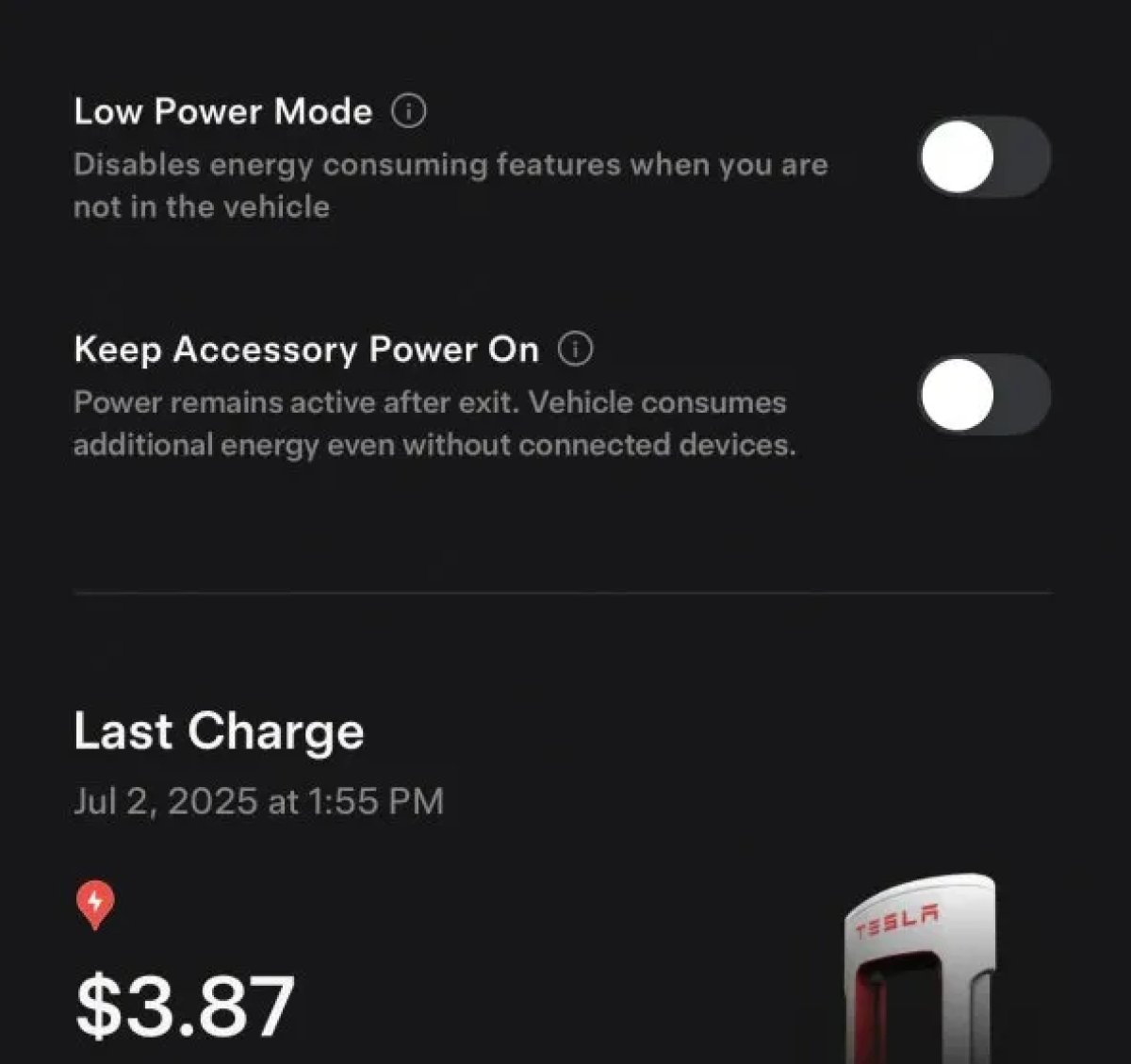
The 2025.38 vehicle update adds support for the ‘Keep Accessory Power On’ option in the latest Tesla app. This option is part of the latest Tesla app update, which adds the new Charging menu that consolidates most charging options under a single menu.
It also adds a button for Low Power Mode, instead of just being under Quick Actions.
Buy Parts

Tesla has added a Buy Parts button to Tesla’s Service Mode. Tapping the button displays a QR code that takes users to Tesla’s service site, where owners can buy parts directly from Tesla.
Parts can be shipped directly to the customer or to the nearest service center.
Charger Visualization

Tesla has added a visualization of a charger when the vehicle is parked and plugged in. In this photo, the owner is using a non-Tesla charger, so a generic charger is displayed. Tesla will presumably display a mobile charger, Wall Connector, or Supercharger if those are plugged into the vehicle.
Service Mode Improvements

New Trunk Panel
A new Trunk panel with an overview of the liftgate status, latch status, and calibration status for the trunk is now available. The panel also provides additional information, such as the request source, set liftgate height, and hands-free settings.
Models: ModelS (2021+), Model 3, Model X (2021+), Model Y
New Front Trunk Panel
A new Front Trunk (or frunk) panel with an overview of the liftgate status, latch status, and calibration status for the front trunk is now available. The panel also provides additional information, such as the request source, set liftgate height, and hands-free settings.
Models: Cybertruck
Cameras Panel Update - Mismatched Firmware Detection
In the Cameras panel, detection for when Driver Assistance System (DAS) Hardware 4 (HW4) cameras have mismatched firmware versions has been added.
If a DAS HW4 camera with mismatched firmware is detected, touch the Update Camera button to initiate a camera firmware update.
Models: ModelS (2021+), Model 3, Model X (2021+), Model Y, Cybertruck
Brakes Panel Update - ESP Stiffness Test Routine Changes
In the Electronic Stability Program (ESP) replacement panel, the routine TEST-BRAKE_CORNER_STIFFNESS-TEST has been replaced with TEST_BRAKE_X_STIFFNESS-TEST-SERVICE.
Models: Model 3(2017-2023), Model Y (2020-2024)

