











FSD (Supervised) v13.2.9 Down Under

FSD (Supervised) v13 Down Under upgrades every part of the end-to-end driving network.
Includes:
- 36 Hz, full-resolution AI4 video inputs
- Native AI4 inputs and neural network architectures
- 4.2x data scaling
- 5x training compute scaling (enabled by the Cortex cluster)
- Reduced photon-to-control latency by 2x
- Integrated unpark, reverse, and park capabilities
- Improved reward predictions for collision avoidance
- Improved camera cleaning
- Redesigned controller for smoother, more accurate tracking
- Dynamic routing around road closures, which displays them along an affected route when they are detected by the fleet
Upcoming Improvements:
- 3x model size scaling
- 3x model context length scaling
- Audio inputs for better handling of emergency vehicles
- Improved reward predictions for navigation
- Improvements to false braking and slower driving in parking lots
- Support for destination options including pulling over, parking in a spot, driveway, or garage
- Efficient representation of maps and navigation inputs
- Improved handling of camera occlusions
Full Self-Driving (Supervised) Down Under
Under your supervision, Full Self-Driving (Supervised) Down Under can drive your Tesla almost anywhere. It will make lane changes, select forks to follow your navigation route, navigate around other vehicles and objects, and make left and right turns. You and anyone you authorise must use additional caution and remain attentive. It does not make your vehicle autonomous. Do not become complacent.
Full Self-Driving (Supervised) Down Under is enabled on your vehicle. To use the feature, press the right scroll wheel button once. You can disable Full Self-Driving (Supervised) Down Under in Autopilot Settings.
Be aware of road conditions or hazards (such as pot holes and speed bumps) and operate the vehicle responsibly under all circumstances.
Vision-Based Attention Monitoring
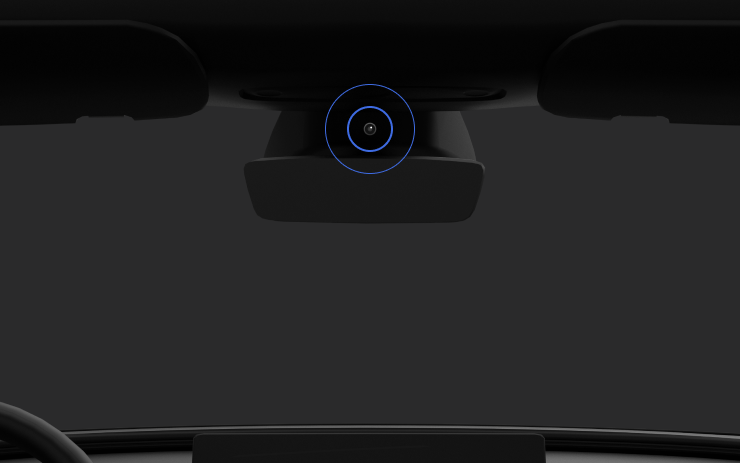
When Full Self-Driving (Supervised) is enabled, the driver monitoring system primarily relies on the cabin camera to determine driver attentiveness. Cabin camera must have clear visibility (e.g., camera is not occluded, eyes, arms, are visible, there is sufficient cabin illumination, and the driver is looking forward at the road without sunglasses, or other objects covering their eyes). In other circumstances, the driver monitoring system will primarily rely on torque-based (steering wheel) monitoring to detect driver attentiveness.
If the cabin camera detects inattentiveness, a warning will appear. The warning can be dismissed by the driver immediately reverting their attention back to the road ahead. Warnings will escalate depending on the nature and frequency of detected inattentiveness, with continuous inattention leading to a Strikeout.
Minor Updates

- Spotify: tap the new down arrow to jump to the bottom of long playlists and podcast episode lists.
- Set Grok's voice to Leo for a British accent.
- Hide suggested destinations in Navigation. Go to Controls > Navigation > Destination Suggestions.
Dashcam Viewer Improvements

Tesla will now show recent Dashcam video at the top of the Dashcam Viewer. This makes it easier to see recent footage that was not saved.
As Tesla points out, this footage is continuously updated and overwritten with the vehicle only keeping the last hour of unsaved footage.
In a future update, Tesla is increasing the number of hours of unsaved footage to (up to) 24 hours.
Driver Profile

The Tesla app will now show you which Tesla driver profile is selected in the vehicle under Security & Drivers.
While drivers can use any driver profile they’d like, unless it’s protected by a PIN, this gives you a good idea of who is currently driving the vehicle.
The profile name also appears even when the vehicle isn’t being driven. In those cases, it’ll show the last used profile.
In addition to the profile name, a Bluetooth icon may also be displayed, which shows whether the current device is being used as a phone key for the vehicle.
This feature requires vehicle update 2026.8 and a recent app update.
Slovak Language Support

This update adds additional language support. The vehicle menus and settings have now been localized to Slovak.
Service Mode Improvements

Speakers Panel Update - Check Speakers Action
The Check Speakers action was added to the speakers panel to support diagnosis of speaker circuitry and allow users to confirm speaker circuit functionality.
Models: Model 3 and Model Y with AMD Ryzen infotainment processor, Model S (2021+), Model X (2021+), Cybertruck
Mid Voltage Panel Update - Jump Posts and Front Trunk Access
The Mid Voltage (MV) Power Distribution panel was updated to show the jump post state, voltage measurement, current measurement, and tronttrunk access connectors. This allows for more visibility and usage of jump posts on the User Intenace (UI)
Models: Cybertruck
Panel Updates - DTC Component Mapping
Diagnostic Trouble Codes (DTs) are now mapped to affected components in the Drive Unit, HV Battery, Thermal, and Charging panels. When a confirmed DTC appears in the Alerts & DTCs panel, users can also see which specific component is affected within these panels.
Models: Model 3 and Model Y with AMD Ryzen infotainment processor, Model S (2021+), Model X (2021+)

