












![Tesla Driver in Mexico Makes His Model Y Fly [VIDEO]](/img/containers/article_images/2026/model-y-flying-accident-mexico.webp/c6f78372a6ed7ca93d8a0c61a905cd6b/model-y-flying-accident-mexico.jpg)



FSD (z nadzorom) v14.1.5

Avtonomna vožnja (z nadzorom) v14.1.5 vključuje:
– Dodane so možnosti prihoda, s katerimi lahko izberete, kje naj FSD parkira: na parkirišču, na ulici, na dovozu, v parkirni hiši ali ob cesti.
– Dodana vodljivost za ustavljanje ali dajanje prednosti reševalnim vozilom (npr. policijskim avtomobilom, gasilskim vozilom, reševalnim vozilom).
– Dodana navigacija in usmerjanje v nevronsko omrežje, ki temelji na vizualnem pogledu za obravnavanje blokiranih cest in obvozov v realnem času.
– Dodan je dodaten profil hitrosti za dodatno prilagajanje nastavitve sloga vožnje.
– Izboljšano upravljanje statičnih in dinamičnih vrat.
– Izboljšano umikanje pri umazaniji na cesti (npr. pnevmatike, veje, zaboji).
– Izboljšano obvladovanje več scenarijev, vključno z: nezaščitenimi zavoji, menjavami voznega pasu, vozili, ki se vrinejo pred vas in šolskimi avtobusi.
– Izboljšana je sposobnost FSD za upravljanje sistemskih napak in nemoteno ponovno vzpostavitev po poslabšanem delovanju za večjo zanesljivost.
– Dodano je opozorilo o ostankih na notranji strani vetrobranskega stekla, ki lahko vplivajo na vidljivost sprednje kamere. V primeru vplivanja, obiščite servis za čiščenje!
Prihajajoče izboljšave:
– Splošno gladko delovanje in občutljivost
– Izbira parkirnega mesta in kakovost parkiranja
Možnosti prihoda

– Zdaj lahko izberete možnosti prihoda, kot so Parkirišče, Ulica, Dovoz, Parkirna hiša in Pločnik za predajo v slogu za Robotaxi.
– Vaše nastavitve za možnosti prihoda in želena parkirna mesta se ohranijo za vsak cilj.
– Naš model sklepanja bo ocenil ustrezne možnosti za vaš cilj in izbral intuitivno privzeto nastavitev.
Profili hitrosti

FSD (z nadzorom) bo zdaj določala ustrezno hitrost na podlagi kombinacije profila voznika, omejitve hitrosti in prometa v okolici.
– Predstavljen nov profil hitrosti SLOTH, ki je na voljo z nižjimi hitrostmi in bolj konzervativno izbiro voznih pasov kot CHILL.
– Predstavljen nov profil hitrosti MAD MAX, ki je na voljo z višjimi hitrostmi in pogostejše samodejno spreminjanje voznega pasu kot POHITI.
– Profil voznika ima zdaj močnejši vpliv na vedenje. Bolj odločen kot je profil, višja je največja hitrost.
– Desno drsno kolesce navzgor/navzdol zdaj prilagaja nastavitev profila hitrosti namesto vaše natančne izbire odstopanja od največje hitrosti v mph/kph.
Izboljšave uporabniškega vmesnika

– Začnite avtonomno vožnjo s dotikom zaslona na dotik iz položaja Parkiranje ali kadar koli med vožnjo.
– Prilagodite nastavitve, kot sta profil hitrosti in možnosti prihoda, neposredno v vizualizaciji avtopilota na sredinskem zaslonu.
Potrditev z zavoro

Potrditev z zavoro z gumbom Začni avtonomno vožnjo je zdaj privzeto izklopljena. Ko je potrditev onemogočena, vam ne bo treba pritisniti in spustiti zavore za potrditev vklopa funkcije Začni avtonomno vožnjo.
Potrditev z zavoro lahko omogočite v Avtopilot > Potrditev z zavoro.
Avtonomna vožnja (z nadzorom)

Pod vašim nadzorom lahko Avtonomna vožnja (z nadzorom) vaše vozilo Tesla vozi skoraj povsod. Zapeljalo bo s parkiranega položaja, menjalo vozni pas, izbralo odcepe, ki bodo sledili vaši začrtani navigacijski poti, navigiralo mimo drugih vozil in predmetov, zavijalo levo in desno ter parkiralo na vašem cilju. Vi in vsi, ki jih pooblastite, morate biti dodatno previdni in pozorni. Vaše vozilo s tem ne postane avtonomno. Ne smete se preveč sprostiti.
V vašem vozilu je omogočena Avtonomna vožnja (z nadzorom). Če želite uporabiti funkcijo, pritisnite gumb Začni avtonomno vožnjo v uporabniškem vmesniku ali enkrat pritisnite desno drsno kolesce. Avtonomno vožnjo (z nadzorom) lahko onemogočite v nastavitvah avtopilota.
Santa Mode

Tesla has added Santa Mode to 2026 Model S and Model X vehicles. These cars use the Unreal Engine and did not include Santa Mode until this update. Santa Mode was noticeably absent from the Toybox, and when users tried to enable the feature through voice commands, the system would say that Santa Mode is not available and will be enabled in a future update.
New FSD Guide

When a user activates FSD from the Controls > Autopilot menu, Tesla will now present a one-screen guide that introduces the user to FSD.
The guide includes the same disclaimer as previous updates and now also includes an image of the steering wheel controls for FSD, letting the user know how to switch FSD Profiles and set the maximum speed (for FSD V13 and below).
The image used is specific to the vehicle and will either include steering wheel buttons or stalks, depending on the model.
More Charging Information

While a vehicle is charging, Tesla now includes a link for ‘Additional Charging Information’ in the Controls > Charging section. If the vehicle is charging, the link will appear in blue in the top-right corner.
Tapping the link displays a pop-up containing additional information, such as the maximum and current battery input power.
Maximum Battery Input Power is the total power the charger can deliver.
Battery Input Power is the amount of energy that is being actively put into the vehicle’s battery. The battery input power may be less than the maximum charger capability for several reasons, including a high vehicle charge level. The vehicle will also draw power directly from the charger rather than draining the battery if it needs to run the HVAC system, screen, or other components. This reduces battery wear by using energy from the battery, only to have to re-add it.
Keep Accessory Power On App Control
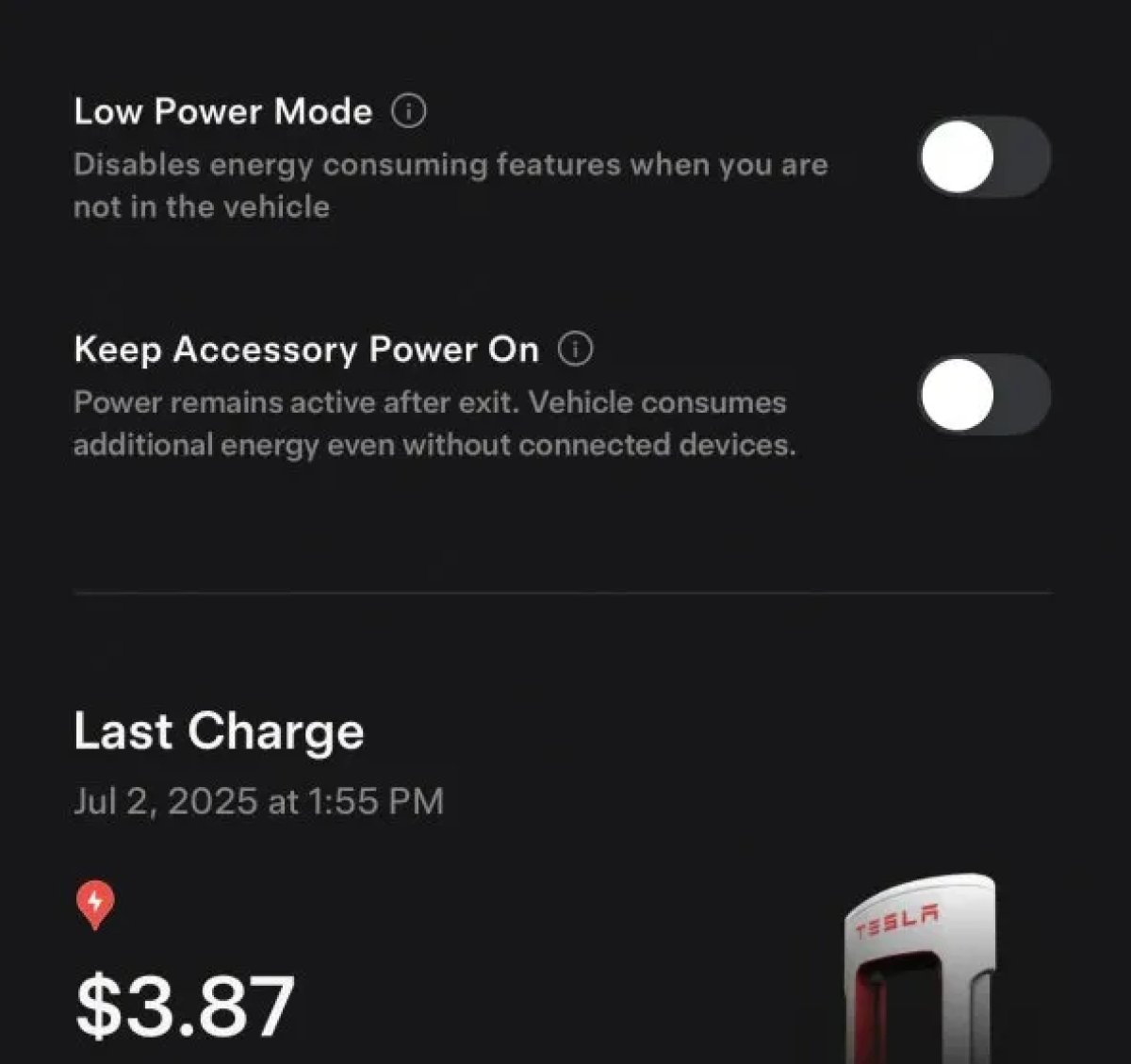
The 2025.38 vehicle update adds support for the ‘Keep Accessory Power On’ option in the latest Tesla app. This option is part of the latest Tesla app update, which adds the new Charging menu that consolidates most charging options under a single menu.
It also adds a button for Low Power Mode, instead of just being under Quick Actions.
Buy Parts

Tesla has added a Buy Parts button to Tesla’s Service Mode. Tapping the button displays a QR code that takes users to Tesla’s service site, where owners can buy parts directly from Tesla.
Parts can be shipped directly to the customer or to the nearest service center.
Charger Visualization

Tesla has added a visualization of a charger when the vehicle is parked and plugged in. In this photo, the owner is using a non-Tesla charger, so a generic charger is displayed. Tesla will presumably display a mobile charger, Wall Connector, or Supercharger if those are plugged into the vehicle.
Service Mode Improvements

New Trunk Panel
A new Trunk panel with an overview of the liftgate status, latch status, and calibration status for the trunk is now available. The panel also provides additional information, such as the request source, set liftgate height, and hands-free settings.
Models: ModelS (2021+), Model 3, Model X (2021+), Model Y
New Front Trunk Panel
A new Front Trunk (or frunk) panel with an overview of the liftgate status, latch status, and calibration status for the front trunk is now available. The panel also provides additional information, such as the request source, set liftgate height, and hands-free settings.
Models: Cybertruck
Cameras Panel Update - Mismatched Firmware Detection
In the Cameras panel, detection for when Driver Assistance System (DAS) Hardware 4 (HW4) cameras have mismatched firmware versions has been added.
If a DAS HW4 camera with mismatched firmware is detected, touch the Update Camera button to initiate a camera firmware update.
Models: ModelS (2021+), Model 3, Model X (2021+), Model Y, Cybertruck
Brakes Panel Update - ESP Stiffness Test Routine Changes
In the Electronic Stability Program (ESP) replacement panel, the routine TEST-BRAKE_CORNER_STIFFNESS-TEST has been replaced with TEST_BRAKE_X_STIFFNESS-TEST-SERVICE.
Models: Model 3(2017-2023), Model Y (2020-2024)

