













Grok z poleceniami nawigacji (beta)

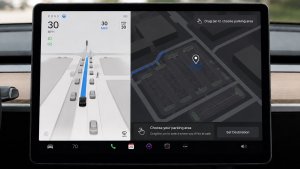
Grok może teraz dodawać i edytować miejsca docelowe nawigacji, stając się Twoim osobistym przewodnikiem. Możesz poprosić Groka o nawigację do najlepszej tajskiej restauracji w pobliżu, znalezienie stacji Supercharger w odległości spaceru od kawiarni, a nawet o zaplanowanie romantycznego zwiedzania. Wymaga łączności Premium lub połączenia Wi-Fi. Rozmowy nie są przesyłane do firmy Tesla i nie są powiązane z pojazdem.
Aby korzystać z poleceń nawigacji, ustaw dla Groka osobowość Asystent. Wybierz opcję Pasek aplikacji > Grok lub naciśnij i przytrzymaj przycisk głosowy na kierownicy po zalogowaniu się do Groka.
Fotobudka Tesla

Przekształć Twój samochód w budkę fotograficzną! Zrób selfie z wnętrza pojazdu Tesla i zmień swój wygląd za pomocą zabawnych filtrów, naklejek i emotikonów. Udostępniaj stylowe zdjęcia znajomym i rodzinie bezpośrednio z aplikacji Tesla. Samochód musi być w położeniu postojowym. Wymaga aplikacji Tesla w wersji 4.51.5+.
Wybierz opcję Pasek aplikacji > Zabawy > Fotobudka.
Aktywność na żywo w Trybie psa w systemie iOS

Miej oko na swojego zwierzaka! Gdy tryb Psa jest aktywny, na iPhonie jest wyświetlana aktywność na żywo wraz z bieżącymi informacjami o temperaturze i warunkach pogodowych. Jeśli masz Łączność Premium, będziesz otrzymywać okresowe zdjęcia kabiny Twojego pojazdu. Wymaga aplikacji Tesla w wersji 4.51.5+.
Aktualizacja wyświetlacza rejestratora

Nagrania z rejestratora zawierają teraz dodatkowe szczegóły, takie jak prędkość, kąt kierownicy i stan funkcji samodzielnej jazdy. Informacje te pojawiają się w wyświetlaczu rejestratora podczas odtwarzania na wyświetlaczu pojazdu i w aplikacji Tesla. Wymaga łączności Premium i aplikacji Tesla w wersji 4.51.5+.
Aby włączyć podgląd na telefonie, wybierz opcję Sterowanie > Bezpieczeństwo i włącz widok z kamery w aplikacji mobilnej.
Aktualizacje trybu Świętego Mikołaja

Dziel się świąteczną radością przez cały rok, zmieniając wnętrze samochodu z użyciem efektów świątecznych. Tryb Świętego Mikołaja dodaje teraz świąteczne bałwanki, drzewa, sygnał dźwiękowy blokady i efekty śniegu, aby uzyskać wizualną ucztę 3D.
Wybierz opcję Pasek aplikacji > Zabawy > Święty Mikołaj.
Aktualizacja pokazu świateł

Pora na świętowanie z najnowszym pokazem świateł — Jingle Rush. Pokaz możesz odtworzyć od razu lub zaplanować z 10-minutowym wyprzedzeniem, w jednym pojeździe lub w synchronizacji ze znajomymi. Entuzjaści pokazów świateł mogą sterować oświetleniem wnętrza, dodawać efekty kolorystyczne wyświetlacza i tworzyć dłuższe niestandardowe pokazy. Aby odtworzyć własny pokaz, zapisz pliki pokazu w folderze „LightShow” na dysku flash, podłącz go i wybierz pokaz.
Pokaz możesz rozpocząć w aplikacji Tesla lub wybierając opcję Pasek aplikacji > Zabawy > Pokaz świateł na ekranie pojazdu.
Lakiernia

Spersonalizuj swojego awatara Tesla za pomocą przyciemnień szyb, niestandardowych powłok i tablic rejestracyjnych. Użyj jednego z wielu fabrycznie załadowanych projektów lub stwórz i prześlij własny za pomocą pamięci flash USB, aby dodać swojemu pojazdowi wyjątkowości.
Wybierz opcję Pasek aplikacji > Zabawy > Lakiernia albo dotknij przycisku malowania lub tablicy rejestracyjnej na ekranie Sterowanie > Oprogramowanie.
Ulepszenia nawigacji

Możesz teraz zmienić kolejność ulubionych elementów nawigacji, ustawić lokalizację Dom lub Praca, umieszczając pinezkę w dowolnym miejscu na mapie, a także przeglądać sugerowane miejsca docelowe na podstawie ostatnich podróży i nawyków.
Automatyczne wyznaczanie trasy z pasami dla pojazdów wieloosobowych

Nawigacja zawiera teraz opcję korzystania z pasów dla grup pasażerów (HOV) korzystających z carpoolingu. Na Twojej trasie zostanie automatycznie wybrany pas dla carpoolingu, jeśli ma zastosowanie, na podstawie czasu, lokalizacji, liczby pasażerów i ograniczeń drogowych.
Wybierz opcję Sterowanie > Nawigacja > HOV Pasy ruchu.
Mapy lokalizacji Supercharger

Możesz teraz zobaczyć widok 3D wybranych stacji Tesla Supercharger, dotykając opcji „Wyświetl mapę lokalizacji”. W przypadku nawigacji do lokalizacji pilotażowej po dotarciu do celu zostanie wyświetlony jej układ wraz z zajętością na żywo (Dostępne / Zajęte / Niedostępne).
Telefon pozostawiony na ładowarce bezprzewodowej

Jeśli pozostawisz telefon na ładowarce bezprzewodowej i nie zostaną wykryci pasażerowie, Twój pojazd wyda sygnał dźwiękowy kilka sekund po zamknięciu drzwi.
Przejdź do opcji Sterowanie > Blokady > Dźwięk ostrzeżenia o telefonie pozostawionym na ładowarce bezprzewodowej.
Pozostawiony telefon
Twój pojazd wygeneruje sygnał dźwiękowy kilka sekund po zamknięciu drzwi, jeśli w kabinie kierowcy znajduje się kluczyk w telefonie lub gdy telefon pozostał na ładowarce bezprzewodowej, a nie zostaną wykryte żadne osoby w pojeździe. Wykrywanie kluczyka w telefonie wymaga urządzeń obsługujących standard UWB.
Wybierz opcję Sterowanie > Blokady > Dźwięk ostrzeżenia o pozostawionym telefonie.
Zapisywanie limitu ładowania według lokalizacji

Możesz teraz zapisać limit ładowania dla aktualnej lokalizacji podczas postoju. Zostanie on zastosowany automatycznie, gdy następnym razem będziesz w danym miejscu ładować baterię.
Wybierz opcję Sterowanie > Ładowanie.
Symulator dokowania SpaceX

Zostań astronautą i pokaż swoje umiejętności, dokując do Międzynarodowej Stacji Kosmicznej. Steruj rakietą i prowadź ją w tym trójwymiarowym symulatorze dokowania, korzystając z zestawu sterowania opartego na rzeczywistych interfejsach używanych przez astronautów NASA.
Aby zagrać, włącz położenie postojowe (P), a następnie wybierz opcję Pasek aplikacji > Gry > SpaceX.
Drobne aktualizacje

- Włącz lub wyłącz podkładki do bezprzewodowego ładowania telefonów, wybierając opcje Sterowanie > Ładowanie.
- Twój pojazd wyśle teraz alert na urządzenie mobilne, jeśli którekolwiek drzwi do kabiny pozostaną otwarte przy aktywnym trybie psa.
- Dodawaj utwory Spotify do kolejki bezpośrednio na ekranie wyszukiwania.
- Przewijaj płynnie duże listy odtwarzania, albumy, podcasty, audiobooki i swoją bibliotekę Spotify bez stronicowania.
- Dźwięk blokowania obejmuje teraz Light Cycle z trybu Tron. Wybierz opcję Pasek aplikacji > Zabawy > Boombox > Dźwięk blokowania.
- Pozwól swojemu pojazdowi na udostępnianie danych dotyczących ładowania firmie Tesla, aby obsługiwać funkcje takie jak statystyki ładowania w aplikacji Tesla.
New Wheel Options

The new wheel designs that are available on the Standard Model 3 and Model Y are now available for all vehicles to equip in the vehicle visualization.
The new 18” Prismata for the Model 3 and the 18” Aperture wheels are available for all models in the tire section. To view or select the new wheels, go to Controls > Service and select tires and wheels.
Express Lanes

Tesla has added support for Express Lanes in some vehicles. Similar to HOV or toll roads, Express Lanes are faster lanes that may charge fees based on vehicle occupancy, vehicle type, and time of day.
With this update, Tesla is adding the ability for users to toggle the use of Express Lanes on or off in navigation settings. This feature is not available in all vehicles and Tesla may still be testing it.
Supercharger Live Maps Shows Exact Models

The new Supercharger Site Maps not only provide a real-time 3D rendering of a Supercharger site but also show the actual vehicle models being charged at each stall.
Tesla will show what kind of vehicle is charging at each stall, whether it’s the original Model Y, the new Model Y, a Cybertruck, or show whether it’s a non-Tesla being charged.
The Supercharger maps are useful to see which stalls are open, their location, which are handicap accessible or whether a location has pull-through stalls.
Dashcam Viewer Zoom Support

When you’re viewing a video in the Dashcam Viewer, you can now pinch the video to zoom in. In addition, you can also pan the video while zoomed to see other parts of the video.
Note: This feature is limited to vehicles with Tesla’s AMD Ryzen infotainment processor.
Camera Visibility Warning Improvement

When you receive a camera visibility warning, indicating that a camera has an obscured view, the camera's view will now be labeled. This lets you know exactly which camera needs to be cleaned.
The display is similar to the Dashcam Viewer, where the camera location is overlaid on top of a photo from the camera. Previously, the camera was unlabeled, making it unclear which camera was obscured and needed to be cleaned.
Tesla will display Front for one of the front cameras underneath the windshield and fascia for the front bumper camera.
V4 Supercharger Visualization

Tesla recently launched charging visualizations on the vehicle’s display. Tesla supports a wide variety of chargers and includes a different visualization for each type, including the mobile connector, Wall Connector, v2, and v3 Supercharger styles, as well as a generic type for third-party chargers.
However, surprisingly absent was a unique visualization for the newer style, V4 Superchargers. With this update, Tesla has added a proper visualization for the V4 Superchargers.
Wrap & License Plate Icons

You can easily access the vehicle wraps and license plate options by navigating to Controls > Software. Underneath the vehicle visualization, you’ll have a photo of the selected license plate for your vehicle, as well as a wrapping paper icon that will take you directly to the vehicle visualization options.
The wrapping paper icon replaces the old colored square that used to take you to the vehicle Colorizer feature.
Car Wash Mode Notification

Tesla will now show you a notification reminding you to use Car Wash Mode. Whenever you’re near a car wash, Tesla pops up a reminder that lets you easily enable Car Wash Mode.
This is part of Tesla’s Car Wash Mode improvements in this update.
Parking Brake

Tesla has removed the ability to enable the emergency brake (parking brake) from the vehicle’s display. Near the bottom of the Controls > Safety menu, users could manually enable the vehicle’s emergency brake. However, this option has now disappeared.
However, users can still enable the vehicle’s emergency brake by using the gear stalk or Park icon on the touch screen.
Car Wash Mode Redesign

Tesla has redesigned the Car Wash Mode feature with this update. It now includes a visualization of the vehicle on the right with the usual checklist items on the left.
For anyone not familiar with Car Wash Mode, it features a real-time checklist to help prepare your vehicle for a car wash. If any items are in the proper setting, such as a window or trunk being opened, the dot next to the item will turn red.
The ‘Enable Free Roll’ option at the bottom is now more obvious, making it easier for users to find how to put their vehicle into neutral.
Switch to Bluetooth

If your phone is connected via Bluetooth and the vehicle detects that your phone is playing audio, it will now prompt you to switch over to the Bluetooth audio source, so the audio comes out of your vehicle’s speakers instead.
Most users likely listen to a music streaming service such as Apple Music or Spotify, but when they listen to audio on their phone, there is often a second pause, leaving the driver wondering why the audio isn’t coming out of their vehicle’s speakers.
This solves that problem and also makes it easier to switch to Bluetooth instead of manually finding and tapping the Bluetooth app.
New Visualizations With Unreal Engine

The new visualizations that have been available on the 2026 Model S and Model X are now available on all 2021+ Model S and Model X vehicles.
Besides the improved visuals in the instrument cluster and in the menus, you can now freely rotate your vehicle’s visualization in the Controls menu, letting you view your vehicle from any angle.
In addition, the module that pops up when parked, which lets you open the doors and trunk, is also interactive, allowing you to pan and zoom in on the vehicle.
Air Suspension Controls

Air suspension controls for the Model S and Model X are now available in the main Controls section, rather than requiring users to go to the separate Suspension tab.
The 2026 models already include this feature. 2025 and older vehicles keep the older, more detailed Suspension menu, instead of the simplified version found in the 2026 models.
Boomerang Fu Game Removed

The game Boomerang Fu has been removed from vehicles and replaced with SpaceX Docking Simulator. The game's license likely expired this year, as it was released in last year’s holiday update.
Favorites On Map

Tesla has made several changes to favorites and home/work in this update. However, this change has gone undocumented in the release notes.
In addition to putting the home/work icons into the Navigate box and showing your top two suggestions underneath, Tesla is also pinning all of your favorites, home, and work locations directly on the map.
This makes it much easier to orient yourself as you move the map around and makes it obvious when you’re near one of your favorites, such as a friend’s home, restaurant, or other favorite location.
View Dashcam Storage

You can now view the storage space of your Dashcam USB drive. You can view the amount of space used by Dashcam and the total size of the drive.
To view Dashcam storage, go to Controls > Safety and scroll down to Dashcam.
Dashcam Filters

Tesla has made additional improvements to the Dashcam Viewer. In addition to having Dashcam and Sentry tabs in the Dashcam Viewer, Tesla now includes additional categories for Dashcam videos.
The system will automatically categorize videos taken with Dashcam and Sentry Mode and put them into appropriate categories that triggered the footage, such as Honk, Manual Save, Handle Pull, etc.
Hebrew Language Added

You can now choose Hebrew as your touchscreen language.
To change the language, shift into Park, and go to Controls > Display > Touchscreen Language.
Service Mode Improvements

Thermal Control Components Panel Added to Service Mode
The Thermal Control Components panel has been added to Service Mode to support thermal Noise, Vibration, and Harshness (NVH) diagnosis. It adds the ability to individually control thermal components, set specific targets, and sweep across operating ranges with real-time feedback. It also includes a 3D static view of the heat pump, including the radiator, blower motor, louver, and pumps.
Models: Model S (2021+), Model 3 (Heat Pump), Model X (2021+), Model Y, Cybertruck
Airbag Panel Update - New Disarm Airbag and Resistance Check Routines
In the Airbags panel, a routine has been added that allows users to disarm the airbags. With this routine, users no longer need to disconnect the Low Voltage (LV) battery when diagnosing the Safety and Restraints system. Once the airbags are disarmed, individual components, such as an airbag or pretensioner, can be tapped to view the resistance readings.
Models: Model S (2021+), Model 3, Model X (2021+), Model Y, Cybertruck

