






![All of Tesla's Robotaxi Markets and Their Actual Sizes [UPDATED]](/img/containers/article_images/robotaxi/robotaxi-regions.webp/f815854a07c0943a7d4dcac05ff125c1/robotaxi-regions.jpg)







FSD (Supervised) v14.2.2

Full Self-Driving (Supervised) v14.2.2 includes:
- Upgraded the neural network vision encoder, leveraging higher resolution features to further improve scenarios like handling emergency vehicles, obstacles on the road, and human gestures.
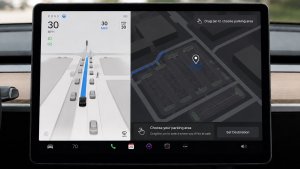
- Added Arrival Options for you to select where FSD should park: in a Parking Lot, on the Street, in a Driveway, in a Parking Garage, or at the Curbside.
- Added handling to pull over or yield for emergency vehicles (e.g. police cars, fire trucks, ambulances).
- Added navigation and routing into the vision-based neural network for real-time handling of blocked roads and detours.
- Added additional Speed Profile to further customize driving style preference.
- Improved handling for static and dynamic gates.
- Improved offsetting for road debris (e.g. tires, tree branches, boxes).
- Improve handling of several scenarios including: unprotected turns, lane changes, vehicle cut-ins, and school busses.
- Improved FSD's ability to manage system faults and recover smoothly from degraded operation for enhanced reliability.
- Added alerting for residue build-up on interior windshield that may impact front camera visibility. If affected, visit Service for cleaning!
- Camera visibility can lead to increased attention monitoring sensitivity.
Upcoming Improvements:
- Overall smoothness and sentience
- Parking spot selection and parking quality
Arrival Options

- You can now select an arrival option such as Parking Lot, Street, Driveway, Parking Garage and Curbside for Robotaxi-style drop offs.
- Your preferences for arrival options and preferred parking positions are persisted for each destination.
- Our reasoning model will assess the suitable options for your destination and pick an intuitive default.
- The navigation pin will be adjusted based on the selected Arrival Option.
Snelheidsprofielen

FSD (Supervised) bepaalt nu de juiste snelheid op basis van een combinatie van bestuurdersprofiel, de snelheidslimiet en het omringende verkeer.
- Nieuw snelheidsprofiel LUIAARD, met lagere snelheden en een meer behoudende rijstrookselectie dan CHILL.
- Introductie van nieuw snelheidsprofiel MAD MAX, met hogere snelheden en meer rijstrookwissels dan GEHAAST.
- Bestuurdersprofiel heeft nu sterkere invloed op het rijgedrag. Hoe assertiever het profiel, hoe hoger de maximumsnelheid.
- Met het rechter scrollwieltje omhoog/omlaag past u nu de instelling van het Snelheidsprofiel aan in plaats van de exacte marge maximale snelheid te selecteren in mph/km/u.
UI Improvements

- You can now view your Self-Driving stats under Controls > Autopilot.
- Start Self-Driving with a tap of the touchscreen from Park, or any time during your drive.
- Adjust settings like the Speed Profile and Arrival Options directly from the Autopilot visualization on the center display.
Rembevestiging

Rembevestiging voor de knop Self-Driving starten is nu standaard uitgeschakeld. Als deze functie is uitgeschakeld, hoeft u voor Self-Driving starten niet het rempedaal in te trappen en los te laten om het inschakelen te bevestigen.
U kunt Rembevestiging inschakelen in Autopilot > Rembevestiging.
Full Self-Driving (Supervised)

Onder uw toezicht kunt u met Full Self-Driving (Supervised) vrijwel overal met uw Tesla rijden. Het start de auto vanuit geparkeerde positie, verandert van rijstrook, selecteert splitsingen om uw navigatieroute te volgen, navigeert om andere voertuigen en objecten heen, slaat links en rechts af en parkeert op uw bestemming. U, en iedereen die u toestemming geeft, moet extra voorzichtig zijn en alert blijven. Het maakt uw auto niet zelfrijdend. Word niet te nonchalant.
Full Self-Driving (Supervised) is ingeschakeld voor uw auto. Druk op de knop Self-Driving starten in de gebruikersinterface of druk eenmaal op de rechter scrollwielknop om de functie te gebruiken. U kunt Full Self-Driving (Supervised) uitschakelen in de Autopilot-instellingen.
Grok met navigatieopdrachten (bèta)

Grok kan nu navigatiebestemmingen toevoegen en bewerken en wordt zo uw persoonlijke gids. U kunt Grok vragen om naar het beste Thaise restaurant bij u in de buurt te navigeren, een Supercharger op loopafstand van een koffiebar te vinden of zelfs een romantische sightseeingtour te plannen. Vereist Premium Connectivity of een wifiverbinding. Gesprekken zijn anoniem voor Tesla en niet gekoppeld aan uw voertuig.
Stel de persoonlijkheid van Grok in op Assistent om navigatieopdrachten te gebruiken. Ga naar App Launcher > Grok of druk lang op de spraakbedieningsknop op het stuurwiel nadat u bent ingelogd bij Grok.
Tesla Photobooth

Maak van uw auto een fotohokje! Maak selfies in uw Tesla en geef uzelf een make-over met leuke filters, stickers en emoji's. Deel uw stijlvolle foto's met vrienden en familie, rechtstreeks vanuit de Tesla-app. Uw auto moet in de stand P staan. Vereist versie 4.51.5+ van de Tesla-app.
Ga naar App Launcher > Toybox > Photobooth.
Live activiteit van Dog Mode in iOS

Houd uw huisdier in de gaten! Als Dog Mode actief is, ziet u live activiteit op uw iPhone met live updates over de temperatuur en het weer. Als u beschikt over Premium Connectivity, ontvangt u ook periodiek snapshots van het interieur van uw voertuig. Vereist versie 4.51.5+ van de Tesla-app.
Update van Dashcam Viewer

Dashcamclips bevatten nu extra gegevens, zoals snelheid, stuurwielhoek en status van de zelfrijdende besturing. Deze informatie verschijnt tijdens het afspelen in de Dashcam Viewer op zowel het voertuigdisplay als de Tesla-app. Vereist Premium Connectivity en versie 4.51.5+ van de Tesla-app.
Ga naar Bediening > Veiligheid en schakel Camera bekijken via mobiele app in om weergave op uw telefoon in te schakelen.
Updates van Kerstman-modus

Zorg het hele jaar door voor een vakantiegevoel in uw auto met effecten in vakantiethema. Aan de Kerstman-modus zijn nu feestelijke sneeuwmannen, bomen, een vergrendelgeluid en sneeuweffecten toegevoegd voor visueel 3D-plezier.
Ga naar App Launcher > Toybox > Kerstman.
Update van lichtshow

Tijd voor een feestje met de nieuwste lichtshow - Jingle Rush. U kunt de show direct afspelen of tot 10 minuten van tevoren inplannen, op één voertuig of synchroon met vrienden. Liefhebbers van lichtshows kunnen de interieurverlichting regelen, kleureffecten voor het display toevoegen en langere aangepaste shows maken. Als u een aangepaste show wilt afspelen, slaat u de bestanden van de show op in een map "LightShow" op uw USB-stick, maakt u verbinding en selecteert u de show.
Start de show vanuit uw Tesla-app of ga naar App Launcher > Toybox > Lichtshow op het touchscreen van uw voertuig.
Lakstraat

Personaliseer uw Tesla-avatar met ruittinten, aangepaste wraps en kentekenplaten. Gebruik een van de vele vooraf geladen ontwerpen of maak uw eigen ontwerpen en upload deze met een USB-stick om uw auto uniek te maken.
Ga naar App Launcher > Toybox > Paint Shop of tik op de verf- of kentekenplaatknop in Bediening > Software.
Paint Shop Upgrade

Paint Shop now lets you customize your Cybertruck with new wraps, window tint options and license plate designs. Perfect your look before hitting the road!
Go to App Launcher > Toybox > Paint Shop.
Verbeteringen van navigatie

U kunt nu uw favoriete navigatiebestemmingen herschikken, Thuis of Werk instellen door ergens op de kaart een speld neer te zetten, en voorgestelde bestemmingen bekijken op basis van uw recente ritten en gewoonten.
Automatische routeplanning met HOV-rijstroken

Het navigatiesysteem bevat nu een optie om gebruik te maken van HOV-rijstroken (carpoolstroken). Uw route selecteert automatisch de carpoolstrook wanneer dit mogelijk is op basis van tijd, locatie, aantal passagiers en wegbeperkingen.
Ga naar Bediening > Navigatie > HOV-rijstroken gebruiken.
Supercharger-sitemaps

U kunt nu een 3D-weergave van geselecteerde Tesla Superchargers bekijken door op "Bekijk sitemap" te tikken. Bij het navigeren naar een pilotlocatie worden bij aankomst de indeling van de locatie en de actuele bezettingsgraad (beschikbaar/bezet/niet beschikbaar) weergegeven.
Telefoon nog op draadloze oplader

Uw auto geeft enkele seconden nadat de portieren zijn gesloten een geluidssignaal geven als er nog een de telefoon op de draadloze oplader ligt en er geen inzittenden worden gedetecteerd.
Ga naar Bediening > Vergrendeling > Geluidssignaal telefoon nog op draadloze oplader.
Full Self-Driving (Supervised)
Onder uw toezicht kunt u met Full Self-Driving (Supervised) vrijwel overal met uw Tesla rijden. Het start de auto vanuit geparkeerde positie, verandert van rijstrook, selecteert splitsingen om uw navigatieroute te volgen, navigeert om andere voertuigen en objecten heen, slaat links en rechts af en parkeert op uw bestemming. U, en iedereen die u toestemming geeft, moet extra voorzichtig zijn en alert blijven. Het maakt uw auto niet zelfrijdend. Word niet te nonchalant.
Full Self-Driving (Supervised) is ingeschakeld voor uw auto. Druk op de knop Self-Driving starten in de gebruikersinterface of druk eenmaal op de rechter scrollwielknop om de functie te gebruiken. U kunt Full Self-Driving (Supervised) uitschakelen in de Autopilot-instellingen.
Achtergebleven telefoon
Uw auto geeft enkele seconden nadat de portieren zijn gesloten een geluidssignaal af als er zich een telefoonsleutel in het interieur bevindt of als de telefoon nog op de draadloze oplader ligt en er geen inzittenden worden gedetecteerd. Voor detectie van een telefoonsleutel zijn apparaten vereist die UWB ondersteunen.
Ga naar Bediening > Vergrendeling > Geluidssignaal achtergebleven telefoon.
Oplaadlimiet per locatie opslaan

U kunt nu een oplaadlimiet opslaan voor uw huidige locatie terwijl uw auto is geparkeerd. Deze wordt dan de volgende keer dat u uw auto daar oplaadt automatisch toegepast.
Ga naar Bediening > Opladen.
SpaceX ISS Docking Simulator

Word astronaut en bewijs uw vaardigheden door uw ruimteschip te koppelen aan het internationale ruimtestation ISS. Bestuur en leid de raket in deze 3D-dockingsimulatorgame met een set bedieningselementen die zijn gebaseerd op echte interfaces die door NASA-astronauten worden gebruikt.
Schakel in P en ga naar de App Launcher > Arcade > SpaceX om het spel te spelen.
Kleine updates

- Enable or disable wireless phone charging pads in Controls > Outlets & Mods.
- Your vehicle will now send a mobile alert if any cabin door is left open while Dog Mode is active.
- Add Spotify tracks to your queue right from the search screen.
- Scroll through large Spotify playlists, albums, podcasts, audiobooks, and your library seamlessly, without paging.
- Take the vibes up another level with rainbow colors during Rave Cave. Accent lights color will change along with the beats of your music. Go to App Launcher > Toybox > Light Sync.
- Lock Sound now includes Light Cycle from Tron Mode. Go to App Launcher > Toybox > Boombox > Lock Sound.
- Allow your vehicle to share charging data with Tesla to support features like Charge Stats in the Tesla app.
- You can now configure your tire season and record your seasonal tire swap. Go to Controls > Service > Wheel & Tire
New Wheel Options

The new wheel designs that are available on the Standard Model 3 and Model Y are now available for all vehicles to equip in the vehicle visualization.
The new 18” Prismata for the Model 3 and the 18” Aperture wheels are available for all models in the tire section. To view or select the new wheels, go to Controls > Service and select tires and wheels.
Express Lanes

Tesla has added support for Express Lanes in some vehicles. Similar to HOV or toll roads, Express Lanes are faster lanes that may charge fees based on vehicle occupancy, vehicle type, and time of day.
With this update, Tesla is adding the ability for users to toggle the use of Express Lanes on or off in navigation settings. This feature is not available in all vehicles and Tesla may still be testing it.
Supercharger Live Maps Shows Exact Models

The new Supercharger Site Maps not only provide a real-time 3D rendering of a Supercharger site but also show the actual vehicle models being charged at each stall.
Tesla will show what kind of vehicle is charging at each stall, whether it’s the original Model Y, the new Model Y, a Cybertruck, or show whether it’s a non-Tesla being charged.
The Supercharger maps are useful to see which stalls are open, their location, which are handicap accessible or whether a location has pull-through stalls.
Dashcam Viewer Zoom Support

When you’re viewing a video in the Dashcam Viewer, you can now pinch the video to zoom in. In addition, you can also pan the video while zoomed to see other parts of the video.
Note: This feature is limited to vehicles with Tesla’s AMD Ryzen infotainment processor.
Camera Visibility Warning Improvement

When you receive a camera visibility warning, indicating that a camera has an obscured view, the camera's view will now be labeled. This lets you know exactly which camera needs to be cleaned.
The display is similar to the Dashcam Viewer, where the camera location is overlaid on top of a photo from the camera. Previously, the camera was unlabeled, making it unclear which camera was obscured and needed to be cleaned.
Tesla will display Front for one of the front cameras underneath the windshield and fascia for the front bumper camera.
V4 Supercharger Visualization

Tesla recently launched charging visualizations on the vehicle’s display. Tesla supports a wide variety of chargers and includes a different visualization for each type, including the mobile connector, Wall Connector, v2, and v3 Supercharger styles, as well as a generic type for third-party chargers.
However, surprisingly absent was a unique visualization for the newer style, V4 Superchargers. With this update, Tesla has added a proper visualization for the V4 Superchargers.
Wrap & License Plate Icons

You can easily access the vehicle wraps and license plate options by navigating to Controls > Software. Underneath the vehicle visualization, you’ll have a photo of the selected license plate for your vehicle, as well as a wrapping paper icon that will take you directly to the vehicle visualization options.
The wrapping paper icon replaces the old colored square that used to take you to the vehicle Colorizer feature.
Car Wash Mode Notification

Tesla will now show you a notification reminding you to use Car Wash Mode. Whenever you’re near a car wash, Tesla pops up a reminder that lets you easily enable Car Wash Mode.
This is part of Tesla’s Car Wash Mode improvements in this update.
Parking Brake

Tesla has removed the ability to enable the emergency brake (parking brake) from the vehicle’s display. Near the bottom of the Controls > Safety menu, users could manually enable the vehicle’s emergency brake. However, this option has now disappeared.
However, users can still enable the vehicle’s emergency brake by using the gear stalk or Park icon on the touch screen.
Car Wash Mode Redesign

Tesla has redesigned the Car Wash Mode feature with this update. It now includes a visualization of the vehicle on the right with the usual checklist items on the left.
For anyone not familiar with Car Wash Mode, it features a real-time checklist to help prepare your vehicle for a car wash. If any items are in the proper setting, such as a window or trunk being opened, the dot next to the item will turn red.
The ‘Enable Free Roll’ option at the bottom is now more obvious, making it easier for users to find how to put their vehicle into neutral.
Switch to Bluetooth

If your phone is connected via Bluetooth and the vehicle detects that your phone is playing audio, it will now prompt you to switch over to the Bluetooth audio source, so the audio comes out of your vehicle’s speakers instead.
Most users likely listen to a music streaming service such as Apple Music or Spotify, but when they listen to audio on their phone, there is often a second pause, leaving the driver wondering why the audio isn’t coming out of their vehicle’s speakers.
This solves that problem and also makes it easier to switch to Bluetooth instead of manually finding and tapping the Bluetooth app.
New Visualizations With Unreal Engine

The new visualizations that have been available on the 2026 Model S and Model X are now available on all 2021+ Model S and Model X vehicles.
Besides the improved visuals in the instrument cluster and in the menus, you can now freely rotate your vehicle’s visualization in the Controls menu, letting you view your vehicle from any angle.
In addition, the module that pops up when parked, which lets you open the doors and trunk, is also interactive, allowing you to pan and zoom in on the vehicle.
Air Suspension Controls

Air suspension controls for the Model S and Model X are now available in the main Controls section, rather than requiring users to go to the separate Suspension tab.
The 2026 models already include this feature. 2025 and older vehicles keep the older, more detailed Suspension menu, instead of the simplified version found in the 2026 models.
Boomerang Fu Game Removed

The game Boomerang Fu has been removed from vehicles and replaced with SpaceX Docking Simulator. The game's license likely expired this year, as it was released in last year’s holiday update.
Favorites On Map

Tesla has made several changes to favorites and home/work in this update. However, this change has gone undocumented in the release notes.
In addition to putting the home/work icons into the Navigate box and showing your top two suggestions underneath, Tesla is also pinning all of your favorites, home, and work locations directly on the map.
This makes it much easier to orient yourself as you move the map around and makes it obvious when you’re near one of your favorites, such as a friend’s home, restaurant, or other favorite location.
View Dashcam Storage

You can now view the storage space of your Dashcam USB drive. You can view the amount of space used by Dashcam and the total size of the drive.
To view Dashcam storage, go to Controls > Safety and scroll down to Dashcam.
Dashcam Filters

Tesla has made additional improvements to the Dashcam Viewer. In addition to having Dashcam and Sentry tabs in the Dashcam Viewer, Tesla now includes additional categories for Dashcam videos.
The system will automatically categorize videos taken with Dashcam and Sentry Mode and put them into appropriate categories that triggered the footage, such as Honk, Manual Save, Handle Pull, etc.
Hebrew Language Added

You can now choose Hebrew as your touchscreen language.
To change the language, shift into Park, and go to Controls > Display > Touchscreen Language.
Service Mode Improvements

Thermal Control Components Panel Added to Service Mode
The Thermal Control Components panel has been added to Service Mode to support thermal Noise, Vibration, and Harshness (NVH) diagnosis. It adds the ability to individually control thermal components, set specific targets, and sweep across operating ranges with real-time feedback. It also includes a 3D static view of the heat pump, including the radiator, blower motor, louver, and pumps.
Models: Model S (2021+), Model 3 (Heat Pump), Model X (2021+), Model Y, Cybertruck
Airbag Panel Update - New Disarm Airbag and Resistance Check Routines
In the Airbags panel, a routine has been added that allows users to disarm the airbags. With this routine, users no longer need to disconnect the Low Voltage (LV) battery when diagnosing the Safety and Restraints system. Once the airbags are disarmed, individual components, such as an airbag or pretensioner, can be tapped to view the resistance readings.
Models: Model S (2021+), Model 3, Model X (2021+), Model Y, Cybertruck

