Reality View gets most of the attention in FSD v15, but Tesla also added two options that owners have been asking for: a way to hide FSD visualizations entirely, and a new Calm Mode that strips the screen down to the basics.
Neither feature is in Tesla’s official release notes, but both appear in Tesla’s FSD v15 promo video, and we’ve documented them in our release notes for software update 2026.38.6.11.
FSD v15 now starting to roll out – upgrading every part of the end-to-end driving network
— Tesla (@Tesla) November 21, 2026
Safety
25x better handling of safety critical cases
Tesla Reality View
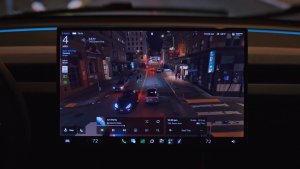
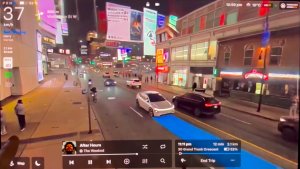
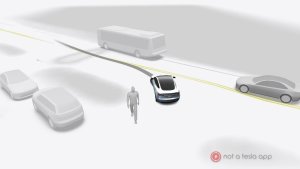
Adds a live visualization of the drive that lets you see & control what FSD is planning to do
Navigation for start… pic.twitter.com/Sfjk4wZecW
Full-Screen Map View
With FSD v15, you can now hide the FSD visualization and have the navigation map take over the whole screen. This is similar to how the Model S and Model X work, since those cars show FSD visuals on the driver display and leave the center screen for the map. Owners of other models have wanted this for years.

The map view still shows your route in 3D, along with nearby buildings and suggested parking lots near your destination. The buttons in the bottom left corner let you switch between the full screen map, Reality View, and Calm Mode.
As Sawyer Merritt (@SawyerMerritt) pointed out, opening an app while the map is full screen now moves the map to the left side of the screen. Your current location stays centered, and the transition is smooth. Model S and Model X owners have had this for a while, and it’s a welcome change, since open apps no longer block your route.
With FSD V15, if you’re viewing the map in full screen and open an app, the map automatically shifts to the left side of the screen. pic.twitter.com/iFNcm3gyjY
— Sawyer Merritt (@SawyerMerritt) November 22, 2026
Calm Mode
Calm Mode goes a step further and hides both the FSD visualization and the map. The screen shows only the essentials, like your speed, the speed limit, your next turn, and your arrival time. The dock is also simplified, with just vehicle settings, climate controls, and music.

You can swipe down from the top of the screen with three fingers to switch to Calm Mode. When in Calm Mode, you can also swipe up from the bottom of the screen with one finger to go back to either Reality View or the full-screen map view (video via @01Ananto).
Small Tips for New Visualization on FSD V15 pic.twitter.com/eWKmFBdf0E
— 🅰️nanto Mohammad (@01Ananto) November 22, 2026
Calm Mode comes from Tesla’s Robotaxi service, which added Calm Mode to commercial rides last month for a more relaxed ride. Now, owners with FSD v15 can use it in their own cars.
Why These Options Matter Now
Reality View is impressive, but it can also be a lot to take in. As we covered in our look at how Reality View works, it’s a realistic recreation of the world around you rather than a direct view of what FSD sees and reacts to. That makes it great to look at, but not always more useful than a simple map.
The full-screen map and Calm Mode give you a choice. You can watch Reality View, focus on navigation, or clear the screen and just enjoy the ride.
Coming to More Owners Soon
These features are part of FSD v15, which is still limited to a small number of newer vehicles. Elon Musk said last week that FSD v15 will reach more owners with the Holiday Update next month, so many more drivers should be able to try these views soon.
Follow Us on Google
Add Not a Tesla App as a preferred source on Google to see more of our stories in Top Stories.
Add to Preferred Sources