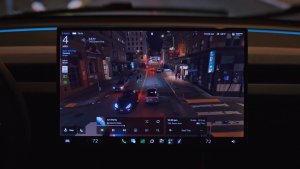
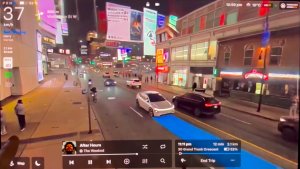
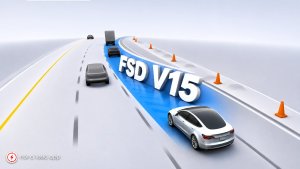
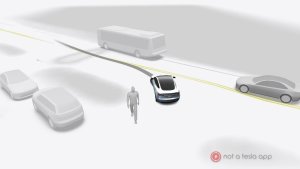
FSD v15 has only been out for a few days, but owners have already shared plenty of clips showing what it can do. Most of the attention is on Reality View, the new AI-generated visualization that recreates the world around your car in realistic 3D.
Here are some of the best FSD v15 videos so far, from garages and parking lots to fog, popular landmarks, potholes, and more (all credits for the videos belong to their original creators, including @roger_kappler, @SawyerMerritt, @komocode, @DirtyTesLa, @hashemcreatedus, @01Ananto, @niccruzpatane, @MinimalDuck, @Rob_ing_yo_mny, @mikepat711, @dalaoma0, @BLKMDL3, @WorldlyReviewer, @Chansoo, and @mikepat711).
Parking
Parking is where FSD v15 stands out the most. It can now pull into a home garage, and the garage itself shows up in Reality View, right down to the boxes and clutter on the floor.
When you arrive at a parking lot or garage, you can pick the spot you want, and FSD pulls into it most of the time. Reversing gets a big upgrade too. Instead of relying only on the backup camera, Reality View shows a bird’s-eye view of your car from the front, so you can see everything behind and around you as you back out.
FSD v15 also handles drive-throughs well, building on progress from earlier versions. @DirtyTesLa tested it twice, and both times FSD pulled away as soon as the window closed.
This is what it looks like when FSD V15 pulls into the home garage ✅
— Roger Kappler (@roger_kappler) November 22, 2026
Some other observations:
- depressed man hole covers are not being avoided (sorry suspension, you are still needed) ❌
- school zone speed limits were not considered. Today is Sunday, so need to test again… pic.twitter.com/HETb10OFJQ
FSD V15 just pulled straight into my garage for the first time ever! pic.twitter.com/MGx3JQrO3w
— Sawyer Merritt (@SawyerMerritt) November 22, 2026
ON MY GOD @Tesla FSD V15 lets you select any parking spot of your choice!
— Sawyer Merritt (@SawyerMerritt) November 22, 2026
Lots of arrows pop up and you just select your spot. pic.twitter.com/kNtet6scMq
Selecting a parking spot in FSD V15 pic.twitter.com/zLWRwmLSRP
— komocode (@komocode) November 22, 2026
V15 correctly parks in my parking spot pic.twitter.com/6bAwUW31cj
— Dirty Tesla (@DirtyTesLa) November 22, 2026
Here’s what it’s like to drive in a multi-level parking garage with Tesla Reality View. pic.twitter.com/2ROpxVcWDU
— Sawyer Merritt (@SawyerMerritt) November 22, 2026
FSD V15 - backup cameras are a thing of the past. You get the full view of what's behind the car. This feels super safe and comfortable! pic.twitter.com/n1bgdqsxQR
— Roger Kappler (@roger_kappler) November 22, 2026
Your entire screen in reality view is now your backup camera. So cool. pic.twitter.com/dyLCOldCMV
— Dirty Tesla (@DirtyTesLa) November 22, 2026
FSD V15 perfectly handles a drive through
— Dirty Tesla (@DirtyTesLa) November 23, 2026
I tested it twice and it drove away as soon as they shut the window pic.twitter.com/2WLPx1jmmA
Weather
Reality View has also impressed owners in bad weather. In heavy fog, it shows a clear view of the road, even when you can barely see through the windshield.
In the rain, it picks up reflections on wet roads, and it can even show which parts of the road are wet and which are still dry.
This is where it helps to understand how Reality View works. It builds the scene from camera footage and uses generative AI to fill in the gaps, so a clear view in the fog doesn’t necessarily mean FSD sees that clearly. The old visualization showed what FSD detected and reacted to. Reality View looks much more realistic, but it doesn’t always show exactly what FSD is seeing.
Tonight I used FSD in the Fogg , and FSD V15 Completely removes the fogg , unreal pic.twitter.com/B49h3IlY17
— Yosef (@hashemcreatedus) November 22, 2026
Just drove in the rain with FSD V15. Tesla's new Reality View picks up the reflections on the wet roads. pic.twitter.com/fUqXAPYhbX
— Sawyer Merritt (@SawyerMerritt) November 23, 2026
The new Reality View is so amazing that it shows wet roads and keeps parts of the road dry if it's dry in real life. This new view is insane. I can't wait for everyone to use this update. pic.twitter.com/6R9TPga54t
— 🅰️nanto Mohammad (@01Ananto) November 23, 2026
Around Town
Reality View does a convincing job with busy downtown areas, from crowded intersections and pedestrians to storefronts, billboards, and streetcars. It also shows Christmas lights and holiday decorations in detail as you drive past.
Other Teslas finally show up as Teslas, too. Owners have been asking for this for years, and Reality View now renders them as the actual models instead of generic cars.
It works away from downtown as well. At beaches and marinas, Reality View recreates the water, the boats (even those in the distance), the waves, and even birds walking across the parking lot.
This is absolutely INSANE
— Nic Cruz Patane (@niccruzpatane) November 22, 2026
Tesla FSD V15 Reality View in a busy downtown setting pic.twitter.com/n4DWxumS7p
Look how FSD V15 shows all the Christmas lights/decorations. pic.twitter.com/l1jrY5tFCu
— Sawyer Merritt (@SawyerMerritt) November 22, 2026
Here’s what another Tesla looks like in FSD V15’s Reality View.
— Nic Cruz Patane (@niccruzpatane) November 22, 2026
Back in the day, everyone hoped the car would render other Teslas, etc. Now it can render EVERYTHING.
Tesla cooked. pic.twitter.com/cPkV2eEcVV
It’s so fascinating to watch how the car is interpreting the world. From boats to seagulls. It’s so cool!! 🙌🏽🙌🏽🙌🏽 @Tesla @TeslaSI @elonmusk pic.twitter.com/pGMD56RdUG
— Arash (@MinimalDuck) November 23, 2026
FSD 15 can see the boats in the distance 🤯🤯🤯 @elonmusk @Tesla @TeslaSI pic.twitter.com/CmBcWXTue8
— Arash (@MinimalDuck) November 22, 2026
My mind is blown 🤯🤯🤯 it’s picking up the ocean waves!!! @elonmusk @Tesla @TeslaSI pic.twitter.com/nqQThq81X8
— Arash (@MinimalDuck) November 22, 2026
V15 sunrise in the desert! pic.twitter.com/yZJ1QYC6y8
— Tesla.Rob (@Rob_ing_yo_mny) November 23, 2026
我擦尼🐎!!FSD V15 这可视化效果太惊艳了!! 我宣布,特斯拉这次遥遥领先了!🤣
— 大老马 (@dalaoma0) November 22, 2026
开车时完全打开了上帝视角!!! pic.twitter.com/xKKwzf2Z9d
FSD 15 can see chain link fence and power lines! 🤯🙌🏽 @Tesla @TeslaSI @elonmusk pic.twitter.com/m3fn7c4obA
— Arash (@MinimalDuck) November 22, 2026
Landmarks
Reality View also handles tunnels and recognizable places. Drivers have shared clips of it recreating tunnels, LAX airport, the Brooklyn Bridge, and even a SpaceX Falcon rocket on display.
Tesla FSD V15 Reality View in a Tunnel pic.twitter.com/tT6pZK3qL1
— Nic Cruz Patane (@niccruzpatane) November 23, 2026
This is SO cool. LAX Airport as seen through Tesla Reality View pic.twitter.com/AwQpF0bJLG
— Zack (@BLKMDL3) November 23, 2026
Your first look at Tesla FSD V15 on the Brooklyn Bridge. This Reality View is insane. pic.twitter.com/pY9zJuOkAH
— 🅰️nanto Mohammad (@01Ananto) November 22, 2026
SpaceX Falcon 9 rocket as seen from Tesla Reality View in FSD v15 pic.twitter.com/j2CUAzF0hD
— Zack (@BLKMDL3) November 22, 2026
Rodeo Drive as seen by Tesla Reality View on FSD v15! pic.twitter.com/3fkHgyToWl
— Zack (@BLKMDL3) November 22, 2026
Pothole Avoidance
FSD v15 is detecting and steering around more potholes than ever before. It’s not perfect yet, though. It still struggles with shallow potholes, potholes filled with water, and sunken manhole covers. But it’s a big step up from previous versions.
FSD V15 vs pothole pic.twitter.com/cwEdG6pKZJ
— Mike P (@mikepat711) November 23, 2026
FSD 15 is so freaking good!! Avoids all my previous potholes and slows for dips!! I also noticed it can see planes!! @Tesla @elonmusk @TeslaSI 🤯🤯🤯 pic.twitter.com/5yrRhMaN3P
— Arash (@MinimalDuck) November 22, 2026
City Drives
Here are a few videos of longer drives across cities like New York, Austin, and Toronto on FSD v15.
Let’s be real… we were all waiting to see how Tesla FSD V15 would handle NYC (Manhattan).@tregan01 and I went on an almost TWO-HOUR drive through Manhattan, and WOW, did it not disappoint!
— 🅰️nanto Mohammad (@01Ananto) November 23, 2026
There are some insane moments in this video that blew both of our minds. Tesla Reality… pic.twitter.com/gWMn2EuQOG
FSD v15 driving through downtown Austin. Look at how the reality view matches actual reality. It looks so damn sick. This could have easily been a robotaxi ride. Also peep that Cybercab counter 👀 pic.twitter.com/z7jcFJWA0X
— Abhimanyu Yadav (@WorldlyReviewer) November 23, 2026
Tesla FSD v15 driving around Downtown Toronto for an hour
— Chansoo Byeon (@Chansoo) November 23, 2026
FSD drove me & my family back home after dinner last night. The entire video is sped up 3x. FSD v15 is way, way better than v14. I thought v14 was amazing already...!
At the end of the video, FSD arrives at Tesla… pic.twitter.com/fvj9X1VVp3
Early Quirks
This is still an early release, and some owners have run into issues. In one case, FSD v15 drove to where the navigation expected a parking spot, didn’t find one, and stopped in the middle of a dead-end road. In another, a double speed bump in a parking garage confused FSD, and it kept going back and forth until the driver nudged it over the second bump.
Two examples of V15 early release weirdness:
— Mike P (@mikepat711) November 22, 2026
1) we get to where the nav thinks there’s a place to park. There isn’t, and fsd just kinda gives up and stops in the middle of the road. This is a dead end road in a park so it’s not that huge of a deal, but obviously bad. Haven’t… pic.twitter.com/xYuhw5kFmw
What’s Next
FSD v15 is still limited to a small number of newer vehicles, but Elon Musk said it’s coming to more owners with this year’s Holiday Update next month. With visuals like these, it’s no surprise that one of the top feature requests right now is a way to screen-record Reality View.
Follow Us on Google
Add Not a Tesla App as a preferred source on Google to see more of our stories in Top Stories.
Add to Preferred Sources