






![All of Tesla's Robotaxi Markets and Their Actual Sizes [UPDATED]](/img/containers/article_images/robotaxi/robotaxi-regions.webp/f815854a07c0943a7d4dcac05ff125c1/robotaxi-regions.jpg)







Grok med navigasjonskommandoer (Beta)

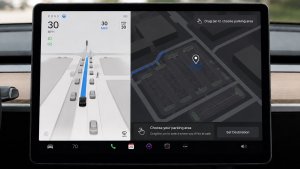
Grok kan nå legge til og redigere navigasjonsdestinasjoner og bli din personlige guide. Du kan be Grok navigere til den beste thairestauranten i nærheten, finne en Supercharger i gangavstand fra en kafé eller til og med planlegge en romantisk sightseeingtur. Krever Premium Connectivity eller en Wifi-forbindelse Samtalene er anonyme for Tesla og er ikke knyttet til kjøretøyet ditt.
Angi Groks personlighet til Assistent for å bruke navigasjonskommandoer. Gå til Appstarter > Grok, eller trykk lenge på knappen for talekommandoer på rattet når du har logget på Grok.
Tesla Fotoautomat

Gjør bilen din om til en fotoautomat. Ta selfier fra innsiden av Tesla-en din og gi deg selv en makeover med morsomme filtre, klistremerker og emojier. Del de stilige bildene dine med venner og familie direkte fra Tesla-appen. Bilen må være i Park. Krever Tesla-app versjon 4.51.5+.
Gå til Appstarter > Leketøy > Fotoautomat.
Live Dog Mode-aktivitet på iOS

Hold øye med kjæledyret ditt! Når Dog Mode er aktiv, ser du Live-aktivitet på iPhone med sanntidsoppdateringer om temperatur og klimaforhold. Hvis du har Premium Connectivity, får du også jevnlige øyeblikksbilder av bilens kupé. Krever Tesla-app versjon 4.51.5+.
Oppdatering av visningsprogram for dashbordkamera

Dashbordkameraklippene inneholder nå tilleggsdetaljer som hastighet, rattvinkel og selvkjørende funksjoner. Denne informasjonen vises i visningsprogrammet for dashbordkamera under avspilling på både kjøretøyskjermen og Tesla-appen. Krever Premium Connectivity og Tesla-app versjon 4.51.5+.
Hvis du vil aktivere visning på telefonen, går du til Kontroller > Sikkerhet og slår på Vis kamera via mobilapp.
Julenisseoppdateringer

Spre juleglede året rundt og forvandle opplevelsen i bilen med juleeffekter. Julenissemodus legger nå til festlige snømenn, trær, en låselyd og snøeffekter for en visuell godbit i 3D.
Gå til Appstarter > Leketøy > Julenisse.
Oppdatering av lysshow

Det er på tide å feire med det nyeste lysshowet - Jingle Rush. Du kan spille av showet umiddelbart eller planlegge opptil 10 minutter på forhånd, enten på et enkelt kjøretøy eller synkronisert med venner. Lysshowentusiaster kan kontrollere innvendig belysning, legge til fargeeffekter på skjermen og lage lengre tilpassede show. For å spille av et tilpasset show, lagrer du showfilene i en «LightShow»-mappe på minnepinnen, kobler til og velger.
Start showet fra Tesla-appen eller gå til Appstarter > Leketøy > Lysshow på bilens berøringsskjerm.
Lakkerings-verksted

Tilpass Tesla-avataren din med vindusfarger, tilpassede folier og nummerskilt. Bruk en av de mange forhåndsinstallerte designene, eller lag og last opp egne design ved hjelp av en USB-minnepinne for å gjøre kjøretøyet unikt.
Gå til Appstarter > Leketøy > Lakkeringsverksted, eller trykk på malings- eller nummerskiltknappen i Kontroller > Programvare.
Navigasjonsforbedringer

Du kan nå endre rekkefølgen på navigasjonsfavorittene dine, velge Hjem eller Jobb ved å sette en knappenål hvor som helst på kartet, og se foreslåtte destinasjoner basert på dine siste turer og vaner.
Automatisk ruting for kollektivfelt

Navigasjon inkluderer nå et alternativ for å bruke kollektivfelt. Ruten velger automatisk kollektivfelt når den er kvalifisert, basert på tidspunkt, sted, passasjerantall og veirestriksjoner.
Gå til Kontroller > Navigasjon > Bruk kollektivfelt.
Kart over Supercharger-stasjoner

Du kan nå se en 3D-visning av utvalgte Tesla Superchargere ved å trykke på «Vis stedskart». Når du navigerer til et pilotsted, vises stedets oppsett og belegg i sanntid (Tilgjengelig/Opptatt/Nede) ved ankomst.
Telefon etterlatt på trådløs lader

Bilen din avgir et lydsignal noen sekunder etter at dørene lukkes hvis en telefon blir liggende på den trådløse laderen og ingen personer er i bilen.
Gå til Kontroller > Låser > Lydsignal for telefon etterlatt på trådløs lader.
Etterlatt telefon
Bilen din avgir et lydsignal noen sekunder etter at dørene lukkes hvis en telefonnøkkel er inne i kupeen, eller en telefon blir forlatt på den trådløse laderen og ingen personer er i bilen. Gjenkjenning av telefonnøkkel krever UWB-støttede enheter.
Gå til Kontroller > Låser > Lydsignal for etterlatt telefon.
Lagre ladegrense etter sted

Du kan nå lagre en ladegrense for den nåværende posisjonen din mens du er parkert, og den vil bli brukt automatisk neste gang du lader der.
Gå til Kontroller > Lading.
SpaceX Docking Simulator

Become an astronaut and prove your skills by docking with the International Space Station. Control and guide the rocket in this 3D docking simulator game using a set of controls based on actual interfaces used by NASA astronauts.
To play, shift into Park (P), and go to App Launcher > Arcade > SpaceX.
Mindre oppdateringer

- Aktiver eller deaktiver ladeplater for trådløs lading av telefon i Kontroller > Lading.
- Bilen vil nå sende et mobilvarsel hvis en dør forblir åpen mens Dog Mode er aktiv.
- Legg til Spotify-spor i køen din direkte fra søkeskjermen.
- Bla gjennom store Spotify-spillelister, album, podcaster, lydbøker og biblioteket ditt sømløst, uten å bla gjennom flere sider.
- Låselyd inkluderer nå lyssyklus fra Tron-modus. Gå til Appstarter > Leketøy > Boombox > Låselyd.
- La kjøretøyet dele ladedata med Tesla for å støtte funksjoner som Ladestatistikk i Tesla-appen.
New Wheel Options

The new wheel designs that are available on the Standard Model 3 and Model Y are now available for all vehicles to equip in the vehicle visualization.
The new 18” Prismata for the Model 3 and the 18” Aperture wheels are available for all models in the tire section. To view or select the new wheels, go to Controls > Service and select tires and wheels.
Express Lanes

Tesla has added support for Express Lanes in some vehicles. Similar to HOV or toll roads, Express Lanes are faster lanes that may charge fees based on vehicle occupancy, vehicle type, and time of day.
With this update, Tesla is adding the ability for users to toggle the use of Express Lanes on or off in navigation settings. This feature is not available in all vehicles and Tesla may still be testing it.
Supercharger Live Maps Shows Exact Models

The new Supercharger Site Maps not only provide a real-time 3D rendering of a Supercharger site but also show the actual vehicle models being charged at each stall.
Tesla will show what kind of vehicle is charging at each stall, whether it’s the original Model Y, the new Model Y, a Cybertruck, or show whether it’s a non-Tesla being charged.
The Supercharger maps are useful to see which stalls are open, their location, which are handicap accessible or whether a location has pull-through stalls.
Dashcam Viewer Zoom Support

When you’re viewing a video in the Dashcam Viewer, you can now pinch the video to zoom in. In addition, you can also pan the video while zoomed to see other parts of the video.
Note: This feature is limited to vehicles with Tesla’s AMD Ryzen infotainment processor.
Camera Visibility Warning Improvement

When you receive a camera visibility warning, indicating that a camera has an obscured view, the camera's view will now be labeled. This lets you know exactly which camera needs to be cleaned.
The display is similar to the Dashcam Viewer, where the camera location is overlaid on top of a photo from the camera. Previously, the camera was unlabeled, making it unclear which camera was obscured and needed to be cleaned.
Tesla will display Front for one of the front cameras underneath the windshield and fascia for the front bumper camera.
V4 Supercharger Visualization

Tesla recently launched charging visualizations on the vehicle’s display. Tesla supports a wide variety of chargers and includes a different visualization for each type, including the mobile connector, Wall Connector, v2, and v3 Supercharger styles, as well as a generic type for third-party chargers.
However, surprisingly absent was a unique visualization for the newer style, V4 Superchargers. With this update, Tesla has added a proper visualization for the V4 Superchargers.
Wrap & License Plate Icons

You can easily access the vehicle wraps and license plate options by navigating to Controls > Software. Underneath the vehicle visualization, you’ll have a photo of the selected license plate for your vehicle, as well as a wrapping paper icon that will take you directly to the vehicle visualization options.
The wrapping paper icon replaces the old colored square that used to take you to the vehicle Colorizer feature.
Car Wash Mode Notification

Tesla will now show you a notification reminding you to use Car Wash Mode. Whenever you’re near a car wash, Tesla pops up a reminder that lets you easily enable Car Wash Mode.
This is part of Tesla’s Car Wash Mode improvements in this update.
Parking Brake

Tesla has removed the ability to enable the emergency brake (parking brake) from the vehicle’s display. Near the bottom of the Controls > Safety menu, users could manually enable the vehicle’s emergency brake. However, this option has now disappeared.
However, users can still enable the vehicle’s emergency brake by using the gear stalk or Park icon on the touch screen.
Car Wash Mode Redesign

Tesla has redesigned the Car Wash Mode feature with this update. It now includes a visualization of the vehicle on the right with the usual checklist items on the left.
For anyone not familiar with Car Wash Mode, it features a real-time checklist to help prepare your vehicle for a car wash. If any items are in the proper setting, such as a window or trunk being opened, the dot next to the item will turn red.
The ‘Enable Free Roll’ option at the bottom is now more obvious, making it easier for users to find how to put their vehicle into neutral.
Switch to Bluetooth

If your phone is connected via Bluetooth and the vehicle detects that your phone is playing audio, it will now prompt you to switch over to the Bluetooth audio source, so the audio comes out of your vehicle’s speakers instead.
Most users likely listen to a music streaming service such as Apple Music or Spotify, but when they listen to audio on their phone, there is often a second pause, leaving the driver wondering why the audio isn’t coming out of their vehicle’s speakers.
This solves that problem and also makes it easier to switch to Bluetooth instead of manually finding and tapping the Bluetooth app.
New Visualizations With Unreal Engine

The new visualizations that have been available on the 2026 Model S and Model X are now available on all 2021+ Model S and Model X vehicles.
Besides the improved visuals in the instrument cluster and in the menus, you can now freely rotate your vehicle’s visualization in the Controls menu, letting you view your vehicle from any angle.
In addition, the module that pops up when parked, which lets you open the doors and trunk, is also interactive, allowing you to pan and zoom in on the vehicle.
Air Suspension Controls

Air suspension controls for the Model S and Model X are now available in the main Controls section, rather than requiring users to go to the separate Suspension tab.
The 2026 models already include this feature. 2025 and older vehicles keep the older, more detailed Suspension menu, instead of the simplified version found in the 2026 models.
Boomerang Fu Game Removed

The game Boomerang Fu has been removed from vehicles and replaced with SpaceX Docking Simulator. The game's license likely expired this year, as it was released in last year’s holiday update.
Favorites On Map

Tesla has made several changes to favorites and home/work in this update. However, this change has gone undocumented in the release notes.
In addition to putting the home/work icons into the Navigate box and showing your top two suggestions underneath, Tesla is also pinning all of your favorites, home, and work locations directly on the map.
This makes it much easier to orient yourself as you move the map around and makes it obvious when you’re near one of your favorites, such as a friend’s home, restaurant, or other favorite location.
View Dashcam Storage

You can now view the storage space of your Dashcam USB drive. You can view the amount of space used by Dashcam and the total size of the drive.
To view Dashcam storage, go to Controls > Safety and scroll down to Dashcam.
Dashcam Filters

Tesla has made additional improvements to the Dashcam Viewer. In addition to having Dashcam and Sentry tabs in the Dashcam Viewer, Tesla now includes additional categories for Dashcam videos.
The system will automatically categorize videos taken with Dashcam and Sentry Mode and put them into appropriate categories that triggered the footage, such as Honk, Manual Save, Handle Pull, etc.
Hebrew Language Added

You can now choose Hebrew as your touchscreen language.
To change the language, shift into Park, and go to Controls > Display > Touchscreen Language.
Service Mode Improvements

Thermal Control Components Panel Added to Service Mode
The Thermal Control Components panel has been added to Service Mode to support thermal Noise, Vibration, and Harshness (NVH) diagnosis. It adds the ability to individually control thermal components, set specific targets, and sweep across operating ranges with real-time feedback. It also includes a 3D static view of the heat pump, including the radiator, blower motor, louver, and pumps.
Models: Model S (2021+), Model 3 (Heat Pump), Model X (2021+), Model Y, Cybertruck
Airbag Panel Update - New Disarm Airbag and Resistance Check Routines
In the Airbags panel, a routine has been added that allows users to disarm the airbags. With this routine, users no longer need to disconnect the Low Voltage (LV) battery when diagnosing the Safety and Restraints system. Once the airbags are disarmed, individual components, such as an airbag or pretensioner, can be tapped to view the resistance readings.
Models: Model S (2021+), Model 3, Model X (2021+), Model Y, Cybertruck

