












오토파일럿 이름 업데이트

이 변경 사항은 차량의 특정 기능 이름 및 텍스트만 업데이트하며 기능의 작동 방식은 변경하지 않습니다.
- 내비게이트 온 오토파일럿은 내비게이트 온 오토스티어로 명칭이 변경되었습니다
- 풀 셀프 드라이빙 컴퓨터는 AI 컴퓨터로 명칭이 변경되었습니다.
주차 중 사각 지대 경고등

사각지대에서 접근 중인 물체가 감지된 상태(예: 뒤에서 접근 중인 자전거가 있는 경우)로 도어를 열려고 시도하면, 사각지대 경고등이 점멸하고, 경고음이 울리며, 처음 버튼을 눌렀을 때는 도어가 열리지 않습니다. 잠시 기다린 다음, 버튼을 다시 한번 눌러 경고를 무시하세요.
컴포트 브레이킹

이제 일상 제동 시 Tesla 차량은 더 부드럽게 완전히 정차합니다.
사소한 업데이트

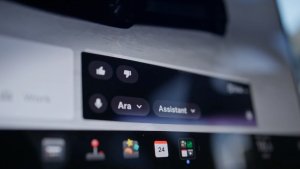
- Spotify: 새로운 아래쪽 화살표를 탭하면 긴 재생목록이나 팟캐스트 에피소드 목록의 맨 아래로 이동할 수 있습니다.
- Grok의 음성을 Leo로 설정하면 영국식 억양으로 들을 수 있습니다.
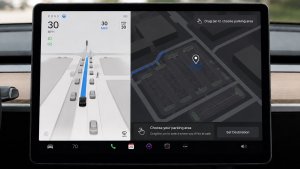
- 내비게이션에서 추천 목적지를 숨길 수 있습니다. 컨트롤 > 내비게이션 > 목적지 제안으로 이동하세요.
보안 개선 사항

이 업데이트에는 중요한 보안 향상 및 개선 사항이 포함되어 있습니다.
사소한 오류 수정
이번 릴리스에는 사소한 오류 수정 및 개선 사항이 포함되어 있습니다.
Dashcam Viewer Improvements

Tesla will now show recent Dashcam video at the top of the Dashcam Viewer. This makes it easier to see recent footage that was not saved.
As Tesla points out, this footage is continuously updated and overwritten with the vehicle only keeping the last hour of unsaved footage.
In a future update, Tesla is increasing the number of hours of unsaved footage to (up to) 24 hours.
Driver Profile

The Tesla app will now show you which Tesla driver profile is selected in the vehicle under Security & Drivers.
While drivers can use any driver profile they’d like, unless it’s protected by a PIN, this gives you a good idea of who is currently driving the vehicle.
The profile name also appears even when the vehicle isn’t being driven. In those cases, it’ll show the last used profile.
In addition to the profile name, a Bluetooth icon may also be displayed, which shows whether the current device is being used as a phone key for the vehicle.
This feature requires vehicle update 2026.8 and a recent app update.
Slovak Language Support

This update adds additional language support. The vehicle menus and settings have now been localized to Slovak.
Service Mode Improvements

Speakers Panel Update - Check Speakers Action
The Check Speakers action was added to the speakers panel to support diagnosis of speaker circuitry and allow users to confirm speaker circuit functionality.
Models: Model 3 and Model Y with AMD Ryzen infotainment processor, Model S (2021+), Model X (2021+), Cybertruck
Mid Voltage Panel Update - Jump Posts and Front Trunk Access
The Mid Voltage (MV) Power Distribution panel was updated to show the jump post state, voltage measurement, current measurement, and tronttrunk access connectors. This allows for more visibility and usage of jump posts on the User Intenace (UI)
Models: Cybertruck
Panel Updates - DTC Component Mapping
Diagnostic Trouble Codes (DTs) are now mapped to affected components in the Drive Unit, HV Battery, Thermal, and Charging panels. When a confirmed DTC appears in the Alerts & DTCs panel, users can also see which specific component is affected within these panels.
Models: Model 3 and Model Y with AMD Ryzen infotainment processor, Model S (2021+), Model X (2021+)

