









FSD (Supervised) v13.2.9 Down Under

גרסת FSD (Supervised) v13 Down Under משדרגת את כל חלקי רשת הנהיגה מקצה לקצה.
כולל את:
- ערוצי קלט וידאו AI4 ברזולוציה מלאה, 36 הרץ
- ערוצי קלט AI4 מקומיים ומבני רשת עצבית
- סילום נתונים 4.2x
- סילום חישוב אימון 5x (מופעל באמצעות לוח אימוני Cortex)
- השהיית photon-to-control ב-2x
-יכולות משולבות ביציאה מחנייה, בנסיעה לאחור ובחנייה
- חיזוי פרסים משופר למניעת התנגשות
- ניקוי מצלמה משופר
- בקר בעיצוב חדש לניטור מדויק יותר ללא הפרעות
- ניווט דינמי סביב כבישים סגורים, המציג אותם לאורך המסלול הרלוונטי כשהם מזוהים על ידי צי כלי הרכב
השיפורים הנוכחיים:
- סילום גודל הדגם 3x
- סילום אורך הקשר הדגם
- ערוצי קלט שמע לטיפול טוב יותר בכלי רכב במצב חירום
- חיזוי פרסים משופר עבור ניווט
- שיפורים בבלימת שווא ובנסיעה איטית יותר בחניונים
- תמיכה עבור אפשרויות יעד כולל עצירה, חנייה במקום חנייה, בשביל הגישה לחנייה או במקום חנייה מקורה
- ייצוג יעיל של מפות וקלטי ניווט
- טיפול משופר בחסימות מצלמה
Full Self-Driving (Supervised) Down Under
תחת השגחת הנהג, התכונה Full Self-Driving (Supervised) Down Under יכולה לנהוג ברכב Tesla כמעט לכל מקום. היא תבצע החלפת נתיבים, תבחר הסתעפויות בהתאם למסלול הניווט, תנווט סביב כלי-רכב ועצמים אחרים ותבצע פניות לשמאל ולימין. עליכם ועל כל מי שתתנו לו הרשאה לנקוט במשנה זהירות ולהישאר ערניים. היא לא הופכת את הרכב לאוטונומי. אין לנהוג בשאננות.
התכונה Full Self-Driving (Supervised) Down Under מופעלת ברכב. כדי להשתמש בתכונה, יש ללחוץ על גלגל הגלילה הימני פעם אחת. ניתן להשבית את התכונה Full Self-Driving (Supervised) Down Under תחת הגדרות Autopilot.
יש לשים לב לתנאי הדרך או לסכנות בדרך (כגון מהמורות ופסי האטה) ולתפעל את הרכב באופן אחראי בכל תרחיש.
ניטור אחר ערנות המבוסס על ראות
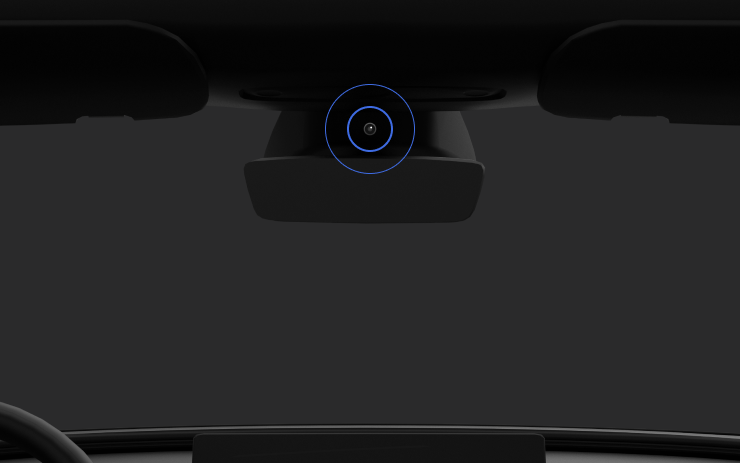
כאשר התכונה Full Self-Driving (Supervised) מופעלת, מערכת הניטור אחר הנהג מסתמכת בעיקר על מצלמת תא הנוסעים כדי לקבוע את מידת ערנות הנהג. למצלמת תא הנוסעים חייבת להיות ראות ברורה (למשל, כאשר המצלמה לא חסומה, כאשר ניתן לראות בבירור את העיניים והידיים של הנהג, כאשר יש תאורה מספקת בתא הנוסעים וכאשר הנהג מסתכל על הכביש שלפניו ולא מרכיב משקפי שמש או דבר מה המכסה את העיניים). בנסיבות אחרות, מערכת הניטור אחר הנהג תסתמך בעיקר על ניטור המבוסס על מומנט הסיבוב (הגה) כדי לזהות את ערנות הנהג.
אם מצלמת תא הנוסעים מזהה חוסר ערנות של הנהג, תוצג אזהרה. ניתן לבטל את האזהרה על ידי כך שהנהג יסיט את תשומת ליבו לכביש שלפניו באופן מיידי. האזהרות יסלימו בהתאם לאופי ולתדירות חוסר הערנות שזוהה, כאשר חוסר תשומת לב מתמשך יוביל לפסילה.
עדכונים קלים

- Spotify: הקש על החץ החדש למטה כדי לדלג לסוף של רשימות השמעה ארוכות ורשימות פרקים של פודקאסטים.
- הגדר את הקול של Grok להיות Leo לקבלת מבטא בריטי.
- הסתר הצעות ליעדים ב'ניווט'. עבור אל 'פקדים' > 'ניווט' > 'הצעות ליעדים'.
Dashcam Viewer Improvements

Tesla will now show recent Dashcam video at the top of the Dashcam Viewer. This makes it easier to see recent footage that was not saved.
As Tesla points out, this footage is continuously updated and overwritten with the vehicle only keeping the last hour of unsaved footage.
In a future update, Tesla is increasing the number of hours of unsaved footage to (up to) 24 hours.
Driver Profile

The Tesla app will now show you which Tesla driver profile is selected in the vehicle under Security & Drivers.
While drivers can use any driver profile they’d like, unless it’s protected by a PIN, this gives you a good idea of who is currently driving the vehicle.
The profile name also appears even when the vehicle isn’t being driven. In those cases, it’ll show the last used profile.
In addition to the profile name, a Bluetooth icon may also be displayed, which shows whether the current device is being used as a phone key for the vehicle.
This feature requires vehicle update 2026.8 and a recent app update.
Slovak Language Support

This update adds additional language support. The vehicle menus and settings have now been localized to Slovak.
Service Mode Improvements

Speakers Panel Update - Check Speakers Action
The Check Speakers action was added to the speakers panel to support diagnosis of speaker circuitry and allow users to confirm speaker circuit functionality.
Models: Model 3 and Model Y with AMD Ryzen infotainment processor, Model S (2021+), Model X (2021+), Cybertruck
Mid Voltage Panel Update - Jump Posts and Front Trunk Access
The Mid Voltage (MV) Power Distribution panel was updated to show the jump post state, voltage measurement, current measurement, and tronttrunk access connectors. This allows for more visibility and usage of jump posts on the User Intenace (UI)
Models: Cybertruck
Panel Updates - DTC Component Mapping
Diagnostic Trouble Codes (DTs) are now mapped to affected components in the Drive Unit, HV Battery, Thermal, and Charging panels. When a confirmed DTC appears in the Alerts & DTCs panel, users can also see which specific component is affected within these panels.
Models: Model 3 and Model Y with AMD Ryzen infotainment processor, Model S (2021+), Model X (2021+)

