













Mise à jour du nom de l'Autopilot

Cette modification met uniquement à jour le nom de certaines fonctionnalités et certains textes dans votre véhicule, sans en modifier le comportement.
- La Navigation en Autopilot a été renommée Navigation avec Assistance au maintien de cap
- L'ordinateur FSD a été renommé en Ordinateur d'IA.
Avertisseur d’angle mort en stationnement

Si vous tentez d’ouvrir une portière alors qu’un objet en approche est détecté dans votre angle mort (par exemple, si votre véhicule est en stationnement et qu’un cycliste s'approche par l’arrière), le témoin d’avertissement d’angle mort clignote, un signal sonore retentit, et votre portière ne s’ouvre pas avec la pression initiale sur le bouton. Attendez un court instant et appuyez sur le bouton une deuxième fois pour ignorer l’alerte si l’objet est toujours détecté.
Freinage confort

Votre Tesla offre désormais une sensation plus fluide lors de l’arrêt complet en cas de freinage normal.
Mises à jour mineures

- Spotify : appuyez sur la nouvelle flèche vers le bas pour accéder directement à la fin des longues playlists et des listes d’épisodes de podcast.
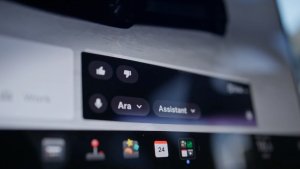
- Réglez la voix de Grok sur Leo pour un accent britannique.
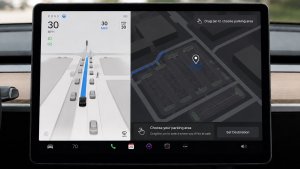
- Masquer les destinations suggérées dans Navigation. Allez sur Contrôles > Navigation > Suggestions de destinations.
Améliorations de la sécurité

Cette mise à jour comprend d’importants correctifs de sécurité et améliorations.
Corrections mineures
Cette mise à jour comprend des corrections mineures et des améliorations.
Dashcam Viewer Improvements

Tesla will now show recent Dashcam video at the top of the Dashcam Viewer. This makes it easier to see recent footage that was not saved.
As Tesla points out, this footage is continuously updated and overwritten with the vehicle only keeping the last hour of unsaved footage.
In a future update, Tesla is increasing the number of hours of unsaved footage to (up to) 24 hours.
Driver Profile

The Tesla app will now show you which Tesla driver profile is selected in the vehicle under Security & Drivers.
While drivers can use any driver profile they’d like, unless it’s protected by a PIN, this gives you a good idea of who is currently driving the vehicle.
The profile name also appears even when the vehicle isn’t being driven. In those cases, it’ll show the last used profile.
In addition to the profile name, a Bluetooth icon may also be displayed, which shows whether the current device is being used as a phone key for the vehicle.
This feature requires vehicle update 2026.8 and a recent app update.
Slovak Language Support

This update adds additional language support. The vehicle menus and settings have now been localized to Slovak.
Service Mode Improvements

Speakers Panel Update - Check Speakers Action
The Check Speakers action was added to the speakers panel to support diagnosis of speaker circuitry and allow users to confirm speaker circuit functionality.
Models: Model 3 and Model Y with AMD Ryzen infotainment processor, Model S (2021+), Model X (2021+), Cybertruck
Mid Voltage Panel Update - Jump Posts and Front Trunk Access
The Mid Voltage (MV) Power Distribution panel was updated to show the jump post state, voltage measurement, current measurement, and tronttrunk access connectors. This allows for more visibility and usage of jump posts on the User Intenace (UI)
Models: Cybertruck
Panel Updates - DTC Component Mapping
Diagnostic Trouble Codes (DTs) are now mapped to affected components in the Drive Unit, HV Battery, Thermal, and Charging panels. When a confirmed DTC appears in the Alerts & DTCs panel, users can also see which specific component is affected within these panels.
Models: Model 3 and Model Y with AMD Ryzen infotainment processor, Model S (2021+), Model X (2021+)

