





![Tesla Driver in Mexico Makes His Model Y Fly [VIDEO]](https://www.notateslaapp.com/img/containers/article_images/2026/model-y-flying-accident-mexico.webp/d58bf5d7e21ac7f8713f4f35023d506b/model-y-flying-accident-mexico.jpg)
Passkey Support

In this update, the Tesla app introduces passkey support.
A passkey is a digital credential that lets you sign in using Face ID, Touch ID instead of typing out a password. Under the hood, passkeys rely on two cryptographic parts — a private key stored on your phone and a public key registered with Tesla’s authentication servers so they’re much more secure than traditional passwords that can be more easily guessed.
Setting up a passkey takes less than a minute directly inside the app:
Open the Menu.
Tap on your profile name and select Security & Privacy.
Choose Sign In Management.
Tap Passkey and then tap the Add Passkey button.
Share Camera

Several phrases in this app update hint at Tesla letting users share their cameras with representatives when asking for help.
By sharing your camera, the Tesla rep could guide you to find certain features in your vehicle. Some of the phrases in this update include:
Camera Share
“Would you like to share your camera with a representative? They will only see the camera to guide you.”
“Allow camera access in Settings to share your camera with a representative.”
Supercharger Site Maps
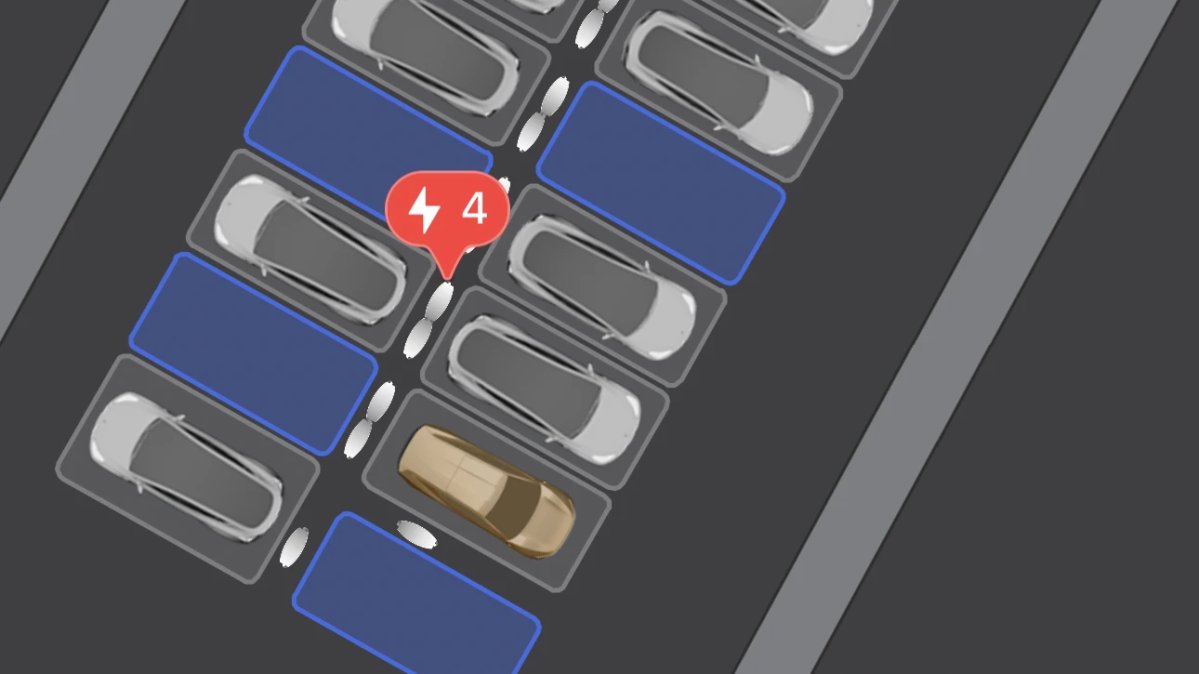
Tesla has added Supercharger Site Maps to its iOS app with this update. By zooming in on a Supercharger site, the app will now switch to the Site Map view, which shows the Supercharger stall orientations, which ones are occupied and what type of vehicles are charging.
As you can see in the photo above, Tesla also supports the Cybercab in Site Maps. While Site Maps are supported in the vehicle as well, they still do not show the Cybercab as its own vehicle yet.