




Update 2026.14.6.6 (FSD 14.3.3) - Release Notes

Update Stats

Number of Cars

0

Percent of Fleet

0%

Installs Pending

0

Rollout Yesterday

0

Rollout Today

0

Tesla Videos

Details

FSD Version

FSD 14.3.3

Release Date

May 17, 2026

Recent News

Statistics Overview

Number of Cars
0
Percent of Fleet
0%
Installs Pending
0
Rollout Yesterday
0
Rollout Today
0

This update adds the Spring Update features to vehicles on FSD v14.3. It also increments the FSD version to 14.3.3 and adds several improvements.

FSD (Supervised) v14.3.3

Tesla FSD (Supervised) v14.3.3 feature in update 2026.14.6.6
HW4
Modele:
S
3
X
Y
CT
HW4

Full Self-Driving (Supervised) v14.3.3 includes:

- Upgraded the Reinforcement Learning (RL) stage of training the FSD neural network, resulting in improvements in a wide variety of driving scenarios.

- Upgraded the neural network vision encoder, improving understanding in rare and low-visibility scenarios, strengthening 3D geometry understanding, and expanding traffic sign understanding.

- Rewrote the AI compiler and runtime from the ground up with MLIR, resulting in 20% faster reaction time and improving model iteration speed.

- Mitigated unnecessary lane biasing and minor tailgating behaviors.

- Increased decisiveness of parking spot selection and maneuvering.

- Improved parking location pin prediction, now shown on a map with a P icon.

- Enhanced response to emergency vehicles, school buses, right-of-way violators, and other rare vehicles.

- Improved handling of small animals by focusing RL training on harder examples and adding rewards for better proactive safety.

- Improved traffic light handling at complex intersections with compound lights, curved roads, and yellow light stopping — driven by training on hard RL examples sourced from the Tesla fleet.

- Improved handling for rare and unusual objects extending, hanging, or leaning into the vehicle path by sourcing infrequent events from the fleet.

- Improved handling of temporary system degradations by maintaining control and automatically recovering without driver intervention, reducing unnecessary disengagements.

- Help Tesla improve Self-Driving by selecting an intervention reason on the main screen after taking over.

- You can now see distance traveled in FSD (Supervised) without an intervention. The Self-Driving App will also show your longest intervention-free streak.

Upcoming Improvements:

- Expand reasoning to all behaviors beyond destination handling.

- Add pothole avoidance.

- Improve driver monitoring system sensitivity with better eye gaze tracking, eye wear handling, and higher accuracy in variable lighting conditions.

Aplikacja Samodzielna jazda

Tesla Aplikacja Samodzielna jazda feature in update 2026.14.6.6
HW4
FSD
Modele:
New S
3
New X
Y
CT
HW4
FSD

Dzięki nowej aplikacji Samodzielna jazda możesz jednym dotknięciem rozpocząć subskrypcję, dowiedzieć się, jak włączyć tę funkcję i z niej korzystać, oraz przeglądać bieżące statystyki.

Aby otworzyć aplikację, przejdź do opcji Pasek aplikacji > Samodzielna jazda.

Szacowane opłaty drogowe

Tesla Szacowane opłaty drogowe feature in update 2026.14.6.6
Modele:
3
Y

Nawigacja wyświetla teraz szacowane opłaty drogowe dla każdej trasy, w tym zniżkowe stawki dla pojazdów EV, jeśli są dostępne. Ta funkcja wymaga wyznaczania trasy online. Przejdź do opcji Sterowanie > Nawigacja > Wyznaczanie trasy online, aby włączyć.

Ulepszenie w zakresie dźwięku przestrzennego

Tesla Ulepszenie w zakresie dźwięku przestrzennego feature in update 2026.14.6.6
Dostępne globalnie
Modele:
New 3
New Y

Dzięki zaawansowanej ekstrakcji sygnałów dźwiękowych funkcja Dźwięk przestrzenny Premium zapewnia słuchaczowi wrażenie przebywania we wnętrzu szczegółowej sceny dźwiękowej. To ulepszenie działa ze wszystkimi źródłami strumieniowymi.

Przejdź do opcji Ustawienia > Audio > Barwa > Dźwięk przestrzenny, aby dostosować.

Pełna samodzielna jazda (pod nadzorem)

Tesla Pełna samodzielna jazda (pod nadzorem) feature in update 2026.14.6.6
HW4
Modele:
S
3
X
Y
CT
HW4

Funkcja Pełna samodzielna jazda (pod nadzorem) może prowadzić pojazd Tesla niemal w każdych warunkach, z zachowaniem Twojego nadzoru. Po uruchomieniu funkcji na postoju pojazd będzie zmieniać pasy, skręcać na rozwidleniach według trasy nawigacji, omijać inne pojazdy i przedmioty oraz skręcać w lewo i prawo, a na koniec zaparkuje w miejscu docelowym. Zarówno Ty, jak i każda upoważniona osoba, musicie zachować dodatkową ostrożność i uwagę. Funkcja nie sprawia, że pojazd jest autonomiczny. Nie należy lekceważyć zagrożeń.

W pojeździe włączono funkcję Pełna samodzielna jazda (pod nadzorem). Aby skorzystać z tej funkcji, naciśnij przycisk Uruchom funkcję Samodzielna jazda w interfejsie użytkownika lub naciśnij jeden raz prawe pokrętło przewijania. Funkcję Pełna samodzielna jazda (pod nadzorem) można wyłączyć w Ustawieniach Autopilota.

Tylny wyświetlacz

Tesla Tylny wyświetlacz feature in update 2026.14.6.6
Dostępne globalnie
Modele:
New S
New 3
New X
New Y
CT

Pasażerowie na tylnych siedzeniach mogą teraz przeglądać mapy i wchodzić z nimi w interakcje na tylnym wyświetlaczu, gdy Twoja Tesla nawiguje po trasie. Dotknij ikony map na tylnym wyświetlaczu, aby być na bieżąco.

„Hey Grok”

Tesla „Hey Grok”  feature in update 2026.14.6.6
AMD
Modele:
New S
3
New X
Y
CT
AMD

Powiedz „Hey Grok”, aby uruchomić Groka. Przejdź do opcji Grok > Ustawienia, aby włączyć. Możesz również ustawiać przypomnienia na podstawie lokalizacji, takie jak „remind me to pick up milk when I'm near home” (przypomnij mi, że mam kupić mleko, gdy będę w pobliżu domu). Powiedz „goodbye”, aby odrzucić.

Tryb zwierzaka

Tesla Tryb zwierzaka feature in update 2026.14.6.6
Dostępne globalnie
Modele:
S
3
X
Y
CT

Wybierz i nazwij swojego zwierzaka, przechodząc do opcji Sterowanie > Wyświetlacz > Dostosuj tryb zwierzaka.

Lakiernia

Tesla Lakiernia feature in update 2026.14.6.6
Dostępne globalnie
Modele:
New S
New X

Spersonalizuj swojego awatara Tesla za pomocą przyciemnień szyb, niestandardowych powłok i tablic rejestracyjnych. Użyj jednego z wielu fabrycznie załadowanych projektów lub stwórz i prześlij własny za pomocą pamięci flash USB, aby dodać swojemu pojazdowi wyjątkowości. Wybierz opcję Pasek aplikacji > Zabawy > Lakiernia albo dotknij przycisku malowania lub tablicy rejestracyjnej na ekranie Sterowanie > Oprogramowanie.

Aktualizacje wizualne

Tesla Aktualizacje wizualne feature in update 2026.14.6.6
Dostępne globalnie
Modele:
New 3
New Y

Wyświetlacz środkowy przedstawia teraz obrazy Twojej Tesli w wyższej jakości oraz ulepszoną wizualizację środowiska sceny parkowania.

Podróże

Tesla Podróże feature in update 2026.14.6.6
Dostępne globalnie
Modele:
New S
3
New X
Y
CT

Podróże są teraz dostępne w aplikacji Energia, w której możesz tworzyć wiele podróży i zarządzać nimi, aby śledzić zużycie energii podczas różnych przejazdów i tras lub w różnych warunkach. Wybierz opcję Pasek aplikacji > Energia > Podróże. Aby uzyskać szybki dostęp do karty Podróże, przesuń kartę Media w lewo.

Blind Spot Warning While Parked

Tesla Blind Spot Warning While Parked feature in update 2026.14.6.6
Dostępne globalnie
Modele:
CT

If you attempt to open a door while an approaching object is detected in your blind spot (for example, a bicyclist approaching from behind) the blind spot indicator light flashes, a chime sounds, and your door will not open upon initial button press. Wait a short time and press the button a second time to override the warning.

Szkicownik

Tesla Szkicownik feature in update 2026.14.6.6
Dostępne globalnie
Modele:
New S
3
New X
Y
CT

Uwolnij wewnętrznego artystę z ulepszonym Szkicownikiem, obsługującym teraz naklejki i emotikony. Zapisz swoje rysunki, aby móc je przeglądać w aplikacji mobilnej i udostępniać. Wymaga aplikacji mobilnej w wersji 4.55.6 lub nowszej.

Kontrolki ostrzeżenia o martwej strefie

Tesla Kontrolki ostrzeżenia o martwej strefie feature in update 2026.14.6.6
Dostępne globalnie
Ambient Lights
Modele:
New S
New 3
New X
New Y
CT
Ambient Lights

Oświetlenie akcentowe świeci teraz na czerwono, gdy w Twoim martwym polu znajduje się obiekt, a kierunkowskaz jest włączony, lub gdy podczas postoju zostanie wykryty zbliżający się obiekt. Aby wyłączyć tę funkcję, przejdź do opcji Sterowanie > Światła > Kontrolki ostrzeżenia o martwej strefie.

Sygnał dźwiękowy przy zielonym świetle

Tesla Sygnał dźwiękowy przy zielonym świetle feature in update 2026.14.6.6
Modele:
S
3
X
Y
CT

Gdy światło, przed którym stoisz, zmieni się na zielone, pojazd wygeneruje sygnał dźwiękowy. Jeśli stoisz za innym pojazdem, usłyszysz sygnał dźwiękowy, gdy pojazd ten zacznie ruszać, chyba że jest włączony Tempomat uwzględniający sytuację drogową lub Asystent kierowania. Ten sygnał dźwiękowy jest tylko powiadomieniem. Aby włączyć tę funkcję, wybierz opcję Sterowanie > Samodzielna jazda > Sygnał dźwiękowy przy zielonym świetle.

Widok z kamery na żywo

Tesla Widok z kamery na żywo feature in update 2026.14.6.6
Modele:
S
3
X
Y
CT

Możesz teraz sprawdzić wnętrze swojego samochodu Tesla, będąc poza nim. Aby włączyć tę funkcję, przejdź do opcji Sterowanie > Bezpieczeństwo > Włącz widok z kamery na żywo w aplikacji mobilnej. Kamera na żywo jest zabezpieczona kompleksowym szyfrowaniem, a Tesla nie ma do niej dostępu. Ta funkcja wymaga łączności Premium i korzystania z aplikacji mobilnej Tesla w wersji 4.55.6 lub nowszej.

Kolejkowanie w aplikacji muzycznej

Tesla Kolejkowanie w aplikacji muzycznej feature in update 2026.14.6.6
Dostępne globalnie
Modele:
S
3
X
Y
CT

Przesuń w prawo na utworach w Apple Music lub Spotify, aby dodać je do kolejki. W Apple Music dotknij utworu i przytrzymaj go, aby dodać do Ulubionych lub z nich usunąć. W Spotify przesuń w lewo, aby dodać lub usunąć z Polubionych utworów.

Automatyczne aktualizacje

Tesla Automatyczne aktualizacje feature in update 2026.14.6.6
Dostępne globalnie
Modele:
New S
3
New X
Y
CT

Twój samochód Tesla może teraz automatycznie instalować w nocy pobrane aktualizacje oprogramowania. Po włączeniu tej opcji aktualizacje będą instalowane, gdy Twój samochód Tesla jest zaparkowany i nieużywany, co zapewni Ci dostęp do najnowszych funkcji i ulepszeń.

Aby włączyć tę funkcję, przejdź do obszaru Sterowanie > Oprogramowanie > Automatycznie instaluj aktualizacje.

Aktualizacje wyświetlacza rejestratora

Tesla Aktualizacje wyświetlacza rejestratora feature in update 2026.14.6.6
Dostępne globalnie
AMD
Modele:
New S
3
New X
Y
CT
AMD

Ostatnie nagranie z rejestratora może teraz obejmować do 24 godzin. Dowolny klip możesz zapisać na stałe w samochodzie Tesla lub na telefonie, przechodząc do opcji Pasek aplikacji > Wyświetlacz rejestratora. Aby włączyć podgląd na telefonie, wybierz opcję Sterowanie > Bezpieczeństwo i włącz widok z kamery w aplikacji mobilnej. Klipy pozostają w pojeździe i nigdy nie są udostępniane firmie Tesla.

Klipy pobrane na Twój telefon zawierają teraz szczegóły, takie jak prędkość, kąt kierownicy i stan funkcji Samodzielna jazda. Pobranie wymaga łączności Premium i aplikacji mobilnej w wersji 4.55.6 lub nowszej.

Aktualizacje wyświetlacza rejestratora

Tesla Aktualizacje wyświetlacza rejestratora feature in update 2026.14.6.6
Dostępne globalnie
Intel
Modele:
S
3
X
Y
Intel

Możesz zapisać dowolny klip z ostatniego nagrania z rejestratora na stałe w samochodzie Tesla lub na telefonie, przechodząc do opcji Pasek aplikacji > Wyświetlacz rejestratora. Aby włączyć podgląd na telefonie, wybierz opcję Sterowanie > Bezpieczeństwo i włącz widok z kamery w aplikacji mobilnej. Klipy pozostają w pojeździe i nigdy nie są udostępniane firmie Tesla.

Klipy pobrane na Twój telefon zawierają teraz szczegóły, takie jak prędkość, kąt kierownicy i stan funkcji Samodzielna jazda. Pobranie wymaga łączności Premium i aplikacji mobilnej w wersji 4.55.6 lub nowszej.

Ulepszenia map pogodowych

Tesla Ulepszenia map pogodowych feature in update 2026.14.6.6
Dostępne globalnie
Modele:
New S
3
New X
Y
CT

Mapy pogodowe pokazują teraz śnieg i deszcz w ulepszonych kolorach, co ułatwia rozróżnianie typów opadów. Możesz także przeglądać dane pogodowe z ostatniej godziny, aby zobaczyć, jak zmieniały się warunki na Twojej trasie. Ta funkcja wymaga łączności Premium. Aby wyświetlić, dotknij ikony pogody na mapie.

Filtr cen Supercharger

Tesla Filtr cen Supercharger feature in update 2026.14.6.6
Modele:
S
3
X
Y
CT

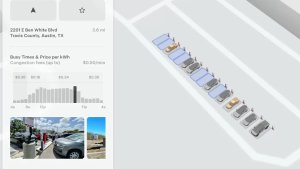
Możesz teraz wybrać wyznaczanie trasy tylko do stacji Supercharger z cennikiem Tesla. Po włączeniu tej opcji funkcja Planowanie trasy będzie unikać lokalizacji, w których Tesla nie ustala cen ładowania i w których nie są akceptowane kredyty na bezpłatny dostęp do usługi Supercharging. To ustawienie wymaga łączności z włączoną opcją Wyznaczanie trasy online.

Aby włączyć, wybierz opcję Sterowanie > Nawigacja > Ustawienia planowania trasy.

Klawiatura

Tesla Klawiatura feature in update 2026.14.6.6
Dostępne globalnie
Modele:
S
3
X
Y
CT

Wybrany język klawiatury ustawia również język używany do dyktowania. Dotknij przycisku klawiatury międzynarodowej, aby zmienić język klawiatury i dyktowania bez zmiany języka poleceń głosowych. Dotknij ikony mikrofonu na klawiaturze, aby dyktować.

Ulepszenia bezpieczeństwa

Tesla Ulepszenia bezpieczeństwa feature in update 2026.14.6.6
Dostępne globalnie
Modele:
S
3
X
Y
CT

Ta aktualizacja zawiera ważne poprawki i ulepszenia funkcji bezpieczeństwa.

Updated Disengagement Menu

Tesla Updated Disengagement Menu feature in update 2026.14.6.6
Credit @SawyerMerritt
Undocumented
Modele:
S
3
X
Y
CT
Undocumented
Niedokumentowane funkcje są dostępne tylko w języku angielskim.

Tesla has updated the intervention menu to include new reasons for disengagement. Parking, possibly the most popular reason for disengaging behind navigation, has now been added as an option. Tesla has also brought back ‘Other.’ There are still only four reasons for intervening, so that means that ‘Preference’ and ‘Discomfort’ have been removed.

Cloud Profiles

Tesla Cloud Profiles feature in update 2026.14.6.6
Dostępne globalnie
Undocumented
Modele:
S
3
X
Y
CT
Undocumented
Niedokumentowane funkcje są dostępne tylko w języku angielskim.

Tesla cloud profiles now feature a new cloud icon to indicate they’re cloud profiles rather than local profiles stored only on the vehicle.

Amber Brake Lights

Tesla Amber Brake Lights feature in update 2026.14.6.6
Undocumented
Modele:
S
3
X
Y
CT
Undocumented
Niedokumentowane funkcje są dostępne tylko w języku angielskim.

This update properly visualizes vehicles with amber brake lights. Some regions require turn signals to be orange/amber. Up until now, the visualization has only displayed turn signals in red, but with this update, Tesla now properly displays amber turn signals for the appropriate vehicles.

The Unreal Engine brings drastic improvements to lighting in the visualization, making the brake lights much more noticeable as they reflect on the ground.

Parental Controls Improvement

Tesla Parental Controls Improvement feature in update 2026.14.6.6
Dostępne globalnie
Performance
Undocumented
Modele:
S
3
X
Y
CT
Performance
Undocumented
Niedokumentowane funkcje są dostępne tylko w języku angielskim.

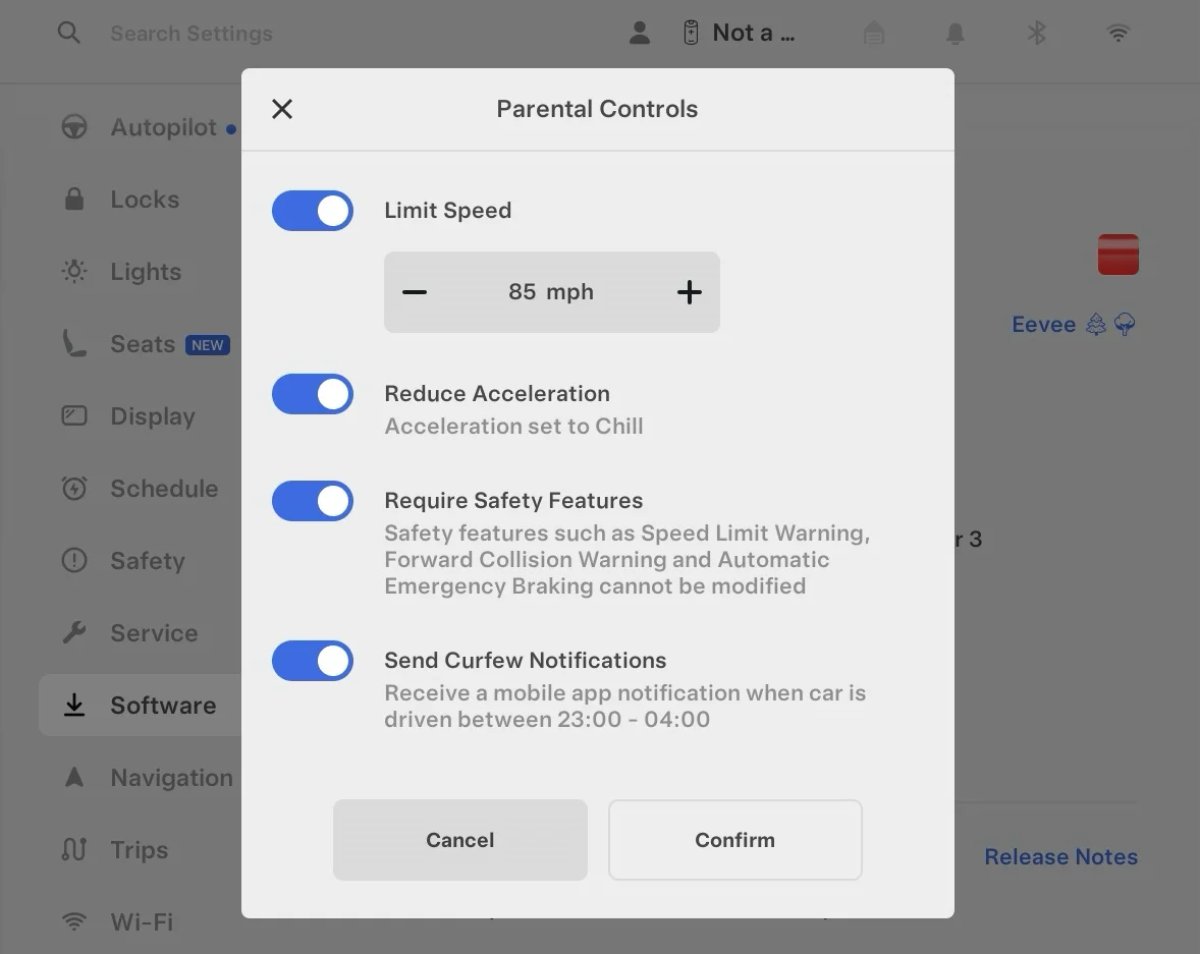
Tesla’s parental controls are designed to keep new drivers safe by limiting access to certain features. Parents can reduce the vehicle’s acceleration, limit the top speed, and prevent safety features from being turned off.

With this update, Tesla is adding another improvement to Parental Controls for Performance vehicles. Track Mode is now restricted when you enable Require Safety Features, preventing teens from manipulating the vehicle's handling, braking, and more.

Require Safety Features prevents these features from being turned off:

  • Automatic Emergency Braking

  • Obstacle-Aware Acceleration

  • Automatic Blind Spot Camera

  • Blind Spot Collision Warning Chime

  • Automatic 911 Call (US only)

  • Allow Mobile Access

  • Park Assist Chimes

It also prevents these settings from being changed:

  • Track Mode is disabled

  • Lane Departure Avoidance is set to Assist

  • Speed Limit Warning set to Chime

    • Speed Limit set to relative

    • Offset set to +5 mph (8 km/h)

  • Forward Collision Warning set to Early

Increased Attention Monitoring Alert

Tesla Increased Attention Monitoring Alert feature in update 2026.14.6.6
Undocumented
Modele:
S
3
X
Y
CT
Undocumented
Niedokumentowane funkcje są dostępne tylko w języku angielskim.

Tesla has added a new camera visibility alert with this update. What’s most interesting about this alert is that Tesla states that the poor camera visibility is resulting in increased attention monitoring.

Grok Turns Off After Inactivity

Tesla Grok Turns Off After Inactivity feature in update 2026.14.6.6
Credit default
Dostępne globalnie
AMD
Undocumented
Modele:
New S
3
New X
Y
CT
AMD
Undocumented
Niedokumentowane funkcje są dostępne tylko w języku angielskim.

With the introduction of the "Hey Grok" wake word, Tesla has changed the way Grok behaves. Previously, once Grok was triggered, it would remain active indefinitely, staying in a constant listening state.

Now, in order to turn off accidental activations and minimize background processing, Grok will automatically dismiss itself after approximately 15 seconds of inactivity.

This behavior applies regardless of whether you triggered the assistant using the new voice wake word or the physical steering wheel button. For those who prefer to close the interface manually, you can still use natural language dismissal commands; simply saying "goodbye" or "talk to you later" will instantly close Grok.

h/t: @Deandawiz

Grok Favorites

Tesla Grok Favorites feature in update 2026.14.6.6
Dostępne globalnie
AMD
Undocumented
Modele:
New S
3
New X
Y
CT
AMD
Undocumented
Niedokumentowane funkcje są dostępne tylko w języku angielskim.

The integrated Grok assistant now has access to your vehicle’s saved favorites. Grok can now "see" and interpret the custom labels you have assigned to your saved locations.

For example, if you have an address saved as "Kim’s parents," you can simply say, "Hey Grok, navigate to “Kim’s parents," and the system will immediately pull the correct address from your list of favorites.

h/t: @NickScheber

Advanced Software Updates

Tesla Advanced Software Updates feature in update 2026.14.6.6
Dostępne globalnie
Undocumented
Modele:
S
3
X
Y
CT
Undocumented
Niedokumentowane funkcje są dostępne tylko w języku angielskim.

Tesla has updated the Software Update Preference setting under the Software menu.

Previously, the software update preference was a toggle between "Standard" and "Advanced." This has now changed into a simpler on/off toggle for "Advanced" updates.

By switching this to "On," you are opting in to receive the latest software releases as soon as they become available for your specific vehicle configuration and region. This could result in receiving updates with minor bugs or receiving updates more often.

If left "Off," your vehicle will wait for a wider release before installing updates.

Re-Order Trip Meters

Tesla Re-Order Trip Meters feature in update 2026.14.6.6
Dostępne globalnie
Undocumented
Modele:
New S
3
New X
Y
CT
Undocumented
Niedokumentowane funkcje są dostępne tylko w języku angielskim.

You can reorder the new trip meters however you’d like. Simply tap and hold one to get it to jiggle, and then move it to a new location.

Additionally, you can also tap on the energy graph in the top-right corner to view a larger, more detailed version of it.

Chromium Browser Updated

Tesla Chromium Browser Updated feature in update 2026.14.6.6
Dostępne globalnie
Undocumented
Modele:
S
3
X
Y
CT
Undocumented
Niedokumentowane funkcje są dostępne tylko w języku angielskim.

Tesla has upgraded the browser in the vehicle. Tesla’s browser is based on the open-source Chromium browser, the same browser that powers Google’s Chrome browser.

The browser was updated to version 140, up from version 136.

This update to Chromium increases compatibility with modern web standards, improves WebGPU performance, and resolves known issues.

Save Recent Dashcam Videos

Tesla Save Recent Dashcam Videos feature in update 2026.14.6.6
Dostępne globalnie
Undocumented
Modele:
New S
3
New X
Y
CT
Undocumented
Niedokumentowane funkcje są dostępne tylko w języku angielskim.

Tesla continues to make it easier to browse and save recent Dashcam clips. In the last update, Tesla made it easier to browse recent, non-saved Dashcam clips by listing them at the top of the Dashcam Viewer.

With this update, they’re now letting you save recent clips that are still on the USB drive, but not saved from being deleted.

Volume Icons

Tesla Volume Icons feature in update 2026.14.6.6
Dostępne globalnie
Undocumented
Modele:
S
3
X
Y
CT
Undocumented
Niedokumentowane funkcje są dostępne tylko w języku angielskim.

When adjusting the volume of an app, such as Spotify, the volume icon will now display the app's icon. While the navigation volume has always had its own icon and an independent volume setting, this change does not add app-dependent volume settings.
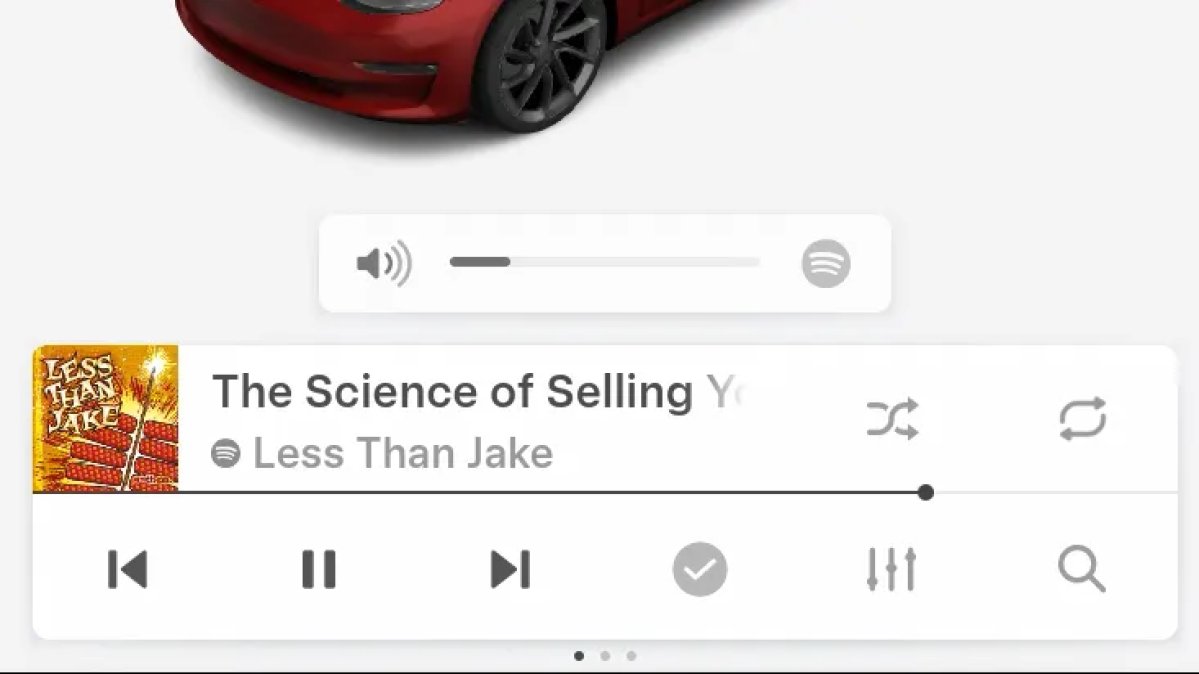
The same volume that’s used for Spotify will be used for YouTube and other apps. This icon simply makes it more obvious which volume is being changed.

Driver Profiles

Tesla Driver Profiles feature in update 2026.14.6.6
Dostępne globalnie
Undocumented
Modele:
S
3
X
Y
CT
Undocumented
Niedokumentowane funkcje są dostępne tylko w języku angielskim.

Driver profiles are now also available in vehicle settings, rather than only in the Profiles icon in the status bar.

Users can navigate to Controls > Profiles to see the settings for all driver profiles.

Grok Settings

Tesla Grok Settings feature in update 2026.14.6.6
Dostępne globalnie
Undocumented
Modele:
S
3
X
Y
CT
Undocumented
Niedokumentowane funkcje są dostępne tylko w języku angielskim.

Grok settings are now also shown in the Audio section under Controls. These are the same settings available in the Grok app, but Tesla appears to be duplicating most of them under controls to make them easier to find.

Euro Semi Visualization

Tesla Euro Semi Visualization feature in update 2026.14.6.6
Dostępne globalnie
Undocumented
Modele:
S
3
X
Y
CT
Undocumented
Niedokumentowane funkcje są dostępne tylko w języku angielskim.

A new Autopilot/FSD visualization has been found in this update. The cab-over-engine style semi trucks often seen in Europe are now appearing in Autopilot visualizations with this update.

New 'All Apps' Icon

Tesla New 'All Apps' Icon feature in update 2026.14.6.6
Dostępne globalnie
Undocumented
Modele:
S
3
X
Y
CT
Undocumented
Niedokumentowane funkcje są dostępne tylko w języku angielskim.

Tesla has updated the ‘All Apps’ icon displayed in the dock. Instead of an ellipsis inside of a rectangle, Tesla has now created a design that resembles iOS folders. The new design shows four apps inside the folder, but it’s not a static image.

The apps shown in the folder will change, presumably to show your most recent or most popular apps that aren't displayed in the dock.

Larger Dock Icons

Tesla Larger Dock Icons feature in update 2026.14.6.6
Credit default
Dostępne globalnie
Undocumented
Modele:
S
3
X
Y
CT
Undocumented
Niedokumentowane funkcje są dostępne tylko w języku angielskim.

To go along with the new ‘App Apps’ icon, Tesla has also increased the size of all icons in the dock. While the dock appears to remain the same size, the icons are now larger.

Animated Badges

Tesla Animated Badges feature in update 2026.14.6.6
Dostępne globalnie
Undocumented
Modele:
S
3
X
Y
CT
Undocumented
Niedokumentowane funkcje są dostępne tylko w języku angielskim.

Tesla models that have special badges, such as the Ludicrous badge on the Performance Model 3, are now animated in Software screen.

Upon navigating to the Software menu, the badge will play a short animation. You can also tap the badge to replay the animation.

New Creations Section

Tesla New Creations Section feature in update 2026.14.6.6
Credit @maxbrco
Dostępne globalnie
AMD
Undocumented
Modele:
New S
3
New X
Y
CT
AMD
Undocumented
Niedokumentowane funkcje są dostępne tylko w języku angielskim.

With the introduction of Photobooth, Tesla added a Photobooth section to the top level of the app that lets you view your saved photo sessions.

With the Spring Update and the update to the Sketchpad app for AMD Ryzen vehicles, Tesla is rebranding the Photobooth section to Creations, and it’ll now house Photobooth photos and sketches created in Sketchpad.

When you go into Creations, you’ll now have two tabs, one for Photobooth and one for Sketchpad, however, the features are similar. You’ll be able to view your saved creations and share them with others.

These creations are saved on your vehicle, not on Tesla’s servers, so when you open this section of the app, your vehicle will wake up and send the requested images.

Note: You’ll need vehicle update 2026.14 and an AMD Ryzen vehicle in order to see this new Creations section in the app.

Service Mode Improvements

Tesla Service Mode Improvements feature in update 2026.14.6.6
Dostępne globalnie
Undocumented
Modele:
S
3
X
Y
CT
Undocumented
Niedokumentowane funkcje są dostępne tylko w języku angielskim.

New Service Mode Plus Authentication QR Code for Independent

Independent repairers can now quickly authenticate for Service Mode Plus by scanning a QR code displayed on the vehicle with a mobile device and logging in with their Toolbox credentials.

Models: All vehicles

Blinking DTC indicator added to the bottom banner

A Diagnostic Trouble Code (DTC) indicator has been added next to the Vehicle Identification Number (VIN) on the bottom Service Mode banner. The indicator is visible when DCs are present on the vehicle.

Models: All vehicles

Noise Recording Panel Updates (Service Mode Plus)

The Noise Recording panel now supports Active Noise Cancellation (ANC microphone recording. When ANC mode is enabled, the panel displays ANC microphone locations and extends the recording duration to 3 minutes.

Models: Model S (2021+), Model X (2021+), Cybertruck

Vehicle Functions Panel Added to Service Mode

The Vehicle Functions panel is now available on Service Mode. It shows an overview of degraded vehicle functions and their associated set alerts. Full functionality including more detailed functions, historical view and advanced controls are still only available on Service Mode Plus.

Models: Model 3, Model Y

New Bluetooth Panel

A new Bluetooth panel is available under Infotainment to support Bluetooth system diagnosis. The panel displays the status of both the main and rear Bluetooth modules (if rear Bluetooth is available on the vehicle), including connection states, signal strength with health indicators, and connected device information.

Models: Model S (2021+), Model 3, Model X (2021+), Model Y, Cybertruck

Statistics Overview

Number of Cars
0
Percent of Fleet
0%
Installs Pending
0
Rollout Yesterday
0
Rollout Today
0

Details

FSD Version

FSD 14.3.3

Release Date

May 17, 2026