


Update 2026.14.6.6 (FSD 14.3.3) - Release Notes

Update Stats

Number of Cars

0

Percent of Fleet

0%

Installs Pending

0

Rollout Yesterday

0

Rollout Today

0

Tesla Videos

Details

FSD Version

FSD 14.3.3

Release Date

May 17, 2026

Recent News

Statistics Overview

Number of Cars
0
Percent of Fleet
0%
Installs Pending
0
Rollout Yesterday
0
Rollout Today
0

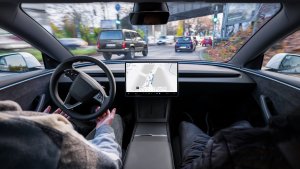
This update adds the Spring Update features to vehicles on FSD v14.3. It also increments the FSD version to 14.3.3 and adds several improvements.

FSD (Supervised) v14.3.3

Tesla FSD (Supervised) v14.3.3 feature in update 2026.14.6.6
HW4
Modellen:
S
3
X
Y
CT
HW4

Full Self-Driving (Supervised) v14.3.3 includes:

- Upgraded the Reinforcement Learning (RL) stage of training the FSD neural network, resulting in improvements in a wide variety of driving scenarios.

- Upgraded the neural network vision encoder, improving understanding in rare and low-visibility scenarios, strengthening 3D geometry understanding, and expanding traffic sign understanding.

- Rewrote the AI compiler and runtime from the ground up with MLIR, resulting in 20% faster reaction time and improving model iteration speed.

- Mitigated unnecessary lane biasing and minor tailgating behaviors.

- Increased decisiveness of parking spot selection and maneuvering.

- Improved parking location pin prediction, now shown on a map with a P icon.

- Enhanced response to emergency vehicles, school buses, right-of-way violators, and other rare vehicles.

- Improved handling of small animals by focusing RL training on harder examples and adding rewards for better proactive safety.

- Improved traffic light handling at complex intersections with compound lights, curved roads, and yellow light stopping — driven by training on hard RL examples sourced from the Tesla fleet.

- Improved handling for rare and unusual objects extending, hanging, or leaning into the vehicle path by sourcing infrequent events from the fleet.

- Improved handling of temporary system degradations by maintaining control and automatically recovering without driver intervention, reducing unnecessary disengagements.

- Help Tesla improve Self-Driving by selecting an intervention reason on the main screen after taking over.

- You can now see distance traveled in FSD (Supervised) without an intervention. The Self-Driving App will also show your longest intervention-free streak.

Upcoming Improvements:

- Expand reasoning to all behaviors beyond destination handling.

- Add pothole avoidance.

- Improve driver monitoring system sensitivity with better eye gaze tracking, eye wear handling, and higher accuracy in variable lighting conditions.

Self-Driving-app

Tesla Self-Driving-app feature in update 2026.14.6.6
HW4
FSD
Modellen:
New S
3
New X
Y
CT
HW4
FSD

Met de nieuwe Self-Driving-app kunt u zich met één tik abonneren, leren hoe u de functie activeert en gebruikt en doorlopende statistieken bekijken.

Ga om te openen naar App Launcher > Self-Driving.

Geschatte tolgelden

Tesla Geschatte tolgelden feature in update 2026.14.6.6
Modellen:
3
Y

Navigatie geeft nu geschatte tolgelden voor elke route weer, inclusief verlaagde tarieven voor elektrische voertuigen waar beschikbaar. Voor deze functie is actuele verkeersinformatie vereist. Ga naar Bediening > Navigatie > Actuele verkeersinformatie om in te schakelen.

Immersive Sound-upgrade

Tesla Immersive Sound-upgrade feature in update 2026.14.6.6
Wereldwijd beschikbaar
Modellen:
New 3
New Y

Premium Immersive Sound maakt gebruik van geavanceerde geluidsextractie om de luisteraar in een gedetailleerde geluidsomgeving te plaatsen in een immersieve ruimte. Deze verbetering werkt met alle streamingbronnen.

Ga naar Instellingen > Audio > Toon > Immersive Sound om aan te passen.

Full Self-Driving (Supervised)

Tesla Full Self-Driving (Supervised) feature in update 2026.14.6.6
HW4
Modellen:
S
3
X
Y
CT
HW4

Onder uw toezicht kunt u met Full Self-Driving (Supervised) vrijwel overal met uw Tesla rijden. Het start de auto vanuit geparkeerde positie, verandert van rijstrook, selecteert splitsingen om uw navigatieroute te volgen, navigeert om andere voertuigen en objecten heen, slaat links en rechts af en parkeert op uw bestemming. U, en iedereen die u toestemming geeft, moet extra voorzichtig zijn en alert blijven. Het maakt uw auto niet zelfrijdend. Word niet te nonchalant.

Full Self-Driving (Supervised) is ingeschakeld voor uw auto. Druk op de knop Self-Driving starten in de gebruikersinterface of druk eenmaal op de rechter scrollwielknop om de functie te gebruiken. U kunt Full Self-Driving (Supervised) uitschakelen in de Autopilot-instellingen.

Display achter

Tesla Display achter feature in update 2026.14.6.6
Wereldwijd beschikbaar
Modellen:
New S
New 3
New X
New Y
CT

Passagiers op de achterbank kunnen nu kaarten bekijken en gebruiken op het display achter terwijl uw Tesla een route navigeert. Tik op het kaartenpictogram op het display achter om mee te kijken.

"Hey Grok"

Tesla
AMD
Modellen:
New S
3
New X
Y
CT
AMD

Start Grok door "Hey Grok" te zeggen. Ga naar Grok > Instellingen om in te schakelen. U kunt ook herinneringen op basis van locatie instellen, zoals "herinner me eraan om melk te halen als ik bijna thuis ben." Zeg "goodbye" om te sluiten.

Huisdiermodus

Tesla Huisdiermodus feature in update 2026.14.6.6
Wereldwijd beschikbaar
Modellen:
S
3
X
Y
CT

Ga naar Bediening > Scherm > Pas Huisdiermodus aan om uw huisdier te kiezen en een naam te geven.

Lakstraat

Tesla Lakstraat feature in update 2026.14.6.6
Wereldwijd beschikbaar
Modellen:
New S
New X

Personaliseer uw Tesla-avatar met ruittinten, aangepaste wraps en kentekenplaten. Gebruik een van de vele vooraf geladen ontwerpen of maak uw eigen ontwerpen en upload deze met een USB-stick om uw auto uniek te maken. Ga naar App Launcher > Toybox > Paint Shop of tik op de verf- of kentekenplaatknop in Bediening > Software.

Visuele updates

Tesla Visuele updates feature in update 2026.14.6.6
Wereldwijd beschikbaar
Modellen:
New 3
New Y

Het middenscherm beschikt nu over afbeeldingen van hogere kwaliteit van uw Tesla en een verbeterde parkeeromgeving.

Ritten

Tesla Ritten feature in update 2026.14.6.6
Wereldwijd beschikbaar
Modellen:
New S
3
New X
Y
CT

Ritten staan nu in de Energy-app, waar u meerdere ritten kunt aanmaken en beheren om het energieverbruik te volgen over verschillende ritten, routes of omstandigheden. Ga naar App Launcher > Energy > Ritten. Voor snelle toegang tot de Rittenkaart veegt u naar links op de Mediakaart.

Blind Spot Warning While Parked

Tesla Blind Spot Warning While Parked feature in update 2026.14.6.6
Wereldwijd beschikbaar
Modellen:
CT

If you attempt to open a door while an approaching object is detected in your blind spot (for example, a bicyclist approaching from behind) the blind spot indicator light flashes, a chime sounds, and your door will not open upon initial button press. Wait a short time and press the button a second time to override the warning.

Tekenblok

Tesla Tekenblok feature in update 2026.14.6.6
Wereldwijd beschikbaar
Modellen:
New S
3
New X
Y
CT

Ontdek de kunstenaar in uzelf met het verbeterde Tekenblok, dat nu stickers en emoji's ondersteunt. Sla uw schetsen op om ze in de mobiele app te bekijken en te delen. Vereist versie 4.55.6 of hoger van de mobiele app.

Waarschuwingsaccentverlichting voor dode hoek

Tesla Waarschuwingsaccentverlichting voor dode hoek feature in update 2026.14.6.6
Wereldwijd beschikbaar
Ambient Lights
Modellen:
New S
New 3
New X
New Y
CT
Ambient Lights

De accentverlichting wordt nu rood wanneer er zich een object in uw dode hoek bevindt en uw richtingaanwijzer is ingeschakeld, of wanneer er een naderend object wordt gedetecteerd terwijl u geparkeerd staat. Om uit te schakelen, ga naar Bediening > Verlichting > Waarschuwingsaccentverlichting voor dodehoek.

Geluidssignaal bij groen licht

Tesla Geluidssignaal bij groen licht feature in update 2026.14.6.6
Modellen:
S
3
X
Y
CT

Er wordt een geluidssignaal afgespeeld wanneer het verkeerslicht waarvoor u wacht op groen springt. Als u achter een ander voertuig wacht, hoort u het geluidssignaal wanneer dat voertuig doorrijdt, tenzij Traffic-Aware Cruise Control of Automatisch sturen is ingeschakeld. Dit geluidssignaal is uitsluitend als melding bedoeld. Ga naar Bediening > Self-Driving > Geluidssignaal groen verkeerslicht om dit in te schakelen.

Live cameraweergave

Tesla Live cameraweergave feature in update 2026.14.6.6
Modellen:
S
3
X
Y
CT

U kunt nu het interieur van uw Tesla controleren terwijl u weg bent. Ga naar Bediening > Veiligheid > Live camerabeelden bekijken via mobiele app om in te schakelen. Live Camera is end-to-end versleuteld en niet toegankelijk voor medewerkers van Tesla. Deze functie vereist Premium Connectivity en versie 4.55.6 of hoger van de mobiele Tesla-app.

Muziek-app wachtrij

Tesla Muziek-app wachtrij feature in update 2026.14.6.6
Wereldwijd beschikbaar
Modellen:
S
3
X
Y
CT

Veeg naar rechts over nummers in Apple Music of Spotify om ze aan de wachtrij toe te voegen. Tik en houd een nummer in Apple Music ingedrukt om het toe te voegen aan Favorieten of eruit te verwijderen. In Spotify veegt u naar links om een nummer aan Nummers die je leuk vindt toe te voegen of te verwijderen.

Automatische software-updates

Tesla Automatische software-updates feature in update 2026.14.6.6
Wereldwijd beschikbaar
Modellen:
New S
3
New X
Y
CT

Uw Tesla kan nu 's nachts automatisch gedownloade software-updates installeren. Indien ingeschakeld, worden updates geïnstalleerd terwijl uw Tesla geparkeerd staat en niet in gebruik is, zodat u altijd over de nieuwste functies en verbeteringen beschikt.

Ga naar Bediening > Software > Updates automatisch installeren om deze functie in te schakelen.

Updates van Dashcam Viewer

Tesla Updates van Dashcam Viewer feature in update 2026.14.6.6
Wereldwijd beschikbaar
AMD
Modellen:
New S
3
New X
Y
CT
AMD

Recente dashcambeelden zijn nu tot 24 uur beschikbaar en u kunt elke clip permanent opslaan op uw Tesla of op uw telefoon via App Launcher > Dashcam Viewer. Ga naar Bediening > Veiligheid en schakel Cameraweergave via mobiele app in om weergave op uw telefoon te activeren. De clips blijven op het voertuig en worden nooit met Tesla gedeeld.

Clips die naar uw telefoon worden gedownload, bevatten nu gegevens, zoals snelheid, stuurwielhoek en de status van Self-Driving. Downloads vereisen Premium Connectivity en versie 4.55.6 of hoger van de mobiele app.

Updates van Dashcam Viewer

Tesla Updates van Dashcam Viewer feature in update 2026.14.6.6
Wereldwijd beschikbaar
Intel
Modellen:
S
3
X
Y
Intel

U kunt elke clip van recente dashcambeelden permanent opslaan op uw Tesla of op uw telefoon via App Launcher > Dashcam Viewer. Ga naar Bediening > Veiligheid en schakel Cameraweergave via mobiele app in om weergave op uw telefoon te activeren. De clips blijven op het voertuig en worden nooit met Tesla gedeeld.

Clips die naar uw telefoon worden gedownload, bevatten nu gegevens, zoals snelheid, stuurwielhoek en de status van Self-Driving. Downloads vereisen Premium Connectivity en versie 4.55.6 of hoger van de mobiele app.

Verbeteringen aan weerkaarten

Tesla Verbeteringen aan weerkaarten feature in update 2026.14.6.6
Wereldwijd beschikbaar
Modellen:
New S
3
New X
Y
CT

Weerkaarten tonen nu sneeuw en regen met verbeterde kleuren, waardoor de verschillende soorten neerslag beter van elkaar te onderscheiden zijn. U kunt ook de weergegevens van het afgelopen uur bekijken om te zien hoe de omstandigheden langs uw route zijn veranderd. Voor deze functie is Premium Connectivity vereist. Om te bekijken, tikt u op het weerpictogram op de kaart.

Supercharger-prijsfilter

Tesla Supercharger-prijsfilter feature in update 2026.14.6.6
Modellen:
S
3
X
Y
CT

U kunt nu kiezen om alleen naar Superchargers met Tesla-tarieven te worden geleid. Wanneer ingeschakeld, vermijdt Reisplanner locaties waar Tesla geen oplaadprijzen bepaalt of gratis Supercharging-tegoeden accepteert. Voor deze instelling is een verbinding vereist en moet Online routeplanning zijn ingeschakeld.

Om dit in te schakelen, gaat u naar Bediening > Navigatie > Instellingen voor Reisplanner.

Toetsenbord

Tesla Toetsenbord feature in update 2026.14.6.6
Wereldwijd beschikbaar
Modellen:
S
3
X
Y
CT

De door u geselecteerde toetsenbordtaal bepaalt ook de taal voor dicteren. Tik op de knop voor het internationale toetsenbord om de toetsenbord- en dicteertaal te wijzigen, zonder de taal voor spraakopdrachten te wijzigen. Tik op het microfoonpictogram op het toetsenbord om te dicteren.

Verbeteringen van beveiliging

Tesla Verbeteringen van beveiliging feature in update 2026.14.6.6
Wereldwijd beschikbaar
Modellen:
S
3
X
Y
CT

Deze update bevat belangrijke beveiligingsoplossingen en -verbeteringen.

Updated Disengagement Menu

Tesla Updated Disengagement Menu feature in update 2026.14.6.6
Credit @SawyerMerritt
Undocumented
Modellen:
S
3
X
Y
CT
Undocumented
Ongedocumenteerde functies zijn alleen beschikbaar in het Engels.

Tesla has updated the intervention menu to include new reasons for disengagement. Parking, possibly the most popular reason for disengaging behind navigation, has now been added as an option. Tesla has also brought back ‘Other.’ There are still only four reasons for intervening, so that means that ‘Preference’ and ‘Discomfort’ have been removed.

Cloud Profiles

Tesla Cloud Profiles feature in update 2026.14.6.6
Wereldwijd beschikbaar
Undocumented
Modellen:
S
3
X
Y
CT
Undocumented
Ongedocumenteerde functies zijn alleen beschikbaar in het Engels.

Tesla cloud profiles now feature a new cloud icon to indicate they’re cloud profiles rather than local profiles stored only on the vehicle.

Amber Brake Lights

Tesla Amber Brake Lights feature in update 2026.14.6.6
Undocumented
Modellen:
S
3
X
Y
CT
Undocumented
Ongedocumenteerde functies zijn alleen beschikbaar in het Engels.

This update properly visualizes vehicles with amber brake lights. Some regions require turn signals to be orange/amber. Up until now, the visualization has only displayed turn signals in red, but with this update, Tesla now properly displays amber turn signals for the appropriate vehicles.

The Unreal Engine brings drastic improvements to lighting in the visualization, making the brake lights much more noticeable as they reflect on the ground.

Parental Controls Improvement

Tesla Parental Controls Improvement feature in update 2026.14.6.6
Wereldwijd beschikbaar
Performance
Undocumented
Modellen:
S
3
X
Y
CT
Performance
Undocumented
Ongedocumenteerde functies zijn alleen beschikbaar in het Engels.

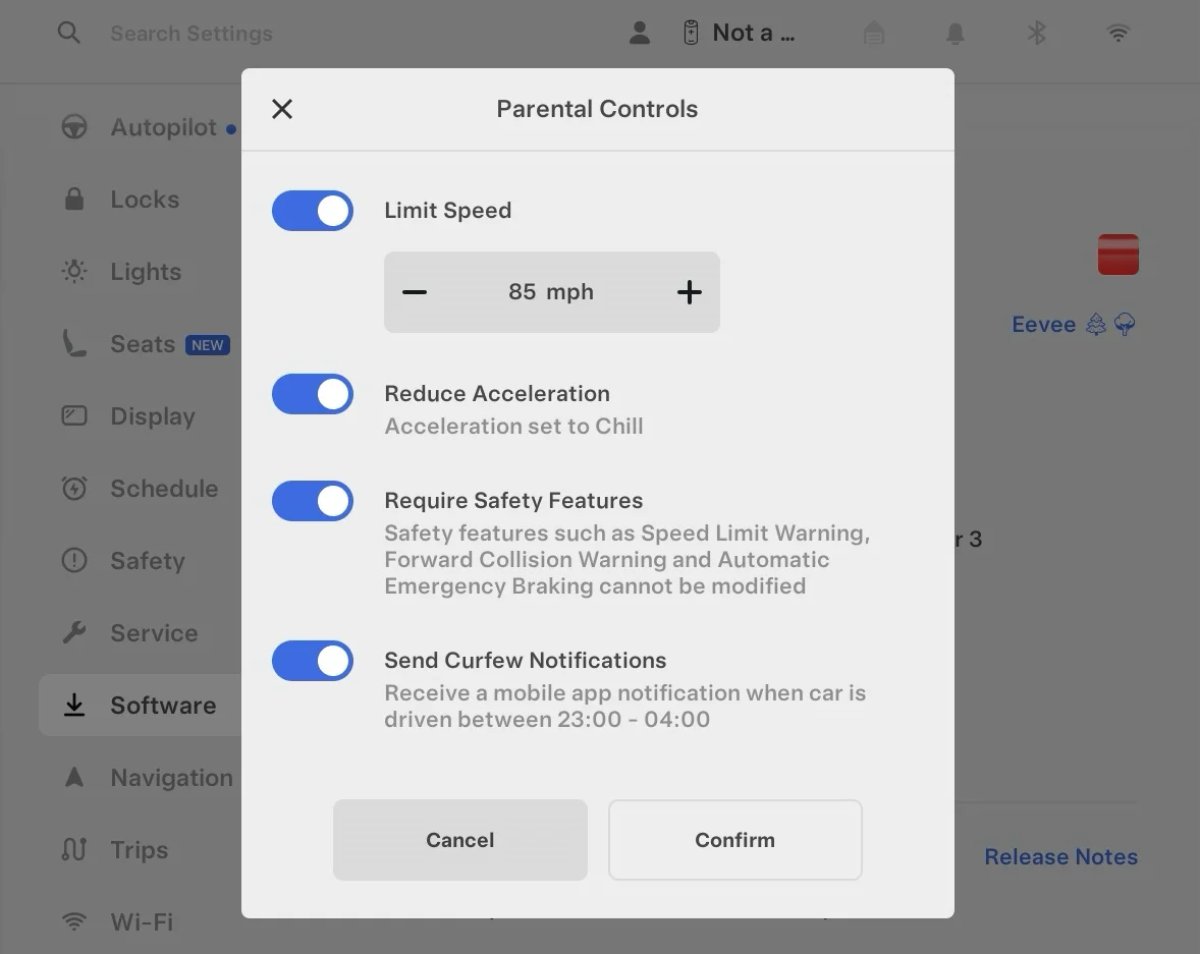
Tesla’s parental controls are designed to keep new drivers safe by limiting access to certain features. Parents can reduce the vehicle’s acceleration, limit the top speed, and prevent safety features from being turned off.

With this update, Tesla is adding another improvement to Parental Controls for Performance vehicles. Track Mode is now restricted when you enable Require Safety Features, preventing teens from manipulating the vehicle's handling, braking, and more.

Require Safety Features prevents these features from being turned off:

  • Automatic Emergency Braking

  • Obstacle-Aware Acceleration

  • Automatic Blind Spot Camera

  • Blind Spot Collision Warning Chime

  • Automatic 911 Call (US only)

  • Allow Mobile Access

  • Park Assist Chimes

It also prevents these settings from being changed:

  • Track Mode is disabled

  • Lane Departure Avoidance is set to Assist

  • Speed Limit Warning set to Chime

    • Speed Limit set to relative

    • Offset set to +5 mph (8 km/h)

  • Forward Collision Warning set to Early

Increased Attention Monitoring Alert

Tesla Increased Attention Monitoring Alert feature in update 2026.14.6.6
Undocumented
Modellen:
S
3
X
Y
CT
Undocumented
Ongedocumenteerde functies zijn alleen beschikbaar in het Engels.

Tesla has added a new camera visibility alert with this update. What’s most interesting about this alert is that Tesla states that the poor camera visibility is resulting in increased attention monitoring.

Grok Turns Off After Inactivity

Tesla Grok Turns Off After Inactivity feature in update 2026.14.6.6
Credit default
Wereldwijd beschikbaar
AMD
Undocumented
Modellen:
New S
3
New X
Y
CT
AMD
Undocumented
Ongedocumenteerde functies zijn alleen beschikbaar in het Engels.

With the introduction of the "Hey Grok" wake word, Tesla has changed the way Grok behaves. Previously, once Grok was triggered, it would remain active indefinitely, staying in a constant listening state.

Now, in order to turn off accidental activations and minimize background processing, Grok will automatically dismiss itself after approximately 15 seconds of inactivity.

This behavior applies regardless of whether you triggered the assistant using the new voice wake word or the physical steering wheel button. For those who prefer to close the interface manually, you can still use natural language dismissal commands; simply saying "goodbye" or "talk to you later" will instantly close Grok.

h/t: @Deandawiz

Grok Favorites

Tesla Grok Favorites feature in update 2026.14.6.6
Wereldwijd beschikbaar
AMD
Undocumented
Modellen:
New S
3
New X
Y
CT
AMD
Undocumented
Ongedocumenteerde functies zijn alleen beschikbaar in het Engels.

The integrated Grok assistant now has access to your vehicle’s saved favorites. Grok can now "see" and interpret the custom labels you have assigned to your saved locations.

For example, if you have an address saved as "Kim’s parents," you can simply say, "Hey Grok, navigate to “Kim’s parents," and the system will immediately pull the correct address from your list of favorites.

h/t: @NickScheber

Advanced Software Updates

Tesla Advanced Software Updates feature in update 2026.14.6.6
Wereldwijd beschikbaar
Undocumented
Modellen:
S
3
X
Y
CT
Undocumented
Ongedocumenteerde functies zijn alleen beschikbaar in het Engels.

Tesla has updated the Software Update Preference setting under the Software menu.

Previously, the software update preference was a toggle between "Standard" and "Advanced." This has now changed into a simpler on/off toggle for "Advanced" updates.

By switching this to "On," you are opting in to receive the latest software releases as soon as they become available for your specific vehicle configuration and region. This could result in receiving updates with minor bugs or receiving updates more often.

If left "Off," your vehicle will wait for a wider release before installing updates.

Re-Order Trip Meters

Tesla Re-Order Trip Meters feature in update 2026.14.6.6
Wereldwijd beschikbaar
Undocumented
Modellen:
New S
3
New X
Y
CT
Undocumented
Ongedocumenteerde functies zijn alleen beschikbaar in het Engels.

You can reorder the new trip meters however you’d like. Simply tap and hold one to get it to jiggle, and then move it to a new location.

Additionally, you can also tap on the energy graph in the top-right corner to view a larger, more detailed version of it.

Chromium Browser Updated

Tesla Chromium Browser Updated feature in update 2026.14.6.6
Wereldwijd beschikbaar
Undocumented
Modellen:
S
3
X
Y
CT
Undocumented
Ongedocumenteerde functies zijn alleen beschikbaar in het Engels.

Tesla has upgraded the browser in the vehicle. Tesla’s browser is based on the open-source Chromium browser, the same browser that powers Google’s Chrome browser.

The browser was updated to version 140, up from version 136.

This update to Chromium increases compatibility with modern web standards, improves WebGPU performance, and resolves known issues.

Save Recent Dashcam Videos

Tesla Save Recent Dashcam Videos feature in update 2026.14.6.6
Wereldwijd beschikbaar
Undocumented
Modellen:
New S
3
New X
Y
CT
Undocumented
Ongedocumenteerde functies zijn alleen beschikbaar in het Engels.

Tesla continues to make it easier to browse and save recent Dashcam clips. In the last update, Tesla made it easier to browse recent, non-saved Dashcam clips by listing them at the top of the Dashcam Viewer.

With this update, they’re now letting you save recent clips that are still on the USB drive, but not saved from being deleted.

Volume Icons

Tesla Volume Icons feature in update 2026.14.6.6
Wereldwijd beschikbaar
Undocumented
Modellen:
S
3
X
Y
CT
Undocumented
Ongedocumenteerde functies zijn alleen beschikbaar in het Engels.

When adjusting the volume of an app, such as Spotify, the volume icon will now display the app's icon. While the navigation volume has always had its own icon and an independent volume setting, this change does not add app-dependent volume settings.
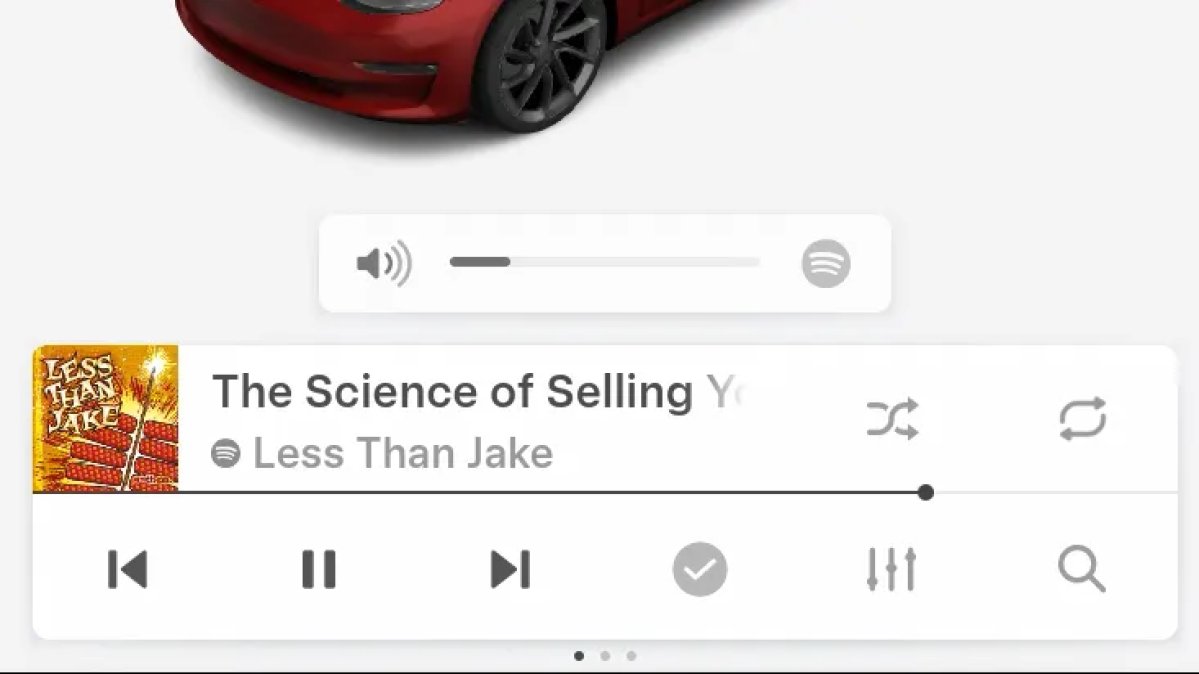
The same volume that’s used for Spotify will be used for YouTube and other apps. This icon simply makes it more obvious which volume is being changed.

Driver Profiles

Tesla Driver Profiles feature in update 2026.14.6.6
Wereldwijd beschikbaar
Undocumented
Modellen:
S
3
X
Y
CT
Undocumented
Ongedocumenteerde functies zijn alleen beschikbaar in het Engels.

Driver profiles are now also available in vehicle settings, rather than only in the Profiles icon in the status bar.

Users can navigate to Controls > Profiles to see the settings for all driver profiles.

Grok Settings

Tesla Grok Settings feature in update 2026.14.6.6
Wereldwijd beschikbaar
Undocumented
Modellen:
S
3
X
Y
CT
Undocumented
Ongedocumenteerde functies zijn alleen beschikbaar in het Engels.

Grok settings are now also shown in the Audio section under Controls. These are the same settings available in the Grok app, but Tesla appears to be duplicating most of them under controls to make them easier to find.

Euro Semi Visualization

Tesla Euro Semi Visualization feature in update 2026.14.6.6
Wereldwijd beschikbaar
Undocumented
Modellen:
S
3
X
Y
CT
Undocumented
Ongedocumenteerde functies zijn alleen beschikbaar in het Engels.

A new Autopilot/FSD visualization has been found in this update. The cab-over-engine style semi trucks often seen in Europe are now appearing in Autopilot visualizations with this update.

New 'All Apps' Icon

Tesla New 'All Apps' Icon feature in update 2026.14.6.6
Wereldwijd beschikbaar
Undocumented
Modellen:
S
3
X
Y
CT
Undocumented
Ongedocumenteerde functies zijn alleen beschikbaar in het Engels.

Tesla has updated the ‘All Apps’ icon displayed in the dock. Instead of an ellipsis inside of a rectangle, Tesla has now created a design that resembles iOS folders. The new design shows four apps inside the folder, but it’s not a static image.

The apps shown in the folder will change, presumably to show your most recent or most popular apps that aren't displayed in the dock.

Larger Dock Icons

Tesla Larger Dock Icons feature in update 2026.14.6.6
Credit default
Wereldwijd beschikbaar
Undocumented
Modellen:
S
3
X
Y
CT
Undocumented
Ongedocumenteerde functies zijn alleen beschikbaar in het Engels.

To go along with the new ‘App Apps’ icon, Tesla has also increased the size of all icons in the dock. While the dock appears to remain the same size, the icons are now larger.

Animated Badges

Tesla Animated Badges feature in update 2026.14.6.6
Wereldwijd beschikbaar
Undocumented
Modellen:
S
3
X
Y
CT
Undocumented
Ongedocumenteerde functies zijn alleen beschikbaar in het Engels.

Tesla models that have special badges, such as the Ludicrous badge on the Performance Model 3, are now animated in Software screen.

Upon navigating to the Software menu, the badge will play a short animation. You can also tap the badge to replay the animation.

New Creations Section

Tesla New Creations Section feature in update 2026.14.6.6
Credit @maxbrco
Wereldwijd beschikbaar
AMD
Undocumented
Modellen:
New S
3
New X
Y
CT
AMD
Undocumented
Ongedocumenteerde functies zijn alleen beschikbaar in het Engels.

With the introduction of Photobooth, Tesla added a Photobooth section to the top level of the app that lets you view your saved photo sessions.

With the Spring Update and the update to the Sketchpad app for AMD Ryzen vehicles, Tesla is rebranding the Photobooth section to Creations, and it’ll now house Photobooth photos and sketches created in Sketchpad.

When you go into Creations, you’ll now have two tabs, one for Photobooth and one for Sketchpad, however, the features are similar. You’ll be able to view your saved creations and share them with others.

These creations are saved on your vehicle, not on Tesla’s servers, so when you open this section of the app, your vehicle will wake up and send the requested images.

Note: You’ll need vehicle update 2026.14 and an AMD Ryzen vehicle in order to see this new Creations section in the app.

Service Mode Improvements

Tesla Service Mode Improvements feature in update 2026.14.6.6
Wereldwijd beschikbaar
Undocumented
Modellen:
S
3
X
Y
CT
Undocumented
Ongedocumenteerde functies zijn alleen beschikbaar in het Engels.

New Service Mode Plus Authentication QR Code for Independent

Independent repairers can now quickly authenticate for Service Mode Plus by scanning a QR code displayed on the vehicle with a mobile device and logging in with their Toolbox credentials.

Models: All vehicles

Blinking DTC indicator added to the bottom banner

A Diagnostic Trouble Code (DTC) indicator has been added next to the Vehicle Identification Number (VIN) on the bottom Service Mode banner. The indicator is visible when DCs are present on the vehicle.

Models: All vehicles

Noise Recording Panel Updates (Service Mode Plus)

The Noise Recording panel now supports Active Noise Cancellation (ANC microphone recording. When ANC mode is enabled, the panel displays ANC microphone locations and extends the recording duration to 3 minutes.

Models: Model S (2021+), Model X (2021+), Cybertruck

Vehicle Functions Panel Added to Service Mode

The Vehicle Functions panel is now available on Service Mode. It shows an overview of degraded vehicle functions and their associated set alerts. Full functionality including more detailed functions, historical view and advanced controls are still only available on Service Mode Plus.

Models: Model 3, Model Y

New Bluetooth Panel

A new Bluetooth panel is available under Infotainment to support Bluetooth system diagnosis. The panel displays the status of both the main and rear Bluetooth modules (if rear Bluetooth is available on the vehicle), including connection states, signal strength with health indicators, and connected device information.

Models: Model S (2021+), Model 3, Model X (2021+), Model Y, Cybertruck

Statistics Overview

Number of Cars
0
Percent of Fleet
0%
Installs Pending
0
Rollout Yesterday
0
Rollout Today
0

Details

FSD Version

FSD 14.3.3

Release Date

May 17, 2026