Tesla’s Halloween Mode turns your car into a rolling haunted house, and it’s packed with more spooky details than you might expect. It first arrived with software update 2026.38.3 and lives in the Toybox alongside Santa Mode, so you can turn it on any time of year.
We covered the basics when it launched. Here’s a closer look at every feature, with help from a detailed walkthrough by YouTuber Sergiu Mogan.
How to Turn On Halloween Mode
You’ll find Halloween Mode in the Toybox, where the feature reads “Spread holiday fear year round with Halloween Mode.” It has two toggles: Ghost Costume and Trick or Treat.
Turn it on, and the screen plays a short intro with a “Happy Halloween” title over a full moon before switching to the spooky theme. The cabin’s ambient lighting also turns orange.
Halloween Visualizations
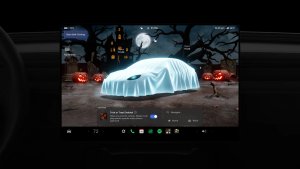
Ghost Costume drapes a glowing white sheet with eye holes over your car’s avatar. In Park, you get a custom fullscreen visualization where the background becomes a graveyard with a haunted house, a full moon, withered trees, jack-o’-lanterns, and a zombie hand clawing out of the dirt. You can tap items in the background to interact with them, and opening a door makes the ghost car open its door too.
Cybertruck gets its own parked scene, with the sheet stretched over its angular shape amidst a similar background and Halloween elements.
The theme carries over to driving. The sheet ripples as you drive, and it moves more at higher speeds. Other cars glow green as if infected with ectoplasm, pedestrians become skeletons, and recycling bins turn orange with jack-o’-lantern faces on them.
Traffic lights become colored pumpkins, traffic cones turn green, and the FSD (Supervised) and Autopilot path and lane markers turn purple.

Trick or Treat Mode
Trick or Treat plays spooky sounds through the exterior speaker and flickers the interior and exterior lights when visitors approach your parked car. It keeps the cameras awake and uses extra energy, and it turns off automatically when you shift out of Park or enter Low Power Mode.
You can’t use Trick or Treat and Sentry Mode at the same time, though. Tesla notes that “Sentry Mode, security alarm and walk-away lock will be disabled” while the Trick or Treat toggle is enabled.
Halloween Wraps
Halloween Mode adds four new themed wraps:
An orange pumpkin finish with carved faces, a stem on the hood, bats and cobwebs.
A black base with white ghosts and bats.
A candy-covered “Trick or Treat” design with jack-o’-lanterns.
A dark textured finish with red streaks.


Halloween Lock Sound and Owl Turn Signals

A new Halloween lock sound is available under Boombox’s Lock Sound menu, and we have more Halloween lock sounds if you want options. Your turn signals also get an owl hoot layered over the usual click.
Halloween Fright Show
Halloween Mode lets you schedule a haunting light show, aptly called a Fright Show. In Mogan’s video, a Model 3 flickers its external lights, opens and closes its trunk, and cycles its cabin lighting to the music. The more Teslas you can get to join in on the action, the better the Fright Show looks, as showcased by @OwenSparks on X.
Get all the neighborhood Tesla's together for a light show this Halloween 👻 https://t.co/OhYkwR65lu pic.twitter.com/KMClvrhf6b
— Owen Sparks (@OwenSparks) October 7, 2026
Halloween Photobooth
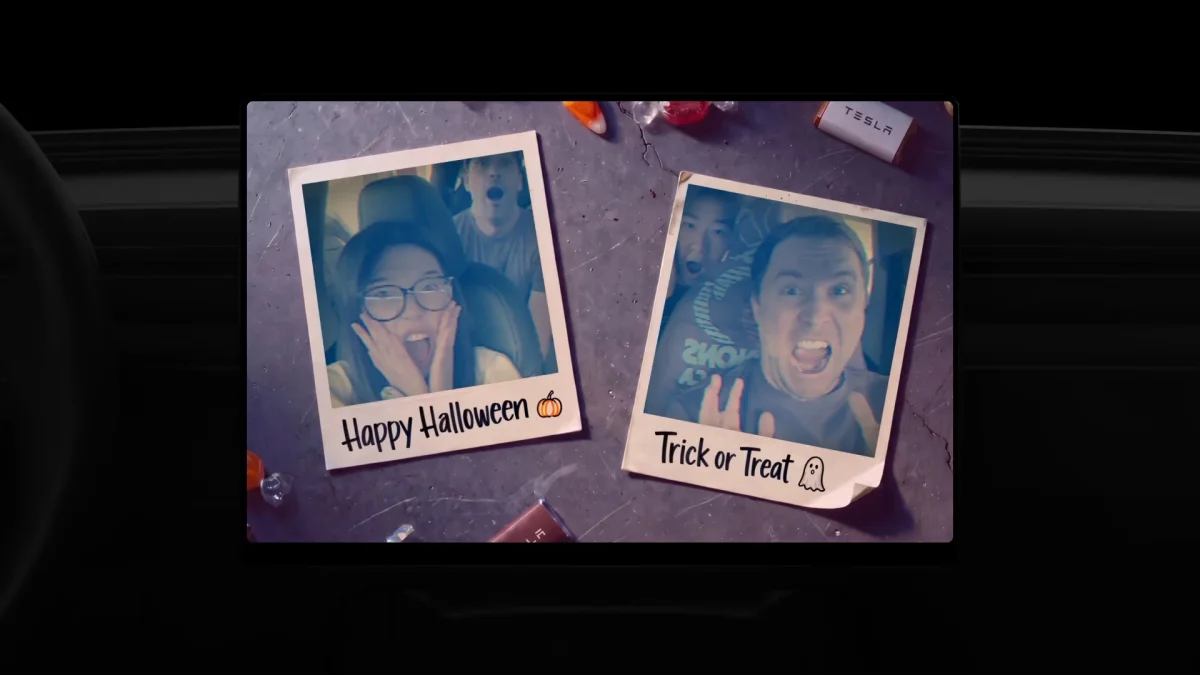
Photobooth frames your shots as Polaroid-style prints captioned “Happy Halloween” and “Trick or Treat,” with spooky new stickers to add.
Halloween Boombox
Speak through the Tesla app’s Boombox, and your car repeats it out loud in a new scary voice instead of the usual robotic one. Check out Halloween Mode in action in the video below:
Halloween Mode works in its entirety on vehicles with AMD-powered infotainment units. Intel-based cars should get wraps and lock sounds but not the parked scene or Photobooth extras. With Santa Mode and Halloween Mode both in the Toybox, Tesla could add more holiday themes down the road.