



Update 2026.14.6.6 (FSD 14.3.3) - Release Notes

Update Stats

Number of Cars

0

Percent of Fleet

0%

Installs Pending

0

Rollout Yesterday

0

Rollout Today

0

Tesla Videos

Details

FSD Version

FSD 14.3.3

Release Date

May 17, 2026

Recent News

Statistics Overview

Number of Cars
0
Percent of Fleet
0%
Installs Pending
0
Rollout Yesterday
0
Rollout Today
0

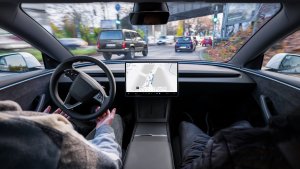
This update adds the Spring Update features to vehicles on FSD v14.3. It also increments the FSD version to 14.3.3 and adds several improvements.

풀 셀프 드라이빙(감독형) v14.3.3

Tesla 풀 셀프 드라이빙(감독형) v14.3.3 feature in update 2026.14.6.6
HW4
모델:
S
3
X
Y
CT
HW4

풀 셀프 드라이빙(감독형) v14.3.3 포함 기능:

- 풀 셀프 드라이빙 신경망 학습의 강화 학습(RL) 단계를 업그레이드하여 다양한 주행 시나리오에서 성능을 개선했습니다.

- 신경망 비전 인코더를 업그레이드하여 드물게 발생하는 상황 및 시야가 제한된 상황에 대한 인식 성능을 개선하고, 3D 기하 구조에 대한 이해를 강화했으며, 교통 표지 인식 범위를 확장했습니다.

- AI 컴파일러와 런타임을 MLIR 기반으로 전면 재작성하여 반응 속도를 20% 높이고 모델 반복 속도를 개선했습니다.

- 불필요한 차선 편향 동작과 경미한 근접 주행 성향을 완화했습니다.

- 주차 공간 선택 및 조향 동작의 판단 능력을 향상시켰습니다.

- 주차 위치 핀 표시 정확도를 개선했으며, 이제 지도에 P 아이콘으로 표시됩니다.

- 긴급 차량, 스쿨버스, 통행 우선권 등을 위반하는 차량 및 기타 드물게 마주치는 차량에 대한 대응 성능을 강화했습니다.

- 더 어려운 사례에 강화 학습(RL)을 집중하고 향상된 선제적 안전 확보에 대한 보상 메커니즘을 추가하여 소형 동물에 대한 대응 성능을 개선했습니다.

- Tesla 차량 플릿에서 수집한 어려운 강화 학습(RL) 사례를 기반으로, 복합 신호등이 있는 복잡한 교차로, 곡선 도로 및 황색 신호 정지 상황에서의 신호등 처리 성능을 개선했습니다.

- 차량 진행 경로로 돌출되거나 매달리거나 기울어져 들어오는 드물고 특이한 물체에 대한 대응 성능을 개선했으며, 이를 위해 Tesla 차량 플릿에서 발생 빈도가 낮은 사례를 수집해 반영했습니다.

- 운전자 개입 없이도 제어를 유지하고 자동으로 복구하도록 하여 일시적인 시스템 성능 저하 상황에 대한 대응을 개선했으며, 불필요한 해제를 줄였습니다.

- 인계 후 메인 화면에서 개입 이유를 선택하여 Tesla의 자율주행 개선에 도움을 주세요.

- 이제 개입 없이 풀 셀프 드라이빙(감독형)으로 주행한 거리를 확인할 수 있습니다. 어시스티드 드라이빙 앱은 최장 무개입 연속 기록도 표시합니다.

향후 개선 사항:

- 목적지 처리 외의 모든 동작으로 추론 범위를 확장합니다.

- 포트홀 회피 기능을 추가합니다.

- 시선 추적 성능 향상, 안경 등 착용 상태 처리 개선, 가변적인 조명 환경에서의 정확도 향상을 통해 운전자 모니터링 시스템의 민감도를 개선합니다.

어시스티드 드라이빙 앱

Tesla 어시스티드 드라이빙 앱 feature in update 2026.14.6.6
HW4
FSD
모델:
New S
3
New X
Y
CT
HW4
FSD

새로운 어시스티드 드라이빙 앱에서 한 번의 탭으로 구독하고, 기능의 활성화 및 사용 방법을 확인하며, 현재 통계를 볼 수 있습니다.

열려면 앱 시작 관리자 > 어시스티드 드라이빙으로 이동합니다.

예상 통행료

Tesla 예상 통행료 feature in update 2026.14.6.6
모델:
3
Y

이제 내비게이션에서 각 경로별 예상 통행료를 표시하며, 적용 가능한 경우 전기차 할인 요금도 함께 표시합니다. 이 기능을 사용하려면 온라인 경로 탐색이 필요합니다. 활성화하려면 컨트롤 > 내비게이션 > 온라인 경로 탐색으로 이동합니다.

몰입형 사운드 업그레이드

Tesla 몰입형 사운드 업그레이드 feature in update 2026.14.6.6
전 세계에서 사용 가능
모델:
New 3
New Y

프리미엄 몰입형 사운드는 고급 사운드 추출 기술을 사용해 몰입형 공간 내 정교한 사운드스테이지의 정면에 있는 듯한 청취 경험을 제공합니다. 이 향상된 기능은 모든 스트리밍 소스에서 사용할 수 있습니다.

조정하려면 설정 > 오디오 > 이퀄라이저 > 몰입형 사운드로 이동합니다.

풀 셀프-드라이빙(수퍼바이즈드)

Tesla 풀 셀프-드라이빙(수퍼바이즈드) feature in update 2026.14.6.6
HW4
모델:
S
3
X
Y
CT
HW4

운전자의 감독 하에 풀 셀프 드라이빙 구현 기능(수퍼바이즈드)으로 Tesla를 거의 모든 곳에서 운전할 수 있습니다. 주차된 위치에서 출발하여 차선변경, 내비게이션 경로상의 분기 선택, 다른 차량 및 장애물 주변 운행, 좌우회전 및 목적지 주차 등 작업을 수행합니다. 사용자와 사용자가 허가한 모든 사람은 주의 깊은 관찰과 함께 추가적인 주의를 기울여 사용해야 합니다. 이 기능으로 차량이 자율주행 차량이 되는 것은 아닙니다. 방심하지 마세요.

풀 셀프 드라이빙 구현 기능(수퍼바이즈드)이 차량에서 활성화되었습니다. 이 기능을 사용하려면 UI의 자율주행 시작하기 버튼을 누르거나 오른쪽 스크롤 휠 버튼을 한 번 누르세요. 오토파일럿 설정에서 풀 셀프 드라이빙 구현 기능(수퍼바이즈드)을 비활성화할 수 있습니다.

후면 디스플레이

Tesla 후면 디스플레이 feature in update 2026.14.6.6
전 세계에서 사용 가능
모델:
New S
New 3
New X
New Y
CT

이제 Tesla 차량이 경로를 안내하는 동안 뒷좌석 탑승자는 후면 디스플레이에서 지도를 보고 조작할 수 있습니다. 후면 디스플레이에서 지도 아이콘을 탭하면 경로 안내를 함께 확인할 수 있습니다.

"Hey Grok"

Tesla
AMD
모델:
New S
3
New X
Y
CT
AMD

"Hey Grok"이라고 말해 Grok을 실행할 수 있습니다. 활성화하려면 Grok > 설정으로 이동합니다. "집 근처에 가면 우유 사라고 알려줘"와 같이 말해 위치 기반 미리 알림을 설정할 수도 있습니다. 해제하려면 "goodbye"라고 말하세요.

펫 모드

Tesla 펫 모드 feature in update 2026.14.6.6
전 세계에서 사용 가능
모델:
S
3
X
Y
CT

컨트롤 > 디스플레이 > 펫 모드 사용자 지정으로 이동하여 반려동물을 선택하고 이름을 지정할 수 있습니다.

도장 작업장

Tesla 도장 작업장 feature in update 2026.14.6.6
전 세계에서 사용 가능
모델:
New S
New X

창문 틴팅, 커스텀 랩핑 및 번호판으로 Tesla 아바타를 맞춤 설정할 수 있습니다. 다양한 기본 제공 디자인을 사용하거나, USB 플래시 드라이브로 사용자 지정 디자인을 제작해 업로드하여 차량을 개성 있게 설정할 수 있습니다. 앱 시작 관리자 > 토이박스 > 도장 정비소로 이동하거나 컨트롤 > 소프트웨어에서 도장 또는 번호판 버튼을 탭하세요.

시각적 업데이트

Tesla 시각적 업데이트 feature in update 2026.14.6.6
전 세계에서 사용 가능
모델:
New 3
New Y

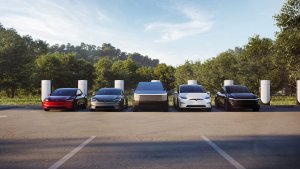
이제 센터 디스플레이에서 더 높은 품질의 Tesla 이미지와 향상된 주차 장면 환경을 제공합니다.

트립

Tesla 트립 feature in update 2026.14.6.6
전 세계에서 사용 가능
모델:
New S
3
New X
Y
CT

이제 트립은 에너지 앱에서 확인할 수 있으며, 여러 트립을 생성하고 관리해 다양한 주행, 경로 또는 조건에서의 에너지 사용량을 추적할 수 있습니다. 앱 시작 관리자 > 에너지 > 트립으로 이동합니다. 트립 카드에 빠르게 액세스하려면 미디어 카드에서 왼쪽으로 스와이프하세요.

주차 중 사각 지대 경고등

Tesla 주차 중 사각 지대 경고등 feature in update 2026.14.6.6
전 세계에서 사용 가능
모델:
CT

사각지대에서 접근 중인 물체가 감지된 상태(예: 뒤에서 접근 중인 자전거가 있는 경우)로 도어를 열려고 시도하면, 사각지대 경고등이 점멸하고, 경고음이 울리며, 처음 버튼을 눌렀을 때는 도어가 열리지 않습니다. 잠시 기다린 다음, 버튼을 다시 한번 눌러 경고를 무시하세요.

스케치패드

Tesla 스케치패드 feature in update 2026.14.6.6
전 세계에서 사용 가능
모델:
New S
3
New X
Y
CT

이제 스티커와 이모지를 지원하도록 향상된 스케치패드로 창의력을 마음껏 발휘할 수 있습니다. 스케치를 저장하면 모바일 앱에서 액세스하고 공유할 수 있습니다. 이 기능을 사용하려면 모바일 앱 버전 4.55.6 이상이 필요합니다.

사각 지대 경고 엠비언트 라이트

Tesla 사각 지대 경고 엠비언트 라이트 feature in update 2026.14.6.6
전 세계에서 사용 가능
Ambient Lights
모델:
New S
New 3
New X
New Y
CT
Ambient Lights

사각지대에 물체가 있고 방향지시등이 작동 중이거나, 주차 상태에서 접근하는 물체가 감지되면 엠비언트 라이트가 적색으로 점등됩니다. 비활성화하려면 컨트롤 > 라이트 > 사각 지대 경고 엠비언트 라이트로 이동합니다.

녹색 신호등 알림

Tesla 녹색 신호등 알림 feature in update 2026.14.6.6
모델:
S
3
X
Y
CT

대기 중인 신호등이 녹색으로 바뀌면 신호음이 재생됩니다. 다른 차량의 뒤에서 대기 중인 경우에는 트래픽 어웨어 크루즈 컨트롤 또는 오토스티어가 켜져 있지 않을 때 앞차가 출발하면 신호음이 재생됩니다. 이 신호음은 단순 안내용입니다. 활성화하려면 컨트롤 > 어시스티드 드라이빙 > 녹색 신호등 경고음으로 이동합니다.

라이브 카메라 보기

Tesla 라이브 카메라 보기 feature in update 2026.14.6.6
모델:
S
3
X
Y
CT

차량에서 떨어져 있는 동안에도 이제 Tesla 차량의 실내를 확인할 수 있습니다. 활성화하려면 컨트롤 > 안전 > 모바일 앱을 통해 라이브 카메라 보기로 이동합니다. 라이브 카메라는 종단 간 암호화로 보호되며 Tesla는 이에 액세스할 수 없습니다. 이 기능을 사용하려면 프리미엄 커넥티비티 및 Tesla 모바일 앱 버전 4.55.6 이상이 필요합니다.

음악 앱 재생 대기열

Tesla 음악 앱 재생 대기열 feature in update 2026.14.6.6
전 세계에서 사용 가능
모델:
S
3
X
Y
CT

Apple Music 또는 Spotify에서 트랙을 오른쪽으로 스와이프하면 대기열에 추가할 수 있습니다. Apple Music에서는 트랙을 길게 눌러 즐겨찾기에 추가하거나 제거할 수 있습니다. Spotify에서는 왼쪽으로 스와이프해 좋아요 표시한 곡에 추가하거나 제거할 수 있습니다.

소프트웨어 업데이트 자동 설정

Tesla 소프트웨어 업데이트 자동 설정 feature in update 2026.14.6.6
전 세계에서 사용 가능
모델:
New S
3
New X
Y
CT

이제 Tesla 차량은 다운로드된 소프트웨어 업데이트를 야간에 자동으로 설치할 수 있습니다. 이 기능을 활성화하면 Tesla 차량이 주차되어 사용되지 않는 동안 업데이트가 자동으로 설치되어 항상 최신 기능과 개선 사항을 이용할 수 있습니다.

활성화하려면 컨트롤 > 소프트웨어 > 자동 업데이트 설치로 이동합니다.

블랙박스 뷰어 업데이트

Tesla 블랙박스 뷰어 업데이트 feature in update 2026.14.6.6
전 세계에서 사용 가능
AMD
모델:
New S
3
New X
Y
CT
AMD

이제 최근 블랙박스 영상을 최대 24시간까지 저장할 수 있으며, 앱 시작 관리자 > 블랙박스 뷰어에서 원하는 클립을 Tesla 차량 또는 휴대폰에 영구 저장할 수 있습니다. 휴대폰에서 보려면 컨트롤 > 안전으로 이동한 후 '모바일 앱을 통해 카메라 보기'를 활성화합니다. 클립은 차량에 저장되며 절대 Tesla와 공유되지 않습니다.

휴대폰에 다운로드한 클립에는 이제 속도, 스티어링 휠 각도, 어시스티드 드라이빙 상태 등의 정보가 포함됩니다. 다운로드하려면 프리미엄 커넥티비티 및 모바일 앱 버전 4.55.6 이상이 필요합니다.

블랙박스 뷰어 업데이트

Tesla 블랙박스 뷰어 업데이트 feature in update 2026.14.6.6
전 세계에서 사용 가능
Intel
모델:
S
3
X
Y
Intel

앱 시작 관리자 > 블랙박스 뷰어에서 최근 블랙박스 영상의 원하는 클립을 Tesla 차량 또는 휴대폰에 영구 저장할 수 있습니다. 휴대폰에서 보려면 컨트롤 > 안전으로 이동한 후 '모바일 앱을 통해 카메라 보기'를 활성화합니다. 클립은 차량에 저장되며 절대 Tesla와 공유되지 않습니다.

휴대폰에 다운로드한 클립에는 이제 속도, 스티어링 휠 각도, 어시스티드 드라이빙 상태 등의 정보가 포함됩니다. 다운로드하려면 프리미엄 커넥티비티 및 모바일 앱 버전 4.55.6 이상이 필요합니다.

날씨 지도 개선

Tesla 날씨 지도 개선 feature in update 2026.14.6.6
전 세계에서 사용 가능
모델:
New S
3
New X
Y
CT

이제 날씨 지도에서는 강수 유형을 더 쉽게 구분할 수 있도록 개선된 색상으로 눈과 비를 표시합니다. 경로를 따라 날씨가 어떻게 변화해 왔는지 확인할 수 있도록 지난 1시간의 날씨 데이터도 볼 수 있습니다. 이 기능을 사용하려면 프리미엄 커넥티비티가 필요합니다. 보려면 지도에서 날씨 아이콘을 탭합니다.

수퍼차저 요금 필터

Tesla 수퍼차저 요금 필터 feature in update 2026.14.6.6
모델:
S
3
X
Y
CT

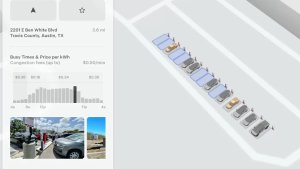
이제 Tesla 요금이 적용되는 수퍼차저만 경로에 포함하도록 선택할 수 있습니다. 이 기능을 활성화하면 트립 플래너는 Tesla가 충전 요금을 설정하지 않거나 무료 수퍼차징 크레딧이 적용되지 않는 위치를 피합니다. 이 설정을 사용하려면 온라인 경로 탐색이 활성화된 상태에서 연결이 유지되어야 합니다.

이 기능을 활성화하려면 컨트롤 > 내비게이션 > 트립 플래너 설정으로 이동합니다.

키보드

Tesla 키보드 feature in update 2026.14.6.6
전 세계에서 사용 가능
모델:
S
3
X
Y
CT

선택한 키보드 언어가 받아쓰기 언어로도 적용됩니다. 음성 명령 언어는 변경하지 않은 상태에서 키보드 언어 전환 버튼을 탭해 키보드 및 받아쓰기 언어를 변경할 수 있습니다. 받아쓰기를 사용하려면 키보드의 마이크 아이콘을 탭합니다.

보안 개선 사항

Tesla 보안 개선 사항 feature in update 2026.14.6.6
전 세계에서 사용 가능
모델:
S
3
X
Y
CT

이 업데이트에는 중요한 보안 향상 및 개선 사항이 포함되어 있습니다.

Updated Disengagement Menu

Tesla Updated Disengagement Menu feature in update 2026.14.6.6
Credit @SawyerMerritt
Undocumented
모델:
S
3
X
Y
CT
Undocumented
문서화되지 않은 기능은 현재 영어로만 제공됩니다.

Tesla has updated the intervention menu to include new reasons for disengagement. Parking, possibly the most popular reason for disengaging behind navigation, has now been added as an option. Tesla has also brought back ‘Other.’ There are still only four reasons for intervening, so that means that ‘Preference’ and ‘Discomfort’ have been removed.

Cloud Profiles

Tesla Cloud Profiles feature in update 2026.14.6.6
전 세계에서 사용 가능
Undocumented
모델:
S
3
X
Y
CT
Undocumented
문서화되지 않은 기능은 현재 영어로만 제공됩니다.

Tesla cloud profiles now feature a new cloud icon to indicate they’re cloud profiles rather than local profiles stored only on the vehicle.

Amber Brake Lights

Tesla Amber Brake Lights feature in update 2026.14.6.6
Undocumented
모델:
S
3
X
Y
CT
Undocumented
문서화되지 않은 기능은 현재 영어로만 제공됩니다.

This update properly visualizes vehicles with amber brake lights. Some regions require turn signals to be orange/amber. Up until now, the visualization has only displayed turn signals in red, but with this update, Tesla now properly displays amber turn signals for the appropriate vehicles.

The Unreal Engine brings drastic improvements to lighting in the visualization, making the brake lights much more noticeable as they reflect on the ground.

Parental Controls Improvement

Tesla Parental Controls Improvement feature in update 2026.14.6.6
전 세계에서 사용 가능
Performance
Undocumented
모델:
S
3
X
Y
CT
Performance
Undocumented
문서화되지 않은 기능은 현재 영어로만 제공됩니다.

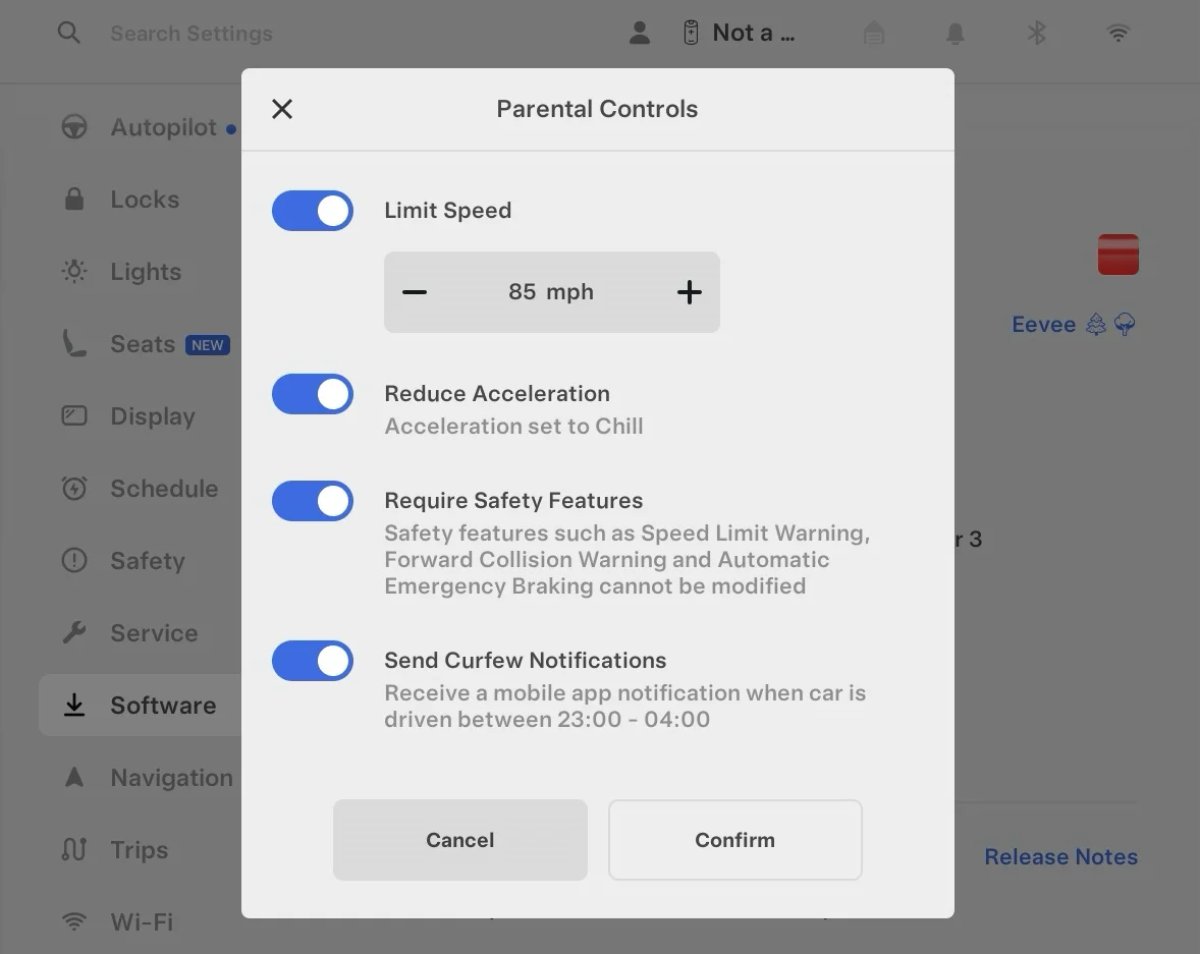
Tesla’s parental controls are designed to keep new drivers safe by limiting access to certain features. Parents can reduce the vehicle’s acceleration, limit the top speed, and prevent safety features from being turned off.

With this update, Tesla is adding another improvement to Parental Controls for Performance vehicles. Track Mode is now restricted when you enable Require Safety Features, preventing teens from manipulating the vehicle's handling, braking, and more.

Require Safety Features prevents these features from being turned off:

  • Automatic Emergency Braking

  • Obstacle-Aware Acceleration

  • Automatic Blind Spot Camera

  • Blind Spot Collision Warning Chime

  • Automatic 911 Call (US only)

  • Allow Mobile Access

  • Park Assist Chimes

It also prevents these settings from being changed:

  • Track Mode is disabled

  • Lane Departure Avoidance is set to Assist

  • Speed Limit Warning set to Chime

    • Speed Limit set to relative

    • Offset set to +5 mph (8 km/h)

  • Forward Collision Warning set to Early

Increased Attention Monitoring Alert

Tesla Increased Attention Monitoring Alert feature in update 2026.14.6.6
Undocumented
모델:
S
3
X
Y
CT
Undocumented
문서화되지 않은 기능은 현재 영어로만 제공됩니다.

Tesla has added a new camera visibility alert with this update. What’s most interesting about this alert is that Tesla states that the poor camera visibility is resulting in increased attention monitoring.

Grok Turns Off After Inactivity

Tesla Grok Turns Off After Inactivity feature in update 2026.14.6.6
Credit default
전 세계에서 사용 가능
AMD
Undocumented
모델:
New S
3
New X
Y
CT
AMD
Undocumented
문서화되지 않은 기능은 현재 영어로만 제공됩니다.

With the introduction of the "Hey Grok" wake word, Tesla has changed the way Grok behaves. Previously, once Grok was triggered, it would remain active indefinitely, staying in a constant listening state.

Now, in order to turn off accidental activations and minimize background processing, Grok will automatically dismiss itself after approximately 15 seconds of inactivity.

This behavior applies regardless of whether you triggered the assistant using the new voice wake word or the physical steering wheel button. For those who prefer to close the interface manually, you can still use natural language dismissal commands; simply saying "goodbye" or "talk to you later" will instantly close Grok.

h/t: @Deandawiz

Grok Favorites

Tesla Grok Favorites feature in update 2026.14.6.6
전 세계에서 사용 가능
AMD
Undocumented
모델:
New S
3
New X
Y
CT
AMD
Undocumented
문서화되지 않은 기능은 현재 영어로만 제공됩니다.

The integrated Grok assistant now has access to your vehicle’s saved favorites. Grok can now "see" and interpret the custom labels you have assigned to your saved locations.

For example, if you have an address saved as "Kim’s parents," you can simply say, "Hey Grok, navigate to “Kim’s parents," and the system will immediately pull the correct address from your list of favorites.

h/t: @NickScheber

Advanced Software Updates

Tesla Advanced Software Updates feature in update 2026.14.6.6
전 세계에서 사용 가능
Undocumented
모델:
S
3
X
Y
CT
Undocumented
문서화되지 않은 기능은 현재 영어로만 제공됩니다.

Tesla has updated the Software Update Preference setting under the Software menu.

Previously, the software update preference was a toggle between "Standard" and "Advanced." This has now changed into a simpler on/off toggle for "Advanced" updates.

By switching this to "On," you are opting in to receive the latest software releases as soon as they become available for your specific vehicle configuration and region. This could result in receiving updates with minor bugs or receiving updates more often.

If left "Off," your vehicle will wait for a wider release before installing updates.

Re-Order Trip Meters

Tesla Re-Order Trip Meters feature in update 2026.14.6.6
전 세계에서 사용 가능
Undocumented
모델:
New S
3
New X
Y
CT
Undocumented
문서화되지 않은 기능은 현재 영어로만 제공됩니다.

You can reorder the new trip meters however you’d like. Simply tap and hold one to get it to jiggle, and then move it to a new location.

Additionally, you can also tap on the energy graph in the top-right corner to view a larger, more detailed version of it.

Chromium Browser Updated

Tesla Chromium Browser Updated feature in update 2026.14.6.6
전 세계에서 사용 가능
Undocumented
모델:
S
3
X
Y
CT
Undocumented
문서화되지 않은 기능은 현재 영어로만 제공됩니다.

Tesla has upgraded the browser in the vehicle. Tesla’s browser is based on the open-source Chromium browser, the same browser that powers Google’s Chrome browser.

The browser was updated to version 140, up from version 136.

This update to Chromium increases compatibility with modern web standards, improves WebGPU performance, and resolves known issues.

Save Recent Dashcam Videos

Tesla Save Recent Dashcam Videos feature in update 2026.14.6.6
전 세계에서 사용 가능
Undocumented
모델:
New S
3
New X
Y
CT
Undocumented
문서화되지 않은 기능은 현재 영어로만 제공됩니다.

Tesla continues to make it easier to browse and save recent Dashcam clips. In the last update, Tesla made it easier to browse recent, non-saved Dashcam clips by listing them at the top of the Dashcam Viewer.

With this update, they’re now letting you save recent clips that are still on the USB drive, but not saved from being deleted.

Volume Icons

Tesla Volume Icons feature in update 2026.14.6.6
전 세계에서 사용 가능
Undocumented
모델:
S
3
X
Y
CT
Undocumented
문서화되지 않은 기능은 현재 영어로만 제공됩니다.

When adjusting the volume of an app, such as Spotify, the volume icon will now display the app's icon. While the navigation volume has always had its own icon and an independent volume setting, this change does not add app-dependent volume settings.
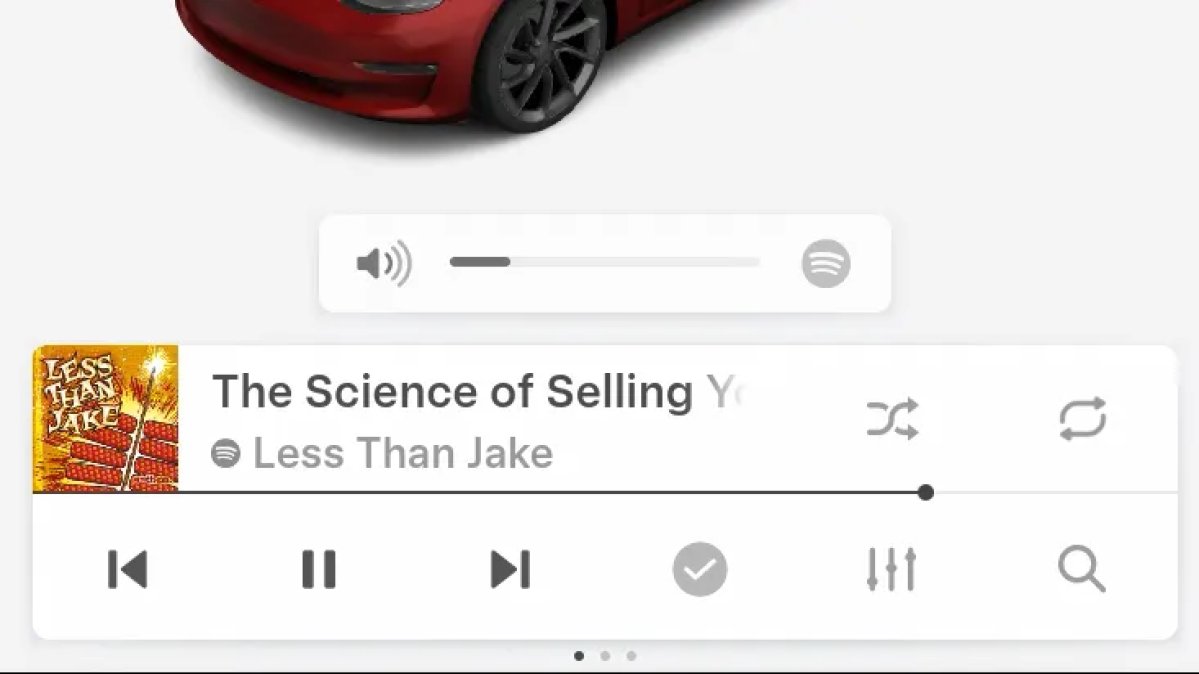
The same volume that’s used for Spotify will be used for YouTube and other apps. This icon simply makes it more obvious which volume is being changed.

Driver Profiles

Tesla Driver Profiles feature in update 2026.14.6.6
전 세계에서 사용 가능
Undocumented
모델:
S
3
X
Y
CT
Undocumented
문서화되지 않은 기능은 현재 영어로만 제공됩니다.

Driver profiles are now also available in vehicle settings, rather than only in the Profiles icon in the status bar.

Users can navigate to Controls > Profiles to see the settings for all driver profiles.

Grok Settings

Tesla Grok Settings feature in update 2026.14.6.6
전 세계에서 사용 가능
Undocumented
모델:
S
3
X
Y
CT
Undocumented
문서화되지 않은 기능은 현재 영어로만 제공됩니다.

Grok settings are now also shown in the Audio section under Controls. These are the same settings available in the Grok app, but Tesla appears to be duplicating most of them under controls to make them easier to find.

Euro Semi Visualization

Tesla Euro Semi Visualization feature in update 2026.14.6.6
전 세계에서 사용 가능
Undocumented
모델:
S
3
X
Y
CT
Undocumented
문서화되지 않은 기능은 현재 영어로만 제공됩니다.

A new Autopilot/FSD visualization has been found in this update. The cab-over-engine style semi trucks often seen in Europe are now appearing in Autopilot visualizations with this update.

New 'All Apps' Icon

Tesla New 'All Apps' Icon feature in update 2026.14.6.6
전 세계에서 사용 가능
Undocumented
모델:
S
3
X
Y
CT
Undocumented
문서화되지 않은 기능은 현재 영어로만 제공됩니다.

Tesla has updated the ‘All Apps’ icon displayed in the dock. Instead of an ellipsis inside of a rectangle, Tesla has now created a design that resembles iOS folders. The new design shows four apps inside the folder, but it’s not a static image.

The apps shown in the folder will change, presumably to show your most recent or most popular apps that aren't displayed in the dock.

Larger Dock Icons

Tesla Larger Dock Icons feature in update 2026.14.6.6
Credit default
전 세계에서 사용 가능
Undocumented
모델:
S
3
X
Y
CT
Undocumented
문서화되지 않은 기능은 현재 영어로만 제공됩니다.

To go along with the new ‘App Apps’ icon, Tesla has also increased the size of all icons in the dock. While the dock appears to remain the same size, the icons are now larger.

Animated Badges

Tesla Animated Badges feature in update 2026.14.6.6
전 세계에서 사용 가능
Undocumented
모델:
S
3
X
Y
CT
Undocumented
문서화되지 않은 기능은 현재 영어로만 제공됩니다.

Tesla models that have special badges, such as the Ludicrous badge on the Performance Model 3, are now animated in Software screen.

Upon navigating to the Software menu, the badge will play a short animation. You can also tap the badge to replay the animation.

New Creations Section

Tesla New Creations Section feature in update 2026.14.6.6
Credit @maxbrco
전 세계에서 사용 가능
AMD
Undocumented
모델:
New S
3
New X
Y
CT
AMD
Undocumented
문서화되지 않은 기능은 현재 영어로만 제공됩니다.

With the introduction of Photobooth, Tesla added a Photobooth section to the top level of the app that lets you view your saved photo sessions.

With the Spring Update and the update to the Sketchpad app for AMD Ryzen vehicles, Tesla is rebranding the Photobooth section to Creations, and it’ll now house Photobooth photos and sketches created in Sketchpad.

When you go into Creations, you’ll now have two tabs, one for Photobooth and one for Sketchpad, however, the features are similar. You’ll be able to view your saved creations and share them with others.

These creations are saved on your vehicle, not on Tesla’s servers, so when you open this section of the app, your vehicle will wake up and send the requested images.

Note: You’ll need vehicle update 2026.14 and an AMD Ryzen vehicle in order to see this new Creations section in the app.

Service Mode Improvements

Tesla Service Mode Improvements feature in update 2026.14.6.6
전 세계에서 사용 가능
Undocumented
모델:
S
3
X
Y
CT
Undocumented
문서화되지 않은 기능은 현재 영어로만 제공됩니다.

New Service Mode Plus Authentication QR Code for Independent

Independent repairers can now quickly authenticate for Service Mode Plus by scanning a QR code displayed on the vehicle with a mobile device and logging in with their Toolbox credentials.

Models: All vehicles

Blinking DTC indicator added to the bottom banner

A Diagnostic Trouble Code (DTC) indicator has been added next to the Vehicle Identification Number (VIN) on the bottom Service Mode banner. The indicator is visible when DCs are present on the vehicle.

Models: All vehicles

Noise Recording Panel Updates (Service Mode Plus)

The Noise Recording panel now supports Active Noise Cancellation (ANC microphone recording. When ANC mode is enabled, the panel displays ANC microphone locations and extends the recording duration to 3 minutes.

Models: Model S (2021+), Model X (2021+), Cybertruck

Vehicle Functions Panel Added to Service Mode

The Vehicle Functions panel is now available on Service Mode. It shows an overview of degraded vehicle functions and their associated set alerts. Full functionality including more detailed functions, historical view and advanced controls are still only available on Service Mode Plus.

Models: Model 3, Model Y

New Bluetooth Panel

A new Bluetooth panel is available under Infotainment to support Bluetooth system diagnosis. The panel displays the status of both the main and rear Bluetooth modules (if rear Bluetooth is available on the vehicle), including connection states, signal strength with health indicators, and connected device information.

Models: Model S (2021+), Model 3, Model X (2021+), Model Y, Cybertruck

Statistics Overview

Number of Cars
0
Percent of Fleet
0%
Installs Pending
0
Rollout Yesterday
0
Rollout Today
0

Details

FSD Version

FSD 14.3.3

Release Date

May 17, 2026