


Update 2026.14.6.6 (FSD 14.3.3) - Release Notes

Update Stats

Number of Cars

0

Percent of Fleet

0%

Installs Pending

0

Rollout Yesterday

0

Rollout Today

0

Tesla Videos

Details

FSD Version

FSD 14.3.3

Release Date

May 17, 2026

Recent News

Statistics Overview

Number of Cars
0
Percent of Fleet
0%
Installs Pending
0
Rollout Yesterday
0
Rollout Today
0

This update adds the Spring Update features to vehicles on FSD v14.3. It also increments the FSD version to 14.3.3 and adds several improvements.

FSD (Supervised) v14.3.3

Tesla FSD (Supervised) v14.3.3 feature in update 2026.14.6.6
HW4
モデル:
S
3
X
Y
CT
HW4

Full Self-Driving (Supervised) v14.3.3 includes:

- Upgraded the Reinforcement Learning (RL) stage of training the FSD neural network, resulting in improvements in a wide variety of driving scenarios.

- Upgraded the neural network vision encoder, improving understanding in rare and low-visibility scenarios, strengthening 3D geometry understanding, and expanding traffic sign understanding.

- Rewrote the AI compiler and runtime from the ground up with MLIR, resulting in 20% faster reaction time and improving model iteration speed.

- Mitigated unnecessary lane biasing and minor tailgating behaviors.

- Increased decisiveness of parking spot selection and maneuvering.

- Improved parking location pin prediction, now shown on a map with a P icon.

- Enhanced response to emergency vehicles, school buses, right-of-way violators, and other rare vehicles.

- Improved handling of small animals by focusing RL training on harder examples and adding rewards for better proactive safety.

- Improved traffic light handling at complex intersections with compound lights, curved roads, and yellow light stopping — driven by training on hard RL examples sourced from the Tesla fleet.

- Improved handling for rare and unusual objects extending, hanging, or leaning into the vehicle path by sourcing infrequent events from the fleet.

- Improved handling of temporary system degradations by maintaining control and automatically recovering without driver intervention, reducing unnecessary disengagements.

- Help Tesla improve Self-Driving by selecting an intervention reason on the main screen after taking over.

- You can now see distance traveled in FSD (Supervised) without an intervention. The Self-Driving App will also show your longest intervention-free streak.

Upcoming Improvements:

- Expand reasoning to all behaviors beyond destination handling.

- Add pothole avoidance.

- Improve driver monitoring system sensitivity with better eye gaze tracking, eye wear handling, and higher accuracy in variable lighting conditions.

ドライブアシスト アプリ

Tesla ドライブアシスト アプリ feature in update 2026.14.6.6
HW4
FSD
モデル:
New S
3
New X
Y
CT
HW4
FSD

新しいドライブアシスト アプリでは、一回タップするだけでサブスクライブし、機能を有効にして使用する方法を学び、進行中の統計情報を表示できます。

開くには、「アプリランチャー」>「ドライブアシスト」の順に移動します。

通行料金概算

Tesla 通行料金概算 feature in update 2026.14.6.6
モデル:
3
Y

ナビゲーションに、各ルートの推定通行料金が表示されるようになり、利用可能な場合は割引EV料金も含まれます。この機能にはオンラインルート案内が必要です。有効にするには、「コントロール」>「ナビゲーション」>「オンラインルート案内」の順に移動します。

イマーシブサウンド アップグレード

Tesla イマーシブサウンド アップグレード feature in update 2026.14.6.6
世界中で利用可能
モデル:
New 3
New Y

プレミアムイマーシブサウンドは、先端のサウンド エクストラクション機能を使用して、リスナーを繊細なサウンドステージの前に置くことでイマーシブ空間へ導きます。この機能強化は、すべてのストリーミング ソースに対応しています。

「設定」>「オーディオ」>「トーン」>「イマーシブサウンド」の順に選択して調整します。

フルセルフドライビング(Supervised)

Tesla フルセルフドライビング(Supervised) feature in update 2026.14.6.6
HW4
モデル:
S
3
X
Y
CT
HW4

お客様の監視の下、フルセルフドライビング(スーパーバイズド)は、お客様のTeslaをほぼどこへでも運転することができます。駐車した位置から起動し、車線変更、ナビゲーション ルートに合わせた分岐の選択、他の車両や障害物の回避、および左折や右折を行い、目的地に到着すると駐車します。お客様およびこれの使用を承認される方は、充分に注意を払い、周囲を確認しながら使用する必要があります。この機能はお客様の車両を自律運転させるものではありません。注意力散漫な状態で運転しないでください。

車両は、フルセルフドライビング(スーパーバイズド)が有効になっています。この機能を使用するには、UI の「セルフドライビングを開始」ボタンを押すか、右スクロール ホイール ボタンを 1 回押します。オートパイロット設定でフルセルフドライビング(スーパーバイズド)を無効にすることができます。

リアディスプレイ

Tesla リアディスプレイ feature in update 2026.14.6.6
世界中で利用可能
モデル:
New S
New 3
New X
New Y
CT

Teslaがルートを案内している間、後席の同乗者はリアディスプレイで地図を表示して操作できるようになりました。リアディスプレイからマップ アイコンをタップして、ナビゲーション画面を表示します。

「Hey Grok」

Tesla 「Hey Grok」  feature in update 2026.14.6.6
AMD
モデル:
New S
3
New X
Y
CT
AMD

Grokを起動するには、「Hey Grok」と話しかけます。「Grok」>「設定」に移動して有効にしてください。「自宅が近くなったら牛乳を買うようにリマインドして」などの場所に基づいたリマインダーも設定できます。閉じるには、「goodbye」と話しかけます。

ペットモード

Tesla ペットモード feature in update 2026.14.6.6
世界中で利用可能
モデル:
S
3
X
Y
CT

ペットを選択して名前を付けるには、「コントロール」>「ディスプレイ」>「ペットモードのカスタマイズ」の順にタッチします。

ペイントショップ

Tesla ペイントショップ feature in update 2026.14.6.6
世界中で利用可能
モデル:
New S
New X

ウィンドウ スモーク、カスタムラップ、ナンバープレートで自分のTeslaアバターをカスタマイズできます。 多数あるデザインのひとつを使用する、または独自のデザインを作成してUSBフラッシュドライブに保存してアップロードし、車両を自分の個性に合わせます。 「アプリランチャー」>「おもちゃ箱」>「ペイントショップ」の順に移動するか、「コントロール」>「ソフトウェア」でペイントまたはナンバープレートボタンをタップします。

視覚的なアップデート

Tesla 視覚的なアップデート feature in update 2026.14.6.6
世界中で利用可能
モデル:
New 3
New Y

センターディスプレイでは、Teslaの画像がより高画質になり、駐車シーンの環境表示が強化されました。

走行データ

Tesla 走行データ feature in update 2026.14.6.6
世界中で利用可能
モデル:
New S
3
New X
Y
CT

「走行データ」はエネルギーアプリで利用できるようになり、複数の走行データを作成、管理して、さまざまなドライブ、ルート、または状況でのエネルギー使用量を追跡できます。「アプリランチャー」>「エネルギー」>「走行データ」の順に移動します。走行データ カードにすばやくアクセスするには、メディア カードを左にスワイプしてください。

Blind Spot Warning While Parked

Tesla Blind Spot Warning While Parked feature in update 2026.14.6.6
世界中で利用可能
モデル:
CT

If you attempt to open a door while an approaching object is detected in your blind spot (for example, a bicyclist approaching from behind) the blind spot indicator light flashes, a chime sounds, and your door will not open upon initial button press. Wait a short time and press the button a second time to override the warning.

スケッチパッド

Tesla スケッチパッド feature in update 2026.14.6.6
世界中で利用可能
モデル:
New S
3
New X
Y
CT

ステッカーと絵文字に対応し、強化されたスケッチパッドで、内なるアーティストを解き放ちましょう。スケッチを保存すると、モバイルアプリでのアクセスや共有ができるようになります。モバイルアプリのバージョン4.55.6以降が必要です。

ブラインドスポット警告アクセントライト

Tesla ブラインドスポット警告アクセントライト feature in update 2026.14.6.6
世界中で利用可能
Ambient Lights
モデル:
New S
New 3
New X
New Y
CT
Ambient Lights

死角に物体があり方向指示器が作動している場合、または駐車中に接近してくる物体が検出された場合、アクセントライトが赤色に点灯するようになりました。 無効にするには、「コントロール」>「ライト」>「ブラインドスポット警告アクセントライト」に移動します。

青信号でチャイム

Tesla 青信号でチャイム feature in update 2026.14.6.6
モデル:
S
3
X
Y
CT

待っている信号機が青に変わった際、チャイムが鳴ります。 他の車両の後ろで待っている場合は、トラフィックアウェア クルーズコントロールまたはオートステアリングがオンになっていない限り、車両が前進するとチャイムが鳴ります。 このチャイムは単なる通知です。 有効にするには「コントロール」>「ドライブアシスト」>「青信号チャイム」に移動します。

ライブカメラ ビュー

Tesla ライブカメラ ビュー feature in update 2026.14.6.6
モデル:
S
3
X
Y
CT

離れているときにTeslaのインテリアを確認できるようになりました。有効にするには、「コントロール」>「安全」>「モバイルアプリでライブカメラを表示」の順に移動します。ライブカメラ映像はすべて暗号化されており、Teslaがアクセスすることはできません。プレミアムコネクティビティとTeslaモバイルアプリ バージョン4.55.6以降が必要です。

音楽アプリのキューイング

Tesla 音楽アプリのキューイング feature in update 2026.14.6.6
世界中で利用可能
モデル:
S
3
X
Y
CT

Apple MusicまたはSpotifyのトラックを右にスワイプしてキューに追加します。Apple Musicで、トラックをタップしてホールドすると、「お気に入り」に追加または「お気に入り」から削除できます。Spotifyでは、左にスワイプして「お気に入りの曲」に追加したり、そこから削除したりできます。

自動ソフトウェア アップデート

Tesla 自動ソフトウェア アップデート feature in update 2026.14.6.6
世界中で利用可能
モデル:
New S
3
New X
Y
CT

Teslaでは、ダウンロードされたソフトウェア アップデートが夜間に自動的にインストールされるようになりました。これを有効にすると、Teslaが駐車中で使用されていない間にアップデートがインストールされ、常に最新の機能と改善点をご利用いただけます。

有効にするには、「コントロール」>「ソフトウェア」>「アップデートを自動的にインストールする」に移動します。

ダッシュカム ビューアのアップデート

Tesla ダッシュカム ビューアのアップデート feature in update 2026.14.6.6
世界中で利用可能
AMD
モデル:
New S
3
New X
Y
CT
AMD

直近のダッシュカム映像の録画時間が最大24時間まで延長され、Teslaまたはお使いのスマートフォンに任意のクリップを永続的に保存できるようになりました。保存するには、「アプリランチャー」>「ダッシュカム ビューア」の順に移動します。携帯電話で表示できるようにするには、「コントロール」>「安全」の順に移動し、「モバイル アプリでカメラを表示」をオンにします。クリップは車両に残り、Teslaと共有されることはありません。

スマートフォンにダウンロードされたクリップに、速度、ハンドルの角度、ドライブアシストの状態などの詳細が含まれるようになりました。ダウンロードにはプレミアムコネクティビティとモバイル アプリ バージョン4.55.6以降が必要です。

ダッシュカム ビューアのアップデート

Tesla ダッシュカム ビューアのアップデート feature in update 2026.14.6.6
世界中で利用可能
Intel
モデル:
S
3
X
Y
Intel

最近のドライブレコーダー映像から任意のクリップを、Tesla車両またはスマートフォンに永続的に保存するには、アプリランチャー > ドライブレコーダー閲覧器 へ進んでください。携帯電話で表示できるようにするには、「コントロール」>「安全」の順に移動し、「モバイル アプリでカメラを表示」をオンにします。クリップは車両に残り、Teslaと共有されることはありません。

スマートフォンにダウンロードされたクリップに、速度、ハンドルの角度、ドライブアシストの状態などの詳細が含まれるようになりました。ダウンロードにはプレミアムコネクティビティとモバイル アプリ バージョン4.55.6以降が必要です。

天気マップの改善点

Tesla 天気マップの改善点 feature in update 2026.14.6.6
世界中で利用可能
モデル:
New S
3
New X
Y
CT

天気マップでは、改良された色で雪と雨が表示されるようになり、降水の種類をより簡単に見分けられるようになりました。 過去1時間の気象データを表示して、ルート上の状況がどのように変化しているかを確認することもできます。 この機能にはプレミアムコネクティビティーが必要です。 表示するには、マップ上の天気アイコンをタップしてください。

スーパーチャージャー料金フィルター

Tesla スーパーチャージャー料金フィルター feature in update 2026.14.6.6
モデル:
S
3
X
Y
CT

Teslaの料金が適用されたスーパーチャージャーにのみルート設定できるようになりました。有効にすると、トリップ プランナーはTeslaが充電料金を設定していない、またはスーパーチャージャー無料利用クレジットを受け付けないロケーションを避けます。この設定には、オンラインルート案内が有効な状態での接続が必要です。

有効するには、「コントロール」>「ナビゲーション」>「トリップ プランナー設定」の順に移動します。

キーボード

Tesla キーボード feature in update 2026.14.6.6
世界中で利用可能
モデル:
S
3
X
Y
CT

選択したキーボード言語は、音声入力の言語としても使用されます。音声コマンドの言語を変更せずに、国際キーボードボタンをタップしてキーボードと音声入力の言語を切り替えることができます。キーボードのマイクアイコンをタップして音声入力を開始します。

セキュリティの改善

Tesla セキュリティの改善 feature in update 2026.14.6.6
世界中で利用可能
モデル:
S
3
X
Y
CT

このアップデートには重要なセキュリティに関する修正および改善が含まれます。

Updated Disengagement Menu

Tesla Updated Disengagement Menu feature in update 2026.14.6.6
Credit @SawyerMerritt
Undocumented
モデル:
S
3
X
Y
CT
Undocumented
未記録の機能は現在、英語のみで利用可能です。

Tesla has updated the intervention menu to include new reasons for disengagement. Parking, possibly the most popular reason for disengaging behind navigation, has now been added as an option. Tesla has also brought back ‘Other.’ There are still only four reasons for intervening, so that means that ‘Preference’ and ‘Discomfort’ have been removed.

Cloud Profiles

Tesla Cloud Profiles feature in update 2026.14.6.6
世界中で利用可能
Undocumented
モデル:
S
3
X
Y
CT
Undocumented
未記録の機能は現在、英語のみで利用可能です。

Tesla cloud profiles now feature a new cloud icon to indicate they’re cloud profiles rather than local profiles stored only on the vehicle.

Amber Brake Lights

Tesla Amber Brake Lights feature in update 2026.14.6.6
Undocumented
モデル:
S
3
X
Y
CT
Undocumented
未記録の機能は現在、英語のみで利用可能です。

This update properly visualizes vehicles with amber brake lights. Some regions require turn signals to be orange/amber. Up until now, the visualization has only displayed turn signals in red, but with this update, Tesla now properly displays amber turn signals for the appropriate vehicles.

The Unreal Engine brings drastic improvements to lighting in the visualization, making the brake lights much more noticeable as they reflect on the ground.

Parental Controls Improvement

Tesla Parental Controls Improvement feature in update 2026.14.6.6
世界中で利用可能
Performance
Undocumented
モデル:
S
3
X
Y
CT
Performance
Undocumented
未記録の機能は現在、英語のみで利用可能です。

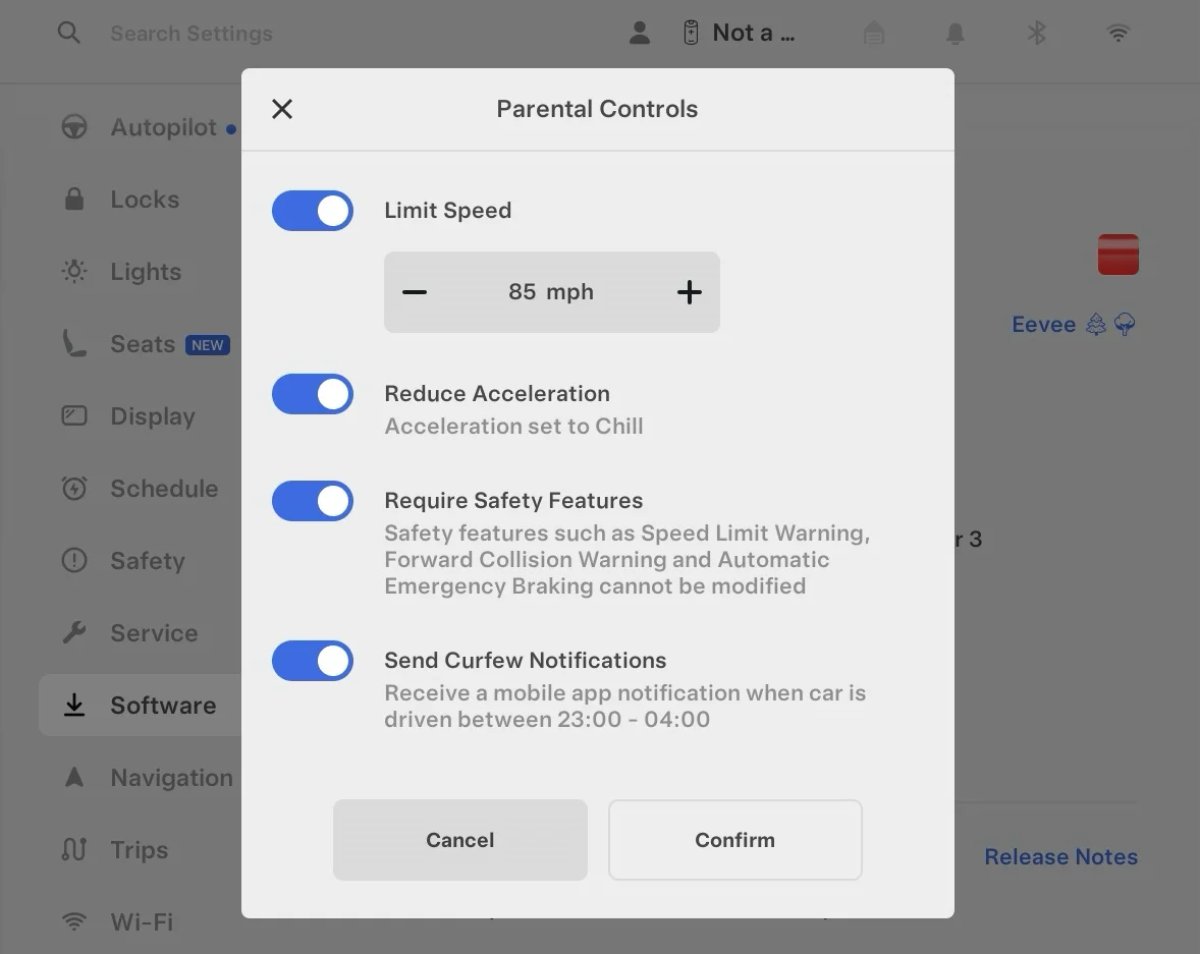
Tesla’s parental controls are designed to keep new drivers safe by limiting access to certain features. Parents can reduce the vehicle’s acceleration, limit the top speed, and prevent safety features from being turned off.

With this update, Tesla is adding another improvement to Parental Controls for Performance vehicles. Track Mode is now restricted when you enable Require Safety Features, preventing teens from manipulating the vehicle's handling, braking, and more.

Require Safety Features prevents these features from being turned off:

  • Automatic Emergency Braking

  • Obstacle-Aware Acceleration

  • Automatic Blind Spot Camera

  • Blind Spot Collision Warning Chime

  • Automatic 911 Call (US only)

  • Allow Mobile Access

  • Park Assist Chimes

It also prevents these settings from being changed:

  • Track Mode is disabled

  • Lane Departure Avoidance is set to Assist

  • Speed Limit Warning set to Chime

    • Speed Limit set to relative

    • Offset set to +5 mph (8 km/h)

  • Forward Collision Warning set to Early

Increased Attention Monitoring Alert

Tesla Increased Attention Monitoring Alert feature in update 2026.14.6.6
Undocumented
モデル:
S
3
X
Y
CT
Undocumented
未記録の機能は現在、英語のみで利用可能です。

Tesla has added a new camera visibility alert with this update. What’s most interesting about this alert is that Tesla states that the poor camera visibility is resulting in increased attention monitoring.

Grok Turns Off After Inactivity

Tesla Grok Turns Off After Inactivity feature in update 2026.14.6.6
Credit default
世界中で利用可能
AMD
Undocumented
モデル:
New S
3
New X
Y
CT
AMD
Undocumented
未記録の機能は現在、英語のみで利用可能です。

With the introduction of the "Hey Grok" wake word, Tesla has changed the way Grok behaves. Previously, once Grok was triggered, it would remain active indefinitely, staying in a constant listening state.

Now, in order to turn off accidental activations and minimize background processing, Grok will automatically dismiss itself after approximately 15 seconds of inactivity.

This behavior applies regardless of whether you triggered the assistant using the new voice wake word or the physical steering wheel button. For those who prefer to close the interface manually, you can still use natural language dismissal commands; simply saying "goodbye" or "talk to you later" will instantly close Grok.

h/t: @Deandawiz

Grok Favorites

Tesla Grok Favorites feature in update 2026.14.6.6
世界中で利用可能
AMD
Undocumented
モデル:
New S
3
New X
Y
CT
AMD
Undocumented
未記録の機能は現在、英語のみで利用可能です。

The integrated Grok assistant now has access to your vehicle’s saved favorites. Grok can now "see" and interpret the custom labels you have assigned to your saved locations.

For example, if you have an address saved as "Kim’s parents," you can simply say, "Hey Grok, navigate to “Kim’s parents," and the system will immediately pull the correct address from your list of favorites.

h/t: @NickScheber

Advanced Software Updates

Tesla Advanced Software Updates feature in update 2026.14.6.6
世界中で利用可能
Undocumented
モデル:
S
3
X
Y
CT
Undocumented
未記録の機能は現在、英語のみで利用可能です。

Tesla has updated the Software Update Preference setting under the Software menu.

Previously, the software update preference was a toggle between "Standard" and "Advanced." This has now changed into a simpler on/off toggle for "Advanced" updates.

By switching this to "On," you are opting in to receive the latest software releases as soon as they become available for your specific vehicle configuration and region. This could result in receiving updates with minor bugs or receiving updates more often.

If left "Off," your vehicle will wait for a wider release before installing updates.

Re-Order Trip Meters

Tesla Re-Order Trip Meters feature in update 2026.14.6.6
世界中で利用可能
Undocumented
モデル:
New S
3
New X
Y
CT
Undocumented
未記録の機能は現在、英語のみで利用可能です。

You can reorder the new trip meters however you’d like. Simply tap and hold one to get it to jiggle, and then move it to a new location.

Additionally, you can also tap on the energy graph in the top-right corner to view a larger, more detailed version of it.

Chromium Browser Updated

Tesla Chromium Browser Updated feature in update 2026.14.6.6
世界中で利用可能
Undocumented
モデル:
S
3
X
Y
CT
Undocumented
未記録の機能は現在、英語のみで利用可能です。

Tesla has upgraded the browser in the vehicle. Tesla’s browser is based on the open-source Chromium browser, the same browser that powers Google’s Chrome browser.

The browser was updated to version 140, up from version 136.

This update to Chromium increases compatibility with modern web standards, improves WebGPU performance, and resolves known issues.

Save Recent Dashcam Videos

Tesla Save Recent Dashcam Videos feature in update 2026.14.6.6
世界中で利用可能
Undocumented
モデル:
New S
3
New X
Y
CT
Undocumented
未記録の機能は現在、英語のみで利用可能です。

Tesla continues to make it easier to browse and save recent Dashcam clips. In the last update, Tesla made it easier to browse recent, non-saved Dashcam clips by listing them at the top of the Dashcam Viewer.

With this update, they’re now letting you save recent clips that are still on the USB drive, but not saved from being deleted.

Volume Icons

Tesla Volume Icons feature in update 2026.14.6.6
世界中で利用可能
Undocumented
モデル:
S
3
X
Y
CT
Undocumented
未記録の機能は現在、英語のみで利用可能です。

When adjusting the volume of an app, such as Spotify, the volume icon will now display the app's icon. While the navigation volume has always had its own icon and an independent volume setting, this change does not add app-dependent volume settings.
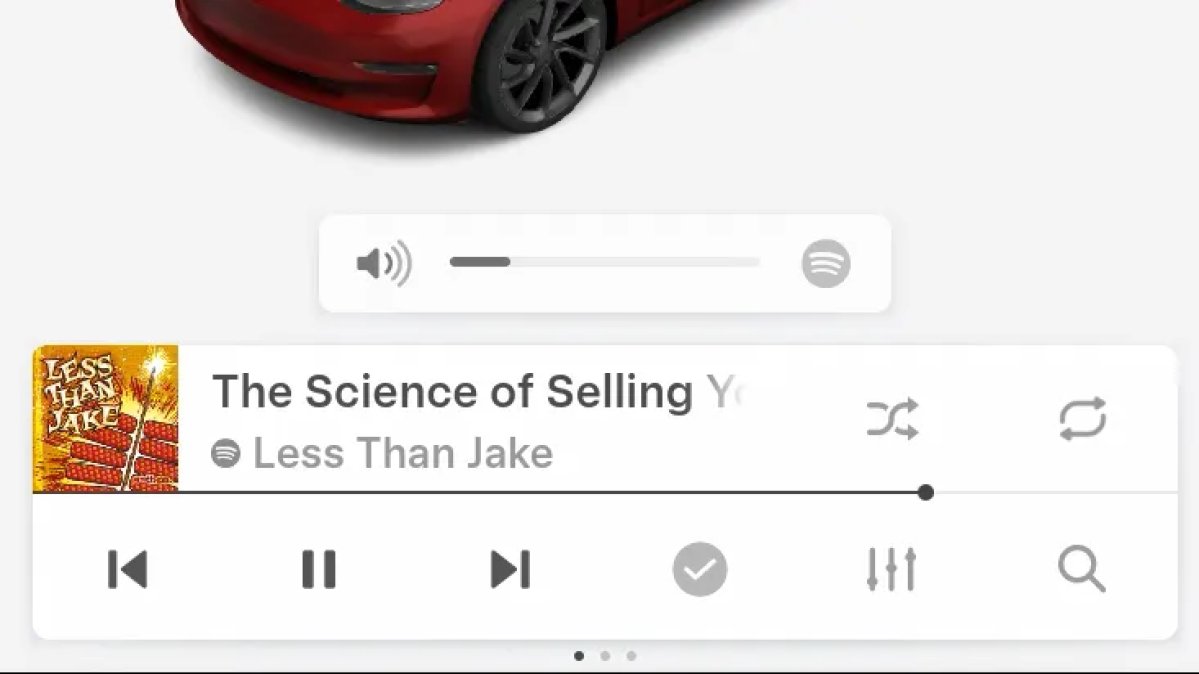
The same volume that’s used for Spotify will be used for YouTube and other apps. This icon simply makes it more obvious which volume is being changed.

Driver Profiles

Tesla Driver Profiles feature in update 2026.14.6.6
世界中で利用可能
Undocumented
モデル:
S
3
X
Y
CT
Undocumented
未記録の機能は現在、英語のみで利用可能です。

Driver profiles are now also available in vehicle settings, rather than only in the Profiles icon in the status bar.

Users can navigate to Controls > Profiles to see the settings for all driver profiles.

Grok Settings

Tesla Grok Settings feature in update 2026.14.6.6
世界中で利用可能
Undocumented
モデル:
S
3
X
Y
CT
Undocumented
未記録の機能は現在、英語のみで利用可能です。

Grok settings are now also shown in the Audio section under Controls. These are the same settings available in the Grok app, but Tesla appears to be duplicating most of them under controls to make them easier to find.

Euro Semi Visualization

Tesla Euro Semi Visualization feature in update 2026.14.6.6
世界中で利用可能
Undocumented
モデル:
S
3
X
Y
CT
Undocumented
未記録の機能は現在、英語のみで利用可能です。

A new Autopilot/FSD visualization has been found in this update. The cab-over-engine style semi trucks often seen in Europe are now appearing in Autopilot visualizations with this update.

New 'All Apps' Icon

Tesla New 'All Apps' Icon feature in update 2026.14.6.6
世界中で利用可能
Undocumented
モデル:
S
3
X
Y
CT
Undocumented
未記録の機能は現在、英語のみで利用可能です。

Tesla has updated the ‘All Apps’ icon displayed in the dock. Instead of an ellipsis inside of a rectangle, Tesla has now created a design that resembles iOS folders. The new design shows four apps inside the folder, but it’s not a static image.

The apps shown in the folder will change, presumably to show your most recent or most popular apps that aren't displayed in the dock.

Larger Dock Icons

Tesla Larger Dock Icons feature in update 2026.14.6.6
Credit default
世界中で利用可能
Undocumented
モデル:
S
3
X
Y
CT
Undocumented
未記録の機能は現在、英語のみで利用可能です。

To go along with the new ‘App Apps’ icon, Tesla has also increased the size of all icons in the dock. While the dock appears to remain the same size, the icons are now larger.

Animated Badges

Tesla Animated Badges feature in update 2026.14.6.6
世界中で利用可能
Undocumented
モデル:
S
3
X
Y
CT
Undocumented
未記録の機能は現在、英語のみで利用可能です。

Tesla models that have special badges, such as the Ludicrous badge on the Performance Model 3, are now animated in Software screen.

Upon navigating to the Software menu, the badge will play a short animation. You can also tap the badge to replay the animation.

New Creations Section

Tesla New Creations Section feature in update 2026.14.6.6
Credit @maxbrco
世界中で利用可能
AMD
Undocumented
モデル:
New S
3
New X
Y
CT
AMD
Undocumented
未記録の機能は現在、英語のみで利用可能です。

With the introduction of Photobooth, Tesla added a Photobooth section to the top level of the app that lets you view your saved photo sessions.

With the Spring Update and the update to the Sketchpad app for AMD Ryzen vehicles, Tesla is rebranding the Photobooth section to Creations, and it’ll now house Photobooth photos and sketches created in Sketchpad.

When you go into Creations, you’ll now have two tabs, one for Photobooth and one for Sketchpad, however, the features are similar. You’ll be able to view your saved creations and share them with others.

These creations are saved on your vehicle, not on Tesla’s servers, so when you open this section of the app, your vehicle will wake up and send the requested images.

Note: You’ll need vehicle update 2026.14 and an AMD Ryzen vehicle in order to see this new Creations section in the app.

Service Mode Improvements

Tesla Service Mode Improvements feature in update 2026.14.6.6
世界中で利用可能
Undocumented
モデル:
S
3
X
Y
CT
Undocumented
未記録の機能は現在、英語のみで利用可能です。

New Service Mode Plus Authentication QR Code for Independent

Independent repairers can now quickly authenticate for Service Mode Plus by scanning a QR code displayed on the vehicle with a mobile device and logging in with their Toolbox credentials.

Models: All vehicles

Blinking DTC indicator added to the bottom banner

A Diagnostic Trouble Code (DTC) indicator has been added next to the Vehicle Identification Number (VIN) on the bottom Service Mode banner. The indicator is visible when DCs are present on the vehicle.

Models: All vehicles

Noise Recording Panel Updates (Service Mode Plus)

The Noise Recording panel now supports Active Noise Cancellation (ANC microphone recording. When ANC mode is enabled, the panel displays ANC microphone locations and extends the recording duration to 3 minutes.

Models: Model S (2021+), Model X (2021+), Cybertruck

Vehicle Functions Panel Added to Service Mode

The Vehicle Functions panel is now available on Service Mode. It shows an overview of degraded vehicle functions and their associated set alerts. Full functionality including more detailed functions, historical view and advanced controls are still only available on Service Mode Plus.

Models: Model 3, Model Y

New Bluetooth Panel

A new Bluetooth panel is available under Infotainment to support Bluetooth system diagnosis. The panel displays the status of both the main and rear Bluetooth modules (if rear Bluetooth is available on the vehicle), including connection states, signal strength with health indicators, and connected device information.

Models: Model S (2021+), Model 3, Model X (2021+), Model Y, Cybertruck

Statistics Overview

Number of Cars
0
Percent of Fleet
0%
Installs Pending
0
Rollout Yesterday
0
Rollout Today
0

Details

FSD Version

FSD 14.3.3

Release Date

May 17, 2026