












![Tesla Driver in Mexico Makes His Model Y Fly [VIDEO]](/img/containers/article_images/2026/model-y-flying-accident-mexico.webp/c6f78372a6ed7ca93d8a0c61a905cd6b/model-y-flying-accident-mexico.jpg)



FSD (スーパーバイズド) v13.2.9オセアニア

FSD (スーパーバイズド) v13オセアニアでは、エンドツーエンド ドライビング ネットワークのあらゆる部分をアップグレードします。
以下を含みます:
- 36Hz、フル解像度のAI4ビデオ入力
- ネイティブAI4入力とニューラルネットワークアーキテクチャ
- 4.2倍のデータスケーリング
- 5倍のトレーニング計算スケーリング(Cortexトレーニングクラスターにより実現)
- 光子から制御へのレイテンシーを2分の1に削減
- 統合された出庫、後進、駐車機能
- 衝突回避のための報酬予測の改善
- カメラ クリーニングの改善
- コントローラーの再設計で、よりスムーズで正確なトラッキングを実現
- 通行止めがフリートによって検知されると、影響を受けるルートに沿って通行止めを表示するダイナミックルート案内
今後の改良点:
- 3倍のモデルサイズスケーリング
- 3倍のモデルコンテキスト長のスケーリング
- 緊急車両への対応を向上させるための音声入力
- ナビゲーションに対する報酬予測の改善
- 駐車場での誤りによるブレーキ作動や徐行運転の改善
- 道路脇に停車、駐車場、私道、ガレージへの駐車など、目的地オプションのサポート
- 地図とナビゲーション入力の効率的な表現
- カメラ オクルージョンの操作の改善
フルセルフドライビング(スーパーバイズド)オセアニア
お客様の監視の下、フルセルフドライビング(スーパーバイズド)オセアニアは、お客様のTeslaをほぼどこへでも運転することができます。この機能は、レーンチェンジ、ナビゲーションルートに沿った分岐の選択、他の車両や障害物の回避、および左折や右折を行います。お客様およびこれの使用を承認される方は、充分に注意を払い、周囲を確認しながら使用する必要があります。この機能はお客様の車両を自律運転させるものではありません。注意力散漫な状態で運転しないでください。
車両は、フルセルフドライビング(スーパーバイズド)オセアニアが有効になっています。この機能を使用するには、右スクロールホイールを1回押します。オートパイロット設定でフルセルフドライビング(スーパーバイズド)オセアニアを無効にすることができます。
注記: これはアーリーアクセス向けのビルドです。お客様およびこれの使用を承認される方は、充分に注意を払い、周囲を確認しながら使用する必要があります。
ビジョンベース注意力モニタリング
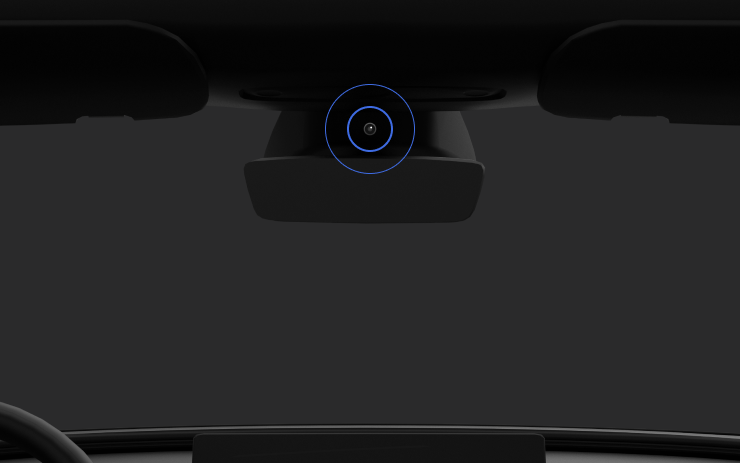
フルセルフドライビング(スーパーバイズド)を有効にすると、ドライバーモニタリングシステムは主にキャビン カメラを使用してドライバーの注意力を判断します。キャビン カメラがクリアな視界を確保している必要があります(例:カメラが遮られていない、ドライバーの目と腕が視認できる、車内照明が十分である、ドライバーがサングラスなどで目を覆わずに前方を見ている)。それ以外の状況では、ドライバーモニタリングシステムは、主にトルクベース(ハンドル)のモニタリングに基づいてドライバーの注意力を判断します。
キャビン カメラが注意力散漫を検知すると、警告が表示されます。この警告は、ドライバーがすぐに前方道路に注意を戻すことで解除されます。警告は、検出された注意力散漫の性質と頻度に応じて段階的に強化され、注意力散漫が続くと機能の強制解除に至ります。
New Lock Alert

Tesla has added a new locking animation when you remotely lock your vehicle through the Tesla app or by walking away, and there’s still someone in the vehicle with a phone.
This new alert lets users inside the vehicle know that the vehicle can still be opened from the outside due to a phone key being nearby.
Mobile Access

Tesla’s mobile access option, found under Controls > Safety, can safely disable your vehicle from being controlled from Tesla’s mobile app. This removes the ability to control any aspects of the vehicle, including seeing the location, unlocking and starting the vehicle.
To disable mobile access, you previously had to provide the email associated with your Tesla account. You can now provide the email address or the phone number associated with your Tesla account.
Battery Health Test Removed

Tesla has removed its Battery Health Test feature from many, but not all, vehicles. Tesla’s Battery Health Test was initially added to Service Mode, but was later added to the vehicle’s main menus under Service — allowing more users to access it.
The test allows owners to see their vehicle’s battery degradation levels. While the tool under Controls and Service Mode are almost identical, the main menu version requires your vehicle to have less than a 20% state of charge before performing the test. It also only allows you to run the test once every six months to prevent further degradation from running the test too often.
It’s not clear why the feature has been removed at this time, even for vehicles that have never run the test, but the removal depends on your vehicle’s model, age, and potentially other factors.
Tow Limit Exceeded

In the latest software update, 2025.26, Tesla has added another new, undocumented feature that helps to improve the Cybertruck’s utility. When towing heavy objects, you need to be sure you balance the trailer and stay within the weight limits of the vehicle. Now, your Cybertruck can detect and warn you if the vehicle’s load rating is being exceeded.
Car Wash Mode Improvements

Car Wash Mode has been improved with this update. While Car Wash Mode will still close windows when it’s initially activated, it will now also continuously monitor your vehicle’s windows and warn you if any windows are opened during the car wash.
Service Mode Improvements

New Vehicle Functions Panel (Service Mode Plus)
A new Vehicle Functions panel with an overview of all vehicle functions, their limitations, and respective states (no conditions detected, degraded, or unavailable) is available. The panel enables users to understand the impact of conditions on affected vehicle functions and pinpoint the respective underlying alerts.
Note: This feature was added in update 2026.26.3 and is not available in prior 2025.26 updates.
Models: Model Y
New Seats Panel
A new Seats panel is available to support diagnosis for the front row seats. It adds the ability to view the location of the actuators, motor statuses, switch statuses, and run calibration routines.
Models: Model 3, Model Y
New Thermal Control Components (Service Mode Plus)
A new Control Components panel is available to support thermal Noise, Vibration, and Harshness (NVH) diagnosis. It adds the ability to individually control thermal components, set specific targets, and sweep across operating ranges with realtime feedback. It also includes a 3D static view of the heat pump, including the radiator, blower motor, louver, and pumps.
Models: Model S (2021+), Model 3, Model X (2021+), Model Y
Infotainment Panel Updates - Reboot Gateway and Infotainment (Service Mode Plus)
The ability to reboot the Gateway (GTW) and Infotainment system has been added to the Infotainment panel in Service Mode Plus. To access these new buttons, tap Infotainment > Actions.
Models: Model S (2021+), Model 3, Model X (2021+), Model Y, Cybertruck, SemiTruck
Infotainment Panel Updates - Touch Check Routine Relocation
The Touch Check routine has been moved to the Infotainment panel. To access it, tap Infotainment > Actions.
Models: All Vehicles
Refrigerant Panel Updates - Drain and Fill Routine
The Refrigerant panel has been updated to display the system pressure and highlight the current pressure values during the Drain and Fill routine. If the system pressure is too high (above 1.5 bar), a warning will be displayed until the pressure is reduced to an acceptable level. Make sure to maintain vehicle power and monitor the pressure in the Refrigerant panel while running the Drain and Fill routine.
Models: Model S (2021+), Model 3, Model X (2021+), Model Y, Cybertruck
Power Distribution Panel Updates - Hardware
The hardware protection self-test and battery capacity self-test has been added to the Power Distribution panel.
Models: Cybertruck
Power Distribution Panel Updates - Active Test Statuses
The status of the hardware protection self-test and battery capacity test is now displayed in the Power Distribution panel while the tests are actively running on the vehicle.
Models: Cybertruck
Sentry Mode With Ambient Lighting

The ambient light strips inside supported vehicles will now gently pulse red when Sentry Mode detects a threat and begins recording.

