












![Tesla Driver in Mexico Makes His Model Y Fly [VIDEO]](/img/containers/article_images/2026/model-y-flying-accident-mexico.webp/c6f78372a6ed7ca93d8a0c61a905cd6b/model-y-flying-accident-mexico.jpg)



FSD (Supervised) v13.2.9 Down Under

גרסת FSD (Supervised) v13 Down Under משדרגת את כל חלקי רשת הנהיגה מקצה לקצה.
כולל את:
- ערוצי קלט וידאו AI4 ברזולוציה מלאה, 36 הרץ
- ערוצי קלט AI4 מקומיים ומבני רשת עצבית
- סילום נתונים 4.2x
- סילום חישוב אימון 5x (מופעל באמצעות לוח אימוני Cortex)
- השהיית photon-to-control ב-2x
-יכולות משולבות ביציאה מחנייה, בנסיעה לאחור ובחנייה
- חיזוי פרסים משופר למניעת התנגשות
- ניקוי מצלמה משופר
- בקר בעיצוב חדש לניטור מדויק יותר ללא הפרעות
- ניווט דינמי סביב כבישים סגורים, המציג אותם לאורך המסלול הרלוונטי כשהם מזוהים על ידי צי כלי הרכב
השיפורים הנוכחיים:
- סילום גודל הדגם 3x
- סילום אורך הקשר הדגם
- ערוצי קלט שמע לטיפול טוב יותר בכלי רכב במצב חירום
- חיזוי פרסים משופר עבור ניווט
- שיפורים בבלימת שווא ובנסיעה איטית יותר בחניונים
- תמיכה עבור אפשרויות יעד כולל עצירה, חנייה במקום חנייה, בשביל הגישה לחנייה או במקום חנייה מקורה
- ייצוג יעיל של מפות וקלטי ניווט
- טיפול משופר בחסימות מצלמה
Full Self-Driving (Supervised) Down Under
תחת השגחת הנהג, התכונה Full Self-Driving (Supervised) Down Under יכולה לנהוג ברכב Tesla כמעט לכל מקום. היא תבצע החלפת נתיבים, תבחר הסתעפויות בהתאם למסלול הניווט, תנווט סביב כלי-רכב ועצמים אחרים ותבצע פניות לשמאל ולימין. עליכם ועל כל מי שתתנו לו הרשאה לנקוט במשנה זהירות ולהישאר ערניים. היא לא הופכת את הרכב לאוטונומי. אין לנהוג בשאננות.
התכונה Full Self-Driving (Supervised) Down Under מופעלת ברכב. כדי להשתמש בתכונה, יש ללחוץ על גלגל הגלילה הימני פעם אחת. ניתן להשבית את התכונה Full Self-Driving (Supervised) Down Under תחת הגדרות Autopilot.
הערה: זוהי גרסה בעלת גישה מוקדמת. עליכם ועל כל מי שתתנו לו הרשאה לנקוט במשנה זהירות ולהישאר ערניים.
ניטור אחר ערנות המבוסס על ראות
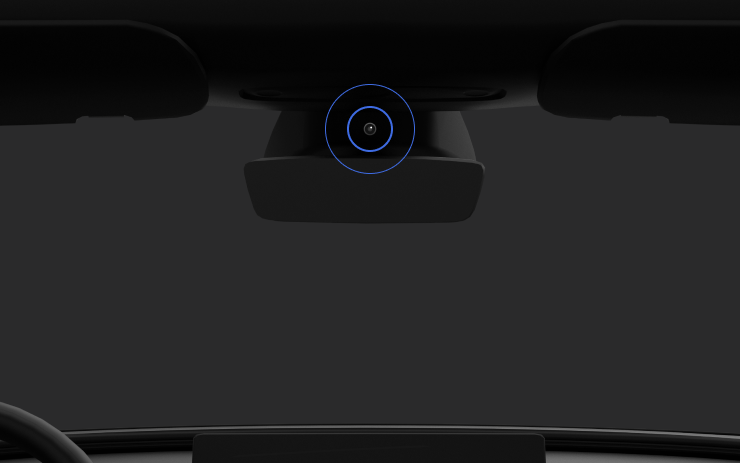
כאשר התכונה Full Self-Driving (Supervised) מופעלת, מערכת הניטור אחר הנהג מסתמכת בעיקר על מצלמת תא הנוסעים כדי לקבוע את מידת ערנות הנהג. למצלמת תא הנוסעים חייבת להיות ראות ברורה (למשל, כאשר המצלמה לא חסומה, כאשר ניתן לראות בבירור את העיניים והידיים של הנהג, כאשר יש תאורה מספקת בתא הנוסעים וכאשר הנהג מסתכל על הכביש שלפניו ולא מרכיב משקפי שמש או דבר מה המכסה את העיניים). בנסיבות אחרות, מערכת הניטור אחר הנהג תסתמך בעיקר על ניטור המבוסס על מומנט הסיבוב (הגה) כדי לזהות את ערנות הנהג.
אם מצלמת תא הנוסעים מזהה חוסר ערנות של הנהג, תוצג אזהרה. ניתן לבטל את האזהרה על ידי כך שהנהג יסיט את תשומת ליבו לכביש שלפניו באופן מיידי. האזהרות יסלימו בהתאם לאופי ולתדירות חוסר הערנות שזוהה, כאשר חוסר תשומת לב מתמשך יוביל לפסילה.
New Lock Alert

Tesla has added a new locking animation when you remotely lock your vehicle through the Tesla app or by walking away, and there’s still someone in the vehicle with a phone.
This new alert lets users inside the vehicle know that the vehicle can still be opened from the outside due to a phone key being nearby.
Mobile Access

Tesla’s mobile access option, found under Controls > Safety, can safely disable your vehicle from being controlled from Tesla’s mobile app. This removes the ability to control any aspects of the vehicle, including seeing the location, unlocking and starting the vehicle.
To disable mobile access, you previously had to provide the email associated with your Tesla account. You can now provide the email address or the phone number associated with your Tesla account.
Battery Health Test Removed

Tesla has removed its Battery Health Test feature from many, but not all, vehicles. Tesla’s Battery Health Test was initially added to Service Mode, but was later added to the vehicle’s main menus under Service — allowing more users to access it.
The test allows owners to see their vehicle’s battery degradation levels. While the tool under Controls and Service Mode are almost identical, the main menu version requires your vehicle to have less than a 20% state of charge before performing the test. It also only allows you to run the test once every six months to prevent further degradation from running the test too often.
It’s not clear why the feature has been removed at this time, even for vehicles that have never run the test, but the removal depends on your vehicle’s model, age, and potentially other factors.
Tow Limit Exceeded

In the latest software update, 2025.26, Tesla has added another new, undocumented feature that helps to improve the Cybertruck’s utility. When towing heavy objects, you need to be sure you balance the trailer and stay within the weight limits of the vehicle. Now, your Cybertruck can detect and warn you if the vehicle’s load rating is being exceeded.
Car Wash Mode Improvements

Car Wash Mode has been improved with this update. While Car Wash Mode will still close windows when it’s initially activated, it will now also continuously monitor your vehicle’s windows and warn you if any windows are opened during the car wash.
Service Mode Improvements

New Vehicle Functions Panel (Service Mode Plus)
A new Vehicle Functions panel with an overview of all vehicle functions, their limitations, and respective states (no conditions detected, degraded, or unavailable) is available. The panel enables users to understand the impact of conditions on affected vehicle functions and pinpoint the respective underlying alerts.
Note: This feature was added in update 2026.26.3 and is not available in prior 2025.26 updates.
Models: Model Y
New Seats Panel
A new Seats panel is available to support diagnosis for the front row seats. It adds the ability to view the location of the actuators, motor statuses, switch statuses, and run calibration routines.
Models: Model 3, Model Y
New Thermal Control Components (Service Mode Plus)
A new Control Components panel is available to support thermal Noise, Vibration, and Harshness (NVH) diagnosis. It adds the ability to individually control thermal components, set specific targets, and sweep across operating ranges with realtime feedback. It also includes a 3D static view of the heat pump, including the radiator, blower motor, louver, and pumps.
Models: Model S (2021+), Model 3, Model X (2021+), Model Y
Infotainment Panel Updates - Reboot Gateway and Infotainment (Service Mode Plus)
The ability to reboot the Gateway (GTW) and Infotainment system has been added to the Infotainment panel in Service Mode Plus. To access these new buttons, tap Infotainment > Actions.
Models: Model S (2021+), Model 3, Model X (2021+), Model Y, Cybertruck, SemiTruck
Infotainment Panel Updates - Touch Check Routine Relocation
The Touch Check routine has been moved to the Infotainment panel. To access it, tap Infotainment > Actions.
Models: All Vehicles
Refrigerant Panel Updates - Drain and Fill Routine
The Refrigerant panel has been updated to display the system pressure and highlight the current pressure values during the Drain and Fill routine. If the system pressure is too high (above 1.5 bar), a warning will be displayed until the pressure is reduced to an acceptable level. Make sure to maintain vehicle power and monitor the pressure in the Refrigerant panel while running the Drain and Fill routine.
Models: Model S (2021+), Model 3, Model X (2021+), Model Y, Cybertruck
Power Distribution Panel Updates - Hardware
The hardware protection self-test and battery capacity self-test has been added to the Power Distribution panel.
Models: Cybertruck
Power Distribution Panel Updates - Active Test Statuses
The status of the hardware protection self-test and battery capacity test is now displayed in the Power Distribution panel while the tests are actively running on the vehicle.
Models: Cybertruck
Sentry Mode With Ambient Lighting

The ambient light strips inside supported vehicles will now gently pulse red when Sentry Mode detects a threat and begins recording.

