












![Tesla Driver in Mexico Makes His Model Y Fly [VIDEO]](/img/containers/article_images/2026/model-y-flying-accident-mexico.webp/c6f78372a6ed7ca93d8a0c61a905cd6b/model-y-flying-accident-mexico.jpg)



FSD (tarkkailua vaativa) v13.2.9 Australia/Uusi-Seelanti

FSD (tarkkailua vaativa) v13 Australia/Uusi-Seelanti päivittää päästä-päähän -ajoverkon jokaisen osan.
Sisältää:
- 36 Hz, täyden resoluution AI4-videotulot
- Natiivit AI4-tulot ja neuroverkkoarkkitehtuurit
- 4.2x tiedon skaalaus
- 5x harjoituslaskennan skaalaus (Cortex-klusterin mahdollistama)
- 2x lyhyempi viive fotonista ohjaukseen
- Integroidut pysäköinnistä poistumis-, peruutus- ja pysäköintiominaisuudet
- Parannetut palkkioennusteet törmäysten välttämisestä
- Parannettu kameran puhdistus
- Uudelleensuunniteltu ohjain tasaisempaan ja tarkempaan seurantaan
- Dynaaminen reititys suljettujen tieosuuksien ympäri, joka näyttää ne vaikuttavan reitin varrella, kun kalusto havaitsee ne
Tulevat parannukset:
- 3x mallin koon skaalaus
- 3x mallin kontekstin pituuden skaalaus
- Äänitulot hälytysajoneuvojen parempaa käsittelyä varten
- Parannetut palkkioennusteet navigoinnille
- Parannuksia väärään jarrutukseen ja hitaampaan ajoon pysäköintipaikoilla
- Tuki määränpäävaihtoehdoille, mukaan lukien pysähtyminen tien sivuun, pysäköinti ruutuun, ajotielle tai autotalliin
- Tehokas karttojen ja navigointisyötteiden esitys
- Parannettu kameran peittymisten käsittely
Täysin itsestään ajava (tarkkailua vaativa) Australia/Uusi-Seelanti
Täysin itsestään ajava (tarkkailua vaativa) Australia/Uusi-Seelanti voi valvonnassasi ajaa Teslasi lähes mihin tahansa. Se vaihtaa kaistaa, valitsee risteyksiä navigointireitin seuraamista varten, navigoi muiden ajoneuvojen ja kohteiden ohi ja kääntyy vasemmalle ja oikealle. Sinun ja jokaisen valtuuttamasi on toimittava erityisen varovaisesti ja pysyttävä tarkkaavaisena. Se ei tee autostasi autonomista. Älä ole välinpitämätön.
Täysin itsestään ajava (tarkkailua vaativa) Australia/Uusi-Seelanti on käytössä ajoneuvossasi. Käytä toimintoa painamalla kerran oikeaa vierityspyörän painiketta. Poista Täysin itsestään ajava (tarkkailua vaativa) Australia/Uusi-Seelanti käytöstä Autopilot-asetuksissa.
Huomautus: Tämä on varhainen käyttöversio. Sinun ja jokaisen valtuuttamasi on toimittava erityisen varovaisesti ja pysyttävä tarkkaavaisena.
Näkymäpohjainen tarkkaavaisuuden valvonta
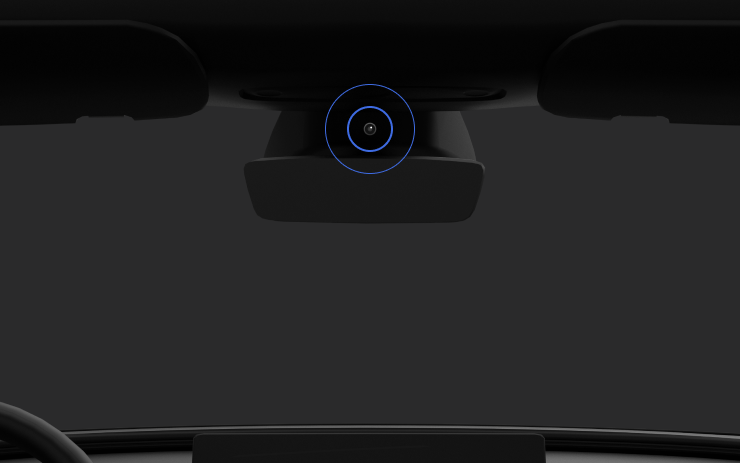
Kun Täysin itsestään ajava (tarkkailua vaativa) on käytössä, kuljettajan valvontajärjestelmä käyttää ensisijaisesti ohjaamokameraa kuljettajan tarkkaavaisuuden määrittämiseksi. Ohjaamokameran näkyvyyden on oltava selkeä (esim. kameran edessä ei ole estettä, silmät ja käsivarret ovat näkyvissä, ohjaamon valaistus on riittävä ja kuljettaja katsoo eteenpäin ilman aurinkolaseja tai muita silmät peittäviä esineitä). Muissa olosuhteissa kuljettajan valvontajärjestelmä käyttää ensisijaisesti vääntöpohjaista (ohjauspyörä) valvontaa kuljettajan tarkkaavaisuuden havaitsemiseksi.
Jos ohjaamokamera havaitsee tarkkaamattomuutta, näyttöön tulee varoitus. Kuljettaja voi kumota varoituksen kääntämällä huomionsa välittömästi takaisin edessä olevaan tiehen. Varoitukset voimistuvat havaitun tarkkaamattomuuden luonteesta ja tiheydestä riippuen, ja jatkuva tarkkaamattomuus johtaa ylilyöntiin.
New Lock Alert

Tesla has added a new locking animation when you remotely lock your vehicle through the Tesla app or by walking away, and there’s still someone in the vehicle with a phone.
This new alert lets users inside the vehicle know that the vehicle can still be opened from the outside due to a phone key being nearby.
Mobile Access

Tesla’s mobile access option, found under Controls > Safety, can safely disable your vehicle from being controlled from Tesla’s mobile app. This removes the ability to control any aspects of the vehicle, including seeing the location, unlocking and starting the vehicle.
To disable mobile access, you previously had to provide the email associated with your Tesla account. You can now provide the email address or the phone number associated with your Tesla account.
Battery Health Test Removed

Tesla has removed its Battery Health Test feature from many, but not all, vehicles. Tesla’s Battery Health Test was initially added to Service Mode, but was later added to the vehicle’s main menus under Service — allowing more users to access it.
The test allows owners to see their vehicle’s battery degradation levels. While the tool under Controls and Service Mode are almost identical, the main menu version requires your vehicle to have less than a 20% state of charge before performing the test. It also only allows you to run the test once every six months to prevent further degradation from running the test too often.
It’s not clear why the feature has been removed at this time, even for vehicles that have never run the test, but the removal depends on your vehicle’s model, age, and potentially other factors.
Tow Limit Exceeded

In the latest software update, 2025.26, Tesla has added another new, undocumented feature that helps to improve the Cybertruck’s utility. When towing heavy objects, you need to be sure you balance the trailer and stay within the weight limits of the vehicle. Now, your Cybertruck can detect and warn you if the vehicle’s load rating is being exceeded.
Car Wash Mode Improvements

Car Wash Mode has been improved with this update. While Car Wash Mode will still close windows when it’s initially activated, it will now also continuously monitor your vehicle’s windows and warn you if any windows are opened during the car wash.
Service Mode Improvements

New Vehicle Functions Panel (Service Mode Plus)
A new Vehicle Functions panel with an overview of all vehicle functions, their limitations, and respective states (no conditions detected, degraded, or unavailable) is available. The panel enables users to understand the impact of conditions on affected vehicle functions and pinpoint the respective underlying alerts.
Note: This feature was added in update 2026.26.3 and is not available in prior 2025.26 updates.
Models: Model Y
New Seats Panel
A new Seats panel is available to support diagnosis for the front row seats. It adds the ability to view the location of the actuators, motor statuses, switch statuses, and run calibration routines.
Models: Model 3, Model Y
New Thermal Control Components (Service Mode Plus)
A new Control Components panel is available to support thermal Noise, Vibration, and Harshness (NVH) diagnosis. It adds the ability to individually control thermal components, set specific targets, and sweep across operating ranges with realtime feedback. It also includes a 3D static view of the heat pump, including the radiator, blower motor, louver, and pumps.
Models: Model S (2021+), Model 3, Model X (2021+), Model Y
Infotainment Panel Updates - Reboot Gateway and Infotainment (Service Mode Plus)
The ability to reboot the Gateway (GTW) and Infotainment system has been added to the Infotainment panel in Service Mode Plus. To access these new buttons, tap Infotainment > Actions.
Models: Model S (2021+), Model 3, Model X (2021+), Model Y, Cybertruck, SemiTruck
Infotainment Panel Updates - Touch Check Routine Relocation
The Touch Check routine has been moved to the Infotainment panel. To access it, tap Infotainment > Actions.
Models: All Vehicles
Refrigerant Panel Updates - Drain and Fill Routine
The Refrigerant panel has been updated to display the system pressure and highlight the current pressure values during the Drain and Fill routine. If the system pressure is too high (above 1.5 bar), a warning will be displayed until the pressure is reduced to an acceptable level. Make sure to maintain vehicle power and monitor the pressure in the Refrigerant panel while running the Drain and Fill routine.
Models: Model S (2021+), Model 3, Model X (2021+), Model Y, Cybertruck
Power Distribution Panel Updates - Hardware
The hardware protection self-test and battery capacity self-test has been added to the Power Distribution panel.
Models: Cybertruck
Power Distribution Panel Updates - Active Test Statuses
The status of the hardware protection self-test and battery capacity test is now displayed in the Power Distribution panel while the tests are actively running on the vehicle.
Models: Cybertruck
Sentry Mode With Ambient Lighting

The ambient light strips inside supported vehicles will now gently pulse red when Sentry Mode detects a threat and begins recording.

