






![Tesla Driver in Mexico Makes His Model Y Fly [VIDEO]](/img/containers/article_images/2026/model-y-flying-accident-mexico.webp/c6f78372a6ed7ca93d8a0c61a905cd6b/model-y-flying-accident-mexico.jpg)





Active Road Noise Reduction

Your vehicle now has the ability to actively reduce low-frequency road noise while driving on rough surfaces. To accomplish this, the system uses the seat microphones to measure the noise in the cabin, then generates anti-noise through the speakers to create quiet zones around occupants.
Autopilot Naming Update

This change only updates the name of certain features and text in your vehicle, and does not change the way your features behave.
- Navigate on Autopilot has been renamed to Navigate on Autosteer
- FSD Computer has been renamed to AI Computer.
การปลดสายชาร์จ

ขณะนี้สามารถหยุดการชาร์จและชาร์จสายชาร์จได้แล้วโดยการดึงที่จับประตูด้านหลังซ้ายค้างไว้เป็นเวลา 3 วินาที โดยมีเงื่อนไขว่ารถไม่ได้ปลดล็อกหรือมีกุญแจที่รู้จักอยู่ใกล้ ๆ ซึ่งจะเป็นประโยชน์อย่างยิ่งเมื่อปุ่มปลดล็อกสายชาร์จไม่ทำงาน หรืออะแดปเตอร์ชาร์จติดค้างอยู่ในพอร์ตชาร์จ คุณยังสามารถปลดสายโดยใช้หน้าจอสัมผัสของรถหรือแอป Tesla ได้
Grok พร้อมคำสั่งการนำทาง (Beta)

ตอนนี้คุณสามารถพูดคุยกับ Grok ผู้ช่วยอัจฉริยะที่สร้างโดย xAI ได้แล้ว คุณสามารถเลือกเสียงและลักษณะนิสัยของ Grok ได้ โดยมีตั้งแต่แบบนักเล่าเรื่องไปจนถึงแบบสุดโต่ง
Grok สามารถเพิ่มและแก้ไขจุดหมายของการนำทางได้ โดยจะเป็นไกด์นำทางส่วนตัวของคุณ คุณสามารถขอให้ Grok นำทางไปยังร้านอาหารไทยที่ดีที่สุดที่อยู่ใกล้คุณ หา Supercharger ที่อยู่ห่างจากร้านกาแฟในระยะที่เดินได้ หรือแม้แต่วางแผนทัวร์ชมสถานที่สุดโรแมนติก ต้องใช้การเชื่อมต่อแบบพรีเมียมหรือการเชื่อมต่อ WiFi ที่เปิดใช้งานอยู่ การพูดคุยสื่อสารจะไม่ระบุชื่อและไม่เกี่ยวข้องกับรถของคุณ
หากต้องการเปิดใช้ Grok ให้ไปที่แอปพลิเคชั่น > Grok หรือกดปุ่มเสียงบนพวงมาลัยค้างไว้หลังจากที่ลงชื่อเข้าใช้ Grok แล้ว ตั้งค่าลักษณะการทำงานของ Grok เป็น Assistant เพื่อใช้คำสั่งการนำทาง
หมายเหตุ: ขณะนี้ Grok ยังเป็นรุ่น Beta และไม่รองรับคำสั่งเสียงสำหรับการควบคุมรถ เช่น การนำทางหรือสื่อ คำสั่งเสียงที่มีอยู่จะยังคงไม่เปลี่ยนแปลง
ระบบตรวจจับการลืมเด็กไว้ในรถ

หากตรวจพบเด็กโดยไม่มีคนดูแล รถจะกะพริบไฟแสดงสถานะภายนอก เล่นเสียงเตือน และส่งการแจ้งเตือนไปยังแอป Tesla ของคุณ การดำเนินการนี้จะทำซ้ำเป็นระยะ ๆ จนกว่าคุณจะกลับไปที่รถ ข้อมูลห้องโดยสารจะได้รับการประมวลผลภายในรถและจะไม่ถูกส่งไปยัง Tesla
การตั้งค่านี้จะเปิดใช้งานตามค่าเริ่มต้น หากต้องการปิดใช้งาน ให้ไปที่การควบคุม > ระบบความปลอดภัย > ระบบตรวจจับการลืมเด็กไว้ในรถ
FSD (Supervised) v14.2.2.5

Full Self-Driving (Supervised) v14.2.2.5 includes:
- Upgraded the neural network vision encoder, leveraging higher resolution features to further improve scenarios like handling emergency vehicles, obstacles on the road, and human gestures.
- Added Arrival Options for you to select where FSD should park: in a Parking Lot, on the Street, in a Driveway, in a Parking Garage, or at the Curbside.
- Added handling to pull over or yield for emergency vehicles (e.g. police cars, fire trucks, ambulances).
- Added navigation and routing into the vision-based neural network for real-time handling of blocked roads and detours.
- Added additional Speed Profile to further customize driving style preference.
- Improved handling for static and dynamic gates.
- Improved offsetting for road debris (e.g. tires, tree branches, boxes).
- Improve handling of several scenarios including: unprotected turns, lane changes, vehicle cut-ins, and school busses.
- Improved FSD's ability to manage system faults and recover smoothly from degraded operation for enhanced reliability.
- Added alerting for residue build-up on interior windshield that may impact front camera visibility. If affected, visit Service for cleaning!
- Camera visibility can lead to increased attention monitoring sensitivity.
Upcoming Improvements:
- Overall smoothness and sentience
- Parking spot selection and parking quality
Arrival Options

- You can now select an arrival option such as Parking Lot, Street, Driveway, Parking Garage and Curbside for Robotaxi-style drop offs.
- Your preferences for arrival options and preferred parking positions are persisted for each destination.
- Our reasoning model will assess the suitable options for your destination and pick an intuitive default.
- The navigation pin will be adjusted based on the selected Arrival Option.
โปรไฟล์ความเร็ว

ตอนนี้ FSD (ผ่านการกำกับ) จะกำหนดความเร็วที่เหมาะสมโดยพิจารณาจากโปรไฟล์ผู้ขับขี่ ขีดจำกัดความเร็ว และสภาพจราจรโดยรอบ
- เปิดตัวโปรไฟล์สลอธ โปรไฟล์ความเร็วใหม่ที่ขับด้วยความเร็วที่ต่ำกว่า และการเลือกเลนที่ระมัดระวังมากกว่าโหมดชิล
- เปิดตัวโปรไฟล์ความเร็วใหม่ MAD MAX ที่มาพร้อมความเร็วที่สูงขึ้นและการเปลี่ยนช่องจราจรที่บ่อยขึ้นกว่าโหมดเร่งรีบ
- ตอนนี้โปรไฟล์ผู้ขับขี่มีผลกระทบต่อพฤติกรรมมากขึ้นแล้ว ยิ่งโปรไฟล์มีระดับความแน่วแน่มากเท่าไร ความเร็วสูงสุดก็จะยิ่งสูงขึ้น
- ตอนนี้ปุ่มเลื่อนขึ้น/ลงด้านขวาจะเป็นปุ่มปรับการตั้งค่าโปรไฟล์ความเร็วแทนการปรับค่าออฟเซตของความเร็วสูงสุดที่แม่นยำเป็น mph/kph
UI Improvements

- You can now view your Self-Driving stats under Controls > Autopilot.
- Start Self-Driving with a tap of the touchscreen from Park, or any time during your drive.
- Adjust settings like the Speed Profile and Arrival Options directly from the Autopilot visualization on the center display.
ยืนยันการเบรก

ตอนนี้ปุ่มเริ่มการขับอัตโนมัติได้ปิดการยืนยันการเบรกไว้โดยค่าเริ่มต้น เมื่อปิดการยืนยันไว้ คุณจะไม่จำเป็นต้องคุณเหยียบเบรกและปล่อยเพื่อยืนยันการเริ่มทำงานการขับอัตโนมัติ
คุณสามารถเปิดใช้งานการยืนยันการเบรกได้ใน Autopilot > ยืนยันการเบรก
การขับอัตโนมัติเต็มรูปแบบ (ผ่านการกำกับ)

การขับอัตโนมัติเต็มรูปแบบ (ผ่านการกำกับ) สามารถขับ Tesla ของคุณได้เกือบทุกที่โดยอยู่ภายใต้การควบคุมของคุณ ซึ่งระบบจะเริ่มจากตำแหน่งจอด ทำการเปลี่ยนช่องจราจร เลือกทางแยกเพื่อวิ่งไปตามเส้นทางการนำทาง หลบหลีกรถคันอื่นและวัตถุต่าง ๆ และเลี้ยวซ้ายและขวา แล้วจอดที่จุดหมายของคุณ คุณและบุคคลที่คุณอนุญาตจะต้องใช้ความระมัดระวังเพิ่มเติมและมีสมาธิในการขับขี่อยู่เสมอ ฟีเจอร์นี้ไม่ได้ทำให้รถของคุณขับเคลื่อนอัตโนมัติ อย่าประมาท
การขับอัตโนมัติเต็มรูปแบบ (ผ่านการกำกับ) เปิดใช้งานอยู่ในรถของคุณ หากต้องการใช้ฟีเจอร์ ให้กดปุ่มเริ่มการขับอัตโนมัติบน UI หรือกดปุ่มเลื่อนด้านขวาหนึ่งครั้ง คุณสามารถปิดใช้งานการขับอัตโนมัติเต็มรูปแบบ (ผ่านการกำกับ) สำหรับออสเตรเลียและนิวซีแลนด์ได้ในการตั้งค่า Autopilot
การแก้ไขเล็กน้อย
รุ่นนี้มีการแก้ไขเล็กน้อยและการปรับปรุงต่างๆ
Autopilot Name Changes

To go along with some of the naming changes, Tesla is replacing the term Autopilot with Self-Driving in most areas.
- Under Controls, the Autopilot tab has been renamed Self-Driving.
- Under the Autopilot menu, “Autopilot Features” has been renamed “Self-Driving Features.” This lets the user select between TACC, Autosteer, or Full Self-Driving.
Maps Version

Tesla has changed the way the map version appears in the Software menu. Instead of listing the full map version, which includes the region, version, and build, Tesla will now include only the region and version, such as NA-2025.44.
Supercharger Site Maps Expanded

Tesla added 3D Supercharger Site maps in the 2025 Holiday Update. While the holiday update included 18 Supercharger sites in the United States, Tesla is now expanding this to Europe. We found at least two new Supercharger site maps in Belgium, located in Brugge and Heusden-Zolder.
These 3D representations of a Supercharger site include an accurate layout of the site, which is then coupled with live data.
The layout shows where each spot is, the location of the charger relative to the parking spot, handicap- and trailer-friendly stalls, and more.
The live data is even more interesting. Not only does it show which spots are occupied, but it also shows which Tesla model is charging at each location. It’ll identify and display a 3D model of the vehicle, and for non-Tesla EVs, it’ll display a generic vehicle model.
While these 3D models are limited to vehicles with AMD Ryzen infotainment units, anyone can view them by searching for the location in maps.
Service Mode Improvements
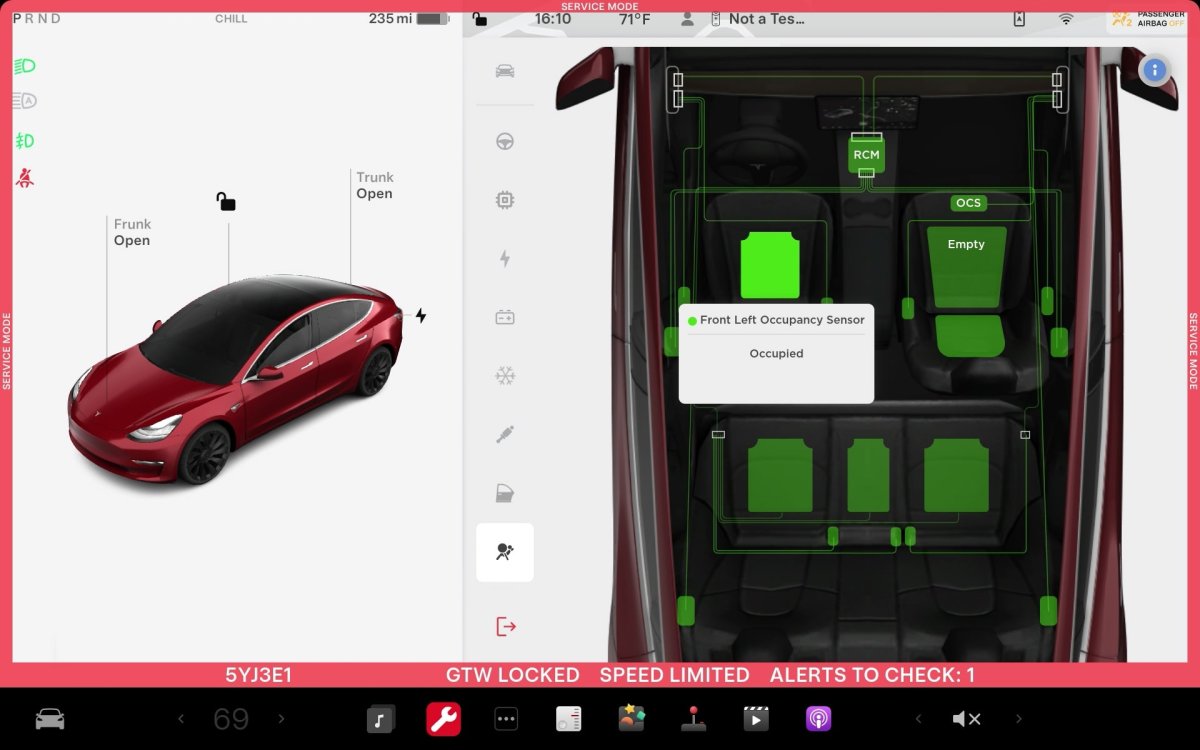
ECU Update Status Panel Updates - Non-CAN ECUs Added
The ECU Update Status panel now includes non-Controller Area Network (CAN) Electronic Control Units (ECUs), such as the Autopilot processors and Telematics Control Unit (TCU).
Models: Model S (2021+), Model 3, Model X (2021+), Model Y, Cybertruck

