Fade In Music Volume After a Phone Call
Summary
Gradually Restore Music Volume After Ending a Phone Call
How It Would Work
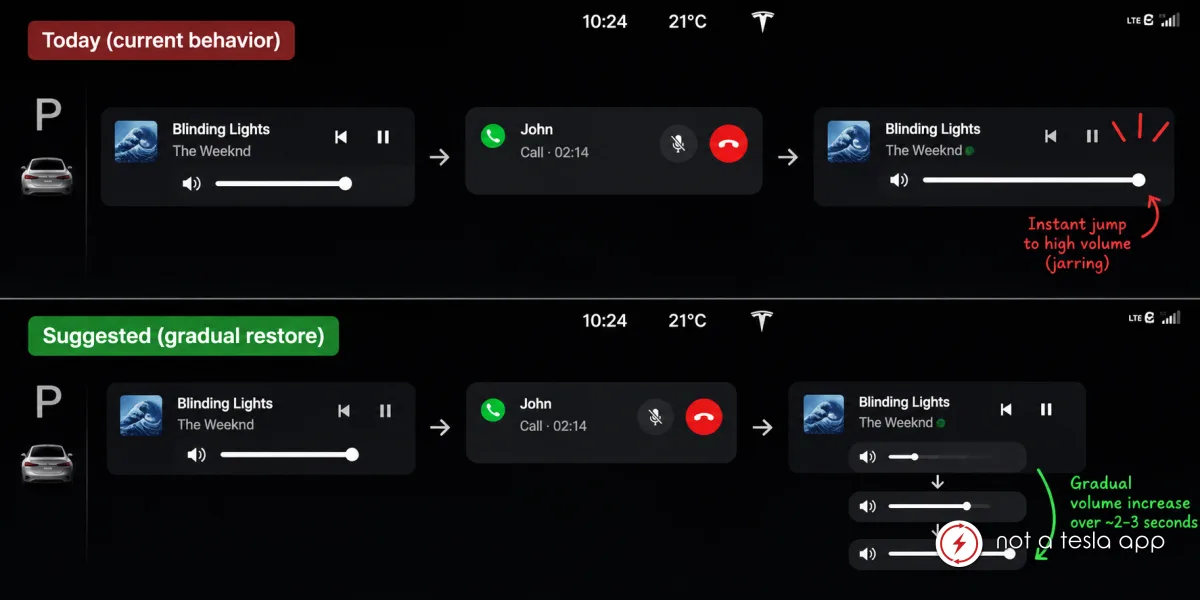
When a phone call is active, Tesla automatically lowers or pauses the music volume. However, immediately after ending a call, the music volume jumps straight back to its previous level.
If the music was playing at a high volume before the call, this can result in a sudden and unpleasant burst of sound, especially when the call ends unexpectedly or the driver is not prepared for it.
Suggested improvement:
Introduce a smooth, gradual volume fade-in when a phone call ends, rather than instantly restoring the previous music volume.
For example:
* When a call ends, resume music at a low volume.
* Gradually increase the volume over approximately 2-3 seconds.
* Restore the exact volume level that was set before the call.
This would make the transition between phone calls and music playback much smoother and improve the overall audio experience.
Optional: Allow users to configure the fade-in duration or disable this behavior entirely.
Vote for this feature
The top three requests at the end of the month will be shared with Tesla.