Ability to Play Videos on USB Drive
Summary
Enable playback of video files directly from USB drives on Tesla's screens, without internet access.
How It Would Work
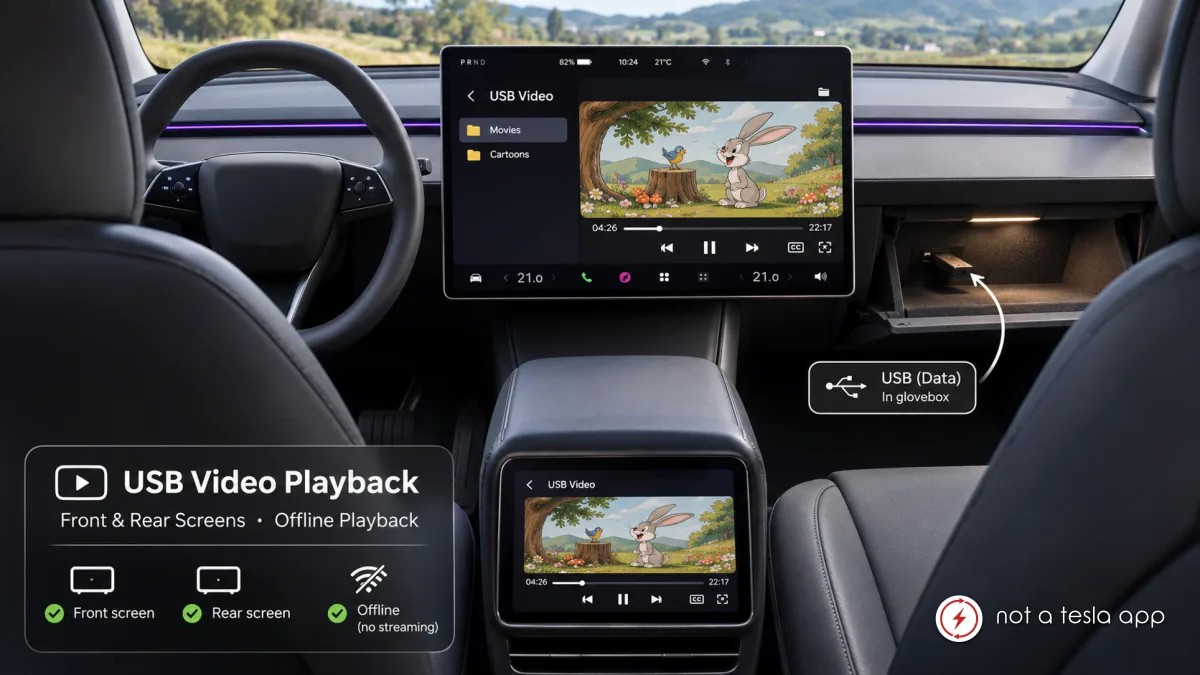
I would love to see the ability to play video files directly from a USB drive connected to the vehicle.
Currently, Tesla supports playing audio files from USB storage, but video playback from USB drives is not supported. This means that passengers are limited to streaming services when they want to watch movies or other video content.
Proposed functionality:
Add a dedicated USB Video source to the Media or Entertainment interface.
Automatically detect supported video files on connected USB drives.
Allow users to browse folders and select individual video files.
Support common video formats and codecs, such as MP4 (H.264/H.265), with appropriate audio formats.
Provide standard playback controls: play, pause, seek, skip, volume, subtitles and full-screen mode.
Remember playback position so passengers can easily continue watching where they left off.
Support playback both on the front and the rear passenger touchscreen, where available.
Why would this be useful?
One of the biggest advantages would be offline entertainment. Families could prepare movies, cartoons and other videos on a USB drive before a journey, without worrying about mobile data coverage, streaming availability or internet connectivity.
For example, parents could store children's movies and cartoons on a USB drive and let their kids watch them on the rear screen during longer journeys.
It would also be useful for road trips, camping and traveling abroad, where reliable internet connectivity is not always available.
Tesla already supports USB audio playback, so extending this functionality to video would be a natural addition to the existing media experience.
This would make Tesla's entertainment system considerably more versatile and give owners more freedom over the content they can enjoy in their vehicles.
Vote for this feature
The top three requests at the end of the month will be shared with Tesla.