






![Tesla Driver in Mexico Makes His Model Y Fly [VIDEO]](/img/containers/article_images/2026/model-y-flying-accident-mexico.webp/c6f78372a6ed7ca93d8a0c61a905cd6b/model-y-flying-accident-mexico.jpg)





Active Road Noise Reduction

Your vehicle now has the ability to actively reduce low-frequency road noise while driving on rough surfaces. To accomplish this, the system uses the seat microphones to measure the noise in the cabin, then generates anti-noise through the speakers to create quiet zones around occupants.
Autopilot Naming Update

This change only updates the name of certain features and text in your vehicle, and does not change the way your features behave.
- Navigate on Autopilot has been renamed to Navigate on Autosteer
- FSD Computer has been renamed to AI Computer.
Laadkabel ontgrendelen

Het opladen kan nu worden gestopt en de laadkabel kan worden ontgrendeld door de portiergreep links achter 3 seconden ingedrukt te houden, op voorwaarde dat de auto is ontgrendeld of een herkende sleutel in de buurt is. Dit is vooral handig wanneer de ontgrendelingsknop van de laadkabel niet werkt of wanneer een laadadapter vastzit in de laadpoort. U kunt de kabel nog steeds ontgrendelen via het touchscreen van de auto of de Tesla-app.
Grok met navigatieopdrachten (bèta)

U kunt nu praten met Grok, een intelligente assistent gebouwd door xAI. U kunt de stem en het karakter van Grok kiezen, van Verteller tot Losgeslagen.
Grok kan nu navigatiebestemmingen toevoegen en bewerken en wordt zo uw persoonlijke gids. U kunt Grok vragen om naar het beste Thaise restaurant bij u in de buurt te navigeren, een Supercharger op loopafstand van een koffiebar te vinden of zelfs een romantische sightseeingtour te plannen. Premium Connectivity of een actieve wifiverbinding is vereist. Gesprekken zijn anoniem voor Tesla en niet gekoppeld aan uw voertuig.
Ga naar de App Launcher > Grok of druk lang op de spraakbedieningsknop op het stuurwiel om Grok te starten. Stel de persoonlijkheid van Grok in op Assistent om navigatieopdrachten te gebruiken.
Opmerking: Grok bevindt zich momenteel in de vroege bètafase en ondersteunt geen spraakopdrachten voor bedieningselementen in de auto, anders dan navigatie. Bestaande spraakopdrachten blijven ongewijzigd.
Detectie achtergebleven kind

Wanneer een kind zonder toezicht wordt gedetecteerd, knippert het voertuig met de buitensignaleringslichten, klinkt er een waarschuwingssignaal en ontvangt u een melding via de Tesla-app. Dit wordt met regelmatige tussenpozen herhaald totdat u weer bij uw auto bent. Interieurgegevens worden lokaal verwerkt en niet naar Tesla verzonden.
Deze instelling is standaard ingeschakeld. Ga naar Bediening > Veiligheid > Detectie achtergebleven kind.
FSD (Supervised) v14.2.2.5

Full Self-Driving (Supervised) v14.2.2.5 includes:
- Upgraded the neural network vision encoder, leveraging higher resolution features to further improve scenarios like handling emergency vehicles, obstacles on the road, and human gestures.
- Added Arrival Options for you to select where FSD should park: in a Parking Lot, on the Street, in a Driveway, in a Parking Garage, or at the Curbside.
- Added handling to pull over or yield for emergency vehicles (e.g. police cars, fire trucks, ambulances).
- Added navigation and routing into the vision-based neural network for real-time handling of blocked roads and detours.
- Added additional Speed Profile to further customize driving style preference.
- Improved handling for static and dynamic gates.
- Improved offsetting for road debris (e.g. tires, tree branches, boxes).
- Improve handling of several scenarios including: unprotected turns, lane changes, vehicle cut-ins, and school busses.
- Improved FSD's ability to manage system faults and recover smoothly from degraded operation for enhanced reliability.
- Added alerting for residue build-up on interior windshield that may impact front camera visibility. If affected, visit Service for cleaning!
- Camera visibility can lead to increased attention monitoring sensitivity.
Upcoming Improvements:
- Overall smoothness and sentience
- Parking spot selection and parking quality
Arrival Options

- You can now select an arrival option such as Parking Lot, Street, Driveway, Parking Garage and Curbside for Robotaxi-style drop offs.
- Your preferences for arrival options and preferred parking positions are persisted for each destination.
- Our reasoning model will assess the suitable options for your destination and pick an intuitive default.
- The navigation pin will be adjusted based on the selected Arrival Option.
Snelheidsprofielen

FSD (Supervised) bepaalt nu de juiste snelheid op basis van een combinatie van bestuurdersprofiel, de snelheidslimiet en het omringende verkeer.
- Nieuw snelheidsprofiel LUIAARD, met lagere snelheden en een meer behoudende rijstrookselectie dan CHILL.
- Introductie van nieuw snelheidsprofiel MAD MAX, met hogere snelheden en meer rijstrookwissels dan GEHAAST.
- Bestuurdersprofiel heeft nu sterkere invloed op het rijgedrag. Hoe assertiever het profiel, hoe hoger de maximumsnelheid.
- Met het rechter scrollwieltje omhoog/omlaag past u nu de instelling van het Snelheidsprofiel aan in plaats van de exacte marge maximale snelheid te selecteren in mph/km/u.
UI Improvements

- You can now view your Self-Driving stats under Controls > Autopilot.
- Start Self-Driving with a tap of the touchscreen from Park, or any time during your drive.
- Adjust settings like the Speed Profile and Arrival Options directly from the Autopilot visualization on the center display.
Rembevestiging

Rembevestiging voor de knop Self-Driving starten is nu standaard uitgeschakeld. Als deze functie is uitgeschakeld, hoeft u voor Self-Driving starten niet het rempedaal in te trappen en los te laten om het inschakelen te bevestigen.
U kunt Rembevestiging inschakelen in Autopilot > Rembevestiging.
Full Self-Driving (Supervised)

Onder uw toezicht kunt u met Full Self-Driving (Supervised) vrijwel overal met uw Tesla rijden. Het start de auto vanuit geparkeerde positie, verandert van rijstrook, selecteert splitsingen om uw navigatieroute te volgen, navigeert om andere voertuigen en objecten heen, slaat links en rechts af en parkeert op uw bestemming. U, en iedereen die u toestemming geeft, moet extra voorzichtig zijn en alert blijven. Het maakt uw auto niet zelfrijdend. Word niet te nonchalant.
Full Self-Driving (Supervised) is ingeschakeld voor uw auto. Druk op de knop Self-Driving starten in de gebruikersinterface of druk eenmaal op de rechter scrollwielknop om de functie te gebruiken. U kunt Full Self-Driving (Supervised) uitschakelen in de Autopilot-instellingen.
Kleine aanpassingen
Deze release bevat kleine correcties en verbeteringen.
Autopilot Name Changes

To go along with some of the naming changes, Tesla is replacing the term Autopilot with Self-Driving in most areas.
- Under Controls, the Autopilot tab has been renamed Self-Driving.
- Under the Autopilot menu, “Autopilot Features” has been renamed “Self-Driving Features.” This lets the user select between TACC, Autosteer, or Full Self-Driving.
Maps Version

Tesla has changed the way the map version appears in the Software menu. Instead of listing the full map version, which includes the region, version, and build, Tesla will now include only the region and version, such as NA-2025.44.
Supercharger Site Maps Expanded

Tesla added 3D Supercharger Site maps in the 2025 Holiday Update. While the holiday update included 18 Supercharger sites in the United States, Tesla is now expanding this to Europe. We found at least two new Supercharger site maps in Belgium, located in Brugge and Heusden-Zolder.
These 3D representations of a Supercharger site include an accurate layout of the site, which is then coupled with live data.
The layout shows where each spot is, the location of the charger relative to the parking spot, handicap- and trailer-friendly stalls, and more.
The live data is even more interesting. Not only does it show which spots are occupied, but it also shows which Tesla model is charging at each location. It’ll identify and display a 3D model of the vehicle, and for non-Tesla EVs, it’ll display a generic vehicle model.
While these 3D models are limited to vehicles with AMD Ryzen infotainment units, anyone can view them by searching for the location in maps.
Service Mode Improvements
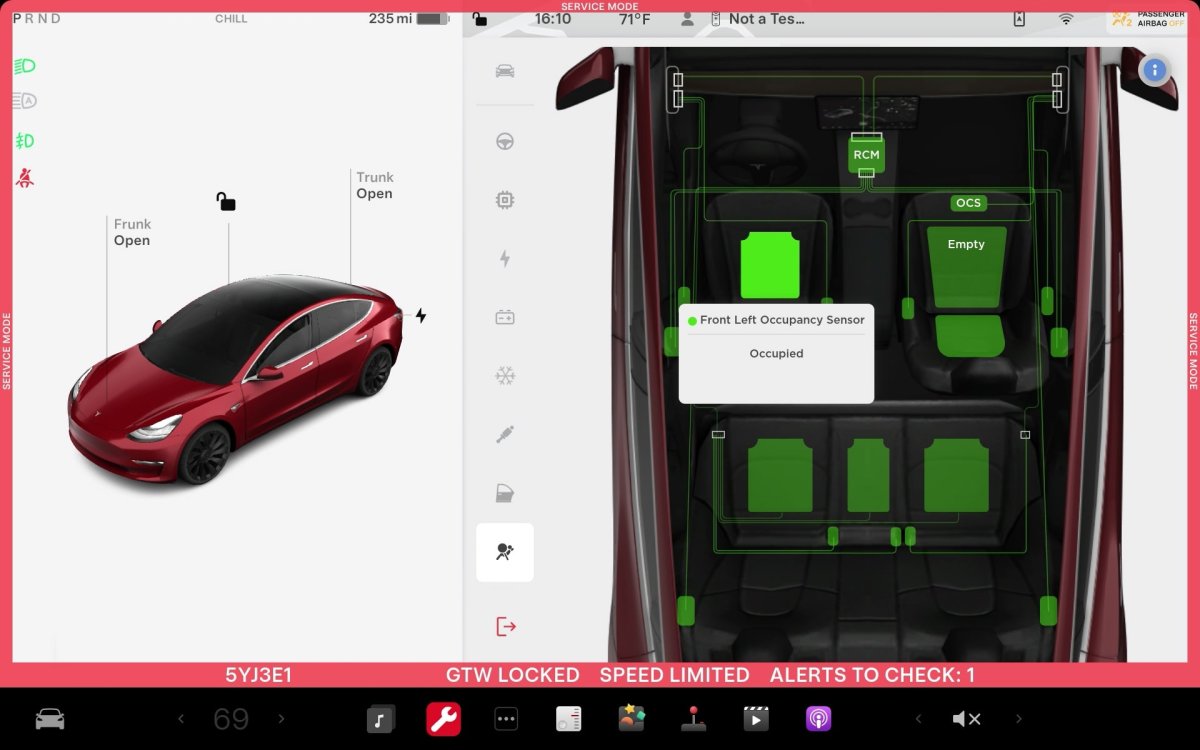
ECU Update Status Panel Updates - Non-CAN ECUs Added
The ECU Update Status panel now includes non-Controller Area Network (CAN) Electronic Control Units (ECUs), such as the Autopilot processors and Telematics Control Unit (TCU).
Models: Model S (2021+), Model 3, Model X (2021+), Model Y, Cybertruck

