Tesla’s new Powershare Home Backup lets the Model 3 and Model Y power your home during an outage, but not every car on the road supports it. The feature depends on bidirectional charging hardware that Tesla only recently started building into its two best-sellers, so whether you have it comes down to when your car was built.
The good news is that you can check in a few seconds right from the touchscreen.
How to Check If Your Tesla Supports Powershare
All new Model 3 and Model Y orders placed on or after October 1, 2026, in the U.S. support Vehicle-to-Home (V2H) output. Some earlier builds are capable too — even ones delivered as far back as May, most likely those built once the new parts reached the production lines. To see if yours made the cut:
Go to Settings > Software on your vehicle’s touchscreen.
Select Additional Vehicle Info.
Look for Powershare Support: Enabled.

If you see it, your car has the hardware it needs. If not, a software update won’t add it, since the feature relies on power electronics built into the vehicle. Tesla hasn’t said anything about official retrofits for vehicles without the necessary hardware yet.

What Powershare Home Backup Does
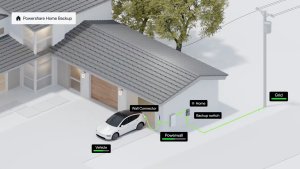
During an outage, a compatible Model 3 or Model Y plugged into your Wall Connector sends its stored energy to your home alongside Powerwall. It can output up to 11.52 kW of continuous power, the same as Cybertruck and far more than the 2.4 kW limit of Vehicle-to-Load (V2L). You can also set a limit for how much of your car’s battery Powershare can use.
You’ll need a Powerwall 3 plus a Wall Connector or Universal Wall Connector, but no separate Powershare Gateway. Powerwall 2 and Powerwall+ support is coming soon. Cybertruck owners already had full-home backup with Powerwall, and the Cybertruck is still the only Tesla that also works without a Powerwall, using a Powershare Gateway you have to install separately.

Here’s how much backup each vehicle can add:
Model and Trim | Backup Duration | Approx. Usable Battery Capacity |
|---|---|---|
Cybertruck (All Trims) | Over three days | 123 kWh |
Model 3 Premium/Performance, Model Y Premium/Performance | Over two days | 75 to 85 kWh |
Model 3 Standard, Model Y Standard | Up to two days | About 70 kWh |
Tesla’s estimates assume an average U.S. home using 30 kWh per day and a vehicle charged to 90%, so real-world results will vary. For scale, a Powerwall 3 holds 13.5 kWh, so a Model 3 or Model Y stores roughly five to six times as much.
Outside the U.S., Tesla just added V2L to all Model 3 and Model Y vehicles built at Giga Shanghai, so those cars could be next in line for full home backup support.