






![Tesla Driver in Mexico Makes His Model Y Fly [VIDEO]](/img/containers/article_images/2026/model-y-flying-accident-mexico.webp/c6f78372a6ed7ca93d8a0c61a905cd6b/model-y-flying-accident-mexico.jpg)





Active Road Noise Reduction

Your vehicle now has the ability to actively reduce low-frequency road noise while driving on rough surfaces. To accomplish this, the system uses the seat microphones to measure the noise in the cabin, then generates anti-noise through the speakers to create quiet zones around occupants.
Autopilot Naming Update

This change only updates the name of certain features and text in your vehicle, and does not change the way your features behave.
- Navigate on Autopilot has been renamed to Navigate on Autosteer
- FSD Computer has been renamed to AI Computer.
充電ケーブルのラッチ解除

車両のロックが解除されているか、認識されたキーが近くにある場合、充電を停止し、左リアドアハンドルを3秒間押し続けることで充電を停止し、充電ケーブルを外すことができます。これは、充電ケーブルのラッチボタンが機能しない場合や、充電アダプターが充電ポートから抜けなくなってしまった場合に特に役立ちます。車両のタッチスクリーンまたはTeslaアプリを使用してケーブルを外すことができます。
Grokでナビゲーション コマンド(ベータ版)

xAIによって構築されたインテリジェント アシスタント、Grokと話すことができるようになりました。Grokの声とパーソナリティ(「ストーリーテラー」から「アンヒンジド」など)を選択することができます。
Grokが、ナビゲーションの目的地を追加および編集できるようになりました。あなたのパーソナル ガイドになります。Grokに、近くにある一番人気のタイ料理レストランへのナビゲーションを依頼したり、コーヒーショップが徒歩圏内にあるスーパーチャージャーを探したり、ロマンチックな観光ツアーを計画したりすることもできます。プレミアム接続または有効なWiFi接続が必要です。やり取りはTeslaに対して匿名性が維持され、お客様の車両に関連付けられません。
Grokを起動するには、「アプリ ランチャー」>「Grok」の順に移動するか、Grokにログインした後ハンドルの音声ボタンを長押しします。ナビゲーション コマンドを使用できるように、Grokのパーソナリティをアシスタントに設定します。
注記:Grokは現在初期のベータ版であり、ナビゲーション以外の車両コントロールのための音声コマンドには対応していません。既存の音声コマンドに変更はありません。
子ども置き去り検知

子どもの置き去りを検知すると、車両灯を点滅させ、警告音を鳴らし、Teslaアプリに通知を送信します。これは、あなたが車両に戻るまで定期的に繰り返されます。キャビンデータはローカルで処理され、Teslaには送信されません。
この設定はデフォルトで有効になっています。無効にするには、「コントロール」>「安全」>「子ども置き去り検知」の順に移動します。
FSD (Supervised) v14.2.2.5

Full Self-Driving (Supervised) v14.2.2.5 includes:
- Upgraded the neural network vision encoder, leveraging higher resolution features to further improve scenarios like handling emergency vehicles, obstacles on the road, and human gestures.
- Added Arrival Options for you to select where FSD should park: in a Parking Lot, on the Street, in a Driveway, in a Parking Garage, or at the Curbside.
- Added handling to pull over or yield for emergency vehicles (e.g. police cars, fire trucks, ambulances).
- Added navigation and routing into the vision-based neural network for real-time handling of blocked roads and detours.
- Added additional Speed Profile to further customize driving style preference.
- Improved handling for static and dynamic gates.
- Improved offsetting for road debris (e.g. tires, tree branches, boxes).
- Improve handling of several scenarios including: unprotected turns, lane changes, vehicle cut-ins, and school busses.
- Improved FSD's ability to manage system faults and recover smoothly from degraded operation for enhanced reliability.
- Added alerting for residue build-up on interior windshield that may impact front camera visibility. If affected, visit Service for cleaning!
- Camera visibility can lead to increased attention monitoring sensitivity.
Upcoming Improvements:
- Overall smoothness and sentience
- Parking spot selection and parking quality
Arrival Options

- You can now select an arrival option such as Parking Lot, Street, Driveway, Parking Garage and Curbside for Robotaxi-style drop offs.
- Your preferences for arrival options and preferred parking positions are persisted for each destination.
- Our reasoning model will assess the suitable options for your destination and pick an intuitive default.
- The navigation pin will be adjusted based on the selected Arrival Option.
速度プロフィール

FSD(スーパーバイズド)は、ドライバープロフィール、制限速度、周囲の交通状況の組み合わせに基づいて適切な速度を判断するようになりました。
- 「コンフォート」よりも低速で、より保守的な車線変更を行う新しい速度プロファイル「ナマケモノ」を導入。
- 新たな速度プロファイル「マッドマックス」を導入しました。これは、「急ぎ」よりも速い高速走行を行い、頻繁に車線変更を行います。
- ドライバー プロフィールが動作に与える影響が大きくなりました。プロフィールが積極的に設定されている場合は、最高速度が高くなります。
- 右スクロールホイールのアップ/ダウンにより、時速の表示(mph/kph)で正確な最大速度オフセットの選択し、速度プロファイル設定が調整可能。
UI Improvements

- You can now view your Self-Driving stats under Controls > Autopilot.
- Start Self-Driving with a tap of the touchscreen from Park, or any time during your drive.
- Adjust settings like the Speed Profile and Arrival Options directly from the Autopilot visualization on the center display.
ブレーキによる確認

「セルフドライビングを開始」ボタンの「ブレーキによる確認」がデフォルトでオフになりました。無効にすると、「セルフドライビングを開始」するために、ブレーキを踏んで解除する必要がなくなります。
「オートパイロット」>「ブレーキによる確認」でブレーキによる確認を有効にすることができます。
フルセルフドライビング(Supervised)

お客様の監視の下、フルセルフドライビング(スーパーバイズド)は、お客様のTeslaをほぼどこへでも運転することができます。駐車した位置から起動し、車線変更、ナビゲーション ルートに合わせた分岐の選択、他の車両や障害物の回避、および左折や右折を行い、目的地に到着すると駐車します。お客様およびこれの使用を承認される方は、充分に注意を払い、周囲を確認しながら使用する必要があります。この機能はお客様の車両を自律運転させるものではありません。注意力散漫な状態で運転しないでください。
車両は、フルセルフドライビング(スーパーバイズド)が有効になっています。この機能を使用するには、UI の「セルフドライビングを開始」ボタンを押すか、右スクロール ホイール ボタンを 1 回押します。オートパイロット設定でフルセルフドライビング(スーパーバイズド)を無効にすることができます。
マイナーな修正
本リリースには若干の修正と改善が含まれています。
Autopilot Name Changes

To go along with some of the naming changes, Tesla is replacing the term Autopilot with Self-Driving in most areas.
- Under Controls, the Autopilot tab has been renamed Self-Driving.
- Under the Autopilot menu, “Autopilot Features” has been renamed “Self-Driving Features.” This lets the user select between TACC, Autosteer, or Full Self-Driving.
Maps Version

Tesla has changed the way the map version appears in the Software menu. Instead of listing the full map version, which includes the region, version, and build, Tesla will now include only the region and version, such as NA-2025.44.
Supercharger Site Maps Expanded

Tesla added 3D Supercharger Site maps in the 2025 Holiday Update. While the holiday update included 18 Supercharger sites in the United States, Tesla is now expanding this to Europe. We found at least two new Supercharger site maps in Belgium, located in Brugge and Heusden-Zolder.
These 3D representations of a Supercharger site include an accurate layout of the site, which is then coupled with live data.
The layout shows where each spot is, the location of the charger relative to the parking spot, handicap- and trailer-friendly stalls, and more.
The live data is even more interesting. Not only does it show which spots are occupied, but it also shows which Tesla model is charging at each location. It’ll identify and display a 3D model of the vehicle, and for non-Tesla EVs, it’ll display a generic vehicle model.
While these 3D models are limited to vehicles with AMD Ryzen infotainment units, anyone can view them by searching for the location in maps.
Service Mode Improvements
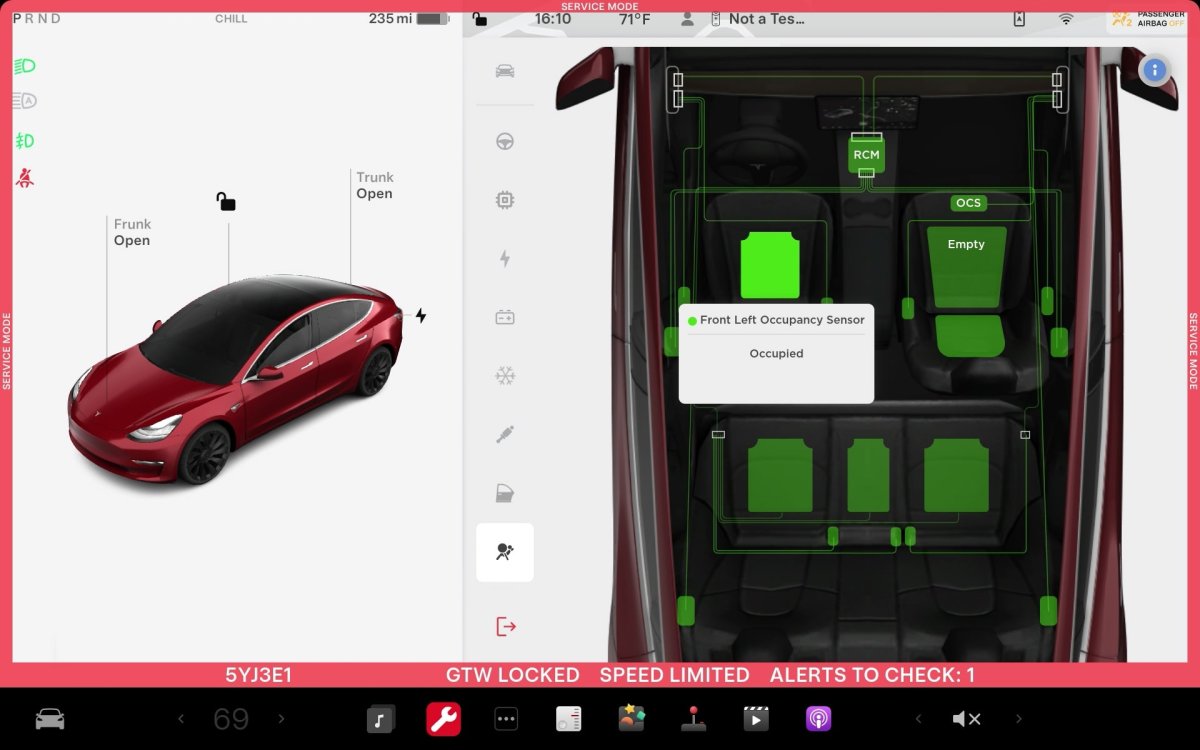
ECU Update Status Panel Updates - Non-CAN ECUs Added
The ECU Update Status panel now includes non-Controller Area Network (CAN) Electronic Control Units (ECUs), such as the Autopilot processors and Telematics Control Unit (TCU).
Models: Model S (2021+), Model 3, Model X (2021+), Model Y, Cybertruck

