






![Tesla Driver in Mexico Makes His Model Y Fly [VIDEO]](/img/containers/article_images/2026/model-y-flying-accident-mexico.webp/c6f78372a6ed7ca93d8a0c61a905cd6b/model-y-flying-accident-mexico.jpg)





Active Road Noise Reduction

Your vehicle now has the ability to actively reduce low-frequency road noise while driving on rough surfaces. To accomplish this, the system uses the seat microphones to measure the noise in the cabin, then generates anti-noise through the speakers to create quiet zones around occupants.
Autopilot Naming Update

This change only updates the name of certain features and text in your vehicle, and does not change the way your features behave.
- Navigate on Autopilot has been renamed to Navigate on Autosteer
- FSD Computer has been renamed to AI Computer.
Sblocco del cavo ricarica

Ora è possibile interrompere la ricarica e rilasciare il cavo di ricarica tirando e tenendo premuta la maniglia della portiera posteriore sinistra per 3 secondi, a condizione che il veicolo sia sbloccato o che una chiave riconosciuta sia nelle vicinanze. Ciò è particolarmente utile quando il pulsante di sblocco del cavo di ricarica non funziona o un adattatore di ricarica è bloccato nello sportello di ricarica. Puoi comunque rilasciare il cavo utilizzando il touchscreen del veicolo o l'app Tesla.
Grok con comandi di navigazione (Beta)

Ora puoi parlare con Grok, un assistente intelligente creato da xAI. Puoi scegliere la voce e la personalità di Grok, da Storyteller a Unhinged.
Grok può ora aggiungere e modificare le destinazioni di navigazione, diventando la tua guida personale. Puoi chiedere a Grok di raggiungere il miglior ristorante thailandese vicino a te, trovare una stazione Supercharger a pochi passi da un bar o persino programmare un romantico giro turistico. Richiede Premium Connectivity o una connessione WiFi attiva. Le interazioni sono anonime e non sono associate al tuo veicolo.
Per avviare Grok, vai su Utilità di avvio app > Grok o tieni premuto il pulsante vocale sul volante. Imposta la personalità di Grok su Assistente per utilizzare i comandi di navigazione.
Nota: Grok è attualmente in versione Early Beta e non supporta i comandi vocali per i comandi dell'auto, ad eccezione della navigazione. I comandi vocali esistenti rimangono invariati.
Rilevamento bambino lasciato solo

Se viene rilevato un bambino incustodito, il veicolo farà lampeggiare le luci di segnalazione esterne, emetterà un segnale acustico e invierà una notifica all'app Tesla. Questa operazione si ripeterà a intervalli regolari fino al ritorno al veicolo. I dati dell'abitacolo vengono elaborati localmente e non vengono trasmessi a Tesla.
Questa impostazione è attivata per impostazione predefinita. Per disattivare, vai a Comandi > Sicurezza > Rilevamento bambini lasciati soli.
FSD (Supervised) v14.2.2.5

Full Self-Driving (Supervised) v14.2.2.5 includes:
- Upgraded the neural network vision encoder, leveraging higher resolution features to further improve scenarios like handling emergency vehicles, obstacles on the road, and human gestures.
- Added Arrival Options for you to select where FSD should park: in a Parking Lot, on the Street, in a Driveway, in a Parking Garage, or at the Curbside.
- Added handling to pull over or yield for emergency vehicles (e.g. police cars, fire trucks, ambulances).
- Added navigation and routing into the vision-based neural network for real-time handling of blocked roads and detours.
- Added additional Speed Profile to further customize driving style preference.
- Improved handling for static and dynamic gates.
- Improved offsetting for road debris (e.g. tires, tree branches, boxes).
- Improve handling of several scenarios including: unprotected turns, lane changes, vehicle cut-ins, and school busses.
- Improved FSD's ability to manage system faults and recover smoothly from degraded operation for enhanced reliability.
- Added alerting for residue build-up on interior windshield that may impact front camera visibility. If affected, visit Service for cleaning!
- Camera visibility can lead to increased attention monitoring sensitivity.
Upcoming Improvements:
- Overall smoothness and sentience
- Parking spot selection and parking quality
Arrival Options

- You can now select an arrival option such as Parking Lot, Street, Driveway, Parking Garage and Curbside for Robotaxi-style drop offs.
- Your preferences for arrival options and preferred parking positions are persisted for each destination.
- Our reasoning model will assess the suitable options for your destination and pick an intuitive default.
- The navigation pin will be adjusted based on the selected Arrival Option.
Profili di velocità

La funzione FSD (sorvegliata) determinerà ora la velocità appropriata in base a un mix di profilo del conducente, limite di velocità e traffico circostante.
- Introdotto il nuovo profilo di velocità BRADIPO, che offre velocità più basse e una selezione della corsia più prudente rispetto a SOFT.
- Introdotto il nuovo profilo di velocità MAD MAX, che offre velocità più alte e cambi di corsia più frequenti rispetto a SBRIGATI.
- Il profilo del conducente ora ha un impatto maggiore sul comportamento. Più il profilo è deciso, maggiore è la velocità massima.
- Il movimento verso l'alto/il basso della rotellina destra ora consente di regolare l'impostazione del profilo di velocità al posto della selezione precisa dell'offset della velocità massima in mph/kph.
UI Improvements

- You can now view your Self-Driving stats under Controls > Autopilot.
- Start Self-Driving with a tap of the touchscreen from Park, or any time during your drive.
- Adjust settings like the Speed Profile and Arrival Options directly from the Autopilot visualization on the center display.
Conferma freno

Il pulsante Conferma freno per avvio guida autonoma è ora disattivato per impostazione predefinita. Se disattivato, Avvia guida autonoma non richiede la pressione e rilascio del freno per confermare l'inserimento.
È possibile abilitare Conferma freno in Autopilot > Conferma freno.
Guida autonoma al massimo potenziale (sorvegliata)

Sotto la tua supervisione, la guida autonoma al massimo potenziale (sorvegliata) può guidare la tua Tesla quasi ovunque. Partirà da una posizione parcheggiata, cambierà corsia, sceglierà la direzione corretta agli incroci per seguire il percorso di navigazione, sorpasserà altri veicoli e ostacoli e svolterà a destra e a sinistra e parcheggerà alla destinazione. Tu e qualunque altra persona che autorizzerai dovrete prestare ancora più attenzione e restare vigili. Non rende il veicolo autonomo. Non perdere la concentrazione.
La guida autonoma al massimo potenziale (sorvegliata) è abilitata sul veicolo. Per utilizzare la funzione, premere il pulsante Avvia Guida autonoma sull'interfaccia utente o premere una volta la rotellina destra. È possibile disattivare la Guida autonoma al massimo potenziale (sorvegliata) in basso nelle impostazioni Autopilot.
Correzioni minori
Questa versione contiene correzioni e piccoli miglioramenti.
Autopilot Name Changes

To go along with some of the naming changes, Tesla is replacing the term Autopilot with Self-Driving in most areas.
- Under Controls, the Autopilot tab has been renamed Self-Driving.
- Under the Autopilot menu, “Autopilot Features” has been renamed “Self-Driving Features.” This lets the user select between TACC, Autosteer, or Full Self-Driving.
Maps Version

Tesla has changed the way the map version appears in the Software menu. Instead of listing the full map version, which includes the region, version, and build, Tesla will now include only the region and version, such as NA-2025.44.
Supercharger Site Maps Expanded

Tesla added 3D Supercharger Site maps in the 2025 Holiday Update. While the holiday update included 18 Supercharger sites in the United States, Tesla is now expanding this to Europe. We found at least two new Supercharger site maps in Belgium, located in Brugge and Heusden-Zolder.
These 3D representations of a Supercharger site include an accurate layout of the site, which is then coupled with live data.
The layout shows where each spot is, the location of the charger relative to the parking spot, handicap- and trailer-friendly stalls, and more.
The live data is even more interesting. Not only does it show which spots are occupied, but it also shows which Tesla model is charging at each location. It’ll identify and display a 3D model of the vehicle, and for non-Tesla EVs, it’ll display a generic vehicle model.
While these 3D models are limited to vehicles with AMD Ryzen infotainment units, anyone can view them by searching for the location in maps.
Service Mode Improvements
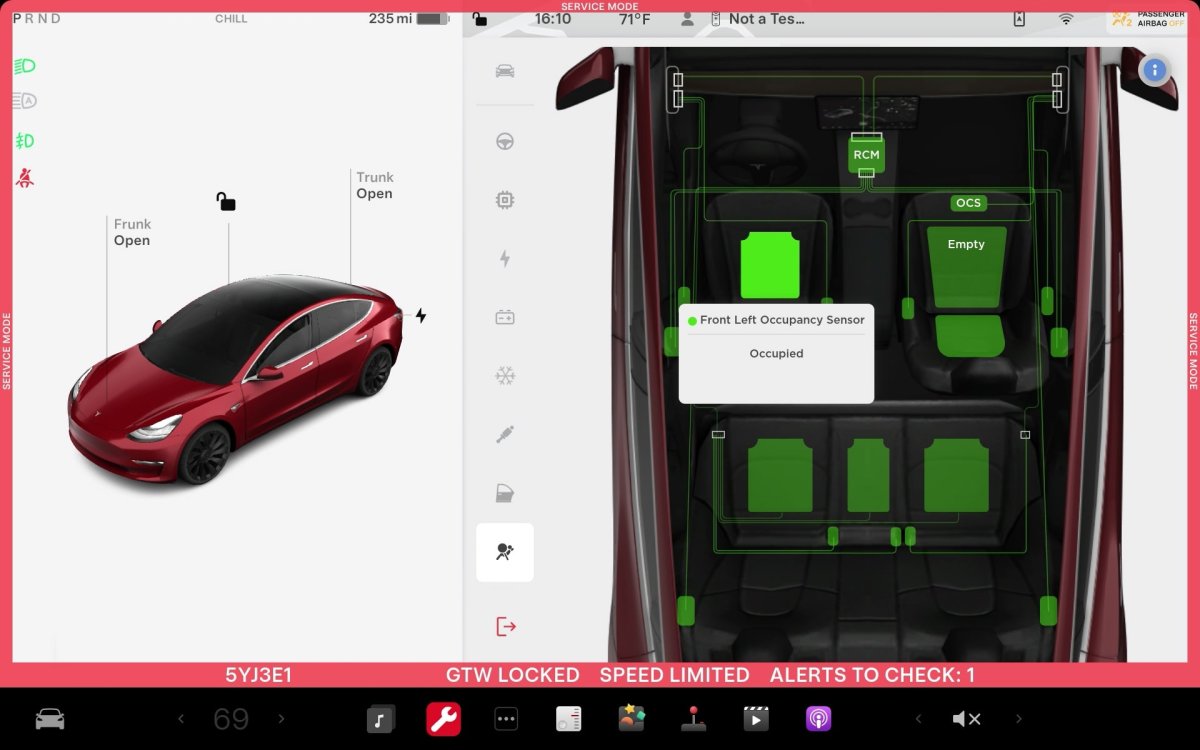
ECU Update Status Panel Updates - Non-CAN ECUs Added
The ECU Update Status panel now includes non-Controller Area Network (CAN) Electronic Control Units (ECUs), such as the Autopilot processors and Telematics Control Unit (TCU).
Models: Model S (2021+), Model 3, Model X (2021+), Model Y, Cybertruck

