






![Tesla Driver in Mexico Makes His Model Y Fly [VIDEO]](/img/containers/article_images/2026/model-y-flying-accident-mexico.webp/c6f78372a6ed7ca93d8a0c61a905cd6b/model-y-flying-accident-mexico.jpg)





Active Road Noise Reduction

Your vehicle now has the ability to actively reduce low-frequency road noise while driving on rough surfaces. To accomplish this, the system uses the seat microphones to measure the noise in the cabin, then generates anti-noise through the speakers to create quiet zones around occupants.
Autopilot Naming Update

This change only updates the name of certain features and text in your vehicle, and does not change the way your features behave.
- Navigate on Autopilot has been renamed to Navigate on Autosteer
- FSD Computer has been renamed to AI Computer.
Oplåsning af ladekabel

Opladning kan nu stoppes, og ladekablet frakobles ved at trække og holde på bageste venstre dørhåndtag i 3 sekunder, forudsat at bilen er låst op, eller en genkendt nøgle er i nærheden. Dette er især nyttigt, når ladekablets udløserknap ikke fungerer, eller en opladningsadapter sidder fast i ladeindgangen. Du kan stadig frakoble kablet ved hjælp af bilens touchskærm eller Tesla-appen.
Grok med navigationskommandoer (beta)

Du kan nu tale med Grok, en intelligent assistent bygget af xAI. Giv Grok den stemme og personlighed, du ønsker – fra venlig historiefortæller til totalt vanvittig.
Grok kan nu tilføje og redigere navigationsdestinationer og blive din personlige guide. Du kan bede Grok om at guide dig til den bedste thailandske restaurant i nærheden, finde en Supercharger inden for gåafstand fra en kaffebar, eller endda planlægge en romantisk sightseeingtur. Kræver Premium Connectivity eller en aktiv WiFi-forbindelse. Samtaler er anonyme for Tesla og ikke forbundet med dit køretøj.
Du starter Grok ved at gå til Appstarter > Grok eller trykke længe på stemmeknappen på dit rat. Indstil Groks personlighed til Assistent for at bruge navigationskommandoer.
Bemærk: Grok er i en tidlig beta og understøtter p.t. ikke stemmekommandoer til betjening af bilen bortset fra navigation. Eksisterende stemmekommandoer forbliver uændrede.
Registrering af barn efterladt alene

Hvis et barn uden opsyn registreres i bilen, vil bilen blinke med de udvendige blinklys, afgive en advarselstone og sende en besked til din Tesla-app. Dette vil gentage sig med jævne mellemrum, indtil du vender tilbage til dit køretøj. Kabinedata behandles lokalt og overføres ikke til Tesla.
Denne indstilling er aktiveret som standard. For at aktivere denne funktion skal du gå til Betjening > Sikkerhed > Registrering af barn efterladt alene.
FSD (Supervised) v14.2.2.5

Full Self-Driving (Supervised) v14.2.2.5 includes:
- Upgraded the neural network vision encoder, leveraging higher resolution features to further improve scenarios like handling emergency vehicles, obstacles on the road, and human gestures.
- Added Arrival Options for you to select where FSD should park: in a Parking Lot, on the Street, in a Driveway, in a Parking Garage, or at the Curbside.
- Added handling to pull over or yield for emergency vehicles (e.g. police cars, fire trucks, ambulances).
- Added navigation and routing into the vision-based neural network for real-time handling of blocked roads and detours.
- Added additional Speed Profile to further customize driving style preference.
- Improved handling for static and dynamic gates.
- Improved offsetting for road debris (e.g. tires, tree branches, boxes).
- Improve handling of several scenarios including: unprotected turns, lane changes, vehicle cut-ins, and school busses.
- Improved FSD's ability to manage system faults and recover smoothly from degraded operation for enhanced reliability.
- Added alerting for residue build-up on interior windshield that may impact front camera visibility. If affected, visit Service for cleaning!
- Camera visibility can lead to increased attention monitoring sensitivity.
Upcoming Improvements:
- Overall smoothness and sentience
- Parking spot selection and parking quality
Arrival Options

- You can now select an arrival option such as Parking Lot, Street, Driveway, Parking Garage and Curbside for Robotaxi-style drop offs.
- Your preferences for arrival options and preferred parking positions are persisted for each destination.
- Our reasoning model will assess the suitable options for your destination and pick an intuitive default.
- The navigation pin will be adjusted based on the selected Arrival Option.
Hastighedsprofiler

FSD (under opsyn) vil nu bestemme den korrekte hastighed baseret på en blanding af førerprofil, fartgrænse og omgivende trafik.
- Introduceret ny hastighedsprofil, DOVENDYR, som har lavere hastigheder og et mere konservativt vognbanevalg end CHILL.
- Introduktion af ny hastighedsprofil, MAD MAX, som har højere hastigheder og hyppigere vognbaneskift end TRAVLT.
- Førerprofil har nu en stærkere indflydelse på adfærden. Jo mere selvsikker profil, jo højere maks. hastighed.
- Højre rullehjul op/ned justerer nu indstillingen af hastighedsprofilen i stedet for dit præcise valg af maks. hastighedsafvigelse i mph/kph.
UI Improvements

- You can now view your Self-Driving stats under Controls > Autopilot.
- Start Self-Driving with a tap of the touchscreen from Park, or any time during your drive.
- Adjust settings like the Speed Profile and Arrival Options directly from the Autopilot visualization on the center display.
Bekræft bremse

Bekræft bremse for knappen Start selvkørende funktion er nu som standard deaktiveret. Når funktionen er deaktiveret, kræver Start selvkørende funktion ikke, at du trykker på bremsen og slipper den for at bekræfte aktivering.
Du kan aktivere Bekræft bremse i Autopilot > Bekræft bremse.
Full Self-Driving (Supervised)

Under dit opsyn kan Full Self-Driving (Supervised) køre din Tesla næsten hvor som helst. Den vil starte fra en parkeret position, foretage vognbaneskift, vælge forgreninger for at følge din navigationsrute, navigere omkring andre køretøjer og genstande, dreje til venstre og højre og parkere ved din destination. Du og alle andre, du autoriserer, skal udvise ekstra forsigtighed og være opmærksomme. Den gør ikke din bil selvstyrende. Vær ikke ukritisk tilfreds.
Full Self-Driving (Supervised) er aktiveret i din bil. For at bruge funktionen skal du trykke på knappen Start selvkørende funktion på brugergrænsefladen eller trykke én gang på højre rullehjul. Du kan deaktivere Full Self-Driving (Supervised) i Autopilot-indstillingerne.
Mindre rettelser
Denne version indeholder mindre rettelser og forbedringer.
Autopilot Name Changes

To go along with some of the naming changes, Tesla is replacing the term Autopilot with Self-Driving in most areas.
- Under Controls, the Autopilot tab has been renamed Self-Driving.
- Under the Autopilot menu, “Autopilot Features” has been renamed “Self-Driving Features.” This lets the user select between TACC, Autosteer, or Full Self-Driving.
Maps Version

Tesla has changed the way the map version appears in the Software menu. Instead of listing the full map version, which includes the region, version, and build, Tesla will now include only the region and version, such as NA-2025.44.
Supercharger Site Maps Expanded

Tesla added 3D Supercharger Site maps in the 2025 Holiday Update. While the holiday update included 18 Supercharger sites in the United States, Tesla is now expanding this to Europe. We found at least two new Supercharger site maps in Belgium, located in Brugge and Heusden-Zolder.
These 3D representations of a Supercharger site include an accurate layout of the site, which is then coupled with live data.
The layout shows where each spot is, the location of the charger relative to the parking spot, handicap- and trailer-friendly stalls, and more.
The live data is even more interesting. Not only does it show which spots are occupied, but it also shows which Tesla model is charging at each location. It’ll identify and display a 3D model of the vehicle, and for non-Tesla EVs, it’ll display a generic vehicle model.
While these 3D models are limited to vehicles with AMD Ryzen infotainment units, anyone can view them by searching for the location in maps.
Service Mode Improvements
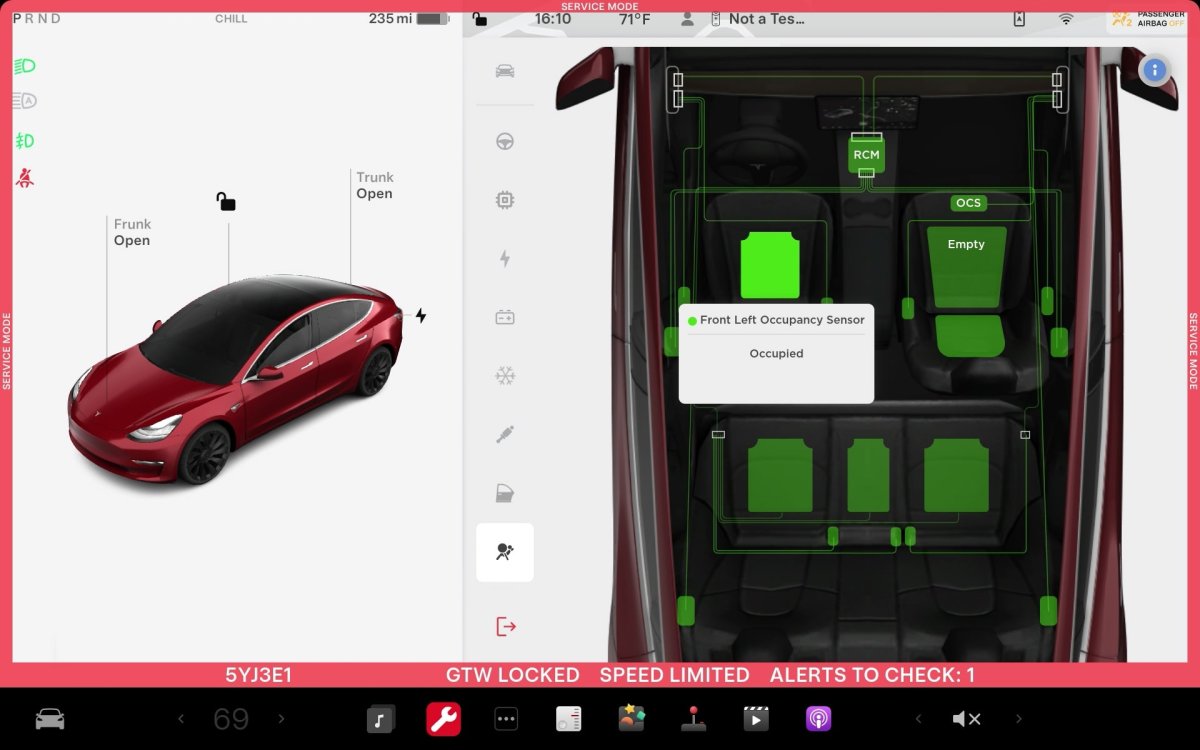
ECU Update Status Panel Updates - Non-CAN ECUs Added
The ECU Update Status panel now includes non-Controller Area Network (CAN) Electronic Control Units (ECUs), such as the Autopilot processors and Telematics Control Unit (TCU).
Models: Model S (2021+), Model 3, Model X (2021+), Model Y, Cybertruck

