


Grok พร้อมคำสั่งการนำทาง (Beta)

ตอนนี้คุณสามารถพูดคุยกับ Grok ผู้ช่วยอัจฉริยะที่สร้างโดย xAI ได้แล้ว คุณสามารถเลือกเสียงและลักษณะนิสัยของ Grok ได้ โดยมีตั้งแต่แบบนักเล่าเรื่องไปจนถึงแบบสุดโต่ง
Grok สามารถเพิ่มและแก้ไขจุดหมายของการนำทางได้ โดยจะเป็นไกด์นำทางส่วนตัวของคุณ คุณสามารถขอให้ Grok นำทางไปยังร้านอาหารไทยที่ดีที่สุดที่อยู่ใกล้คุณ หา Supercharger ที่อยู่ห่างจากร้านกาแฟในระยะที่เดินได้ หรือแม้แต่วางแผนทัวร์ชมสถานที่สุดโรแมนติก ต้องใช้การเชื่อมต่อแบบพรีเมียมหรือการเชื่อมต่อ WiFi ที่เปิดใช้งานอยู่ การพูดคุยสื่อสารจะไม่ระบุชื่อและไม่เกี่ยวข้องกับรถของคุณ
หากต้องการเปิดใช้ Grok ให้ไปที่แอปพลิเคชั่น > Grok หรือกดปุ่มเสียงบนพวงมาลัยค้างไว้หลังจากที่ลงชื่อเข้าใช้ Grok แล้ว ตั้งค่าลักษณะการทำงานของ Grok เป็น Assistant เพื่อใช้คำสั่งการนำทาง
หมายเหตุ: ขณะนี้ Grok ยังเป็นรุ่น Beta และไม่รองรับคำสั่งเสียงสำหรับการควบคุมรถ เช่น การนำทางหรือสื่อ คำสั่งเสียงที่มีอยู่จะยังคงไม่เปลี่ยนแปลง
การปลดสายชาร์จ

ขณะนี้สามารถหยุดการชาร์จและชาร์จสายชาร์จได้แล้วโดยการดึงที่จับประตูด้านหลังซ้ายค้างไว้เป็นเวลา 3 วินาที โดยมีเงื่อนไขว่ารถไม่ได้ปลดล็อกหรือมีกุญแจที่รู้จักอยู่ใกล้ ๆ ซึ่งจะเป็นประโยชน์อย่างยิ่งเมื่อปุ่มปลดล็อกสายชาร์จไม่ทำงาน หรืออะแดปเตอร์ชาร์จติดค้างอยู่ในพอร์ตชาร์จ คุณยังสามารถปลดสายโดยใช้หน้าจอสัมผัสของรถหรือแอป Tesla ได้
ระบบตรวจจับการลืมเด็กไว้ในรถ

หากตรวจพบเด็กโดยไม่มีคนดูแล รถจะกะพริบไฟแสดงสถานะภายนอก เล่นเสียงเตือน และส่งการแจ้งเตือนไปยังแอป Tesla ของคุณ การดำเนินการนี้จะทำซ้ำเป็นระยะ ๆ จนกว่าคุณจะกลับไปที่รถ ข้อมูลห้องโดยสารจะได้รับการประมวลผลภายในรถและจะไม่ถูกส่งไปยัง Tesla
การตั้งค่านี้จะเปิดใช้งานตามค่าเริ่มต้น หากต้องการปิดใช้งาน ให้ไปที่การควบคุม > ระบบความปลอดภัย > ระบบตรวจจับการลืมเด็กไว้ในรถ
การแก้ไขเล็กน้อย
รุ่นนี้มีการแก้ไขเล็กน้อยและการปรับปรุงต่างๆ
Autopilot Name Changes

To go along with some of the naming changes, Tesla is replacing the term Autopilot with Self-Driving in most areas.
- Under Controls, the Autopilot tab has been renamed Self-Driving.
- Under the Autopilot menu, “Autopilot Features” has been renamed “Self-Driving Features.” This lets the user select between TACC, Autosteer, or Full Self-Driving.
Maps Version

Tesla has changed the way the map version appears in the Software menu. Instead of listing the full map version, which includes the region, version, and build, Tesla will now include only the region and version, such as NA-2025.44.
Supercharger Site Maps Expanded

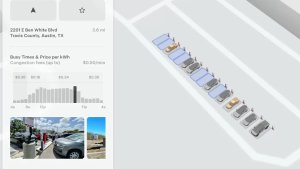
Tesla added 3D Supercharger Site maps in the 2025 Holiday Update. While the holiday update included 18 Supercharger sites in the United States, Tesla is now expanding this to Europe. We found at least two new Supercharger site maps in Belgium, located in Brugge and Heusden-Zolder.
These 3D representations of a Supercharger site include an accurate layout of the site, which is then coupled with live data.
The layout shows where each spot is, the location of the charger relative to the parking spot, handicap- and trailer-friendly stalls, and more.
The live data is even more interesting. Not only does it show which spots are occupied, but it also shows which Tesla model is charging at each location. It’ll identify and display a 3D model of the vehicle, and for non-Tesla EVs, it’ll display a generic vehicle model.
While these 3D models are limited to vehicles with AMD Ryzen infotainment units, anyone can view them by searching for the location in maps.
Service Mode Improvements
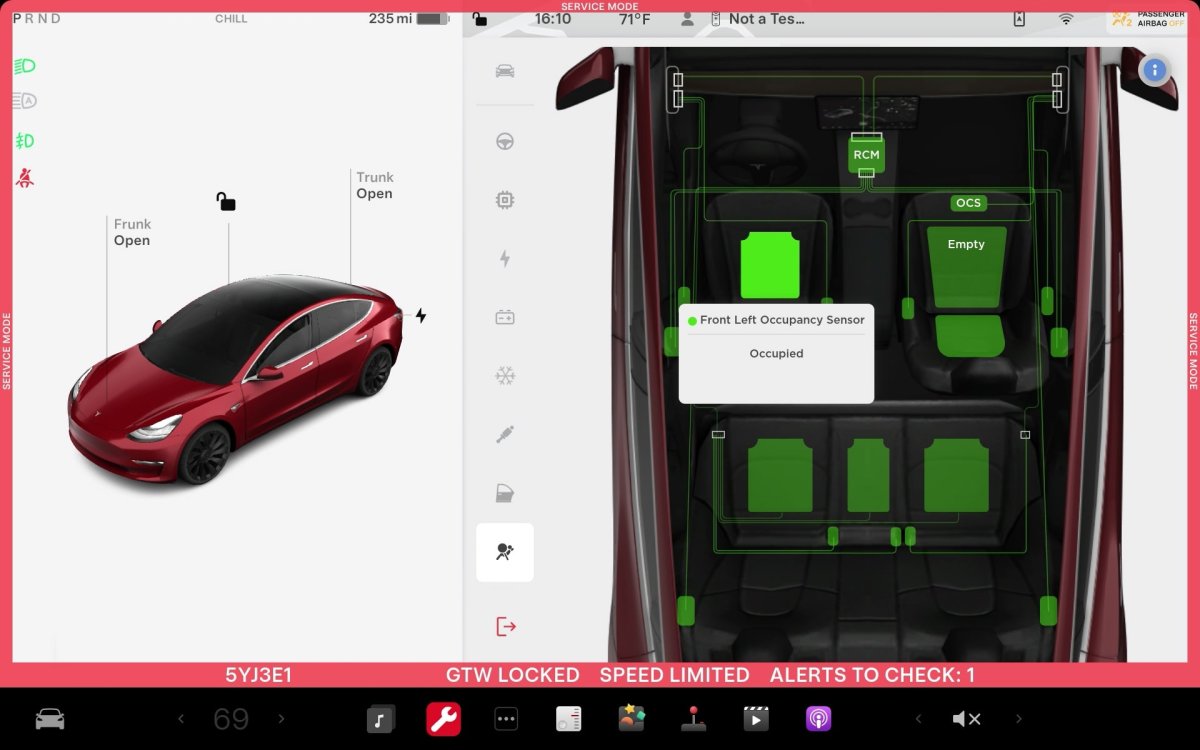
ECU Update Status Panel Updates - Non-CAN ECUs Added
The ECU Update Status panel now includes non-Controller Area Network (CAN) Electronic Control Units (ECUs), such as the Autopilot processors and Telematics Control Unit (TCU).
Models: Model S (2021+), Model 3, Model X (2021+), Model Y, Cybertruck











