



Grok 내비게이션 명령(베타 버전)

이제 xAI로 구축한 지능형 비서 Grok와 대화할 수 있습니다. Grok의 음성과 성격을 선택할 수 있습니다. 스토리텔러부터 자유분방한 스타일까지 다양하게 제공됩니다.
이제 Grok이 내비게이션 목적지를 추가하고 편집할 수 있어, 사용자의 개인 안내 도우미 역할을 합니다. 근처 최고의 태국 음식점까지 안내해 달라고 하거나, 카페에서 도보 거리에 있는 수퍼차저를 찾아 달라고 요청하고, 로맨틱한 관광 코스 계획까지 Grok에게 맡길 수 있습니다. 프리미엄 커넥티비티 또는 활성화된 WiFi 연결이 필요합니다. 대화는 익명으로 처리되며 차량과 연결되지 않습니다.
Grok을 실행하려면 앱 런처 > Grok으로 이동하거나 스티어링 휠의 음성 버튼을 길게 누르세요. 내비게이션 명령을 사용하려면 Grok의 성격을 어시스턴트로 설정합니다.
참고: Grok은 현재 초기 베타 버전이며 내비게이션 외 다른 차량 제어를 위한 음성 명령은 지원하지 않습니다. 기존 음성 명령은 변경되지 않습니다.
충전 케이블 분리

차량이 잠금 해제되어 있거나 인식된 키가 근처에 있을 경우, 이제 후면 좌측 도어 핸들을 3초간 길게 당겨 충전을 중지하고 충전 케이블을 분리할 수 있습니다. 이 기능은 충전 케이블 잠금 해제 버튼이 작동하지 않거나 충전 어댑터가 충전 포트에 걸려 제거되지 않을 때 특히 유용합니다. 차량 터치스크린 또는 Tesla 앱을 사용해 케이블을 분리할 수도 있습니다.
어린이 방치 감지 기능

홀로 남겨진 어린이가 감지되면 차량이 외부 표시등을 점멸하고 경고음을 재생하며 Tesla 앱으로 알림을 전송합니다. 이 작업은 차량으로 돌아갈 때까지 일정한 간격으로 반복됩니다. 실내 데이터는 차량 로컬에서 처리되며 Tesla로 전송되지 않습니다.
이 기능은 기본적으로 활성화되어 있습니다. 비활성화하려면 컨트롤 > 안전 > 어린이 단독 탑승 감지 기능으로 이동하세요.
사소한 오류 수정
이번 릴리스에는 사소한 오류 수정 및 개선 사항이 포함되어 있습니다.
Autopilot Name Changes

To go along with some of the naming changes, Tesla is replacing the term Autopilot with Self-Driving in most areas.
- Under Controls, the Autopilot tab has been renamed Self-Driving.
- Under the Autopilot menu, “Autopilot Features” has been renamed “Self-Driving Features.” This lets the user select between TACC, Autosteer, or Full Self-Driving.
Maps Version

Tesla has changed the way the map version appears in the Software menu. Instead of listing the full map version, which includes the region, version, and build, Tesla will now include only the region and version, such as NA-2025.44.
Supercharger Site Maps Expanded

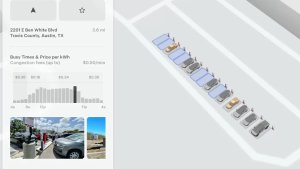
Tesla added 3D Supercharger Site maps in the 2025 Holiday Update. While the holiday update included 18 Supercharger sites in the United States, Tesla is now expanding this to Europe. We found at least two new Supercharger site maps in Belgium, located in Brugge and Heusden-Zolder.
These 3D representations of a Supercharger site include an accurate layout of the site, which is then coupled with live data.
The layout shows where each spot is, the location of the charger relative to the parking spot, handicap- and trailer-friendly stalls, and more.
The live data is even more interesting. Not only does it show which spots are occupied, but it also shows which Tesla model is charging at each location. It’ll identify and display a 3D model of the vehicle, and for non-Tesla EVs, it’ll display a generic vehicle model.
While these 3D models are limited to vehicles with AMD Ryzen infotainment units, anyone can view them by searching for the location in maps.
Service Mode Improvements
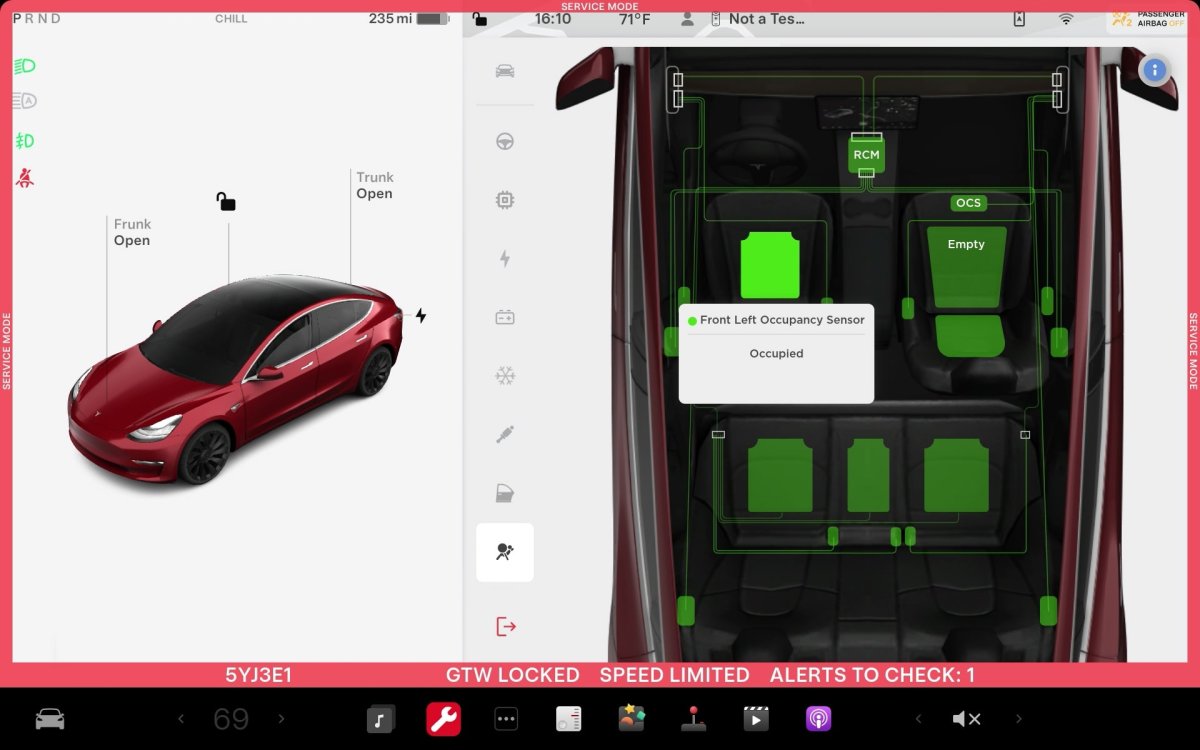
ECU Update Status Panel Updates - Non-CAN ECUs Added
The ECU Update Status panel now includes non-Controller Area Network (CAN) Electronic Control Units (ECUs), such as the Autopilot processors and Telematics Control Unit (TCU).
Models: Model S (2021+), Model 3, Model X (2021+), Model Y, Cybertruck











