



Grok con comandos de navegación (Beta)

Ahora puede hablar con Grok, un asistente inteligente desarrollado por xAI. Puede elegir la voz y la personalidad de Grok, desde Narrador hasta Extravagante.
Grok ahora puede agregar y editar destinos de navegación, convirtiéndolos en su guía personal. Puede pedirle a Grok que le guíe hasta el mejor restaurante tailandés cercano, que localice un Supercargador a poca distancia de una cafetería o incluso que planifique un recorrido turístico romántico. Requiere Conectividad premium o una conexión Wi-Fi activa. Las conversaciones son anónimas para Tesla y no están asociadas a su vehículo.
Para iniciar Grok, vaya al Iniciador de aplicaciones > Grok, o mantenga pulsado el botón de voz del volante después de haber iniciado sesión en Grok. Para usar los comandos de navegación, establezca la personalidad de Grok en Asistente.
Nota: Grok se encuentra actualmente en una versión beta temprana y no admite comandos de voz para controles del coche como navegación o multimedia. Los comandos de voz existentes no se han modificado.
Desenganche del cable de carga

Ahora se puede detener la carga y liberar el cable de carga tirando de la manilla de la puerta izquierda trasera y manteniéndola en esa posición durante 3 segundos, siempre que el vehículo esté desbloqueado o haya una llave reconocida cerca. Esto es especialmente útil cuando el botón de desbloqueo del cable de carga no funciona o cuando un adaptador de carga queda atascado en el puerto de carga. Aún puede liberar el cable con la pantalla táctil del vehículo o la app de Tesla.
Detección de niños olvidado

Si se detecta un niño desatendido, el vehículo hará parpadear las luces indicadoras exteriores, reproducirá un tono de alerta y enviará una notificación a su aplicación de Tesla. Esto se repetirá a intervalos regulares hasta que regrese a su vehículo. Los datos del habitáculo se procesan localmente y no se transmiten a Tesla.
Este ajuste está habilitado de forma predeterminada. Para desactivar, vaya a Controles > Seguridad > Detección de niño olvidado.
Correcciones menores
Esta versión contiene pequeñas correcciones y mejoras.
Autopilot Name Changes

To go along with some of the naming changes, Tesla is replacing the term Autopilot with Self-Driving in most areas.
- Under Controls, the Autopilot tab has been renamed Self-Driving.
- Under the Autopilot menu, “Autopilot Features” has been renamed “Self-Driving Features.” This lets the user select between TACC, Autosteer, or Full Self-Driving.
Maps Version

Tesla has changed the way the map version appears in the Software menu. Instead of listing the full map version, which includes the region, version, and build, Tesla will now include only the region and version, such as NA-2025.44.
Supercharger Site Maps Expanded

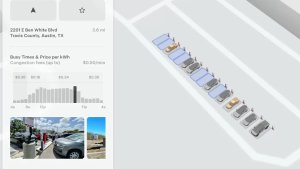
Tesla added 3D Supercharger Site maps in the 2025 Holiday Update. While the holiday update included 18 Supercharger sites in the United States, Tesla is now expanding this to Europe. We found at least two new Supercharger site maps in Belgium, located in Brugge and Heusden-Zolder.
These 3D representations of a Supercharger site include an accurate layout of the site, which is then coupled with live data.
The layout shows where each spot is, the location of the charger relative to the parking spot, handicap- and trailer-friendly stalls, and more.
The live data is even more interesting. Not only does it show which spots are occupied, but it also shows which Tesla model is charging at each location. It’ll identify and display a 3D model of the vehicle, and for non-Tesla EVs, it’ll display a generic vehicle model.
While these 3D models are limited to vehicles with AMD Ryzen infotainment units, anyone can view them by searching for the location in maps.
Service Mode Improvements
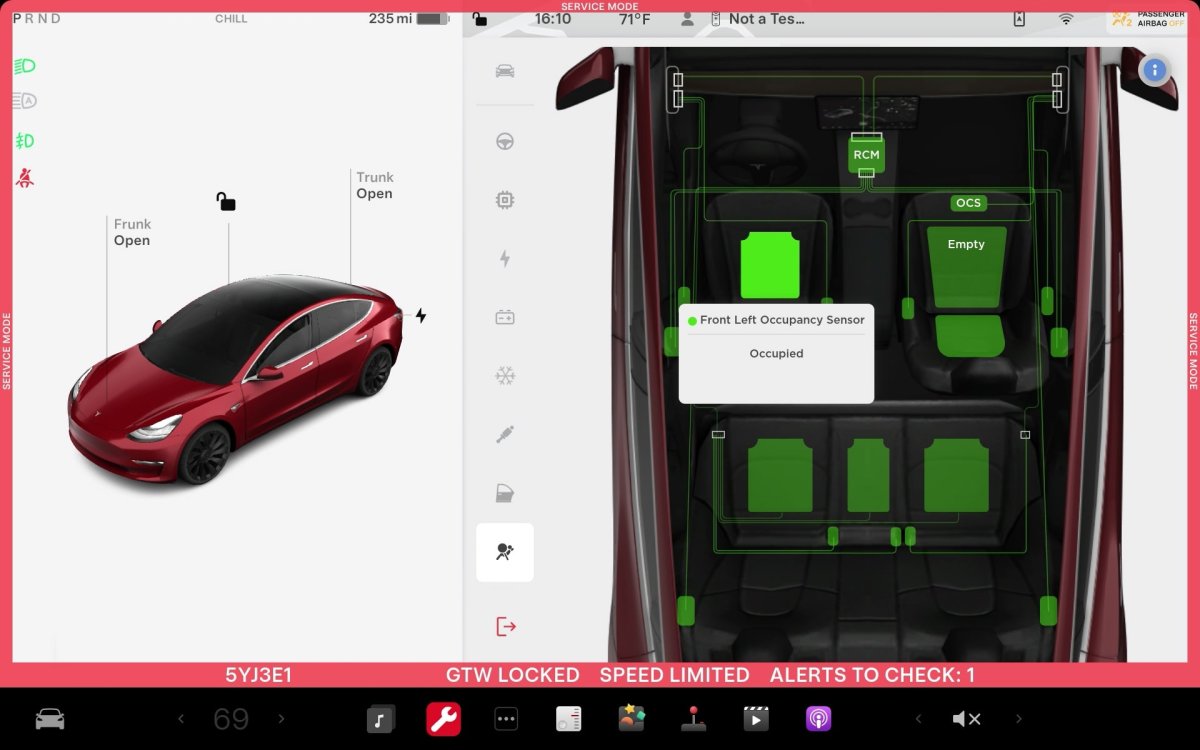
ECU Update Status Panel Updates - Non-CAN ECUs Added
The ECU Update Status panel now includes non-Controller Area Network (CAN) Electronic Control Units (ECUs), such as the Autopilot processors and Telematics Control Unit (TCU).
Models: Model S (2021+), Model 3, Model X (2021+), Model Y, Cybertruck











