This update includes FSD v14.1 Lite. The release notes for FSD remain the same and this release likely focuses on bug fixes such as reversing issues, and potential overheating issues. This update also includes FSD v14.3.7 for HW4 vehicles.
Update Stats
Number of Cars
Percent of Fleet
Installs Pending
Rollout Yesterday
Rollout Today
Tesla Videos
Details
FSD Version
Release Date
FSD Beta Updates
Recent News
FSD (Supervised) v14.1 Lite
FSD (Supervised) v14.1 Lite includes:
- Distilled the intelligence from HW4 V14 into HW3. This allows HW3 to directly learn how to handle scenarios using HW4 V14 as a guide. This process unlocks the improvements that have been made to HW4 including Reinforcement Learning (RL) and offline models for HW3.
- Improved both proactive and reactive responsiveness across a wide variety of categories including navigation handling, merges and forks, pedestrian interactions, traffic lights, and vehicle cut-in scenarios.
- Improved general comfort in nominal scenarios through fewer false slowdowns, smoother steering and more consistent lane centering.
- Introduced parking, unparking, and reversing capabilities.
- Added Arrival Options for you to select where FSD should pull over or park: in a Parking Lot, on the Street, in a Driveway.
- Speed Profiles are now available at all times, to further customize driving style preference.
FSD (Supervised) v14.3.7
Full Self-Driving (Supervised) v14.3.7 includes:
- Upgraded the Reinforcement Learning (RL) stage of training the FSD neural network, resulting in improvements in a wide variety of driving scenarios.
- Upgraded the neural network vision encoder, improving understanding in rare and low-visibility scenarios, strengthening 3D geometry understanding, and expanding traffic sign understanding.
- Rewrote the AI compiler and runtime from the ground up with MLIR, resulting in 20% faster reaction time and improving model iteration speed.
- Mitigated unnecessary lane biasing and minor tailgating behaviors.
- Increased decisiveness of parking spot selection and maneuvering.
- Improved parking location pin prediction, now shown on a map with a P icon.
- Enhanced response to emergency vehicles, school buses, right-of-way violators, and other rare vehicles.
- Improved handling of small animals by focusing RL training on harder examples and adding rewards for better proactive safety.
- Improved traffic light handling at complex intersections with compound lights, curved roads, and yellow light stopping — driven by training on hard RL examples sourced from the Tesla fleet.
- Improved handling for rare and unusual objects extending, hanging, or leaning into the vehicle path by sourcing infrequent events from the fleet.
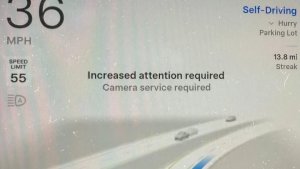
- Improved handling of temporary system degradations by maintaining control and automatically recovering without driver intervention, reducing unnecessary disengagements.
- Improved driver monitoring system sensitivity with better eye gaze tracking, eye wear handling, and higher accuracy in variable lighting conditions.
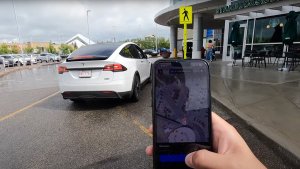
- Unified the model between Actually Smart Summon, FSD, and Robotaxi for more capable and reliable behavior.
- Help Tesla improve Self-Driving by selecting an intervention reason on the main screen after taking over.
- You can now see distance traveled in FSD (Supervised) without an intervention. The Self-Driving App will also show your longest intervention-free streak.
- Parking options now display on the map when arriving at your destination.
Upcoming Improvements:
- Expand reasoning to all behaviors beyond destination handling.
- Add pothole avoidance.
Actually Smart Summon
ASS (Actually Smart Summon) and Dumb Summon are now available for Cybertruck!
Full Self-Driving (Supervised)
Under dit opsyn kan Full Self-Driving (Supervised) køre din Tesla næsten hvor som helst. Den vil starte fra en parkeret position, foretage vognbaneskift, vælge forgreninger for at følge din navigationsrute, navigere omkring andre køretøjer og genstande, dreje til venstre og højre og parkere ved din destination. Du og alle andre, du autoriserer, skal udvise ekstra forsigtighed og være opmærksomme. Den gør ikke din bil selvstyrende. Vær ikke ukritisk tilfreds.
Full Self-Driving (Supervised) er aktiveret i din bil. For at bruge funktionen skal du trykke på knappen Start selvkørende funktion på brugergrænsefladen eller trykke én gang på højre rullehjul. Du kan deaktivere Full Self-Driving (Supervised) i Autopilot-indstillingerne.
Start Self-Driving fra Parkering
Der vises en knap på skærmen, når førerkravene er opfyldt. Førerkrav omfatter (men er ikke begrænset til):
- Føreren sidder i førersædet
- Føreren er fastspændt
- Kabinekameraet har frit udsyn
Bekræft bremse kræver, at føreren trykker på og slipper bremsepedalen, før FSD (Supervised) kan aktiveres. Når Bekræft bremse er deaktiveret, vil et tryk på knappen give Self-Driving mulighed for at aktivere bremserne og FSD (Supervised). Hvis kravene til førerregistrering ikke er opfyldt, eller hvis FSD (Supervised) ikke registrerer en fører, skal du trykke på og slippe bremsepedalen for at bekræfte. Du kan aktivere Bekræft bremse i Self-Driving > Bekræft bremse.
Denne funktion gør ikke din bil selvstyrende, og du skal fortsat være opmærksom og klar til at overtage når som helst. Kun en fører med kørekort, der er autoriseret til at betjene bilen, bør have adgang til førersædet, når bilen ikke er i tilstanden Biograf eller Arkade.
Ankomstmuligheder
- Du kan nu vælge en ankomstmulighed, som f.eks. Parkeringsplads, Gade, Indkørsel og Hold ind for afleveringer som Robottaxi.
- Dine præferencer for ankomstmuligheder og foretrukne parkeringspositioner opretholdes for hver destination.
Hastighedsprofiler
FSD (Supervised) vil nu bestemme den korrekte hastighed baseret på en blanding af førerprofil, fartgrænse og omgivende trafik.
- Introduceret ny hastighedsprofil, DOVENDYR, som har lavere hastigheder og et mere konservativt vognbanevalg end CHILL.
- Førerprofil har nu en stærkere indflydelse på adfærden. Jo mere selvsikker profil, jo højere maks. hastighed.
- Højre rullehjul op/ned justerer nu indstillingen af hastighedsprofilen i stedet for dit præcise valg af maks. hastighedsafvigelse i mph/kph.
Forbedringer af brugergrænseflade
Juster indstillinger som f.eks. Hastighedsprofil og Ankomstmuligheder direkte fra Self-Driving-visualiseringen på midterdisplayet.
Full Self-Driving (Supervised)
Under your supervision, Full Self-Driving (Supervised) can drive your Tesla almost anywhere. It will start from a parked position, make lane changes, select forks to follow your navigation route, navigate around other vehicles and objects, make left and right turns and park at your destination.
You and anyone you authorize must use additional caution and remain attentive. It does not make your vehicle autonomous. Do not become complacent. Full Self-Driving (Supervised) is enabled on your vehicle. To use the feature, press the Start Self-Driving button on the UI, or press the right scroll wheel button once. You can disable Full Self-Driving (Supervised) in Self-Driving Settings.
Camera Preview
You can now open Camera Preview at any time, even if your Tesla is not in Park.
Go to Controls > Service > Camera Preview and tap on any camera view to see it individually. Tap the grid button to switch back to all cameras.